Inputmask: Chrome autofill does not work with Inputmask
Hello,
I have an autofil setup for credit card number in my Chrome, but the autofill dropdown does not show when the Inputmask is initialized:
- Test case: https://jsfiddle.net/uxmonn2z/2/
- File included: https://rawgit.com/RobinHerbots/jquery.inputmask/3.x/dist/jquery.inputmask.bundle.js
It works as expected once the Inputmask initialization is commented out:

Thank you.
 yhosun
All 33 comments
Has this issue bene resolved? It seems to be working for non-alphabetical placeholders, but not for something with alphabetical placeholders yet.
 mcshooter
on 3 Mar 2017
mcshooter
on 3 Mar 2017
I found a workaround and possible reason why Google Autofill stops working.
See the fiddle: https://jsfiddle.net/uxmonn2z/5/
If you set the placeholder to '' (empty string) it works again.
Any other placeholder (even the default one) prevents the Autofill from working.
This is probably because the "placeholder" is actually a "value", which would explain the issue.
As far as solutions, maybe hiding the "placeholder" (emptying the value) on:focus might work.
 EricTousignant
on 12 Feb 2018
EricTousignant
on 12 Feb 2018
@EricTousignant ,
Thx for your findings and feedback.
 RobinHerbots
on 13 Feb 2018
RobinHerbots
on 13 Feb 2018
Is it going to be fixed?
There is relative issue with iOs bank card number scanner, it doesn't fill field with mask
 Romanchuk
on 21 Jan 2019
Romanchuk
on 21 Jan 2019
👍 to fix this please. Have been integrating this into a project, but the behavior of autofill killed it :(
 z1haze
on 7 May 2019
z1haze
on 7 May 2019
Have the same issue. Autofilling payment form doesn't work correctly. Some digits from card number disappear.
 xeontem
on 11 May 2019
xeontem
on 11 May 2019
@yhosun , @mcshooter , @EricTousignant , @Romanchuk , @z1haze , @xeontem ,
Have a look at https://jsfiddle.net/y9qfjxnp/2/ (using inputmask 5.x)
I pushed a fix in inputmask 5.x. In older versions you can pass the showMaskOnFocus: false option
RobinHerbots
on 14 May 2019
Same when using it as a jquery plugin?
Can you push this version to npm, i will test it today.
z1haze
on 14 May 2019
@z1haze ,
Version 5.0.0-beta.152
The numeric alias is still in development in this branch.
RobinHerbots
on 14 May 2019
@RobinHerbots
Why have you closed PR if it still doesn't work with the latest inputmask (5.0.0-beta.163). I'm trying to use autofilling and the masked fields aren't being filled as they should.
 alexeisorokin11
on 29 May 2019
alexeisorokin11
on 29 May 2019
@alexeisorokin11 ,
Have you tried the fiddle in https://github.com/RobinHerbots/Inputmask/issues/1330#issuecomment-492160638.
RobinHerbots
on 29 May 2019
@RobinHerbots I actually pulled down the exact version you mentioned before Version 5.0.0-beta.152 but it still did not work for me. I ended up having to go with another library that didnt have the issue. Good luck on this!
z1haze
on 29 May 2019
@z1haze ,
Hmm, when I try the fiddle I get the popup to autofill with my creditcard number.
I cannot fix things when I don't get feedback.
RobinHerbots
on 29 May 2019
Fiddle example is not working either, exp field is not autofilling
Romanchuk
on 29 May 2019
@Romanchuk ,
Ok, in which browser and os. I tried Chrome on linux and windows 10. Both fields autofill.

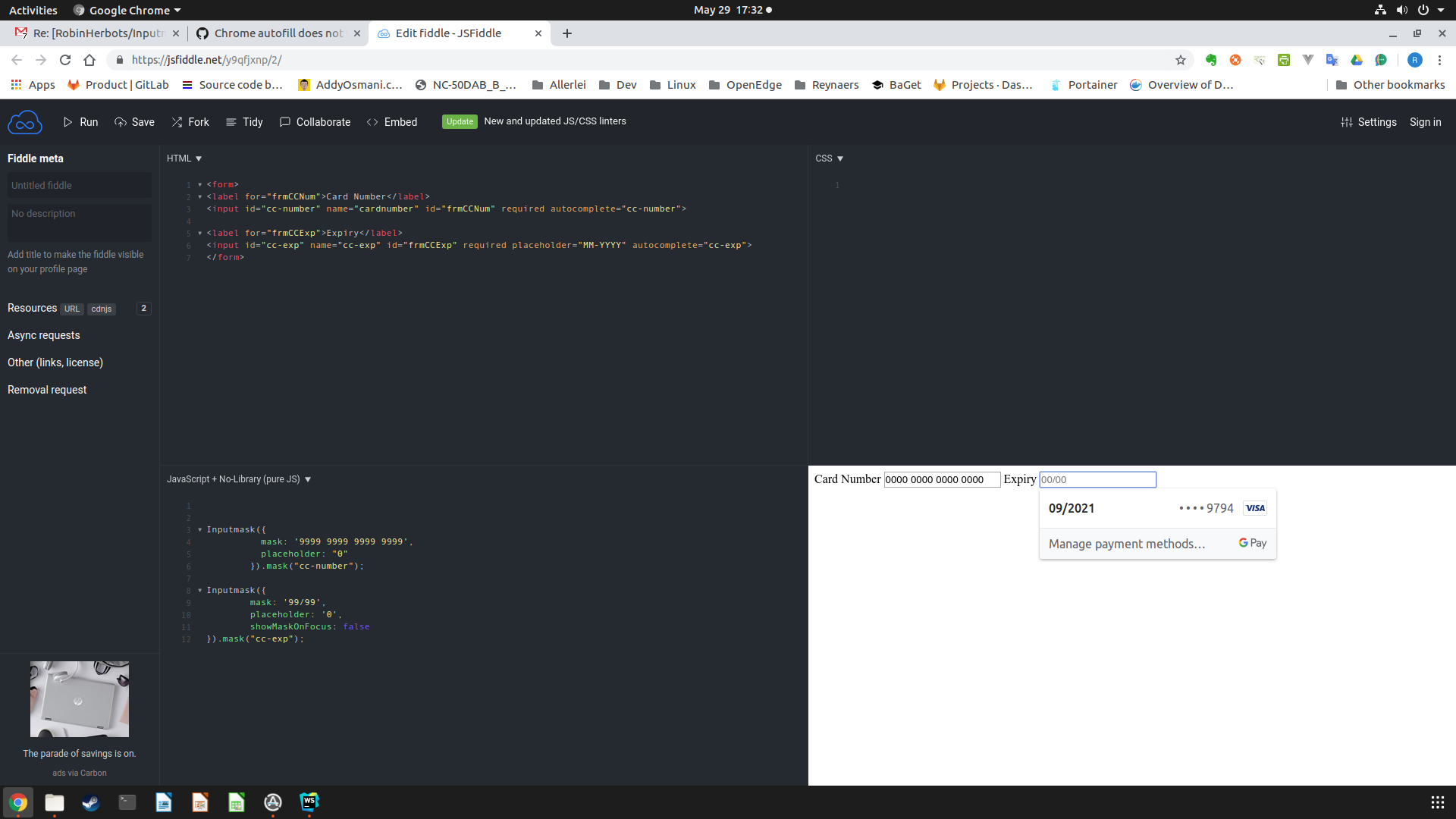
RobinHerbots
on 29 May 2019
Testing on https://jsfiddle.net/y9qfjxnp/2/
Windows
Chome 74
http://joxi.ru/82QZdRRswpjVvA
http://joxi.ru/Vm660ggf4bDR5m
Expiration filled, but card number not.
I noticed that autofill works only for field that was in focus.
Romanchuk
on 9 Jun 2019
@RobinHerbots
Of course I tried #1330 (comment).
Oh. There is important moment. For some reason autofilling works only for field which is in focus. For example, I am picking the card number field and waiting for autofilling of epired date. But only card field is autofilled because it is being in focus at the moment.
alexeisorokin11
on 9 Jun 2019
@alexeisorokin11 , @Romanchuk ,
It seems that focus & value is key.
RobinHerbots
on 10 Jun 2019
@alexeisorokin11 , @Romanchuk ,
No that doesn't work either.... I need some further testing
RobinHerbots
on 10 Jun 2019
@alexeisorokin11 , @Romanchuk ,
Ok, google doesn"t let me verify my credit card again, ... card cannot be verified right now
RobinHerbots
on 11 Jun 2019
@alexeisorokin11 , @Romanchuk,
Can you have a try with https://jsfiddle.net/1wyq69fs/3/
RobinHerbots
on 11 Jun 2019
@RobinHerbots just tried, still the same behaviour (
Romanchuk
on 12 Jun 2019
Tried Linux with Chrome 75.0.3770.80
A new fiddle for reference https://jsfiddle.net/wtvp2szo/
And the cc-exp doesn"t get filled.
RobinHerbots
on 12 Jun 2019
What is this? I tried on another linux with the same Chrome and it works!! ?
Maybe some caching? I need to verify again at home.
RobinHerbots
on 13 Jun 2019
Window, Chrome 74
Android, Chrome 74
Both works! But i dont see mask displaying, not sure it works correctly.
I have removed duplication of id of elements
https://jsfiddle.net/3myx21ob/
There was problem in android until i removed it
Romanchuk
on 13 Jun 2019
@RobinHerbots Question: is there any possibility to adjust card expiration date to MM/YY mask?
In this version it autocompletes as 11/2021 even if you set mask to MM/YY. MM/YY mask is more common format to display expiration dates.
Romanchuk
on 13 Jun 2019
@RobinHerbots we're talking about this case
https://jsfiddle.net/w53sjf9d/
https://monosnap.com/file/8dBDqqkwDIDlkJBcu6dv1M3ZzzQ0I8
I'm not sure it's filling correctly either but
I guess such feature needs to be implemented separately.
alexeisorokin11
on 13 Jun 2019
@Romanchuk , @alexeisorokin11 ,
No that fiddle does not use the mask. The ids in mask do not match anything.
The cc-exp masking can be changed but that has to be implemented to take the correct part of the year part.
https://jsfiddle.net/jyne81sx/1/
Windows = ok
Linux (Ubuntu 19.04) = mixed (at home it doesn't work ~ need to verify again)
Android = nok ~ only field in focus fills.
RobinHerbots
on 13 Jun 2019
You can detect if Chrome's autofill is being used with the "keydown" and "keyup" jQuery events. When Chrome's autofill triggers the "keydown" and "keyup" events, the event key and keyCode are undefined so it won't match any key on a regular keyboard, making it very easy to identify. Using this knowledge, I found a quick simple way to fix this by removing the inputmask on keydown and then re-initializing inputmask on keyup. See code below...
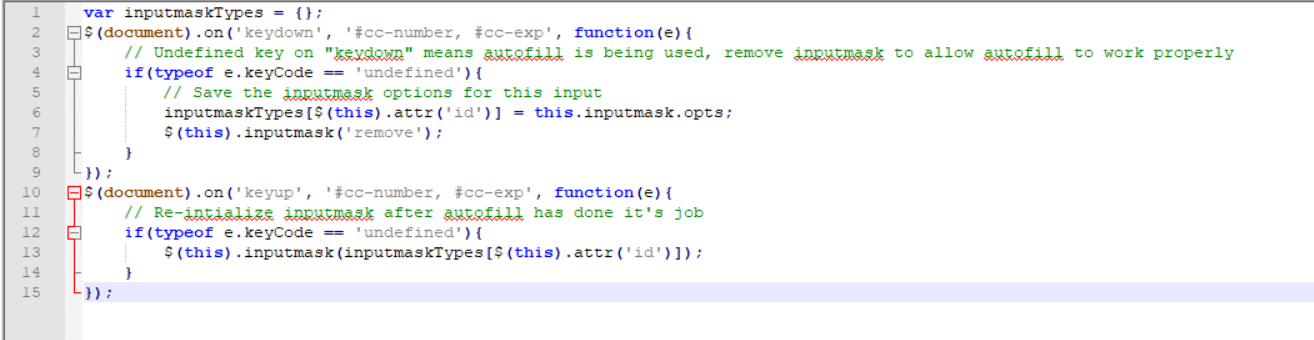
This will allow autofill to do it's job properly and then inputmask will take over after autofill is complete and format the values.
 nholden304
on 28 Jun 2019
nholden304
on 28 Jun 2019
also #841
RobinHerbots
on 5 Sep 2019
So my problem might be a little different and maybe this should be its own issue. So on our form we want CC exp as MM/YY. With the code in the following codeine, its autofilling the month correctly but for the year its taking the first 2 digits of the year instead of the last 2.
 jrock2004
on 9 Jul 2020
jrock2004
on 9 Jul 2020
I had this problem with a phone number and I solved it by using the multiple masks option:
inputmask(["(999) 999-9999","9999999999"])
I thought this might work because when I hover over my autofill option, the phone number shows up in the field as straight digits with no formatting. But then when I selected the autofill option, the input field emptied out.
I expected this to effectively disable the mask when using autofill, but it doesn't. Inputmask correctly masks the value using the first mask I specified.
 carlin-q-scott
on 9 Jul 2020
carlin-q-scott
on 9 Jul 2020
Workaround:
Autofilling still triggers simple webapi change event:
Found the value within event.target.inputmask.undoValue:
public autofillPatch(event: any) {
const currentInputValue = event.target.inputmask.undoValue;
}After we received the value we can do, for example this.formGroup.controls.input.setValue();
 insalespacecat
on 22 Mar 2021
insalespacecat
on 22 Mar 2021
Related issues
 webmastervinay
·
4Comments
webmastervinay
·
4Comments
 JosephWJMaxwell
·
7Comments
JosephWJMaxwell
·
7Comments
 drolsen
·
3Comments
drolsen
·
3Comments
 richard-flosi
·
3Comments
richard-flosi
·
3Comments
 SujayKrishna
·
7Comments
SujayKrishna
·
7Comments
Most helpful comment
👍 to fix this please. Have been integrating this into a project, but the behavior of autofill killed it :(