Inputmask: Issue for "email" mask, when trying to use mouse click to change cursor position/
Describe the bug
When trying to move the cursor over to the other side of the '@' with a mouse click it will for the cursor back to the nearest character. so it is impossible to move over to the other side unless you use the arrow keys. This wouldn't be a big deal but on mobile you don't have arrow keys and some people might not realize this on PC.
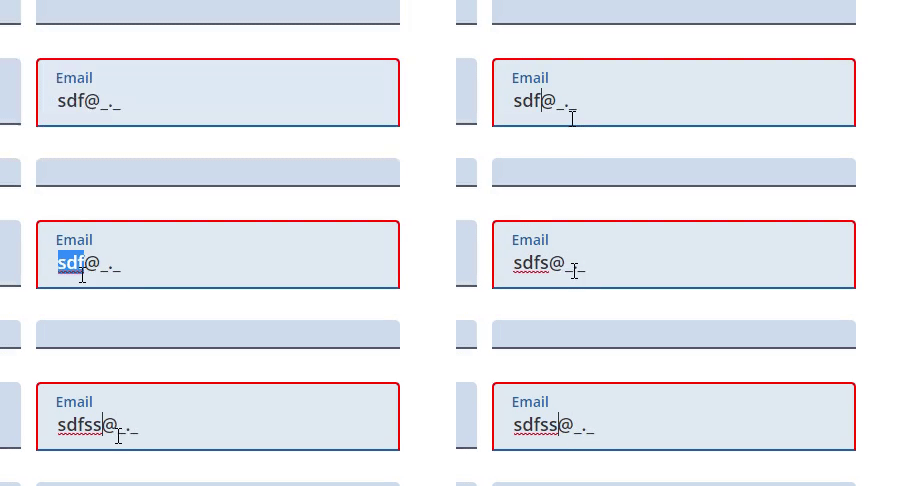
Please complete the following information:
- OS: windows 10
- Browser: any
- Inputmask version: 4.0.8
 JosephWJMaxwell
All 7 comments
I am using the latest pulled version on Windows 10, Chrome Version 75.0.3770.142 (Official Build) (64-bit) and cannot reproduce this issue. What browser are you using? [name, version]
 knoxcard
on 30 Jul 2019
knoxcard
on 30 Jul 2019
@JosephWJMaxwell ,
Hmm, you are right. You can always just type the @, but the above should also work.
I will see if I can tweak this.
 RobinHerbots
on 1 Aug 2019
RobinHerbots
on 1 Aug 2019
Okay i could just remake it so you have to type in the @ and . but this is the default inputmask("email"); I was not sure if this was normal or a bug it just felt weird for myself.
JosephWJMaxwell
on 1 Aug 2019
@JosephWJMaxwell - confirmed, you are correct. I've never noticed this before, great catch.
knoxcard
on 2 Aug 2019
Let me know if you are able to do anything with it! but thanks.
JosephWJMaxwell
on 2 Aug 2019
@JosephWJMaxwell - here is the super easy fix!! Let me know if you have any questions.
Javascript
base.js
$.fn.setCursorPosition = function(pos) {
  this.each(function(index, elem) {
    if (elem.setSelectionRange) {
      elem.setSelectionRange(pos, pos)
    }
    else if (elem.createTextRange) {
      var range = elem.createTextRange()
      range.collapse(true)
      range.moveEnd('character', pos)
      range.moveStart('character', pos)
      range.select()
    }
  })
  return this
}
$.fn.getCursorPosition = function() {
  var pos = 0,
    el = $(this).get(0)
  if(document.selection) {
      el.focus()
      var Sel = document.selection.createRange()
      var SelLength = document.selection.createRange().text.length
      Sel.moveStart('character', -el.value.length)
      pos = Sel.text.length - SelLength
  }
  else if(el.selectionStart || el.selectionStart == '0')
      pos = el.selectionStart
  return pos
}
main.js
$('#email').inputmask({
    alias: 'email',
    showMaskOnHover: false
})
$('#email').on('click touchpress', function() {
    var cursor_pos = $(this).getCursorPosition(),
        p_this = $(this)
    setTimeout(function() {
        // console.log(p_this.val())
        if(p_this.val() === '') {
            p_this.setCursorPosition(0)
            return
        }
        p_this.setCursorPosition(cursor_pos)
    }, 3)
})
HTML
<script src="base.js"></script>
<script src="main.js"></script>
<input type="text" id="email" name="email" maxlength="100" placeholder="[email protected]" spellcheck="false" autocomplete="email" />
DONE!
@RobinHerbots
knoxcard
on 20 Aug 2019
@JosephWJMaxwell, @knoxcard ,
This is already fixed in the current version
RobinHerbots
on 3 Mar 2020
Related issues
 pikaclint
·
3Comments
pikaclint
·
3Comments
 RipDevil
·
5Comments
RipDevil
·
5Comments
 ErikPham
·
5Comments
ErikPham
·
5Comments
 toxpal
·
6Comments
RobinHerbots
·
4Comments
toxpal
·
6Comments
RobinHerbots
·
4Comments