Ingress-nginx: nginx-ingress-controller can't modify parameter port (http 80 / https 443) by other port
NGINX Ingress controller version: 0.25.1
Kubernetes version: v1.14.1
Environment: CentOS 7 x64
Linux CNT7XDCK11D01 4.4.190-1.el7.elrepo.x86_64 #1 SMP Sun Aug 25 07:32:44 EDT 2019 x86_64 x86_64 x86_64 GNU/Linux
What happened: when I modify the installation yaml file's parameter http port and https port by new value, but actual the netstat commad query result : nginx-ingress-controller's used port still is 80 and 443.
What you expected to happen:
when I modify the installation yaml file's port parameter by 11180(http) and 11443(https),
After deploy the nginx used node-port also is 11180(http) and 11443(https),
not the default value 80(http) and 443(https).
How to reproduce it:
* clear old
root >> kubectl delete the deployment --al -n ingress-nginx
root >> kubectl delete the configmap --al -n ingress-nginx
* install
root >> kubectl apply -f {path, my modify file as below attachment: all_ingress_deploy.yaml}
Anything else we need to know:
- deployment, I modify port as below:
ports:
- name: http
containerPort: 11180
- name: https
containerPort: 11443
service, I modify port as below:
type: NodePort
ports:- name: http
port: 11180
targetPort: 11180
protocol: TCP
nodePort: 30080 - name: https
port: 11443
targetPort: 11443
protocol: TCP
nodePort: 30443
- name: http
deploy result, as below:
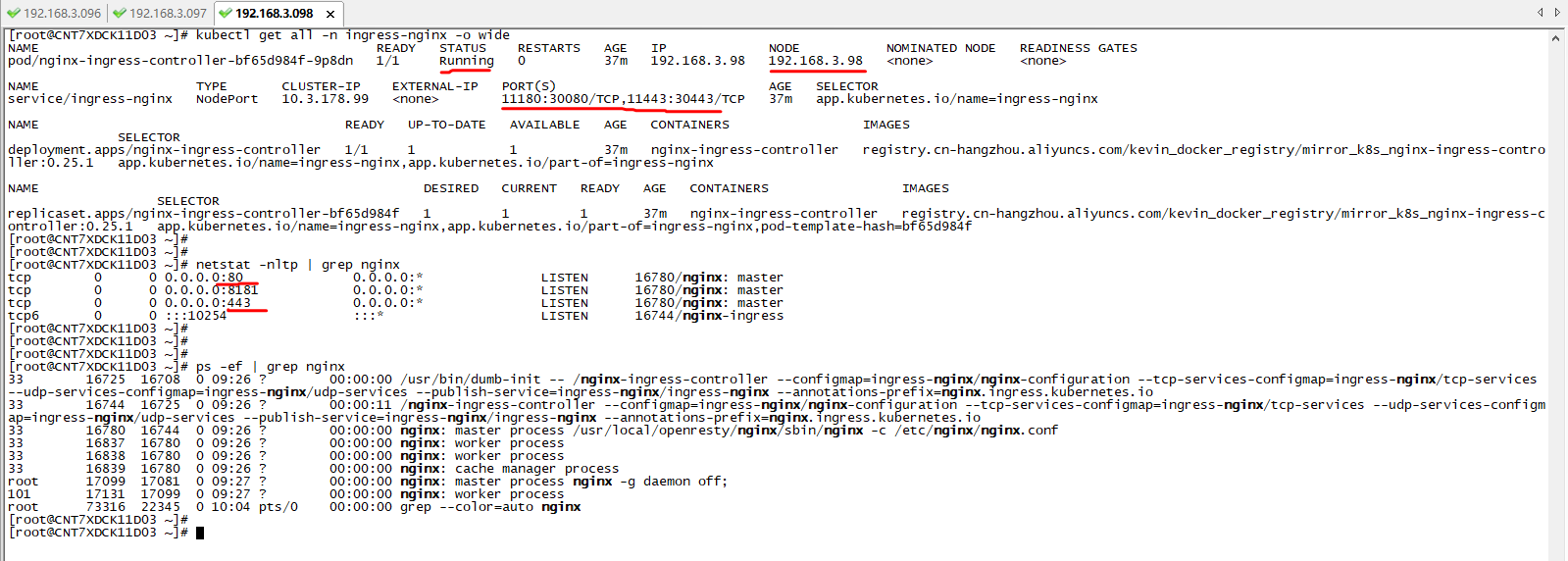
 tiandong19860806
All 6 comments
my modify installation yaml file, as below:
tiandong19860806
on 24 Dec 2019
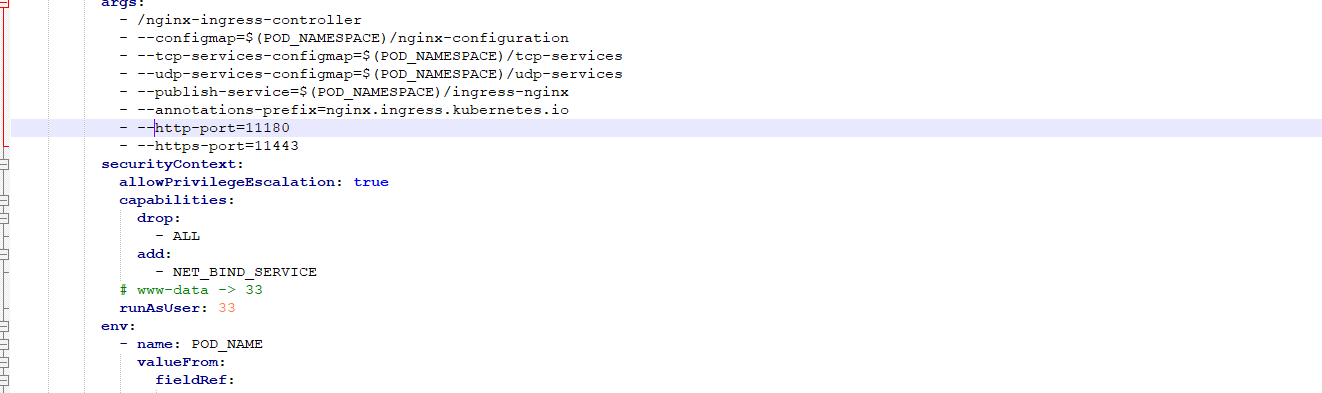
Closing. You are just changing the service ports. You need to change the deployment arguments https://kubernetes.github.io/ingress-nginx/user-guide/cli-arguments/
and specify --http-port and --https-port flags
 aledbf
on 24 Dec 2019
aledbf
on 24 Dec 2019
Hi Aledbf,
Thanks very much, I follow your manual is OK, as below:
step 1: add deploy flag,
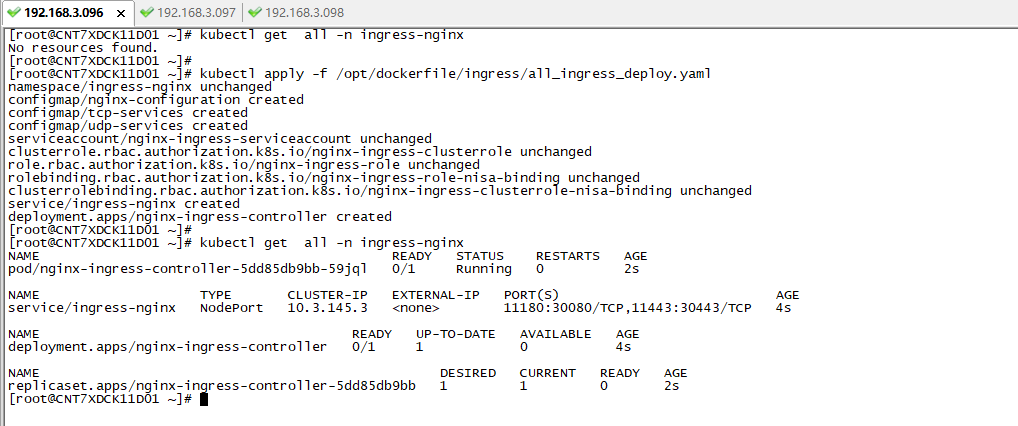
step 2: deploy it
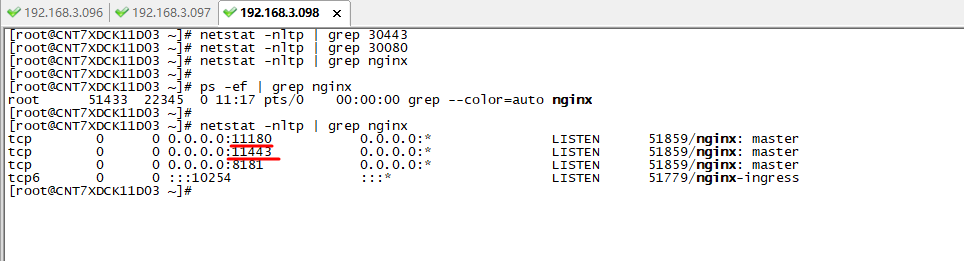
step 3: query the ingress-nginx-controller actual port, is OK
tiandong19860806
on 24 Dec 2019
Closing. You are just changing the service ports. You need to change the deployment arguments https://kubernetes.github.io/ingress-nginx/user-guide/cli-arguments/
and specify--http-portand--https-portflags
Thanks very much, Its working custom ports.
 prabhakaran2304
on 24 Feb 2020
prabhakaran2304
on 24 Feb 2020
Closing. You are just changing the service ports. You need to change the deployment arguments https://kubernetes.github.io/ingress-nginx/user-guide/cli-arguments/
and specify--http-portand--https-portflagsThanks very much, Its working custom ports.
How did you exactly solved this issue? I am also stuck at this, can you please provide detailed steps for this?
 bijay-ps
on 8 Jun 2020
bijay-ps
on 8 Jun 2020
Hi bijay,
Please reference below demo, and there some comment.
https://github.com/kubernetes/ingress-nginx/files/3996939/all_ingress_deploy.yaml.txt
tiandong19860806
on 13 Jun 2020
Related issues
 whereisaaron
·
3Comments
whereisaaron
·
3Comments
 natemurthy
·
3Comments
natemurthy
·
3Comments
 kfox1111
·
3Comments
kfox1111
·
3Comments
 oilbeater
·
3Comments
oilbeater
·
3Comments
 silasbw
·
3Comments
silasbw
·
3Comments
Most helpful comment
Hi Aledbf,
Thanks very much, I follow your manual is OK, as below:
step 1: add deploy flag,

step 2: deploy it

step 3: query the ingress-nginx-controller actual port, is OK
