Incubator-superset: Datasource edit doesn't save schema, only saves new dataset name
On chart explore, when you click on change dataset, and try to edit the datasource (table) name, the table name change works as expected but unless you edit schema, the existing schema doesn't get saved causing the chart to break.
Expected results
Both schema and table name should change.
Actual results
Only table name changes.
Screenshots
Step 1: my table name (before change)
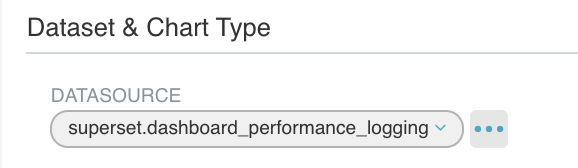
Step 2: try to edit table name, schema is same - do not edit schema
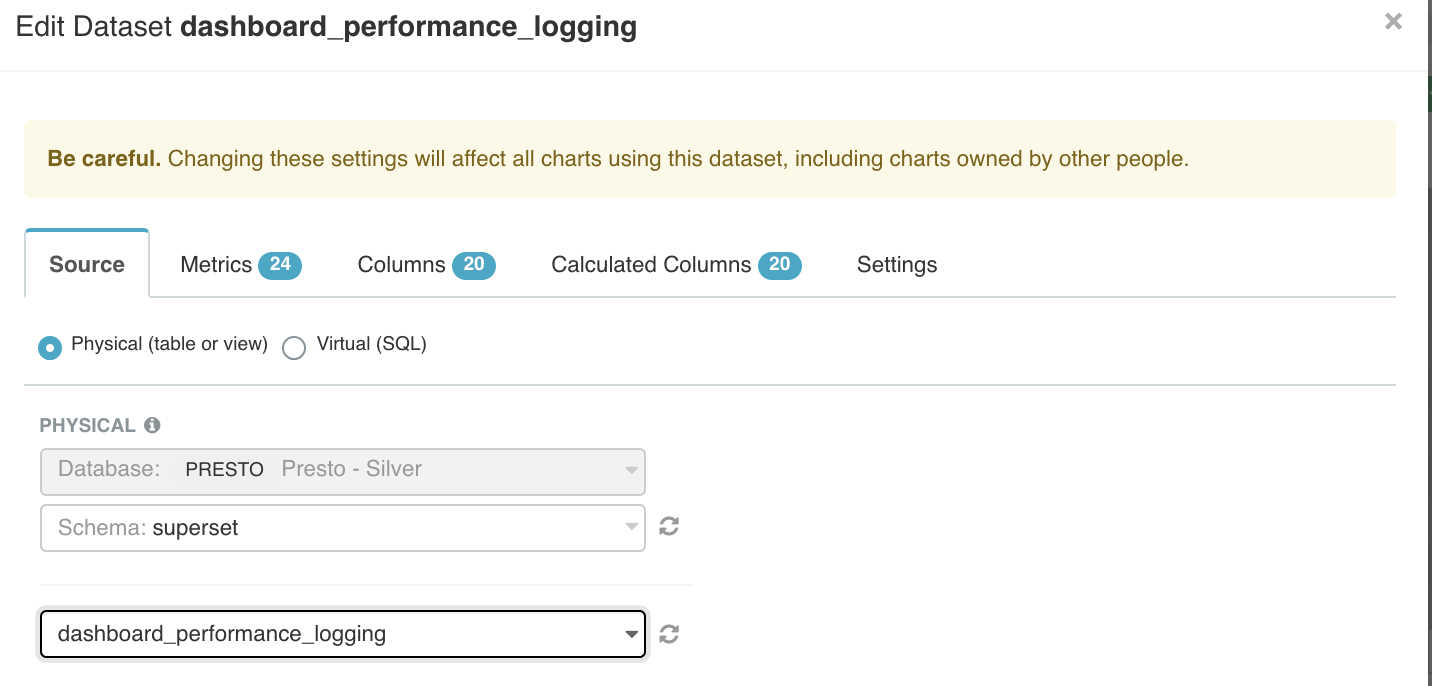
Step 3: This is the result: New table name is displayed with NO SCHEMA. if you run chart, it breaks.

How to reproduce the bug
- Go to 'Chart Explore'
- Click on 'Change Dataset'
- Enter new table name, keep same schema
- Click on Save
- See issue
Environment
(please complete the following information):
- superset version: master
Checklist
Make sure these boxes are checked before submitting your issue - thank you!
- [x] I have checked the superset logs for python stacktraces and included it here as text if there are any.
- [x] I have reproduced the issue with at least the latest released version of superset.
- [x] I have checked the issue tracker for the same issue and I haven't found one similar.
 zuzana-vej
All 7 comments
Issue-Label Bot is automatically applying the label #bug to this issue, with a confidence of 0.95. Please mark this comment with :thumbsup: or :thumbsdown: to give our bot feedback!
Links: app homepage, dashboard and code for this bot.
![issue-label-bot[bot] picture](https://avatars2.githubusercontent.com/in/27079?v=4&s=40) issue-label-bot[bot]
on 22 Oct 2020
issue-label-bot[bot]
on 22 Oct 2020
@lilykuang
 mistercrunch
on 22 Oct 2020
mistercrunch
on 22 Oct 2020
I just opened for the fix https://github.com/apache/incubator-superset/pull/11396
 lilykuang
on 22 Oct 2020
lilykuang
on 22 Oct 2020
Closing as the fix is merged.
 willbarrett
on 26 Oct 2020
willbarrett
on 26 Oct 2020
This issue has cropped up again on our side
 benceorlai
on 11 Dec 2020
benceorlai
on 11 Dec 2020
@benceorlai the step I tried to reproduce this issue
https://www.loom.com/share/494cf29e697841f5b6c038c2642892bc
It doesn't seem to have issue. did i miss anything?
lilykuang
on 11 Dec 2020
quick fix for this issue https://github.com/apache/incubator-superset/pull/12018
lilykuang
on 11 Dec 2020
Related issues
 ylkjick532428
·
3Comments
ylkjick532428
·
3Comments
 fly-high-bj
·
3Comments
fly-high-bj
·
3Comments
 sashank
·
3Comments
sashank
·
3Comments
 gbrian
·
3Comments
gbrian
·
3Comments
 joshuacano
·
3Comments
joshuacano
·
3Comments
Most helpful comment
I just opened for the fix https://github.com/apache/incubator-superset/pull/11396