Incubator-superset: Superset dashboard or no data loading after login
Even after successful docker-compose up with latest updates from master branch after login welcome page keeps loading no dashboards or no data can be seen.
Checked the logs for PostgreSQL in image no error or exception in logs.
Even executed docker-init.sh successfully.
Expected results
Superset should load default roles and dashboard after login.
Actual results
welcome page keeps loading after login, no dashboards or no data can be seen.
Screenshots

How to reproduce the bug
- Go to '...'
- Click on '....'
- Scroll down to '....'
- See error
Environment
(please complete the following information):
- superset version:
superset version - python version:
python --version - node.js version:
node -v - npm version:
npm -v
Checklist
Make sure these boxes are checked before submitting your issue - thank you!
- [x] I have checked the superset logs for python stacktraces and included it here as text if there are any.
- [x] I have reproduced the issue with at least the latest released version of superset.
- [x] I have checked the issue tracker for the same issue and I haven't found one similar.
Additional context
Add any other context about the problem here.
 swapnil-chenoa
All 37 comments
Issue-Label Bot is automatically applying the label #bug to this issue, with a confidence of 0.93. Please mark this comment with :thumbsup: or :thumbsdown: to give our bot feedback!
Links: app homepage, dashboard and code for this bot.
![issue-label-bot[bot] picture](https://avatars2.githubusercontent.com/in/27079?v=4&s=40) issue-label-bot[bot]
on 12 Dec 2019
issue-label-bot[bot]
on 12 Dec 2019
Please post docker-init logs from the superset-init container
 dpgaspar
on 12 Dec 2019
dpgaspar
on 12 Dec 2019
I run the docker-init command twice (considering resources not downloaded on first attempt) so in logs it says admin user already exists.
Please find attached logs.
swapnil-chenoa
on 12 Dec 2019
ok, that seems more or less ok. Looking at the uploaded picture you provided it seems that the docker build step may have failed. Try issuing a docker-compose build first (after docker-compose down)
dpgaspar
on 12 Dec 2019
@swapnil-chenoa Are you sure you've waited for superset-node container to finish before loading page? Looks like you're missing JS files generated from webpack.
 TheMelter
on 13 Dec 2019
TheMelter
on 13 Dec 2019
ok, that seems more or less ok. Looking at the uploaded picture you provided it seems that the docker build step may have failed. Try issuing a
docker-compose buildfirst (after docker-compose down)
Thanks for your response.
The docker build was successful with all 32 steps executed few container initialization failed so used docker-compose build command which was successful.
It took hours for 11th step to complete.
Step 11/32 : RUN cd /app/superset/assets && npm run build && rm -rf node_modules
---> Running in ec3cd24edd7d
[email protected] build /app/superset/assets
cross-env NODE_OPTIONS=--max_old_space_size=8192 NODE_ENV=production webpack --mode=production --colors --progress
clean-webpack-plugin: /app/superset/assets/dist has been removed.
Starting type checking service...
Using 1 worker with 2048MB memory limit
92% chunk asset optimization OptimizeCssAssetsWebpackPluginBrowserslist: caniuse-lite is outdated. Please r 92% chunk asset optimization TerserPlugin
swapnil-chenoa
on 13 Dec 2019
I met the same problem as yours, how do you resolve it
 flutterWang
on 13 Dec 2019
flutterWang
on 13 Dec 2019
@swapnil-chenoa Are you sure you've waited for superset-node container to finish before loading page? Looks like you're missing JS files generated from webpack.
Thanks for your response.
Yes we waited for same even for log-in page resources didn't load.
If we missed something how to recover JS files from webpack.
swapnil-chenoa
on 13 Dec 2019
I met the same problem as yours, how do you resolve it
No that issue not yet resolved.
We are looking for solution.
swapnil-chenoa
on 13 Dec 2019

my superset-work is unhealthy, do you have the same situation ?
flutterWang
on 13 Dec 2019
my superset-work is unhealthy, do you have the same situation ?
No. all were in healthy state.
swapnil-chenoa
on 13 Dec 2019
the default username & password is admin & admin ?
flutterWang
on 13 Dec 2019
the default username & password is admin & admin ?
Yes its written in docker-init.sh.
swapnil-chenoa
on 13 Dec 2019
I used cd superset/assets \
&& npm install \
&& npm run build \
&& rm -rf node_modules to resolve it, but i met another problem:

flutterWang
on 13 Dec 2019
@flutterWang you have to wait for the superset-init to finish, it takes a while since it's upgrading the db, and downloading all the data for the examples dashboards
dpgaspar
on 13 Dec 2019
@dpgaspar

but my superset-init has been exited, did this mean it was finish?
flutterWang
on 15 Dec 2019
seems like superset-init failed, can you post the full log?
dpgaspar
on 20 Dec 2019
This is happening to me as well on macosx
 nabinkhadka
on 23 Dec 2019
nabinkhadka
on 23 Dec 2019
@dpgaspar
but my superset-init has been exited, did this mean it was finish?
@flutterWang - looks like you were running this while github was having some issues, as you can see from the SSL error. Were you able to retry this at all?
 craig-rueda
on 23 Dec 2019
craig-rueda
on 23 Dec 2019
This is happening to me as well on macosx
@nabinkhadka - how much RAM are you allocating to your Docker VM? I'd recommend at least 4GB, as the default of 2 isn't enough to get Terser off the ground.
craig-rueda
on 23 Dec 2019
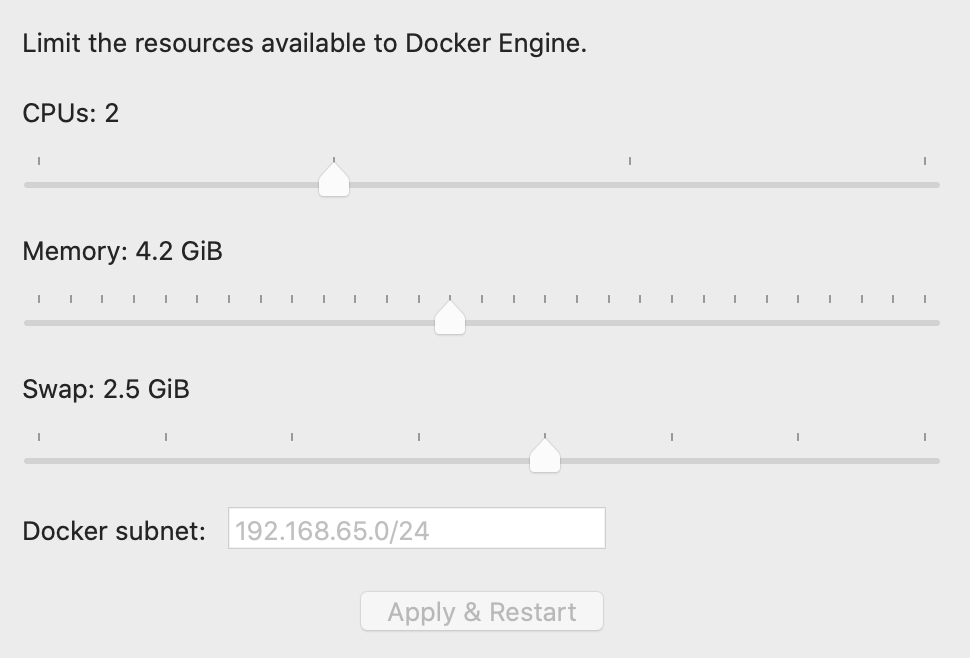
This is what I have. @craig-rueda
nabinkhadka
on 23 Dec 2019
Ok, I'll take a deeper look at this. I'm wondering if there's a way to disable Terser for local development 🤔 ...
craig-rueda
on 23 Dec 2019
@nabinkhadka I looked into the issue you merged #8883 , as I had the same error message.. turns out I was missing webpack. npm update then retrying docker-compose up fixed the issue for me.
 jpatdalton
on 9 Jan 2020
jpatdalton
on 9 Jan 2020
I have noticed another aspect of this bug while trying out the dremio support update. I have installed the latest superset using pip git+https://github.com/apache/incubator-superset in a Ubuntu 18.04 VM with 8 GB RAM. I have followed the steps outlined at default installation instructions page https://superset.incubator.apache.org/installation.html
However, I played around with saved states of my VM and realized that if I skip the command flask fab create-admin, at least the login page comes up. But, of course without any default credentials and not having created any credentials, I am unable to login.
I hope this helps in someway.
 gk1089
on 16 Jan 2020
gk1089
on 16 Jan 2020
@nabinkhadka I looked into the issue you merged #8883 , as I had the same error message.. turns out I was missing webpack.
npm updatethen retryingdocker-compose upfixed the issue for me.
That worked for me!
Outside docker, on your local repo, you should enter superset/assets/ folder and run npm update.
And the, as @nabinkhadka said run docker-compose up
 feroult
on 5 Feb 2020
feroult
on 5 Feb 2020
@nabinkhadka I looked into the issue you merged #8883 , as I had the same error message.. turns out I was missing webpack.
npm updatethen retryingdocker-compose upfixed the issue for me.That worked for me!
Outside docker, on your local repo, you should enter
superset/assets/folder and runnpm update.And the, as @nabinkhadka said run
docker-compose up
superset/assets/ doesnt exist anymore. has it been renamed to something else?
 chongzixin
on 12 Feb 2020
chongzixin
on 12 Feb 2020
@chongzixin yes, superset/assets/ has been moved to superset-frontend/
 willbarrett
on 14 Feb 2020
willbarrett
on 14 Feb 2020
Hi all,
New to superset and your comments above have been really helpful.
I just downloaded superset yesterday and I am able to login without any errors but I am unable to view any charts or dashboards. I have run the npm update on superset/superset-frontend/
but still getting chart plugin errors when inspecting the code (screenshot attached).
Any help would be really useful.
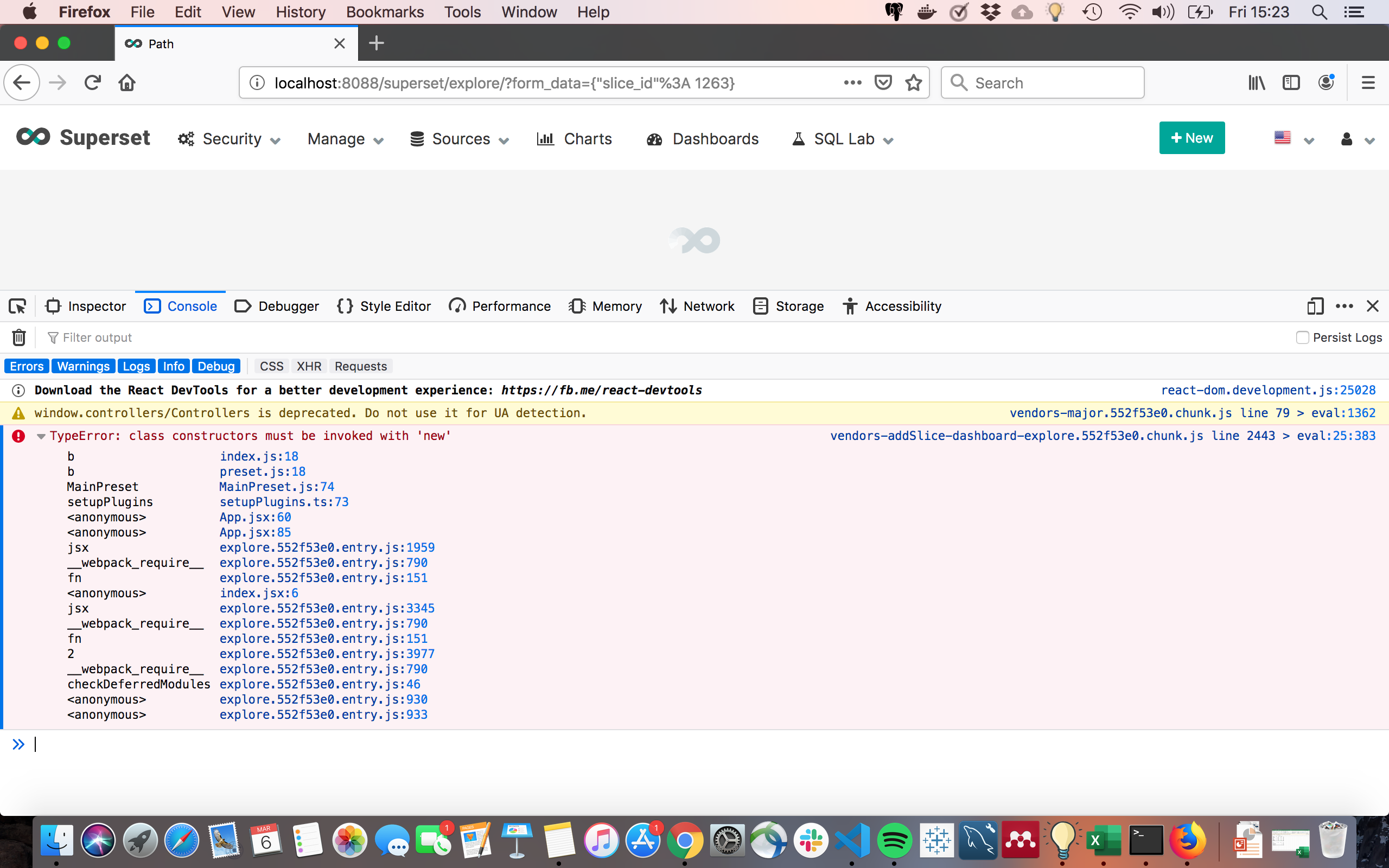
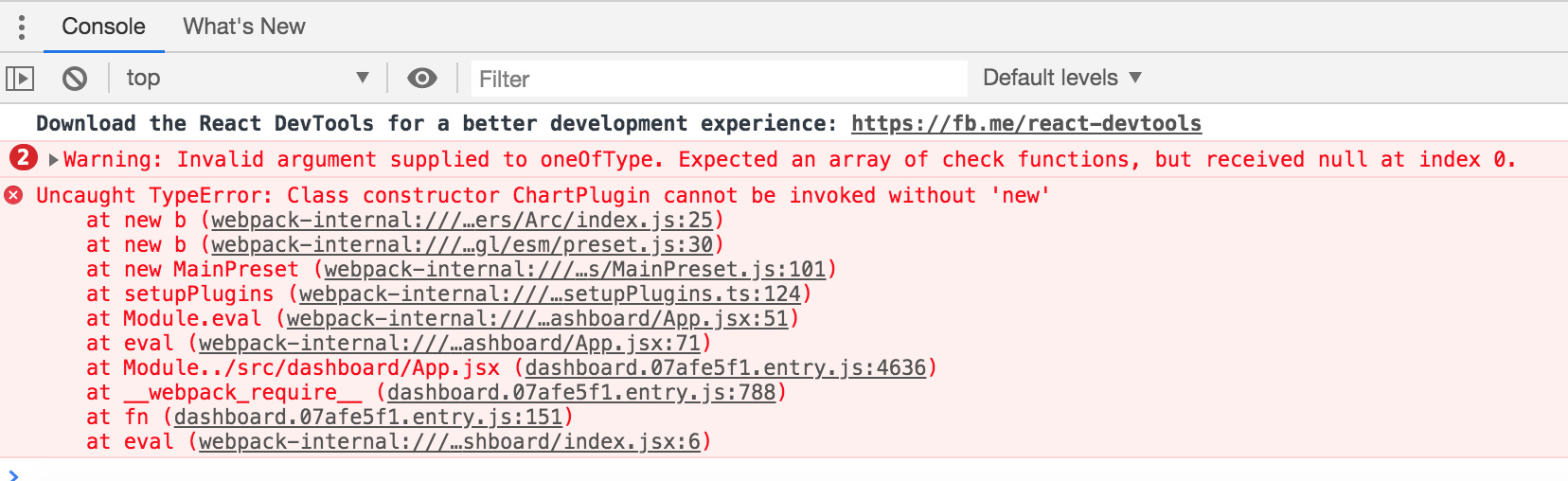
 righttracknana
on 6 Mar 2020
righttracknana
on 6 Mar 2020
Just follow along with the Dockerfile configuration and your compose file and things will be OK.
you might get into some errors which I never bumped into and based on your resources(RAM+CPU) and your internet speed you will face delays, it will usually take about 1 hour to install cause lets face it, you are basically running 4 or 5 services and each will interfere with each other, if you wait for all stages to finish and if you found any "unhealthy" status, just do the docker container restart [container-id] and what @jpatdalton said about running the image as a build not docker up.
but also, do the npm update, do the restarting and give your server some fermentation time :smile:
superset is a heavy software, it demands to check, restart and reboot a couple of times.
Good luck and thanks to the community.
 AramisN
on 7 Mar 2020
AramisN
on 7 Mar 2020
I used
cd superset/assets \
&& npm install \
&& npm run build \
&& rm -rf node_modules
to resolve it, but i met another problem:
I have the same problem. Have you resolved?
 keehl1213
on 1 Apr 2020
keehl1213
on 1 Apr 2020
If you get HTTP 401 errors from browser console, try remove admin accounts from superset's internal postgres database. (You'd need to know how to manipulate postgres)
I caught this error because I ran docker image pulled from docker hub before pull and run the source code version. And resolved that by removing up admin account and rerun docker-compose up
 EnixCoda
on 17 Apr 2020
EnixCoda
on 17 Apr 2020
This issue has been automatically marked as stale because it has not had recent activity. It will be closed if no further activity occurs. Thank you for your contributions. For admin, please label this issue .pinned to prevent stale bot from closing the issue.
![stale[bot] picture](https://avatars3.githubusercontent.com/in/1724?v=4&s=40) stale[bot]
on 17 Jun 2020
stale[bot]
on 17 Jun 2020
my superset-work is unhealthy, do you have the same situation ?
@flutterWang I met the same problem as yours, how do you resolve it
 superrrrrrrrL
on 11 Nov 2020
superrrrrrrrL
on 11 Nov 2020
This issue has not been resolved yet. I have more than 4GB of RAM allocated to Docker, I ran npm update in superset-frontend, I have waited over two hours after running docker-compose up and allowed all the images to finish installing packages and setting things up but still not getting anything to load after the login page. What is the magic trick do get a hello-world example running on MacOS? For reference, tried on MacOS 10.15.7. Getting this as output:
superset_app             | INFO:werkzeug:172.20.0.1 - - [21/Nov/2020 22:49:43] "GET /superset/welcome HTTP/1.1" 200 -
superset_app             | 172.20.0.1 - - [21/Nov/2020 22:49:43] "GET /static/assets/theme.d16f7015.entry.js HTTP/1.1" 404 -
superset_app             | INFO:werkzeug:172.20.0.1 - - [21/Nov/2020 22:49:43] "GET /static/assets/theme.d16f7015.entry.js HTTP/1.1" 404 -
superset_app             | 172.20.0.1 - - [21/Nov/2020 22:49:43] "GET /static/assets/images/loading.gif HTTP/1.1" 404 -
superset_app             | INFO:werkzeug:172.20.0.1 - - [21/Nov/2020 22:49:43] "GET /static/assets/images/loading.gif HTTP/1.1" 404 -
superset_app             | 172.20.0.1 - - [21/Nov/2020 22:49:43] "GET /static/assets/thumbnail.d16f7015.chunk.js HTTP/1.1" 404 -
superset_app             | INFO:werkzeug:172.20.0.1 - - [21/Nov/2020 22:49:43] "GET /static/assets/thumbnail.d16f7015.chunk.js HTTP/1.1" 404 -
superset_app             | 172.20.0.1 - - [21/Nov/2020 22:49:43] "GET /static/assets/mathjs.d16f7015.chunk.js HTTP/1.1" 404 -
superset_app             | INFO:werkzeug:172.20.0.1 - - [21/Nov/2020 22:49:43] "GET /static/assets/mathjs.d16f7015.chunk.js HTTP/1.1" 404 -
superset_app             | 172.20.0.1 - - [21/Nov/2020 22:49:43] "GET /static/assets/vendors.d16f7015.chunk.js HTTP/1.1" 404 -
superset_app             | INFO:werkzeug:172.20.0.1 - - [21/Nov/2020 22:49:43] "GET /static/assets/vendors.d16f7015.chunk.js HTTP/1.1" 404 -
superset_app             | 172.20.0.1 - - [21/Nov/2020 22:49:44] "GET /static/assets/mathjs.d16f7015.chunk.js HTTP/1.1" 404 -
superset_app             | INFO:werkzeug:172.20.0.1 - - [21/Nov/2020 22:49:44] "GET /static/assets/mathjs.d16f7015.chunk.js HTTP/1.1" 404 -
superset_app             | 172.20.0.1 - - [21/Nov/2020 22:49:44] "GET /static/assets/thumbnail.d16f7015.chunk.js HTTP/1.1" 404 -
superset_app             | INFO:werkzeug:172.20.0.1 - - [21/Nov/2020 22:49:44] "GET /static/assets/thumbnail.d16f7015.chunk.js HTTP/1.1" 404 -
 pbegle
on 21 Nov 2020
pbegle
on 21 Nov 2020
Upon further inspection, I noticed that the superset_node container died. Here is the tail of the logs for it:
<s> [webpack.Progress] 94% after asset optimization
<s> [webpack.Progress] 94% after seal
<s> [webpack.Progress] 95% emitting
<s> [webpack.Progress] 95% emitting fork-ts-checker-webpack-plugin
<s> [webpack.Progress] 95% emitting clean-webpack-plugin
<s> [webpack.Progress] 95% emitting ManifestPlugin
Killed
npm ERR! code ELIFECYCLE
npm ERR! errno 137
npm ERR! [email protected] dev: `webpack --mode=development --colors --debug --watch`
npm ERR! Exit status 137
npm ERR!
npm ERR! Failed at the [email protected] dev script.
npm ERR! This is probably not a problem with npm. There is likely additional logging output above.

npm ERR! A complete log of this run can be found in:
npm ERR!     /root/.npm/_logs/2020-11-21T22_04_07_103Z-debug.log
npm WARN using --force I sure hope you know what you are doing.
/usr/local/bin/webpack -> /usr/local/lib/node_modules/webpack/bin/webpack.js
/usr/local/bin/webpack-cli -> /usr/local/lib/node_modules/webpack-cli/bin/cli.js
+ [email protected]
+ [email protected]
updated 2 packages in 7.314s
npm WARN using --force I sure hope you know what you are doing.
Upon further inspection, I noticed that the
superset_nodecontainer died. Here is the tail of the logs for it:<s> [webpack.Progress] 94% after asset optimization <s> [webpack.Progress] 94% after seal <s> [webpack.Progress] 95% emitting <s> [webpack.Progress] 95% emitting fork-ts-checker-webpack-plugin <s> [webpack.Progress] 95% emitting clean-webpack-plugin <s> [webpack.Progress] 95% emitting ManifestPlugin Killed npm ERR! code ELIFECYCLE npm ERR! errno 137 npm ERR! [email protected] dev: `webpack --mode=development --colors --debug --watch` npm ERR! Exit status 137 npm ERR! npm ERR! Failed at the [email protected] dev script. npm ERR! This is probably not a problem with npm. There is likely additional logging output above. npm ERR! A complete log of this run can be found in: npm ERR! /root/.npm/_logs/2020-11-21T22_04_07_103Z-debug.log npm WARN using --force I sure hope you know what you are doing. /usr/local/bin/webpack -> /usr/local/lib/node_modules/webpack/bin/webpack.js /usr/local/bin/webpack-cli -> /usr/local/lib/node_modules/webpack-cli/bin/cli.js + [email protected] + [email protected] updated 2 packages in 7.314s npm WARN using --force I sure hope you know what you are doing.
Status 137 is out of memory. Maybe 4 GB of RAM is not enough. My docker has 5 GB of memory and 3 GB of swap on windows 10. It works fine for me.
keehl1213
on 23 Nov 2020
I had the same issue, in fact the container superset_node takes very long time for first npm-install (more than 20 minutes on my configuration)...
A tip if you want to check if still installing is to go into this container, then in /app/superset-frontend/node_modules or /app/superset-frontend/node_modules/.staging and do some ls -lah | wc -l. Normally, the number of folder will vary ;).
 anivon
on 11 Dec 2020
anivon
on 11 Dec 2020
Related issues
 alanmcruickshank
·
28Comments
alanmcruickshank
·
28Comments
 michailsal
·
29Comments
michailsal
·
29Comments
 PickLiDan
·
30Comments
PickLiDan
·
30Comments
 ktmud
·
26Comments
ktmud
·
26Comments
 mistercrunch
·
37Comments
mistercrunch
·
37Comments
Most helpful comment
Issue-Label Bot is automatically applying the label
#bugto this issue, with a confidence of 0.93. Please mark this comment with :thumbsup: or :thumbsdown: to give our bot feedback!Links: app homepage, dashboard and code for this bot.