Incubator-superset: Error while changing data source in chart
I am getting an error while changing data source in chart after selecting new data source
Expected results
Data source should get changed to chosen source.
Actual results
Message "An error occurred"
### Screenshots


Environment
- superset version: 0.30.0
- python version: 3.6.9
`
Checklist
Make sure these boxes are checked before submitting your issue - thank you!
- [ ] I have checked the superset logs for python stacktraces and included it here as text if there are any.
- [x] I have reproduced the issue with at least the latest released version of superset.
- [x] I have checked the issue tracker for the same issue and I haven't found one similar.
 hemantaggarwal
All 30 comments
Issue-Label Bot is automatically applying the label #bug to this issue, with a confidence of 0.82. Please mark this comment with :thumbsup: or :thumbsdown: to give our bot feedback!
Links: app homepage, dashboard and code for this bot.
![issue-label-bot[bot] picture](https://avatars2.githubusercontent.com/in/27079?v=4&s=40) issue-label-bot[bot]
on 28 Nov 2019
issue-label-bot[bot]
on 28 Nov 2019
Thank you for reporting, yet I'm not able to replicate the issue, please upgrade superset to a newer version and re-test
 dpgaspar
on 29 Nov 2019
dpgaspar
on 29 Nov 2019
@dpgaspar: I will re-test it after upgrading it.
I installed superset using "pip install superset" but now its changed to "apache-superset", so do I have first uninstall old version?
and after upgrading If I am right I have to run "superset db upgrade" then will I loose all my current dashboards? Currently I am using postgres as superset metadata storage (by setting postgres uri in config.py).
hemantaggarwal
on 29 Nov 2019
@dpgaspar : I tried upgrading using command "pip3 install apache-superset==0.35.1" but after successful installation, I got an error while running "superset version" or "superset db upgrade":
Traceback (most recent call last):
File "/usr/local/bin/superset", line 21, in
from superset.cli import create_app
File "/usr/local/lib/python3.6/dist-packages/superset/__init__.py", line 133, in
app.config["LOGGING_CONFIGURATOR"].configure_logging(app.config, app.debug)
KeyError: 'LOGGING_CONFIGURATOR'
Then I tried to install version 0.34 using command "pip3 install apache-superset==0.34.0 and did "db upgrade" but it is still showing version as 0.30.0
hemantaggarwal
on 30 Nov 2019
Update:
Finally I was able to upgrade it to 0.35.1 and ran "db upgrade" and "init" command. 'Logging_configurator' error was due to pip3, only pip should be use to install.
But I am still facing the issue of changing data source in chart and this issue is coming only on production server not in staging. Only difference between two setup is that on production we are using "nginx" reverse proxy and "gunicorn" for superset and using "postgres" to store superset metadata instead of default sqllite.
Is it due to postgres database?
hemantaggarwal
on 30 Nov 2019
@betodealmeida @dpgaspar : Any suggestions for this?
hemantaggarwal
on 3 Dec 2019
This issue has been automatically marked as stale because it has not had recent activity. It will be closed if no further activity occurs. Thank you for your contributions. For admin, please label this issue .pinned to prevent stale bot from closing the issue.
![stale[bot] picture](https://avatars3.githubusercontent.com/in/1724?v=4&s=40) stale[bot]
on 14 Feb 2020
stale[bot]
on 14 Feb 2020
I am also facing the same issue. And also I cannot see any logs in the superset.
Superset version - 0.35.2
 TheRum
on 18 Feb 2020
TheRum
on 18 Feb 2020
This issue has been automatically marked as stale because it has not had recent activity. It will be closed if no further activity occurs. Thank you for your contributions. For admin, please label this issue .pinned to prevent stale bot from closing the issue.
stale[bot]
on 18 Apr 2020
Update:
Finally I was able to upgrade it to 0.35.1 and ran "db upgrade" and "init" command. 'Logging_configurator' error was due to pip3, only pip should be use to install.
But I am still facing the issue of changing data source in chart and this issue is coming only on production server not in staging. Only difference between two setup is that on production we are using "nginx" reverse proxy and "gunicorn" for superset and using "postgres" to store superset metadata instead of default sqllite.
Is it due to postgres database?
Did you find any solution to it? I am still facing the issue in superset 0.36.0
 sedhha
on 8 Jul 2020
sedhha
on 8 Jul 2020
@sedhha : No, I am still facing this issue and haven't find any solution to this.
hemantaggarwal
on 8 Jul 2020
It is working for me but not all times.
I tried with mysql and postgres as metadata store for superset and it is working.
This functionality is not working in our production superset server but works in our staging server.
Environment :
Server - AWS EC2 - t3.small
Docker - amancevice/superset:0.36.0
TheRum
on 8 Jul 2020
@TheRum : Were you able to find the cause?
hemantaggarwal
on 8 Jul 2020
@hemantaggarwal Nope. I tried reproducing but no luck. Also cannot see anything in logs as well.
TheRum
on 8 Jul 2020
Also experiencing this consistently - would love a fix!
 Jclevinson
on 8 Jul 2020
Jclevinson
on 8 Jul 2020
@Jclevinson on what version of Superset are you on? Have you tried this on master branch?
 villebro
on 8 Jul 2020
villebro
on 8 Jul 2020
@villebro I am experiencing this on superset version 0.36.0.
Machine: GCP Ubuntu 18.04 LTS
sedhha
on 8 Jul 2020
Thanks @sedhha . This seems to be fixed on master branch, so all the more reason to release 0.37.0 as quickly as possible. I will try to push through the last blockers today so we can get the release vote started.
villebro
on 8 Jul 2020
Thanks @sedhha . This seems to be fixed on master branch, so all the more reason to release
0.37.0as quickly as possible. I will try to push through the last blockers today so we can get the release vote started.
Hi @villebro alright awesome! When's it going to release? Are you on that slack channel as well?
sedhha
on 8 Jul 2020
The minimum time that the vote will take is 6 days (3 days community vote, 3 days Incubator PMC vote), assuming no problems come up during testing/voting. I'm on that Slack channel, too (#apache-releases), I will post an update there as things progress.
villebro
on 8 Jul 2020
The minimum time that the vote will take is 6 days (3 days community vote, 3 days Incubator PMC vote), assuming no problems come up during testing/voting. I'm on that Slack channel, too (#apache-releases), I will post an update there as things progress.
Awesome! Thanks... had some feature request, just wanted to know if they're incorporated or not. Posted them in slack channel itself!
sedhha
on 8 Jul 2020
I'm also experiencing this on 0.36.0. My issue appears related to this one https://github.com/apache/incubator-superset/issues/8686 in that I'm getting a JavaScript console error:
Unsafe attempt to load URL http://example.com/datasource/get/table/27/ from frame with URL https://example.com/superset/explore/?form_data=....#. Domains, protocols and ports must match.
However I have applied every workaround, including setting ENABLE_PROXY_FIX and PROXY_FIX_CONFIG in superset_config.py as well as validating the X-Forwarded-Proto and other headers are set and it doesn't seem to resolve the issue.
I am running superset on HTTPS behind an nginx reverse proxy.
 czue
on 8 Jul 2020
czue
on 8 Jul 2020
I'm also experiencing this on
0.36.0. My issue appears related to this one #8686 in that I'm getting a JavaScript console error:Unsafe attempt to load URL http://example.com/datasource/get/table/27/ from frame with URL https://example.com/superset/explore/?form_data=....#. Domains, protocols and ports must match.However I have applied every workaround, including setting
ENABLE_PROXY_FIXandPROXY_FIX_CONFIGinsuperset_config.pyas well as validating theX-Forwarded-Protoand other headers are set and it doesn't seem to resolve the issue.
I get the same thing in my console.
sedhha
on 8 Jul 2020
Thanks @sedhha . This seems to be fixed on master branch, so all the more reason to release
0.37.0as quickly as possible. I will try to push through the last blockers today so we can get the release vote started.
Has this fix been released yet?
Jclevinson
on 15 Jul 2020
@Jclevinson many issues were fixed yesterday, but one last blocker remains: #10307 We're working hard to get it fixed and get a new RC out today (UTC).
villebro
on 15 Jul 2020
@Jclevinson many issues were fixed yesterday, but one last blocker remains: #10307 We're working hard to get it fixed and get a new RC out today (UTC).
thanks @villebro !
Jclevinson
on 15 Jul 2020
Finally for me this issue is resolved by setting parameter "ENABLE_PROXY_FIX = True" in config file.
hemantaggarwal
on 23 Jul 2020
We have same issue with 0.37 and using nginx proxy. Setting ENABLE_PROXY_FIX = True didn't help.
 iercan
on 13 Sep 2020
iercan
on 13 Sep 2020
I resolved issue by adding this to superset config
ENABLE_PROXY_FIX = True
and configuring nginx like this
   location / {
      proxy_set_header X-Real-IP $remote_addr;
      proxy_set_header X-Forwarded-For $proxy_add_x_forwarded_for;

      proxy_set_header X-Forwarded-SSL on;
      proxy_set_header X-Forwarded-Proto https;

      proxy_set_header Host $http_host;
      proxy_set_header X-NginX-Proxy true;

      proxy_pass http://127.0.0.1:8088/;
      proxy_redirect off;

      proxy_http_version 1.1;
      proxy_set_header Upgrade $http_upgrade;
      proxy_set_header Connection "upgrade";
    }
These lines do the trick
proxy_set_header X-Forwarded-SSL on;
proxy_set_header X-Forwarded-Proto https;
iercan
on 13 Sep 2020
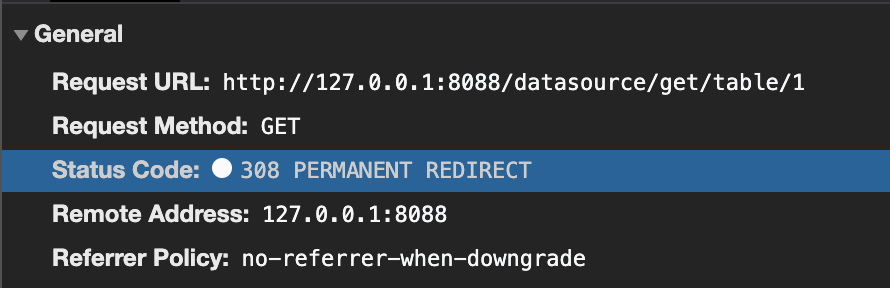
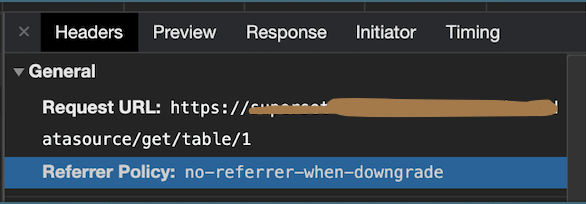
This issue is solved on Firefox and Safari with the lastest comment.
But not on chrome :
Without proxy:
With:
 scampion
on 18 Sep 2020
scampion
on 18 Sep 2020
Related issues
 gbrian
·
3Comments
gbrian
·
3Comments
 john-bodley
·
3Comments
john-bodley
·
3Comments
 lenguyenthedat
·
3Comments
lenguyenthedat
·
3Comments
 sashank
·
3Comments
sashank
·
3Comments
 amien90
·
3Comments
amien90
·
3Comments