Incubator-superset: Dashboard filters do not persist on page refresh
A clear and concise description of what the bug is.
Dashboard filters do not persist on page refresh.
Expected results
The page reloads with the same values for filters
Actual results
The filters reset to defaults.
Screenshots
If applicable, add screenshots to help explain your problem.
How to reproduce the bug
- Load a dashboard which contains filters
- Use dropdown to select one the the filters and hit apply
- Refresh the browser
- Previously applied filter does not get applied (filters not retained)
Environment
(please complete the following information):
- superset version: 33.0 (and 26.3)
- python version: 3.6.8
- node.js version: v10.16.0
- npm version: 6.9.0
Checklist
Make sure these boxes are checked before submitting your issue - thank you!
- [ x] I have checked the superset logs for python stacktraces and included it here as text if there are any.
- [x] I have reproduced the issue with at least the latest released version of superset.
- [ ] I have checked the issue tracker for the same issue and I haven't found one similar.
Issue #5628 is same but the PR does not seem to address this issue., only dashboard refresh interval issue.
Additional context
I am also open to a workaround or change in config that would enable this desired behavior
Add any other context about the problem here.
 smokemonster99
All 11 comments
Issue-Label Bot is automatically applying the label #bug to this issue, with a confidence of 0.94. Please mark this comment with :thumbsup: or :thumbsdown: to give our bot feedback!
Links: app homepage, dashboard and code for this bot.
![issue-label-bot[bot] picture](https://avatars2.githubusercontent.com/in/27079?v=4&s=40) issue-label-bot[bot]
on 23 Aug 2019
issue-label-bot[bot]
on 23 Aug 2019
After applying filters:
Press the arrow next to "Edit dashboard".
"Save as"
That should do it.
 kaspergaj
on 26 Aug 2019
kaspergaj
on 26 Aug 2019
@kaspergaj
Thanks for the reply but that is not going to solve my issue as I do not want the dashboard to permanently change. If the browser url would change when I apply the filters, then I would not lose my filters (and have to reapply them) if I refresh the page. It also helps in being able to share filtered dashboard links using browser url.
smokemonster99
on 26 Aug 2019
How about the _share dashboard_ button under _save as_? That should give you a link. When I follow that link it keeps the selected filters.
kaspergaj
on 27 Aug 2019
Yes but this does not work on v0.26.3.
smokemonster99
on 29 Aug 2019
Desperately need this feature. I have around 15 filters in my dashboard and would like to share the dashboard with others without having to save a copy of dashboard.
The dashboard also looses filters on refresh which I have to due to web server timeout errors.
It would be great if filter values are added to Dashboard URL like it does in explore view.
 avinasht1
on 26 Sep 2019
avinasht1
on 26 Sep 2019
@graceguo-supercat
 mistercrunch
on 26 Sep 2019
mistercrunch
on 26 Sep 2019
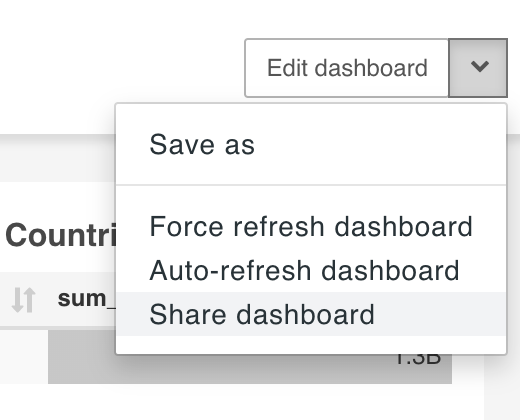
oh @avinasht1 , just use the "share dashboard" link, it saves the filter context
mistercrunch
on 26 Sep 2019
I just saw this thread. Max is right:
- apply filter on your dashboard,
- open dropdown menu and choose
Share dashboard, it will generate a shorten url. this url encode current selected filter values.
This way you don't have to save another copy of dashboard, but your users need to keep a copy of shorten url, otherwise they will lost the filter values in the url parameters.
Or you can
- apply filter on your dashboard,
- open dropdown menu and choose
Save as=> save as another copy.
This way the selected filter values are stored in dashboard's meta data. Dashboard users can open dashboard by id, and it will load preselected values.
 graceguo-supercat
on 26 Sep 2019
graceguo-supercat
on 26 Sep 2019
Hi, I see the work around options above but is there a plan to add a feature so the filters are automatically added to the url when selected? This would prevent our users from losing the filters they've applied when refreshing the page.
 Matthew-Byrne
on 29 Oct 2019
Matthew-Byrne
on 29 Oct 2019
This issue has been automatically marked as stale because it has not had recent activity. It will be closed if no further activity occurs. Thank you for your contributions. For admin, please label this issue .pinned to prevent stale bot from closing the issue.
![stale[bot] picture](https://avatars3.githubusercontent.com/in/1724?v=4&s=40) stale[bot]
on 28 Dec 2019
stale[bot]
on 28 Dec 2019
Related issues
 thoralf-gutierrez
·
3Comments
thoralf-gutierrez
·
3Comments
 tmccartan
·
3Comments
tmccartan
·
3Comments
 gbrian
·
3Comments
gbrian
·
3Comments
 josephtyler
·
3Comments
josephtyler
·
3Comments
 ghost
·
3Comments
ghost
·
3Comments
Most helpful comment
Hi, I see the work around options above but is there a plan to add a feature so the filters are automatically added to the url when selected? This would prevent our users from losing the filters they've applied when refreshing the page.