Incubator-superset: Unable to grant per datasource/schema access with 0.34.0rc1
Original issue.
https://github.com/apache/incubator-superset/issues/7554
You can't use SQL Lab if you don't grant database permission to user. It makes superset unusable with per datasource access model. You can still see dashboards, but you can't manually query any data.
If you add database permission, user can access all tables in database which is not acceptable.
Expected results
See all available database/schema/table in SQL Lab based on granted datasource access.
Actual results
SQL Lab dropdowns are empty.
How to reproduce the bug
- create user
- grant it only datasource permission without database access.
 bobelev
All 6 comments
Issue-Label Bot is automatically applying the label #bug to this issue, with a confidence of 0.89. Please mark this comment with :thumbsup: or :thumbsdown: to give our bot feedback!
Links: app homepage, dashboard and code for this bot.
![issue-label-bot[bot] picture](https://avatars2.githubusercontent.com/in/27079?v=4&s=40) issue-label-bot[bot]
on 21 Aug 2019
issue-label-bot[bot]
on 21 Aug 2019
Looks like it was introduced here: https://github.com/apache/incubator-superset/commit/b65ab51b63200139947d9ee4b3ba80ef263a3e88
Database filter ignores user schema / datasource permissions: https://github.com/apache/incubator-superset/blame/d58dbad076f61cfd05fa8280ad13442d29360873/superset/views/database/__init__.py#L34
 bkyryliuk
on 6 Sep 2019
bkyryliuk
on 6 Sep 2019
I had the same problem:
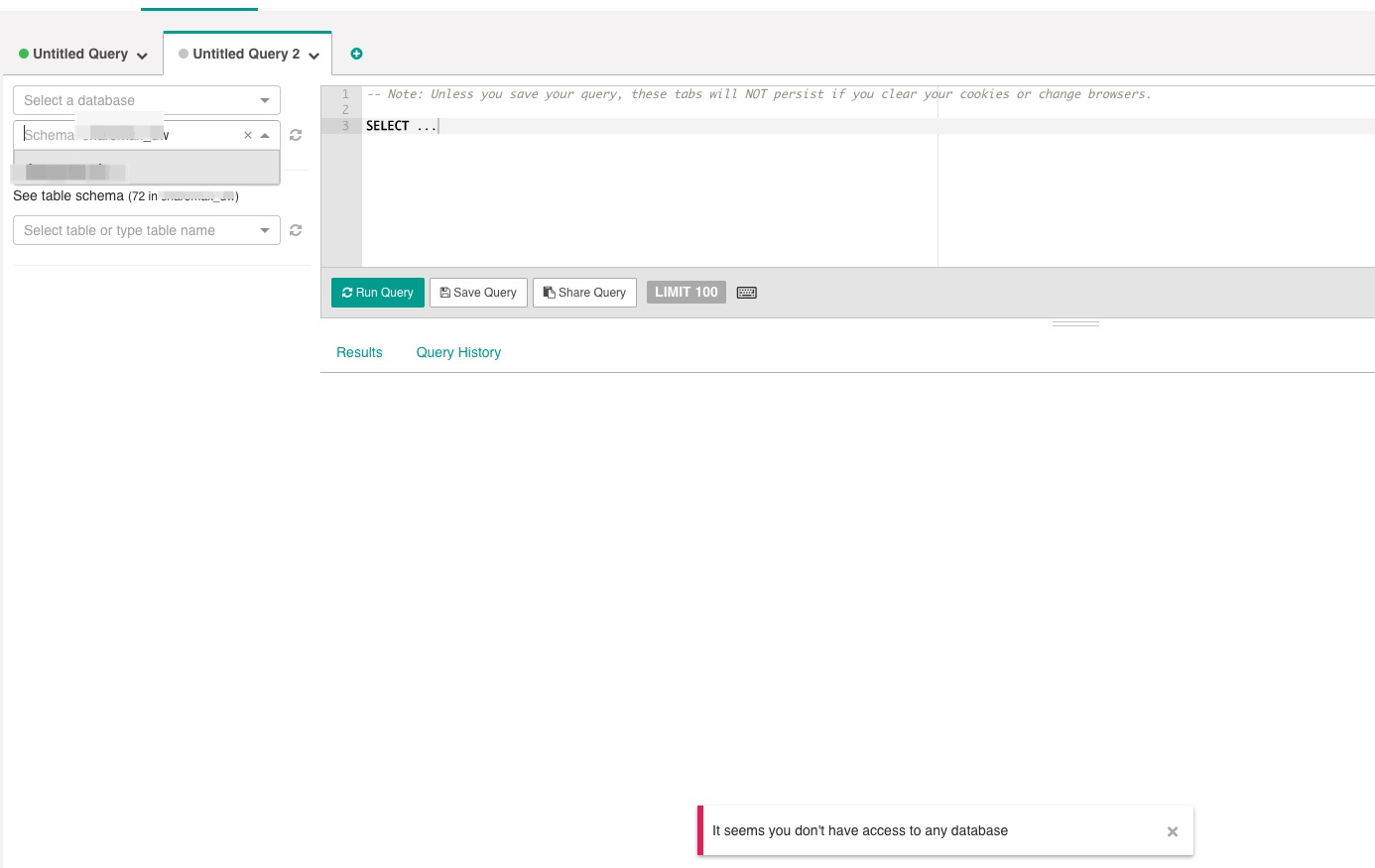
grant the user only datasource permission without database access.
How to change the permission of user?
 Wuyl-matt
on 6 Sep 2019
Wuyl-matt
on 6 Sep 2019
@bkyryliuk on a quick check, seems unrelated with the commit you reference since I used the same existing filter that was applied before.
 dpgaspar
on 12 Sep 2019
dpgaspar
on 12 Sep 2019
This issue has been automatically marked as stale because it has not had recent activity. It will be closed if no further activity occurs. Thank you for your contributions. For admin, please label this issue .pinned to prevent stale bot from closing the issue.
![stale[bot] picture](https://avatars3.githubusercontent.com/in/1724?v=4&s=40) stale[bot]
on 11 Nov 2019
stale[bot]
on 11 Nov 2019
Any updates on this issue.
Instead of the database, we gave permission on the schema. Still, all tables under a schema are accessible.
 nabhosal
on 26 Nov 2019
nabhosal
on 26 Nov 2019
Related issues
 ghost
·
3Comments
ghost
·
3Comments
 lenguyenthedat
·
3Comments
lenguyenthedat
·
3Comments
 thoralf-gutierrez
·
3Comments
thoralf-gutierrez
·
3Comments
 gbrian
·
3Comments
gbrian
·
3Comments
 dinhhuydh
·
3Comments
dinhhuydh
·
3Comments
Most helpful comment
Issue-Label Bot is automatically applying the label
#bugto this issue, with a confidence of 0.89. Please mark this comment with :thumbsup: or :thumbsdown: to give our bot feedback!Links: app homepage, dashboard and code for this bot.