Incubator-superset: [SIP-18] Scheduling queries from SQL Lab
[SIP] Proposal for scheduling queries from SQL Lab
Motivation
A common approach for building dashboards involves:
- User writes a complex query in SQL Lab, often with joins, to get the data they need.
- User clicks "visualize", to explore the data.
- User builds a visualization. This step is usually slow, since the SQL query has to be recomputed every time.
- User builds a dashboard using the visualization. It's often slow, since the SQL query has to be recomputed every time.
- In order to get fresh data in the dashboard, user has to either update the underlying SQL query or write expensive queries using macros (scanning 7 days of data, for example).
We want to optimize that process, allowing the user to write one query in SQL Lab that runs periodically. The query should scan data only for its interval (1 day of data for a daily schedule, for example). This way dashboards can be kept up-to-date with cheap queries.
In this SIP, I propose a way of scheduling queries from within SQL Lab. The actual scheduling of the query is left to an external service (like Apache Airflow, for example). Superset will simply enrich saved queries with additional metadata for the external scheduler.
The proposal is scheduler-agnostic, and can be used with Apache Airflow, Luigi or any other scheduler, since the form for collecting the metadata needed is defined in config.py using react-jsonschema-form.
Proposed Change
In this SIP we propose adding a new feature flag called SCHEDULED_QUERIES. Instead of a boolean, the feature flag would be a dictionary with two keys, JSONSCHEMA and UISCHEMA (see discussion here for using a dict as a feature flag). As an example:
FEATURE_FLAGS = {
    # Configuration for scheduling queries from SQL Lab. This information is
    # collected when the user clicks "Schedule query", and saved into the `extra`
    # field of saved queries.
    # See: https://github.com/mozilla-services/react-jsonschema-form
    'SCHEDULED_QUERIES': {
        'JSONSCHEMA': {
            'title': 'Schedule',
            'description': (
                'In order to schedule a query, you need to specify when it '
                'should start running, when it should stop running, and how '
                'often it should run. You can also optionally specify '
                'dependencies that should be met before the query is '
                'executed. Please read the documentation for best practices '
                'and more information on how to specify dependencies.'
            ),
            'type': 'object',
            'properties': {
                'output_table': {
                    'type': 'string',
                    'title': 'Output table name',
                },
                'start_date': {
                    'type': 'string',
                    'format': 'date-time',
                    'title': 'Start date',
                },
                'end_date': {
                    'type': 'string',
                    'format': 'date-time',
                    'title': 'End date',
                },
                'schedule_interval': {
                    'type': 'string',
                    'title': 'Schedule interval',
                },
                'dependencies': {
                    'type': 'array',
                    'title': 'Dependencies',
                    'items': {
                        'type': 'string',
                    },
                },
            },
        },
        'UISCHEMA': {
            'schedule_interval': {
                'ui:placeholder': '@daily, @weekly, etc.',
            },
            'dependencies': {
                'ui:help': (
                    'Check the documentation for the correct format when '
                    'defining dependencies.'
                ),
            },
        },
    },
}
The configuration is used to dynamically generate a form for collecting the extra metadata needed in order to schedule the query. The example above should work for many schedulers, but it can also be easily adapted (or completely changed) depending on the needs.
If this flag is present, SQL Lab will show a button label "Schedule Query":

Clicking it pops up a modal:
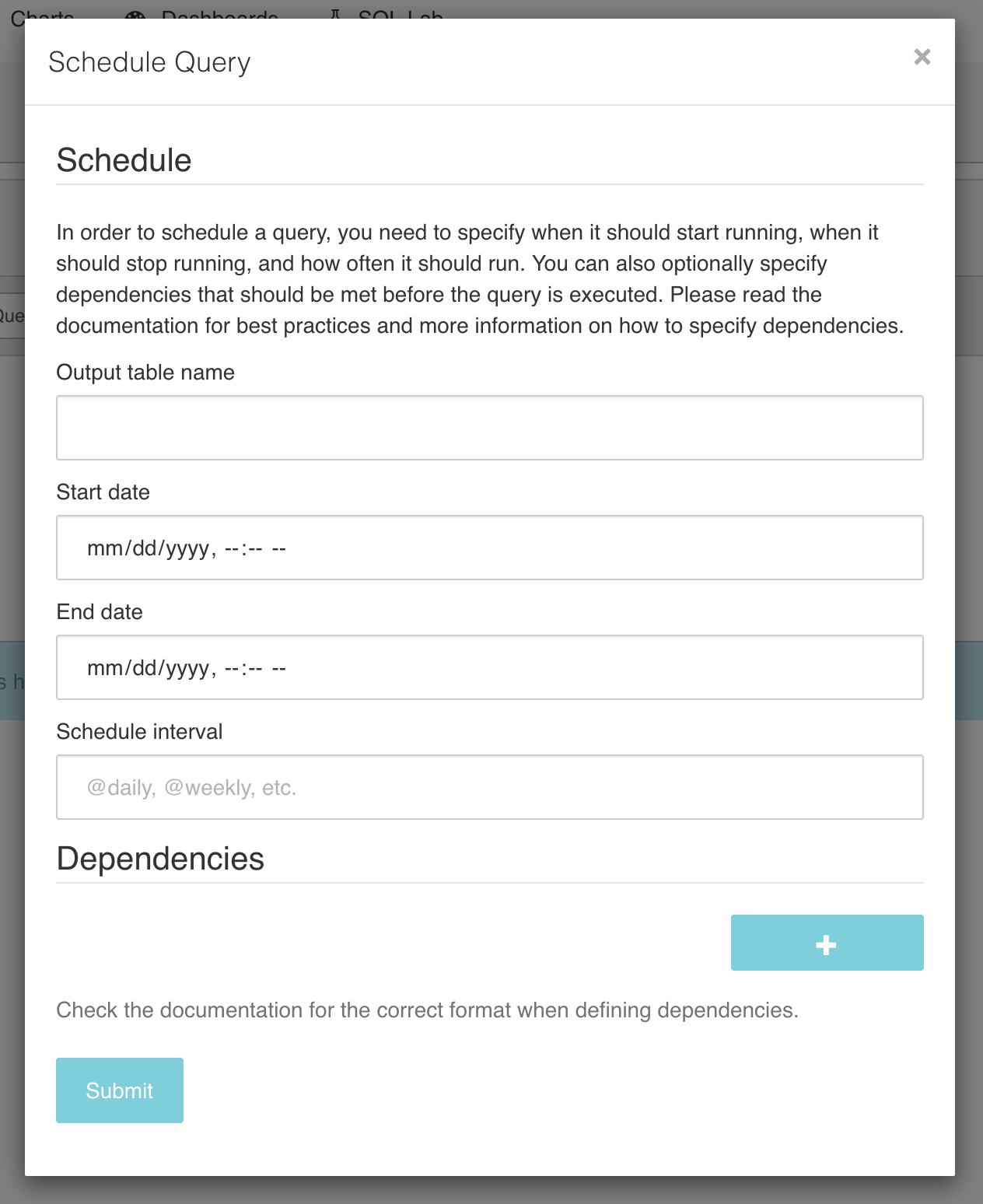
When the user clicks "Submit" the query is saved (just like a saved query) with the schedule information stored in its JSON metadata. The user can edit the query, like any saved query, and the scheduler can fetch the scheduled queries using the API provided by FAB.
New or Changed Public Interfaces
None.
New dependencies
react-jsonschema-form is an Apache 2 licensed project created by Mozilla. It was last updated 14 days ago, and has ~35k weekly downloads.
Migration Plan and Compatibility
None.
Rejected Alternatives
We consider using celery workers to run the queries, but this would add a lot of complexity for backfills, alerting, etc. The proposed approach leverages existing schedulers, leaving to Superset only the task of annotating queries with extra metadata.
 betodealmeida
All 7 comments
Issue-Label Bot is automatically applying the label #enhancement to this issue, with a confidence of 0.96. Please mark this comment with :thumbsup: or :thumbsdown: to give our bot feedback!
Links: app homepage, dashboard and code for this bot.
![issue-label-bot[bot] picture](https://avatars2.githubusercontent.com/in/27079?v=4&s=40) issue-label-bot[bot]
on 1 May 2019
issue-label-bot[bot]
on 1 May 2019
@betodealmeida: I got the message "Your query has been scheduled. To see details of your query, navigate to Saved Queries message". I could see "scheduled_info" stored in saved_query.extra_json column
{"schedule_info":{"output_table":"mm_schedule_query_test","start_date":"2020-04-18T01:00:00.000Z","end_date":"2020-04-18T02:00:00.000Z","schedule_interval":"@hourly"}}
but the query was not running. Please, can you help me to understand how it works? What is the output_table for? Will this table get created automatically or must be exist? Can schedule_interval have a valid cron type syntax? Please, can you share me a sample config file?
 mmuru
on 18 Apr 2020
mmuru
on 18 Apr 2020
@mmuru we have a custom Airflow pipeline that fetches the query information and schedules it. Let me check with Lyft's open source team if we can share it.
betodealmeida
on 21 Apr 2020
There was an ongoing conversation about this here https://github.com/apache/incubator-superset/pull/7416 with @ArgentFalcon
 mistercrunch
on 21 Apr 2020
mistercrunch
on 21 Apr 2020
@betodealmeida and @mistercrunch: Thanks for the response. The sample config file is sorta misleading because its Hive specify use case. I tried to use /savedqueryviewapi/api/read endpoint, it returns everything in saved_query. Is there way to specify url parameters?
mmuru
on 23 Apr 2020
@mmuru , there's a mini language for all ModelView from FAB (/savedqueryviewapi/api/read is one of them). The easiest way is to reverse engineer it by using the UI in the list view at /savedqueryview/list/, getting the filter you want, and copy pasting the querystring from the URL, applying it to /savedqueryviewapi/api/read?{HERE!}

Short term we're working on a state of the art REST API under /api/v1/ that will be fully documented and type safe.
mistercrunch
on 4 Jul 2020
Re: adding objects to FEATURE_FLAGS
I think it's one thing to manage feature configs, it's another to manage whether a feature is turned on or not. If you look at LaunchDarkly's API, their feature flags are created in a very structured manner. And the information stored is only metadata about the variants, nothing related to how the feature is implemented.
It's one thing to store information about variants in feature configs, it's another to store objects required to run the feature. It'd be unscalable and quite dangerous to blur the line here.
Ideally you'd want schema/type enforcement on everything in your program, allowing people to store arbitrary stuff in FEATURE_FLAGS seems to be the opposite of that direction.
 ktmud
on 14 Oct 2020
ktmud
on 14 Oct 2020
Related issues
 fly-high-bj
·
3Comments
fly-high-bj
·
3Comments
 thoralf-gutierrez
·
3Comments
thoralf-gutierrez
·
3Comments
 lenguyenthedat
·
3Comments
lenguyenthedat
·
3Comments
 deity-bram
·
3Comments
deity-bram
·
3Comments
 eliab
·
3Comments
eliab
·
3Comments
Most helpful comment
Issue-Label Bot is automatically applying the label
#enhancementto this issue, with a confidence of 0.96. Please mark this comment with :thumbsup: or :thumbsdown: to give our bot feedback!Links: app homepage, dashboard and code for this bot.