Incubator-superset: can not merge to mysql
I have a exist project of superset, but I have to build a new virtualenv to run the project.
when I run the project, I can't open msyql database, I have checked connection string many times, It's right.
when I run "superset db upgrade", there is a error
Below is information of error:
alembic.util.exc.CommandError: Can't locate revision identified by 'e866bd2d4976'
when I run "superset init", there is a error
(LC_IDI_master) [root@iZbp1haysdqmkemhk7ek2kZ superset]# superset init
2018-03-18 02:09:47,341:INFO:root:Syncing role definition
2018-03-18 02:09:47,342:INFO:root:Creating database reference
2018-03-18 02:09:47,367:INFO:root:Syncing Admin perms
2018-03-18 02:09:47,529:INFO:root:Syncing Alpha perms
2018-03-18 02:09:47,686:INFO:root:Syncing Gamma perms
2018-03-18 02:09:47,845:INFO:root:Syncing granter perms
2018-03-18 02:09:47,997:INFO:root:Syncing sql_lab perms
2018-03-18 02:09:48,151:INFO:root:Fetching a set of all perms to lookup which ones are missing
2018-03-18 02:09:48,296:INFO:root:Creating missing datasource permissions.
2018-03-18 02:09:48,303:INFO:root:Creating missing database permissions.
2018-03-18 02:09:48,502:INFO:root:Creating missing metrics permissions
I can't find the reason , please help me, Thank you very much.
 NZHEzreal
All 21 comments
It looks like you are missing a migration with that hash
 xrmx
on 17 Mar 2018
xrmx
on 17 Mar 2018
I also ran into this error today. I assume that this issue may have something to do with the switch of version of superset. Firstly, I use 0.23.0dev, then switch to 0.22.1. When I cleanup everything in my db and install 0.22.1 again, this error disappear.
Also, the upgrade of superset version can run into many issues. I upgrade superset from 0.22.1 to 0.23.2, it always warning FAB view is None. I checked my db and found there were some null data in ab_permission_view table. I just wonder if I want to upgrade my production superset, what should I do. I just can't mess up the database with different versions.
 yamyamyuo
on 18 Mar 2018
yamyamyuo
on 18 Mar 2018
@yamyamyuo yes, this problem I had known, so I have to revert the superset's version to 0.22.
then database's error still exist.
May I have your email, I want to disscus with you about this problem , thank you.
NZHEzreal
on 18 Mar 2018
@NZHEzreal Since my superset is still under development(not in production), so I just clean the db and re-init everything. However, when it comes to production, things cannot be easy.
yamyamyuo
on 18 Mar 2018
@xrmx I don't know what is hash, but it seems lose some permission.
I'm trying to find how to solve this problem, May I have your email, wo can talk about, thank you.
NZHEzreal
on 18 Mar 2018
@yamyamyuo I can run the application in the production, but couldn't find table that is existed in mysql.
I think it's not about re-init, do you think so?
NZHEzreal
on 18 Mar 2018
I really have no idea about this issue. You can have a look at the code of db migration(under superset/migrations dir)
yamyamyuo
on 18 Mar 2018
@yamyamyuo that's to shame, I'm in China, can't send email to Gmail.
NZHEzreal
on 18 Mar 2018
@yamyamyuo I find there many file in /migrations/versions floder, what do these files do ? I have change the database connection string to mysql, and connection string is right.
NZHEzreal
on 18 Mar 2018
@yamyamyuo @xrmr Thanks very much for help me to solve the question.
now, I have solve the question. the method is new a file named "superset_config.py", then config connection string in this file. Then I modify the "PYTHONPATH" environment variable, in the terminal, run "export PYTHONPATH=your_file_path", for example, your "superset_config.py" in the /home/aa/superset_proj, this is your "your_file_path".
NZHEzreal
on 20 Mar 2018
@yamyamyuo I am also confronted with this situation, when I want to upgrade my superset version, there is always a superset db upgrade error ----> "alembic.util.exc.CommandError: Can't locate revision identified by 'e866bd2d4976'"
 Dukecat0613
on 26 Mar 2018
Dukecat0613
on 26 Mar 2018
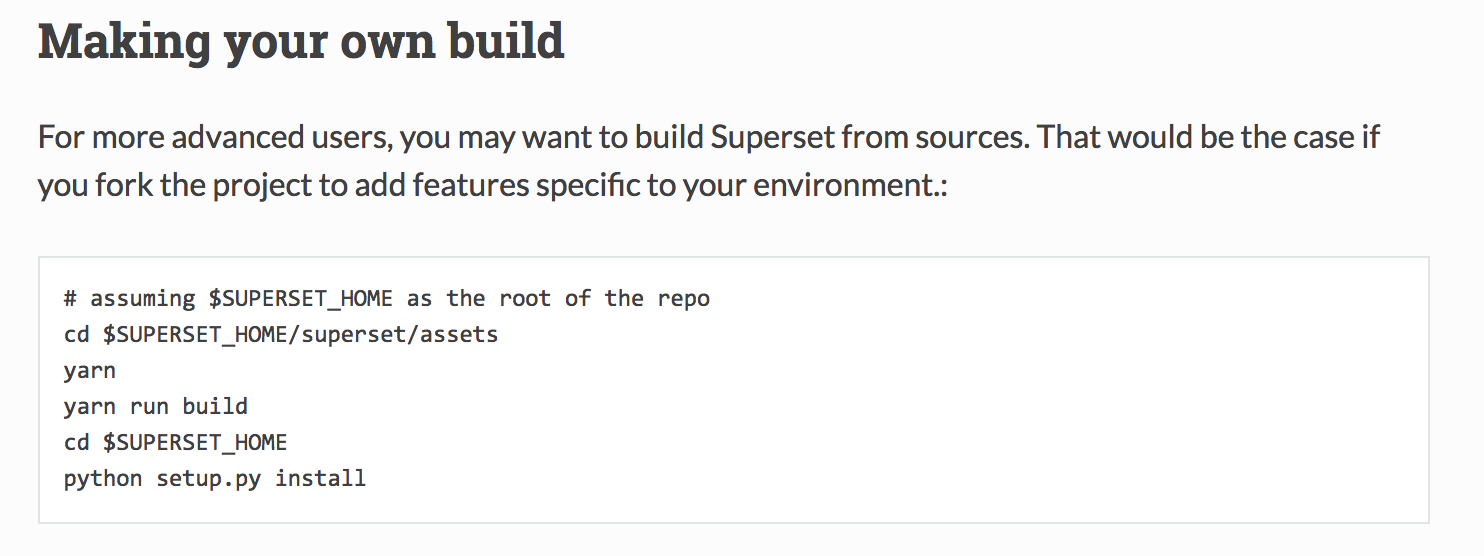
this url will bring you to my blog,https://www.jianshu.com/p/4ebd67575be5。
the point is the command "python setup.py install",this is entrances of the superset.
NZHEzreal
on 26 Mar 2018
@Dukecat0613 I assume the Flask migrate may solve the superset upgrade problem. maybe you can focus on db migrate command. Not try this yet.
yamyamyuo
on 30 Mar 2018
@NZHEzreal NZH you can also read CONTRIBUTING.md for more detail about frontend setup etc.
yamyamyuo
on 30 Mar 2018
I got into this problem. Tried many things. The one worked for me is:
1: Locate .superset folder inside which superset.db is present.
2: Delete .superset folder.
3: Run 'superset db upgrade'
Try this as your last option because it will delete your previous work and you need to start afresh.
 soumen111
on 29 Jan 2019
soumen111
on 29 Jan 2019
If you get Can't locate revision identified by '{some_hash}' your solutions are:
- go back to the branch that contains this hash, and run
superset db downgradeuntil you find a common base with the version you want to run - restore a pre-upgrade database backup
- force a sha in the database (can be done with an UPDATE statement), you need to know what you're doing if you are doing this, you may have issues with future database upgrades
 mistercrunch
on 29 Jan 2019
mistercrunch
on 29 Jan 2019
This issue has been automatically marked as stale because it has not had recent activity. It will be closed if no further activity occurs. Thank you for your contributions.
![stale[bot] picture](https://avatars3.githubusercontent.com/in/1724?v=4&s=40) stale[bot]
on 10 Apr 2019
stale[bot]
on 10 Apr 2019
If someone comes by this issue without having any database set, just like me, probably there's and active superset.db file in your file system, since superset by default uses sqlite, check your /home/youruser directory for hidden files and also the superset folder.
There's probably a .superset hidden folder with a superset.db file lurking inside.
This is mostly caused by an already active installation of superset on your system and the python enviroment is setting the db path to SUPERSET_HOME
 NickStarlight
on 28 Jun 2019
NickStarlight
on 28 Jun 2019
rm -rf ~/.superset
 rangerzhou
on 31 Mar 2020
rangerzhou
on 31 Mar 2020
rm -rf ~/.superset
It works!!!
 yuemanly
on 16 Apr 2020
yuemanly
on 16 Apr 2020
I am running into exactly the same problem trying to upgrade a production db from 0.30.0 to 0.30.1 or any other higher version. The documentation suggests it should be as simple as
pip install apache-superset --upgrade
superset db upgrade
superset init
but obviously that doesn't seem to work even for this minor version upgrade.
 ebauch
on 25 May 2020
ebauch
on 25 May 2020
Related issues
 thoralf-gutierrez
·
3Comments
thoralf-gutierrez
·
3Comments
 eliab
·
3Comments
eliab
·
3Comments
 XiaodiKong
·
3Comments
XiaodiKong
·
3Comments
 vylc
·
3Comments
vylc
·
3Comments
 josephtyler
·
3Comments
josephtyler
·
3Comments
Most helpful comment
rm -rf ~/.superset