Incubator-echarts: dataZoom won't update its status when min/max of xAxis are changed.
Version
4.2.1
Reproduction link
https://gallery.echartsjs.com/editor.html?c=xPG1pygeTn&v=1
Steps to reproduce
详情见重现链接
- 需要用 xAxis 的 min 和 max 来实现线图前后的空白区域,空白区域前后均需要是现有数据的几倍
- 同时需要用 dataZoom 来实现放大和缩小(目的在于显示还没有数据的,由 min 和 max 生出的空白区域)
- 同时首屏数据需要显示已有数据和一部分空白区域(依靠 dataZoom.startValue 和 dataZoom.endValue )
- 同时需要实现动态增加数据(依靠 data.push )
- 同时需要当前页数据 follow 新数据(依靠增加 xAxis 的 min 和 max 的值)
What is expected?
新数据产生位置固定,图表整体产生向左滚动的效果。
What is actually happening?
首屏数据不不能跟随新数据滚动。
但是如果用鼠标拖动一下,或者鼠标缩放一下,图表就会跟随新数据滚动了。
请问有什么办法让首屏数据就实现跟随新数据?
 catscarlet
All 14 comments
Hi! We've received your issue and please be patient to get responded. 🎉
The average response time is expected to be within one day for weekdays.
In the meanwhile, please make sure that you have posted enough image to demo your request. You may also check out the API and chart option to get the answer.
If you don't get helped for a long time (over a week) or have an urgent question to ask, you may also send an email to [email protected] .
If you are interested in the project, you may also subscribe our mail list.
Have a nice day! 🍵
![echarts-bot[bot] picture](https://avatars1.githubusercontent.com/in/20872?v=4&s=40) echarts-bot[bot]
on 25 Aug 2019
echarts-bot[bot]
on 25 Aug 2019
It's a bug! I found that this bug occured when the option.dataZoom.endValue set. But option.dataZoom.start and option.dataZoom.end act normally.
 yufeng04
on 26 Aug 2019
yufeng04
on 26 Aug 2019
It's a bug! I found that this bug occured when the
option.dataZoom.endValueset. Butoption.dataZoom.startandoption.dataZoom.endact normally.
Thanks very much. I was in despair but now I think I may have a chance to prevent this bug.
catscarlet
on 26 Aug 2019
@catscarlet When you zoom on the diagram the startValue and endValue of the dataZoom will changed, so I don't understand what you problem is?
 deqingli
on 24 Oct 2019
deqingli
on 24 Oct 2019
Hi @catscarlet ,
I have made some change to your example:
https://gallery.echartsjs.com/editor.html?c=xync4-wJe&v=2
I think it probably meet your requirement.
The change is: do not specify dataZoom.startValue and dataZoom.endValue manually, but always specify xAxis.min, xAxis.max.
@yufeng04 I think it is not a bug but a feature by design, if I haven't missed something.
There are two mode of dataZoom, auto determined by dataZoom.rangeMode:
'value': If we setdataZoom.startValueordataZoom.endValue, it will be in'value'mode, where the extent of xAxis will be always thedataZoom.startValueanddataZoom.endValueif we don't change it, as what @catscarlet 's example looks like in its initial state.'percent': By defaultdataZoomis in'percent'mode, where100%represents 100% of[xAxis.min, xAxis.max], which is what we want. And why in @catscarlet 's example after we scroll mouse it become normal? because when scrolling mouse it triggersinsde dataZoomand it auto shift to'percent'mode.
 100pah
on 24 Oct 2019
100pah
on 24 Oct 2019
Hi @catscarlet ,
I have made some change to your example:
https://gallery.echartsjs.com/editor.html?c=xync4-wJe&v=2I think it probably meet your requirement.
The change is: do not specify
dataZoom.startValueanddataZoom.endValuemanually, but always specifyxAxis.min,xAxis.max.@yufeng04 I think it is not a bug but a feature by design, if I haven't missed something.
There are two mode of dataZoom, auto determined by dataZoom.rangeMode:
'value': If we setdataZoom.startValueordataZoom.endValue, it will be in'value'mode, where the extent of xAxis will be always thedataZoom.startValueanddataZoom.endValueif we don't change it, as what @catscarlet 's example looks like in its initial state.'percent': By defaultdataZoomis in'percent'mode, where100%represents 100% of[xAxis.min, xAxis.max], which is what we want. And why in @catscarlet 's example after we scroll mouse it become normal? because when scrolling mouse it triggersinsde dataZoomand it auto shift to'percent'mode.
I read your demo.
This one can't meet the requirement.
Without option.dataZoom.startValue or option.dataZoom.endValue, how can zoom-out be produced when the first-screen-data should be able to be zoomed?
catscarlet
on 25 Oct 2019
@catscarlet When you zoom on the diagram the
startValueandendValueof the dataZoom will changed, so I don't understand what you problem is?
You totally misunderstand it. The issue is reproduced before zoom.
(Maybe I should rewrite this issue in English so that you don't read it in Chinese.)
catscarlet
on 25 Oct 2019
To @100pah @deqingli
I upload two gifs so that someone can understand what issue is this.
This is the issue now(can be reproduced in version 4.4.0):
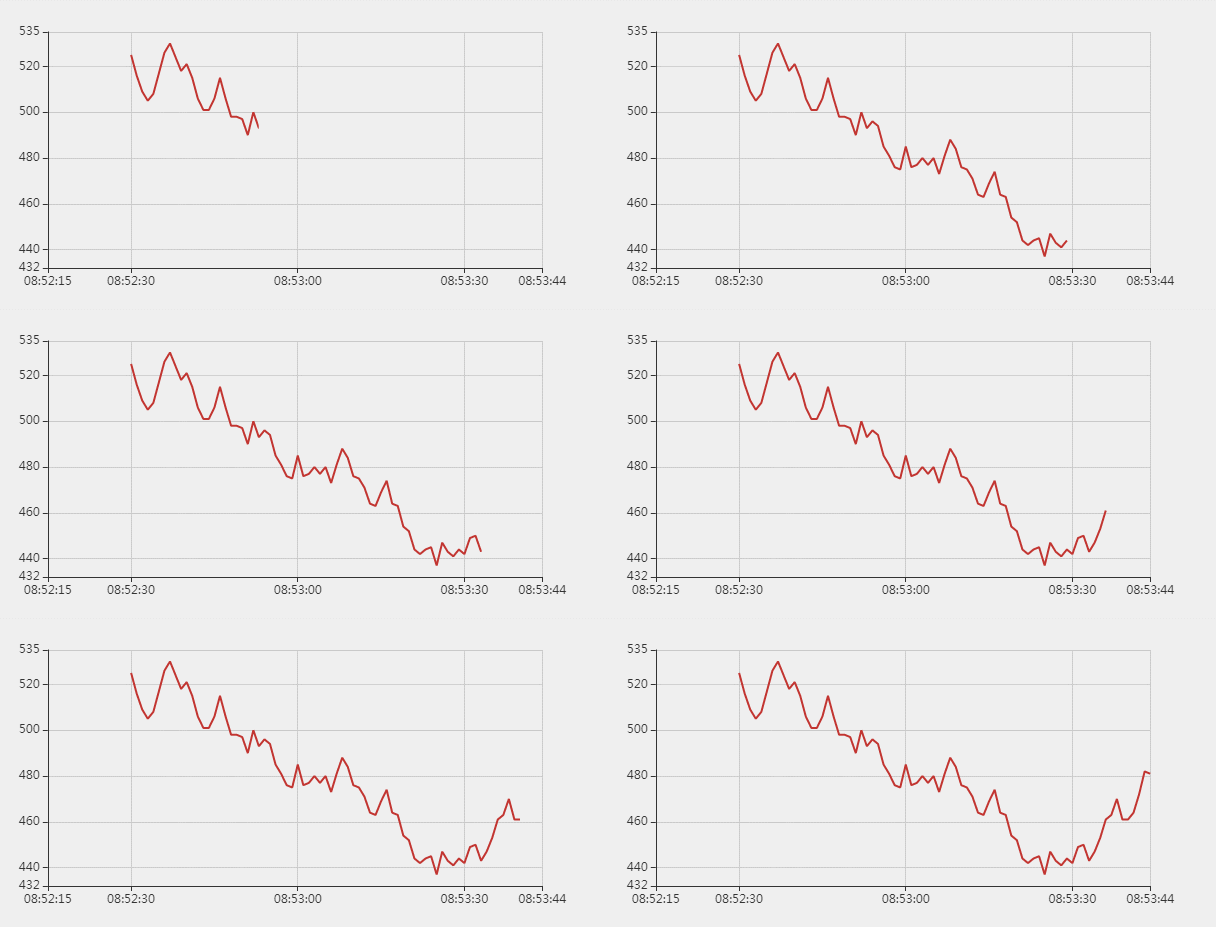
And this is what I need.
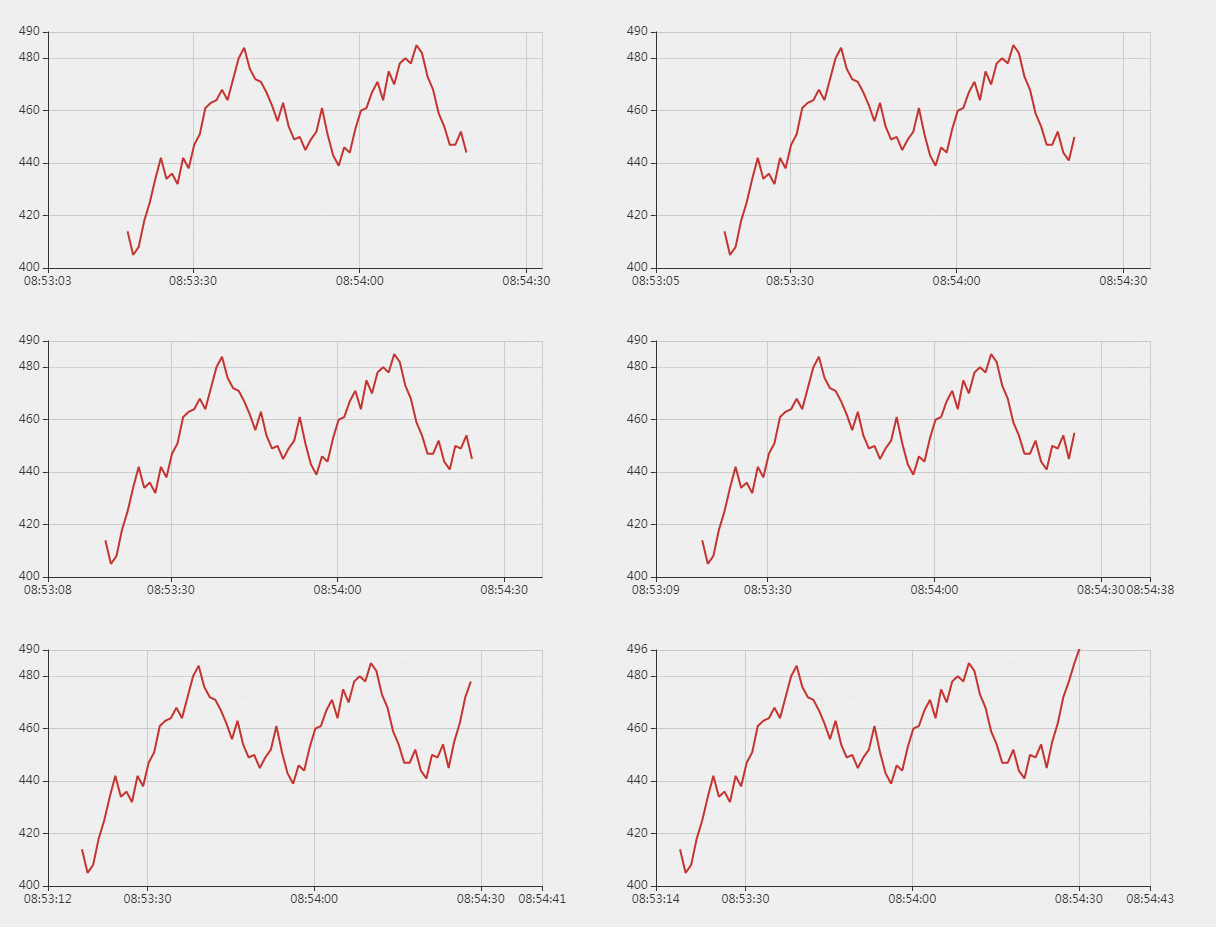
(This one can be fulfilled by dragging/zooming after the first-screen-data is drawed, but it should be avaliable automatically, like this:)
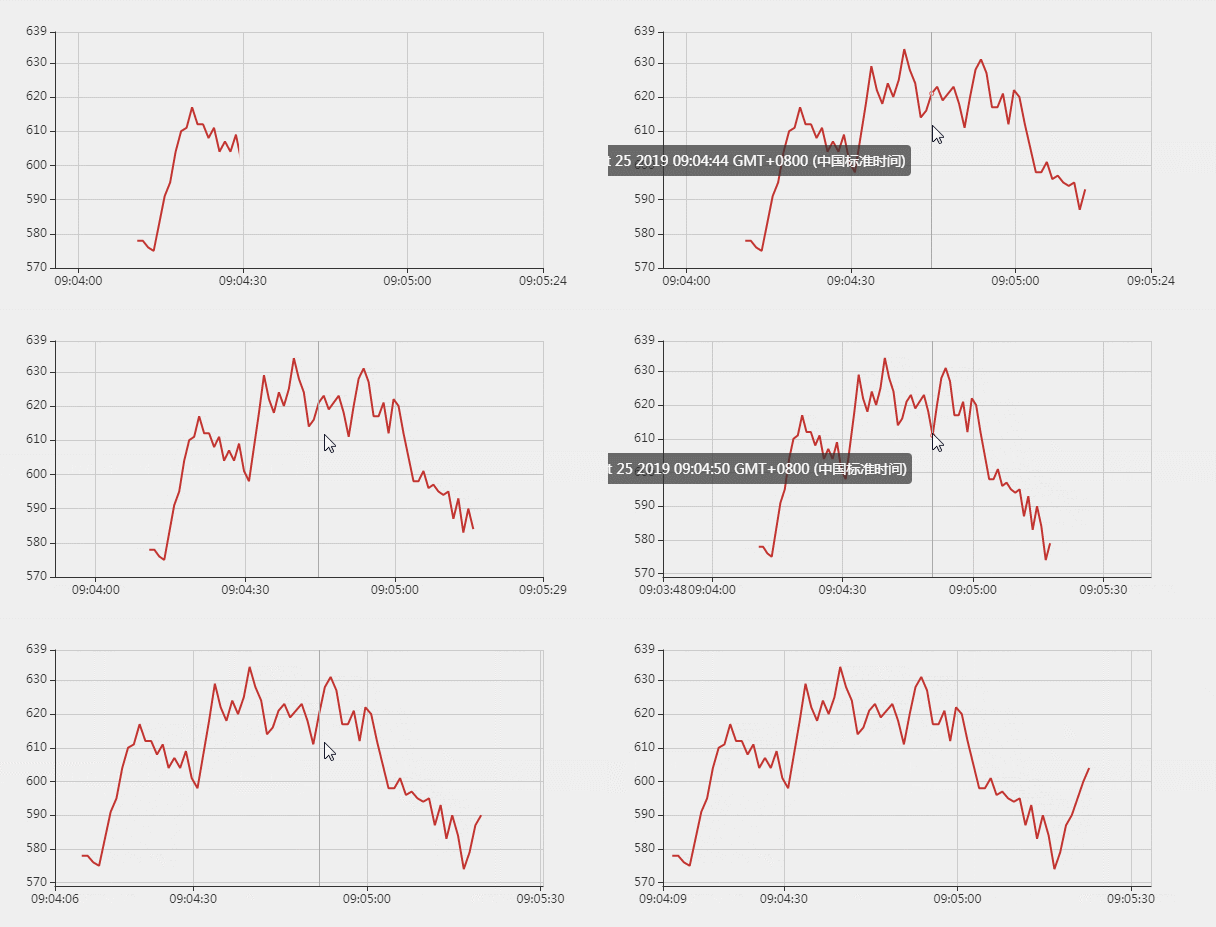
catscarlet
on 25 Oct 2019
And I found something interesting.
In my previous demo: https://gallery.echartsjs.com/editor.html?c=xPG1pygeTn&v=1
If the option.dataZoom.startValue = first - 15 * 1000;, the issue can be reproduced, but if option.dataZoom.startValue = first - 30 * 1000;, everything looks good.
If you set option.dataZoom.startValue = first - 29 * 1000;...
What an interesting and wasting time bug.
catscarlet
on 25 Oct 2019
@catscarlet Do you mean that you always want blank area at the start and end of the diagram?
deqingli
on 25 Oct 2019
@catscarlet
And I have updated the demo:
https://gallery.echartsjs.com/editor.html?c=xync4-wJe&v=3
where dataZoom.start and dataZoom.end are added for the first screen.
It probably matches your requirement I think.
100pah
on 25 Oct 2019
@catscarlet Do you mean that you always want blank area at the start and end of the diagram?
Yes.
catscarlet
on 25 Oct 2019
@catscarlet
And I have updated the demo:
https://gallery.echartsjs.com/editor.html?c=xync4-wJe&v=3
wheredataZoom.startanddataZoom.endare added for the first screen.
It probably matches your requirement I think.
Well I saw you use 10 and 90 as start and end. They are percent, not value. Sadly I already knew that I
can use percent instead of value to avoid this issue, but that also means I need to calculate a percent when I only have a precise value to set.
catscarlet
on 25 Oct 2019
@catscarlet Since this is not a bug, because if you use the dataZoom.endValue the data screen won't be zoomed until the data point value is close to the endValue you set. So I will close it, If you still have any problem, you can reopen it. Anyway, thank you for your feedback.
deqingli
on 28 Oct 2019
Related issues
 akvaliya
·
3Comments
akvaliya
·
3Comments
 shikelong
·
3Comments
shikelong
·
3Comments
 jarben
·
3Comments
jarben
·
3Comments
 yj20060714
·
3Comments
jarben
·
3Comments
yj20060714
·
3Comments
jarben
·
3Comments