Incubator-echarts: Is Echarts 3 responsive ?
Im trying to switch from chartjs to Echarts.
Chartjs resize automatically when i resize the window by default which is not the case for Echarts. Is there any option for that ?
Thank you.
 AngryElephant
All 10 comments
You can use chart.resize() whenever the container size changed
 pissang
on 2 Sep 2016
pissang
on 2 Sep 2016
What if I have multiple charts on the page (inside panel/card) like dashboard? For example I have a panel. Inside panel body, I am showing a bar chart. Since I have specified fix height in px, chart.resize() will not cover the whole panel body. Is there a solution to get the height and width of panel?
 hbthanki
on 6 Dec 2017
hbthanki
on 6 Dec 2017
@hbthanki Do you mean you fix the height of chart? If you have a flexible panel, don't fix the height of the chart. And resize() when panel changes the size.
pissang
on 7 Dec 2017
Thanks for your reply. I got that working now. However, I have strange observation. If panel's _width_ is changed, and I call .resize() nothing happens. But if I change _height and width_ both and call resize(), chart is resizing properly.
hbthanki
on 7 Dec 2017
Use SVG renderer?
pissang
on 7 Dec 2017
Yes I used svg renderer.
hbthanki
on 7 Dec 2017
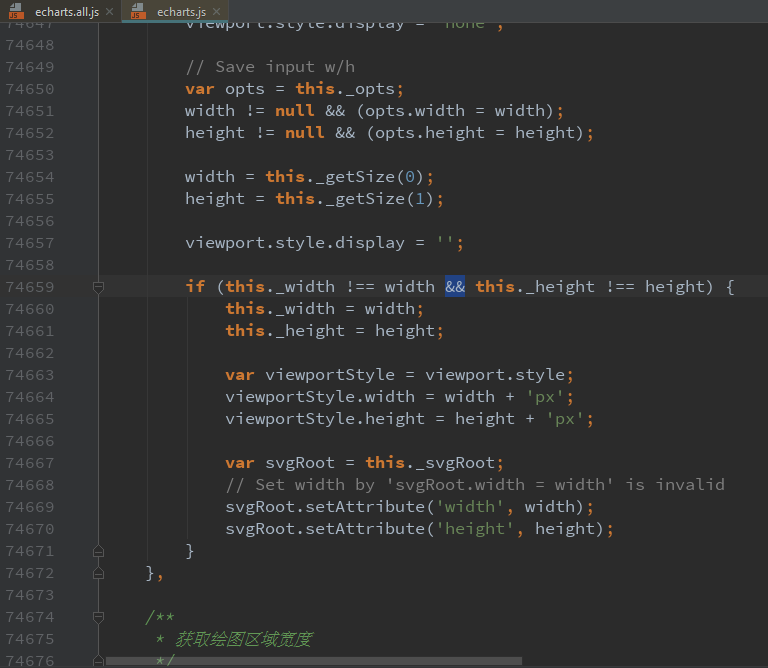
SVG renderer had this problem. Already fixed in https://github.com/ecomfe/zrender/pull/303
pissang
on 7 Dec 2017
I have installed echarts from _npm i echarts_ just now. Do I need to refer any _branch_ for this change? Please bear with my little knowledge. And Thank you so much for your replies. I could find below code in echarts.js file: ("echarts": "^3.8.5")
hbthanki
on 7 Dec 2017
You need to checkout the latest code of zrender and put it under node_modules
pissang
on 8 Dec 2017
Please ignore below 1, I had to build again for zrender to be picked up.
1. Do I need to specifically import zrender? Because after _npm install zrender_ it is still not working. Either something wrong with my setup or I am missing some other lib?
- curiosity question: Without installing zrender, and making _renderer: 'svg'_, it was creating svg. Why do we need extra lib for svg?
Thanks once again.
hbthanki
on 8 Dec 2017
Related issues
 RoxetteI
·
3Comments
RoxetteI
·
3Comments
 antorman
·
3Comments
antorman
·
3Comments
 wm370857724
·
3Comments
wm370857724
·
3Comments
 arssam
·
3Comments
arssam
·
3Comments
 Zendic
·
3Comments
Zendic
·
3Comments
Most helpful comment
You can use
chart.resize()whenever the container size changed