Hi All,
Please could someone tell me how to change VTX power in flight assigned to a switch?
I have tried using the adjustments page with no luck
Currently using INAV 2.1 with the Matek F722 wing board with the Matek VTX-HV with IRC TRAMP
 craigywsm
All 18 comments
Issue-Label Bot is automatically applying the label Support to this issue, with a confidence of 0.75. Please mark this comment with :thumbsup: or :thumbsdown: to give our bot feedback!
Links: app homepage, dashboard and code for this bot.
![issue-label-bot[bot] picture](https://avatars2.githubusercontent.com/in/27079?v=4&s=40) issue-label-bot[bot]
on 22 Jun 2019
issue-label-bot[bot]
on 22 Jun 2019
@craigywsm I don't think you can from a switch. But you can from the OSD menu via stick commands. See here:
https://github.com/iNavFlight/inav/blob/development/docs/Controls.md
Of course, that's not in-flight. For in-flight, I believe your only option is to set the pre-arm and arm transmitter level, which in my opinion works great. I have mine set to be 25 mW before launch, goes to 600 mW at launch, and says at 600 mW when disarmed (in case of a crash where getting a view from the camera could help locate the model). There's a setting also that would take the power back down to the lowest power on disarm, if that's what you want.
See the vtx_low_power_disarm option for details.
 teckel12
on 22 Jun 2019
teckel12
on 22 Jun 2019
Thanks for your info teckel.
Just done some research and found it on the latest 2.2.0 release so i will need to upgrade and re test with the adjustments the setting must have been there for future implementation
https://github.com/iNavFlight/inav/releases
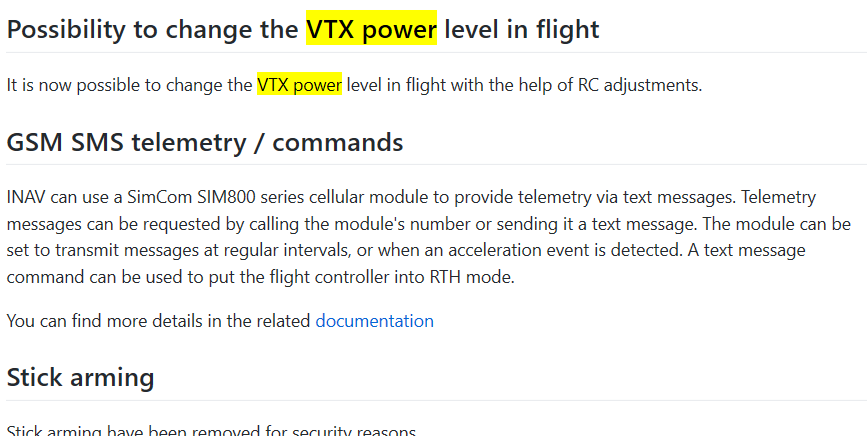
Could really do with some documentation on how this works if at all possible.
Happy to lend a hand writing it if someone can point me in the right direction.
This might need further development as may need to store the power levels as each vtx has different power levels.
craigywsm
on 22 Jun 2019
@craigywsm That's a new feature I wasn't aware was added! =) I assume it would be done via the Modes tab like all other switch-based controls are configured.
The state of power levels is a mess, There will be no way that INAV can keep up with the different models that are released every week with totally different power levels. Best to just set it to 1-5 or whatever and call it a day.
teckel12
on 22 Jun 2019
@craigywsm That's a new feature I wasn't aware was added! =) I assume it would be done via the Modes tab like all other switch-based controls are configured.
The state of power levels is a mess, There will be no way that INAV can keep up with the different models that are released every week with totally different power levels. Best to just set it to 1-5 or whatever and call it a day.
No, this function is handled by Adjustments tab.
Just choose your activation switch ( it could be the arm switch ), VTX power level in the dropdown menu, and the command switch which will be the one that will increase/decrease the value.
My advice is to use a 3-pos switch or a stepped-potentiometer ( i don't know the exact name ).
Remember: you don't have to keep your switch up or down too much or you will make more than one step.
Try that on the ground to learn its effectiveness.
P.S. Add VTX power on OSD to see current power level
 L4ky
on 24 Jun 2019
L4ky
on 24 Jun 2019
There's a great video on setting it up and using it on youtube iNav 2.2.0 VTX power change in flight from NoAgenda FPV. I also wasn't aware of this feature until he posted the video. Skip to about 1:30 in the video to get to setting it up.
 CapnBry
on 24 Jun 2019
CapnBry
on 24 Jun 2019
i'd prefer this was in modes as well, or is there a way to do position based values instead of incrementing?
if it was modes, i would use a 3 pos switch and set my max values in opentx to set the power level to the switch position.
 P-I-Engineer
on 24 Jun 2019
P-I-Engineer
on 24 Jun 2019
Actually you can not assign values based on position.
You can only increase or decrease current value.
L4ky
on 24 Jun 2019
CapnBry many thanks great video will test this on my setup.
P-I-Engineer and L4ky. Yes it will be like the PID adjustment theory.
I see there could be an issue here as all vtx's have different power levels might be worth adding settings for the ones the VTX can support. Not sure on how the Tramp / Smartaudio with handle the changes
e.g 25mW , 100mw, 500mw
or 25mw, 200mw, 800mw???
With a county override
craigywsm
on 24 Jun 2019
my workaround for time based incrementing is going to be a "duration" logical switch. So that moving switch up will increase by one, then back to middle, then back to up to increase again. Same for decrease. That way you don't have to time it with your fingers.
using telemetry you could have it auto increase also with logical switches, but that's not the smartest way to do it, since it's a blind effort.
P-I-Engineer
on 24 Jun 2019
CapnBry many thanks great video will test this on my setup.
P-I-Engineer and L4ky. Yes it will be like the PID adjustment theory.
I see there could be an issue here as all vtx's have different power levels might be worth adding settings for the ones the VTX can support. Not sure on how the Tramp / Smartaudio with handle the changes
e.g 25mW , 100mw, 500mw
or 25mw, 200mw, 800mw???
With a county override
The logic behind all this is "power levels" which are (usually) number from 1 to 5. 25/100/200/500/800 are just labels but they don't exists in the protocols..
At the moment most vtx have 4 or 5 different power levels so not a big issue there.
The problem will be in the future if power level count will increase.
Another user is working on this.. i think you'll see something soon
L4ky
on 24 Jun 2019
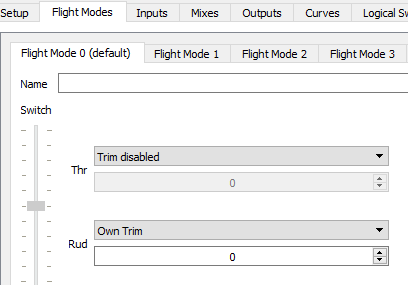
here's my opentx work around for 1 position increment.
the duration will need to be tweaked. I haven't tried this on my plane yet, just in companion.


P-I-Engineer
on 24 Jun 2019
There's a great video on setting it up and using it on youtube iNav 2.2.0 VTX power change in flight from NoAgenda FPV. I also wasn't aware of this feature until he posted the video. Skip to about 1:30 in the video to get to setting it up.
Thanks for sharing, I just stumbled on this and was going to post the link, but you beat me to it.
Now I have to try what PI Engineer did for Auto switching.
 noagendafpv
on 24 Jun 2019
noagendafpv
on 24 Jun 2019
Now we just need VTx power levels to be set automatically based on distance from home =)
teckel12
on 24 Jun 2019
here's simpler mix. I set it to the throttle trim as well. I added an additional channel so it doesn't flash the whole time.



P-I-Engineer
on 24 Jun 2019
@Jetrell I've been playing with something similar to automatically set the power level based on distance from home. It's a little messy because you can't directly select a power level.
The plan is to eventually do this automatically right from within Lua Telemetry without any logical switches or special functions. Also, this will allow selecting an exact power level instead of holding a logical switch for a certain amount of time (which is prone to not always working). The thought is something like power level 2 at 100 feet, power level 3 at 1000 feet, etc. Maybe even raise the power level when facing towards the pilot instead of away from the pilot (where the antenna is sometimes blocked by the model).
This could also be done in INAV, which is probably a better option.
teckel12
on 14 Jul 2019
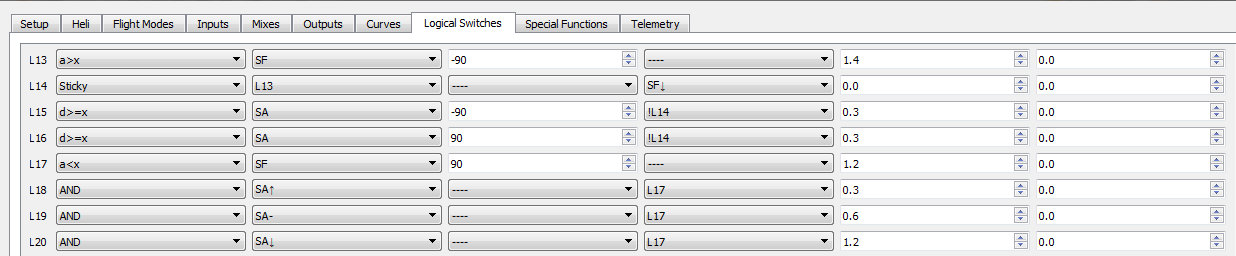
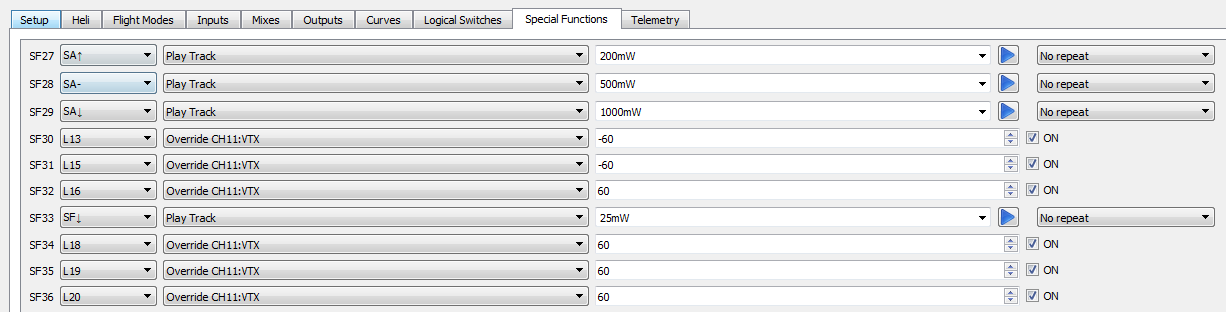
Hi Guys. I finally got around to testing this OpenTX logic switch and Special functions mix for the VTX power control.
It uses a 3Pos switch to set 200mW, 500mW and 1000mW, plus the ARM switch to drop back to 25mW when DisARMED.
When ARMED, it will go to what ever power level you leave the power switch in.
I have given it a good workout, and it doesn't get muddled up. The only thing that needs to be avoided, is flicking through the 3Pos power switch too quickly. i.e. don't flick from Pos1 to Pos3 in a rush. Make sure Pos2 gets at least 0.3 of a second to register its position.
This timing was set using a Unify Pro. I haven't tested it with Tramp.
Make sure that - set vtx_low_power_disarm = OFF in iNav. This is because the timing in iNav, for re-arming isn't as precise as the mixer requires.

 Jetrell
on 14 Aug 2019
Jetrell
on 14 Aug 2019
Power switching in flight is possible now with 2.2 with adjustments, and in 2.3 will be a part of Global Functions. Closing. Thanks
 DzikuVx
on 8 Oct 2019
DzikuVx
on 8 Oct 2019
Related issues
 seriousrob
·
3Comments
seriousrob
·
3Comments
 flashez
·
4Comments
flashez
·
4Comments
 hrrr
·
4Comments
hrrr
·
4Comments
 Key0nee
·
4Comments
Key0nee
·
4Comments
 Ralfde
·
4Comments
Ralfde
·
4Comments