Inav: Omnibus F4 V3 - Can't enable softserial
Softserial is enabled in configuration tab (also checked in cli) but port doesn't appears in ports tab
 DangerD256
All 152 comments
That's because no software serial pins are configured for the OMNIBUS F4 V3 FC.
 shellixyz
on 15 Jan 2018
shellixyz
on 15 Jan 2018
Any way to change this? If I flash pro firmware they will work...
DangerD256
on 15 Jan 2018
No it probably won't work because on the V3 board one of the pins used for softserial on the PRO is used for switching the UART6 inverter. Free usable pins would need to be found to assign to the softserial port for the V3.
shellixyz
on 16 Jan 2018
PWM5 and 6. If I will flash firmware from omnibus f4 pro to my v3 it works.
DangerD256
on 16 Jan 2018
Odd. I don't understand how it could as PC8/PC9 used for softserial on the PRO doesn't seem to be connected to the PWM 5 and 6 outputs. Referring to the source code they should be connected to the CH5/CH6 pads on the PRO (CH5/CH6 is not PWM5/6, not the same thing).
shellixyz
on 16 Jan 2018
Also assuming you were talking about CH5/6 if you are using SBUS and the PC8 pin is really used for controlling the UART6 inverter it would cause issues with your RX link.
shellixyz
on 16 Jan 2018
My uart6 doesnt work at all. no matter what I do. no rc link, no gps, no smart audio, nothing
 KnuckleUpFPV
on 19 Jan 2018
KnuckleUpFPV
on 19 Jan 2018
@KnuckleUpFPV Off topic. This issue is about softserial. Maybe something happened to your UART6 and it is dead. Can't think of anything else. I know it is working for at least SBUS for other people.
Update: In 1.8.0 UART6 is not working with SBUS but the issue has been fixed in dev and it should be working with uninverted signals (GPS). Also are you sure you did not swap RX/TX lines ?
shellixyz
on 19 Jan 2018
Soft serial isnt working either. Meant to include that. And no the wires arent swapped. Like I said it works on uart 1 but uart6 will not respond to any input. Sbus, crsf, non inverted sbus. Nothing. Zip zilch nodda. My apologies for being off topic. No one knows why this uart doesnt work. I've been posting anywhere I can get a response. A lot of threads are dead. I'll just throw it out and buy something else. I have 18 other mini quads and 3 wings to fly.
KnuckleUpFPV
on 20 Jan 2018
Disregard. They removed ch5 and ch6. I scraped the board from the two very tiny pads by the sd card. Where the ch5 and ch6 were at on the v2. I soldered to them and gps is now working over soft serial. I hope someone else comes here and finds this
KnuckleUpFPV
on 20 Jan 2018
The problem looks like similar to mine.
I have Matek 405-AIO board and trying to connect frsky S.BUS telemetry throught softserial.
Enabling softserial feature does not help, there is not softserial ports at all.
 ekitru
on 21 Jan 2018
ekitru
on 21 Jan 2018
I got soft serial working on the matek. Had to use cli to turn it on. The slider doesnt work in inav
KnuckleUpFPV
on 21 Jan 2018
I have tried feature -SOFTSERIAL, save, feature SOFTSERIAL, save
it does not help.
I am newbie in RC and INAV
Can you help me, may be some other feature need to enabled or disabled, or some command is needed to activate s.bus on pin6 ?
ekitru
on 21 Jan 2018
First can I ask why you aren't using the non inverted signal from the receiver? Its alot easier. You can pull the none inverted and hook it to a regular uart. And I use the cli command and moved the soft serial slider both. I had to move slider save and then do the cli command. It would be alot better to pull the non inverted signal. There are lots of pics on Google where to solder too. I'm happy to help you. I can't figure out how to post pics in here. You can find me on Facebook and we can use Facebook messenger. My name is Robert Criteser. There is only two of us on Facebook. Myself and my uncle. The pic is of myself and my girlfriend at a new years party. Message me and I can send you pics.
KnuckleUpFPV
on 21 Jan 2018
@ekitru S.Bus on UART6 doesn't work in 1.8.0. This is a known bug (see #2642 for an explanation an alpha fix). Also softserial doesn't work with the Omnibus F4 V3 board as no pins has been defined for the RX/TX lines.
shellixyz
on 21 Jan 2018
He is talking about the matek f405 aio. Not the omnibus
KnuckleUpFPV
on 21 Jan 2018
If you use the none v3 firmware you can soft serial on the v3. The pads to solder to, are next to the sd card. They are very small and have to be scraped clean first. They are the spots where ch5 and ch6 is on the v5 version of the board. I have mine working.
KnuckleUpFPV
on 21 Jan 2018
I found a non-inverter hack for frsky receivers, but I am using R9 receiver.
propably there is a inverter chip c04f on second level board, but currently there is not instructions to how get non-inverted signal from r9 module.
ekitru
on 21 Jan 2018
Ah ok. You are using the long range module. I'll dig around and see what I can find for you. I use openlrsng over serial, and i recently started using crossfire as well. Love the crossfire. Saw some test videos on the r9. It works really well.
Let me see what I can find on the r9 receiver.
KnuckleUpFPV
on 21 Jan 2018
I also took r9 because of some reviews which shows really good range and stability.
Currently I can't find anythinf about uninverted hak for this module. It is took new =(
ekitru
on 21 Jan 2018
Ok I have external inverter for my frysky x8r on OmnibusF4V3, it works in BF for software serial but it isnot working here.
My hardware inverter from here, and again telemetry works connected to pwm5/pwm6 in BETAFLIGHT:
https://github.com/iNavFlight/inav/blob/master/docs/Telemetry.md
But these commands not working with INAV as described:
set smartport_uart_unidir = ON
set telemetry_inversion = OFF
Where I wrong or could you please consider to make different firmware that will extend firmware of our FC to use pwm5/6 mapping for softserial. Cause here only 3 UARTS. I cannot use my telemetry with INAV.
 yohihoy
on 22 Jan 2018
yohihoy
on 22 Jan 2018
Have you tried set sbus_inversion = off
It works for my openlrs gear. May work for you.
KnuckleUpFPV
on 22 Jan 2018
Cannot figure out how sbus inversion relates to telemetry external inverter in my case?
yohihoy
on 22 Jan 2018
As was expected, when sbus inv set to off, this disabled inversion on uart6 and receiver stop working.
And this had no effect on softserial.
yohihoy
on 22 Jan 2018
So you don't have a hardware inverter? They can be made very easy. Run both with inverters and sbus inversion off.
KnuckleUpFPV
on 22 Jan 2018
So you don't have a hardware inverter? They can be made very easy. Run both with inverters and sbus inversion off.
Have you read my comments above where I mentioned this twice?
Ok I have external inverter for my frysky x8r
My hardware inverter
yohihoy
on 22 Jan 2018
First off if you are going to be a dick you can find help elsewhere. I meant a hardware inverter built into the board. It's not a hard concept. If using an x8r you could just use the uninverted signal. Good luck to you.
KnuckleUpFPV
on 22 Jan 2018
And soft serial works fine on the v4. Had you read above you would see to use the pro target and the small pads by the sd card. It takes a cli command to activate it. And some tiny soldering. Pwm5 and pwm6 are not the pads you soft serial too. When you decide you want to see pics of how its done you can find me on Facebook as I stated above and I can send a pic. Otherwise maybe one of the other gentlemen will help you.
KnuckleUpFPV
on 22 Jan 2018
@KnuckleUpFPV
Buddy, I'm just trying to keep patience, reading any advices from any people, trying to apply them even they looks strange cause Im very interested, but whats wrong with you? I just point you so I mentioned that I have hw invertion for s.port telemetry, but it doesnt work just it. About pads, they are too small for me dont think I can keep FC unbroken when touch them :smile:
But anyway thank you for your help.
yohihoy
on 22 Jan 2018
Again you missed what I was talking about. A physical hardware inverter on the fc. Inverting the inverter makes it none inverted. Can't make this shit up. Using it none inverted through cli and two external inverters will net two none inverted signals. Do some research on sbus and how it works and you may understand.
KnuckleUpFPV
on 22 Jan 2018
@KnuckleUpFPV
Are we talking about the same thing, just to be sure? On my FC omnibusf4v3 s.port telemetry from X8R, workin only with external hw inverter like in article I linked. For sbus connected to ppm(uart6) FC already has hw inverter, but Im trying to fix s.port telem and map it to sft serial.
yohihoy
on 22 Jan 2018
🖒
KnuckleUpFPV
on 22 Jan 2018
@shellixyz
Free usable pins would need to be found to assign to the softserial port for the V3.
Also assuming you were talking about CH5/6 if you are using SBUS and the PC8 pin is really used for controlling the UART6 inverter it would cause issues with your RX link.
I can confirm if it helps someone to make this FW better, softserial with discrete inverter for s.port X8R works in BF with PW5/PWM6 with these cli commands for BETAFLIGHT:
resource motor 5 none
resource motor 6 none
resource led_strip none
resource serial_tx 11 a1
resource serial_rx 11 a8
my board schematic:
https://imgur.com/a/LKdqa
yohihoy
on 23 Jan 2018
You would have to build a custom firmware. No mapping in inav.
KnuckleUpFPV
on 23 Jan 2018
@yohihoy You don't need an inverter for S.Port on softserial
shellixyz
on 23 Jan 2018
If anybody's interested here's a custom firmware for genuine Omnibus F4 V3 with software I2C enabled on PWM5(SCL) and PWM6(SDA). This frees up UART3 as you can use PWM5/PWM6 instead of SCL/TX3 and SDA/RX3 for I2C. This firmware is based on OMNIBUSF4PRO instead of OMNIBUSF4V3 as I had major issues with compass orientation (BN-880) with original OMNIBUSF4V3 firmware.
Download link: inav_1.8.0_OMNIBUSF4V3_I2C_REMAP.hex
Source code: https://github.com/dolphin78/inav/tree/feature/OMNIBUSF4V3_I2C_REMAP
Big thanks to @andriylysenko for this great idea to move I2C instead of using SOFTSERIAL.
 dolphin78
on 1 Feb 2018
dolphin78
on 1 Feb 2018
Dolphin you are awesome. I'm currently soldered to the micro pads on bottom that I scraped clean. I will likely pull them and move them over with your build. Thank you for this. You are an absolute help to the community offering a solution like this.
KnuckleUpFPV
on 1 Feb 2018
@dolphin78
Do we need to enter some cli command, so this not working out of the box?
Configurator doesnt see the compass. When I set magnetometer hardware to auto it reset it to none.
https://imgur.com/a/q6LRN
Check my settings and resources
version
INAV/OMNIBUSF4V3_I2C_REMAP 1.8.0 Feb 1 2018 / 11:56:07 (912d131)
resources
mixer
servo
servo mix
feature
feature GPS
feature TELEMETRY
feature AIRMODE
feature PWM_OUTPUT_ENABLE
beeper
beeper -RUNTIME_CALIBRATION
beeper -HW_FAILURE
beeper -RX_LOST
beeper -RX_LOST_LANDING
beeper -DISARMING
beeper -ARMING
beeper -ARMING_GPS_FIX
beeper -BAT_CRIT_LOW
beeper -BAT_LOW
beeper -GPS_STATUS
beeper -RX_SET
beeper -ACTION_SUCCESS
beeper -ACTION_FAIL
beeper -READY_BEEP
beeper -MULTI_BEEPS
beeper -DISARM_REPEAT
beeper -ARMED
beeper -SYSTEM_INIT
beeper -ON_USB
beeper -LAUNCH_MODE
beeper -CAM_CONNECTION_OPEN
beeper -CAM_CONNECTION_CLOSED
map
name
serial
serial 0 2 115200 57600 0 115200
serial 2 32 115200 57600 0 115200
serial 5 68 115200 57600 0 115200
led
led 0 0,0::C:2
led 1 1,0::C:2
led 2 2,0::C:2
led 3 3,0::C:2
led 4 4,0::C:2
led 5 5,0::C:2
led 6 6,0::C:2
led 7 7,0::C:2
led 8 8,0::C:2
led 9 9,0::C:2
led 10 10,0::C:2
led 11 11,0::C:2
led 12 12,0::C:2
led 13 13,0::C:2
led 14 14,0::C:2
led 15 15,0::C:2
led 16 0,1::C:2
led 17 1,1::C:2
led 18 2,1::C:2
led 19 3,1::C:2
led 20 4,1::C:2
led 21 5,1::C:2
led 22 6,1::C:2
led 23 7,1::C:2
led 24 8,1::C:2
led 25 9,1::C:2
led 26 10,1::C:2
led 27 11,1::C:2
led 28 12,1::C:2
led 29 13,1::C:2
led 30 14,1::C:2
led 31 15,1::C:2
color
mode_color
mode_color 6 0 0
mode_color 6 1 0
aux
aux 0 0 0 1750 2100
aux 1 1 3 900 1700
aux 2 2 2 1750 2100
aux 3 3 4 1400 2100
aux 4 9 4 1725 2100
aux 5 11 1 1300 2100
adjrange
rxrange
master
set acc_hardware = MPU6000
set acczero_x = 196
set acczero_y = -9
set acczero_z = -669
set accgain_x = 4097
set accgain_y = 4076
set accgain_z = 4001
set mag_hardware = HMC5883
set magzero_z = -1
set baro_hardware = BMP280
set pitot_hardware = NONE
set receiver_type = SERIAL
set rssi_channel = 10
set serialrx_provider = SBUS
set max_throttle = 1950
set motor_pwm_rate = 8000
set motor_pwm_protocol = MULTISHOT
set failsafe_procedure = RTH
set align_board_pitch = -4
set gps_sbas_mode = AUTO
set nav_auto_speed = 1800
set nav_manual_speed = 1600
set nav_rth_altitude = 3500
set nav_mc_bank_angle = 37
set nav_mc_hover_thr = 1250
set smartport_uart_unidir = ON
set osd_main_voltage_pos = 2124
set osd_rssi_pos = 2113
set osd_flytimer_pos = 50
set osd_flymode_pos = 2445
set osd_throttle_pos = 2295
set osd_crosshairs_pos = 2048
set osd_gps_speed_pos = 2328
set osd_gps_sats_pos = 2080
set osd_gps_lon_pos = 2501
set osd_gps_lat_pos = 2513
set osd_home_dir_pos = 2351
set osd_home_dist_pos = 2381
set osd_altitude_pos = 2104
set osd_ontime_flytime_pos = 2092
IO:
A00: FREE
A01: FREE
A02: MOTOR4 OUT
A03: MOTOR3 OUT
A04: MPU CS
A05: SPI1 SCK
A06: SPI1 MISO
A07: SPI1 MOSI
A08: FREE
A09: SERIAL1 UART TX
A10: SERIAL1 UART RX
A11: USB IN
A12: USB OUT
A13: FREE
A14: FREE
A15: OSD CS
B00: MOTOR1 OUT
B01: MOTOR2 OUT
B02: FREE
B03: BARO CS
B04: BEEPER OUT
B05: LED1 OUT
B06: FREE
B07: SDCARD IN
B08: FREE
B09: FREE
B10: SERIAL3 UART TX
B11: SERIAL3 UART RX
B12: SDCARD CS
B13: SPI2 SCK
B14: SPI2 MISO
B15: SPI2 MOSI
C00: FREE
C01: FREE
C02: ADC CH2
C03: FREE
C04: MPU EXTI
C05: FREE
C06: SERIAL6 UART TX
C07: SERIAL6 UART RX
C08: INVERTER OUT
C09: FREE
C10: SPI3 SCK
C11: SPI3 MISO
C12: SPI3 MOSI
C13: FREE
C14: FREE
C15: FREE
D00: FREE
D01: FREE
D02: FREE
D03: FREE
D04: FREE
D05: FREE
D06: FREE
D07: FREE
D08: FREE
D09: FREE
D10: FREE
D11: FREE
D12: FREE
D13: FREE
D14: FREE
D15: FREE
yohihoy
on 2 Feb 2018
no CLI command is needed. Did your compass work with this board on RX3/TX3 pins before you flashed this firmware?
dolphin78
on 2 Feb 2018
Yes, it worked, but not now. Thank you for helping with this... Also I noticed that rx3/tx3 was released with fw you shared, and telemetry started to work on uart3. Cause my telem was connected to pwm5/6 and not worked with softserial here in INAV, now its ok on rxtx/3.
Ive just recalled that uart3 shared, so its already set to accept telem and other data.
yohihoy
on 2 Feb 2018
I'll compare your settings with mine when I get home today.
dolphin78
on 2 Feb 2018
@yohihoy, I don't see any issues with your config, below is mine for comparison.
I can think of only two things:
- try to swap SCL/SDA wires
- you may need pull up resistors on SDL/SDA lines
What is the compass you are using?
My working settings and resources
# diff
# version
# INAV/OMNIBUSF4V3_I2C_REMAP 1.8.0 Feb 1 2018 / 11:56:07 (912d131)
# resources
# mixer
# servo
# servo mix
# feature
feature GPS
feature PWM_OUTPUT_ENABLE
# beeper
# map
# name
name Vlad's Quad
# serial
serial 0 2 115200 38400 0 115200
serial 2 1 19200 38400 0 115200
serial 5 64 115200 38400 0 115200
# led
# color
# mode_color
# aux
aux 0 2 1 900 1450
aux 1 3 2 1275 1675
aux 2 9 2 1275 1675
aux 3 8 2 1700 2100
aux 4 19 3 1575 2100
aux 5 23 0 1650 2100
# adjrange
# rxrange
# master
set gyro_sync = ON
set gyro_hardware_lpf = 188HZ
set gyro_lpf_hz = 90
set gyro_notch1_hz = 200
set gyro_notch1_cutoff = 100
set acc_hardware = MPU6000
set acczero_x = 117
set acczero_y = 8
set acczero_z = -77
set accgain_x = 4115
set accgain_y = 4076
set accgain_z = 4011
set align_mag = CW270FLIP
set mag_hardware = HMC5883
set magzero_x = 7
set magzero_y = -181
set magzero_z = 25
set baro_hardware = BMP280
set pitot_hardware = NONE
set receiver_type = SERIAL
set serialrx_provider = IBUS
set min_throttle = 1025
set max_throttle = 1900
set motor_pwm_rate = 8000
set motor_pwm_protocol = MULTISHOT
set failsafe_procedure = RTH
set gps_provider = UBLOX7
set gps_sbas_mode = AUTO
set nav_auto_speed = 833
set nav_manual_speed = 833
set nav_landing_speed = 500
set nav_rth_alt_mode = MAX
set nav_rth_altitude = 2000
set osd_rssi_pos = 23
set osd_throttle_pos = 65
set osd_gps_speed_pos = 2104
set osd_home_dir_pos = 2414
set osd_altitude_pos = 2276
set osd_vario_num_pos = 2295
set osd_ontime_flytime_pos = 2048
set osd_rtc_time_pos = 2072
set tz_offset = -300
# profile
profile 1
set mc_p_pitch = 58
set mc_i_pitch = 50
set mc_d_pitch = 35
set mc_p_roll = 43
set mc_i_roll = 40
set mc_d_roll = 30
set mc_p_yaw = 70
set dterm_lpf_hz = 80
set dterm_notch_hz = 200
set dterm_notch_cutoff = 100
set roll_rate = 67
set pitch_rate = 67
set yaw_rate = 67
# resource
IO:
----------------------
A00: FREE
A01: FREE
A02: MOTOR4 OUT
A03: MOTOR3 OUT
A04: MPU CS
A05: SPI1 SCK
A06: SPI1 MISO
A07: SPI1 MOSI
A08: FREE
A09: SERIAL1 UART TX
A10: SERIAL1 UART RX
A11: USB IN
A12: USB OUT
A13: FREE
A14: FREE
A15: OSD CS
B00: MOTOR1 OUT
B01: MOTOR2 OUT
B02: FREE
B03: BARO CS
B04: BEEPER OUT
B05: LED1 OUT
B06: FREE
B07: SDCARD IN
B08: FREE
B09: FREE
B10: SERIAL3 UART TX
B11: SERIAL3 UART RX
B12: SDCARD CS
B13: SPI2 SCK
B14: SPI2 MISO
B15: SPI2 MOSI
C00: FREE
C01: FREE
C02: ADC CH2
C03: FREE
C04: MPU EXTI
C05: FREE
C06: FREE
C07: SERIAL6 UART RX
C08: INVERTER OUT
C09: FREE
C10: SPI3 SCK
C11: SPI3 MISO
C12: SPI3 MOSI
C13: FREE
C14: FREE
C15: FREE
D00: FREE
D01: FREE
D02: FREE
D03: FREE
D04: FREE
D05: FREE
D06: FREE
D07: FREE
D08: FREE
D09: FREE
D10: FREE
D11: FREE
D12: FREE
D13: FREE
D14: FREE
D15: FREE
dolphin78
on 3 Feb 2018
Thank you for these tips.
- already tried
- need to check with resistors
Im using HMC5983 from Honeywell as part of gps "radiolink se100".
yohihoy
on 3 Feb 2018
Thank you dolphin78,Your hex worked perfect. Now i have everything I want working.
 jdd1777
on 5 Feb 2018
jdd1777
on 5 Feb 2018
Dolphin, I'm glad I found this! Setting up an S800 with V3 board and 880 GPS. Can I use UART3 TX for the Smart Audio on my VTX with this custom firmware?
 jasoneyes01
on 24 Feb 2018
jasoneyes01
on 24 Feb 2018
jasoneyes01, never tried it myself. You can try it and share results with others.
dolphin78
on 26 Feb 2018
The new V3 should be here this week, will post the results. Had alot of problems with the V2 PRO getting everything working not only to have the micro USB fall off the board. Plan B is the V3 board with 2 adjustable DC to DC Buck regulators for 6 volts and 10 volts to power servos and video.
jasoneyes01
on 26 Feb 2018
So dolphin, any plans on a 1.9. Thanks
jdd1777
on 28 Feb 2018
FYI I'm having the same issue with my compass as @yohihoy with your custom hex @dolphin78 . It's an improvement, as before trying it I couldn't have ANYTHING plugged into a UART other than my sbus. Trying to turn on anything else like GPS would cause my receiver to just quit.
Wondering if either of you ever figured out what was happening? Thanks for taking the time to make a custom solution though!
 evmoius
on 1 Mar 2018
evmoius
on 1 Mar 2018
Big thanks to @dolphin78 for source code.
inav_1.9.0_OMNIBUSF4V3_I2C_REMAP.hex
 SebiCo
on 2 Mar 2018
SebiCo
on 2 Mar 2018
To dolphin78: Hello,
I can not create my own firmware for FC OmnibusF4v3.
Can you help me?
I need to change the following:
A01: MOTOR5 OUT - change to softserial 11 TX, A08: MOTOR6 OUT - change to softserial 11 RX,
B06: FREE - change to softserial 12 TX, A09: FREE - change to softserial 12 RX.
Will you create my own hex file?
Thanks.
 romko1
on 4 Apr 2018
romko1
on 4 Apr 2018
Hi,
Is there any chance to get i2c remapped for 1.9.1 or even make it an official target?
 rapiertg
on 23 Apr 2018
rapiertg
on 23 Apr 2018
I would also appreciate this made as an official target also at least until we get resource remapping. Thanks for all the development you guys have been doing for us. I love inav and see it growing in the community.
jdd1777
on 23 Apr 2018
Hi,
I try to remap PWM5-> RX and RWM6 -> TX basic on 1.9.1.
I just have a test in front of my PC only, my gps can work with softseria1. Would someone help to have a detail test?
Thanks a lot.
inav_1.9.1_OMNIBUSF4V3(PWM5[Rx]_PWM6[Tx].zip
 cyrus2047
on 26 Apr 2018
cyrus2047
on 26 Apr 2018
Hi
I'm trying to connect Bluetooth to an Omnibus F4 V5, do I need to use softserial or can I use one of the spare Uarts? On my SPRacing F3 board I just plugged into uart2 set the baudrate and it worked. No such luck with the Omnibus.
 Bernard-S
on 27 Apr 2018
Bernard-S
on 27 Apr 2018
@Bernard-S You should only have to connect the BT module to the UART, enable MSP on the UART you connected it to and set the baud rate to the same baud rate you configured your BT module.
It not recommended to use softserial to connect a bluetooth module. I think the max baud rate for SS is 19200. Might work with higher speed on F4 boards but I'm not sure.
shellixyz
on 27 Apr 2018
Thanks for your help but the problem I have is that now I don't seem to have any spare UART connections left for the HC05. I thought I could use UART6 (RX6/TX6) but have now read somewhere that these are used for the SBUS receiver, is that right ?
UART1 is used for GPS and UART3 is used for the compass. Are there any other connections I could use ?
I'm running INAV 1.9.3 configurator and inav_1.9.1_OMNIBUSF4PRO_LEDSTRIPM5.hex
Bernard-S
on 28 Apr 2018
Built 1.9.1 with @dolphin78 changes to remap i2c to pwn5 and pwm6 but after enabling magnetometer all I get is red icon and constant beeping. This was working with 1.8.9 and 1.9.0 supplied here. Were there any changes in code that needs adressing beside @dolphin78's one or am I doing something wrong? Have someone successfully build remapped i2c 1.9.1?
rapiertg
on 29 Apr 2018
@Bernard-S Yes UART6 is used for SBus. If you have a GPS on UART1 and a compass on I2C (shared with UART3) then you don't have any more free UART. Your only option would be to use a soft serial port but these are limited and also not available by default on OMNIBUSF4V3 (the target should should use with an Omnibus F4 V5, not OMNIBUSF4PRO). If you need more hardware UARTs you should use another FC.
shellixyz
on 29 Apr 2018
What about the possibility of reassigning PWM5&6 ? Most people are not likely to use these outputs whereas compass, GPS and bluetooth must be quite common ?
Living in hope :-)
Bernard-S
on 30 Apr 2018
@Bernard-S It is possible but then I think your only viable option would be to use GPS on soft serial with reduced baud rate. Personally I would not do that.
shellixyz
on 30 Apr 2018
This patch (https://github.com/iNavFlight/inav/pull/3222) aims to add support for unidirectional (TX-only) softserial on OMNIBUSF4V3 by using UART6-TX pin. Once enabled, UART6-RX can still work as a HW UART e.g. for S.BUS, while UART6-TX can be configured for any other purpose, e.g. for one-way telemetry.
 krzysztofmatula
on 25 May 2018
krzysztofmatula
on 25 May 2018
So you are using a uart for soft serial? It's easier to use the pro firmware and the two small pads by the sd card. The stock tip on the ts100 was enough to solder to them. Some hot glue helped support them. Did a write up on the inav facebook page with pics to the two pads I'm talking about.
KnuckleUpFPV
on 25 May 2018
@KnuckleUpFPV you mean using software I2C on those pads, right? Didn't it remove the led-strip support? It was not clear to me looking at the code...
I was actually using half of the UART6 for softserial (only the TX pin:) ).
krzysztofmatula
on 25 May 2018
I use the pro firmware on the v3. That puts soft serial on ch5 and ch6. These pads are not broken out on the v3. However next to the sd card reader there are 3 tiny through hole pads. If looking at the sd card reader from the side, opening to your left. There are two pads close together. The pad closest to sdcard is one of the ch5 or ch6. Then to the right is another pad. I used a razor blade to remove the blue coating. Then tinned the pads and soldered wires to them. Wish I could post a picture here. My led strip still works. I used hot glue to reinforce the joint. It changes the accelerometer direction so you will have to move the fc while in the configurator to find the new front.
It also swaps the servos. So servo 3 is on the right and servo 4 is on the left.
I've been running 4 of these setups for months. Everything functions as it should. I trust it so much that I have gone for miles on it. The soldering can be scary, but it's worth it since we can't remap pins.
Betaflight is getting its GPS code updated by diegofpv. It already works on mini quads with no baro or mag. Just a GPS. It's only for f4s right now. Once the code is completely stable, I will use betaflight only. Simply based on the fact that we can remap and not be stuck with wires crisscrossing over the fc and each other trying to place components. Not to mention dshot functions, and how smooth miniquads fly on betaflight. Being able to freestyle, race, or go long range on one quad is perfect. Honestly noone wants to be upside down a half mile or more away and not be able to turtle mode out of it. Lol
KnuckleUpFPV
on 25 May 2018
Looks like the defines for I2C_DEVICEs changed in 1.9.x?
I see this in dolphins code:
#define I2C_DEVICE (I2CDEV_2)
but I see this in the 1.9.1 target.h file:
#define USE_I2C_DEVICE_2
He has a line like this then:
#define I2C_DEVICE (I2CINVALID)
Whats the proper syntax on that line now? Something like this?
#define USE_I2C_DEVICE_INVALID
Thanks!
 leonard4
on 6 Jun 2018
leonard4
on 6 Jun 2018
For anyone who wants to try softserial for telemetry on pwm6 pin(as TX) with a smartport receiver, here is a custom omnibus f4v3 (1.9.1) target. In my case i have smatport on softserial , uart6 rx serial and gps on uart1, mag on uart3 . Telemetry inversion on. Maybe for others has to be off.
inav_1.9.1_OMNIBUSF4V3.zip
 whydoyouwanttoknow
on 17 Jun 2018
whydoyouwanttoknow
on 17 Jun 2018
@whydoyouwanttoknow
Love your work! I was hoping v2.0 might've had resource mapping like BF, alas it doesn't. How did you manage to do this?
 Ant73
on 28 Jun 2018
Ant73
on 28 Jun 2018
@Ant73
Thanks. I am happy that it worked for you aswell.
It looks like inav doesnt support resource mapping still but you can always do a custom firmware.
You only have to edit the target.h and leave this piece like this, and then build it.
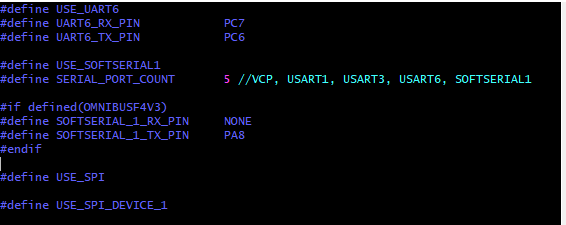
I will leave the last inav firmware version for this target. I can confirm that it works perfectly for my purpose but try it on your own risk.
inav_2.0.0_OMNIBUSF4V3_RC_2_CUSTOM.hex.zip
whydoyouwanttoknow
on 28 Jun 2018
@whydoyouwanttoknow
Thanks again. Building my own custom firmware is above my skill set but I'm slowly figuring it out. I presumed it would be in target.h but I didn't know exactly what to change. Seeing your SS, it kinda seems obvious now. :)
Ant73
on 29 Jun 2018
@whydoyouwanttoknow
Sorry for another question. Both of your hex files work for me but I am unable to replicate it myself. For me, the code in both 1.9.1 and 2.0.0RC1 looks a little different to your ss above.
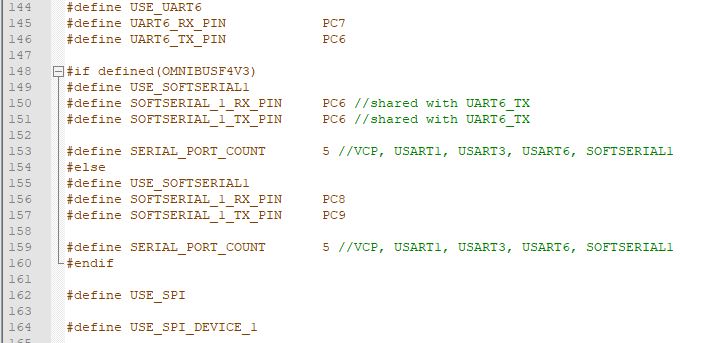
If I simply change softserial_1_rx to 'none' and softserial_1_tx to PA8 it will build ok but smartport doesn't work. If I change all of the code to match yours exactly I get a build error re; timers.
Ant73
on 30 Jun 2018
@Ant73
Hello Sr.
All i can tell you that i have build this target under windows and with ubuntu with good results. I didnt get any build errors,It gave me always an hex file in obj folder. Make sure you have done all the previous steps, follow all the docs ,compiler in the right folders,install ruby, use vim editor to modify the target.h. I noticed that the original code has changed aswell i just wiped out from line 148 to 159 and replaced it with those other lines and left the same gaps. PC8 and PC9(ch5 and ch6) and sharing PC6 with softserial (i am using it for rx) is not needed on the omnibusf4v3(my board has no tiny pads). If it helps, it was a pain in the butt to get this working for a rookie
whydoyouwanttoknow
on 30 Jun 2018
@whydoyouwanttoknow
Looks like we're at the same point, although you are a few weeks ahead of me. I just tried it again replacing all of those lines using RC2 and it looks like it has worked! :) I haven't flown it yet though.
Ant73
on 1 Jul 2018
@Ant73
I am glad that you got it. Dont blame me if you crash.:) Now every time there is a new release that fixes bugs or has new interesting things to play with , you only have to replace those lines and build.
I have flown rc1 but not yet rc2. i am quite confident that telemetry will work ok aswell since is the only piece of code that has been modified from the original.
whydoyouwanttoknow
on 1 Jul 2018
@whydoyouwanttoknow
My Omnibus v3 setup currently:
mag on UART3
GPS on UART1
R-XSR on sbus pin UART6
And while searching for a solution to get telemetry, I got an idea and wondering if anyone has tried it.
Prior to iNav, this quad was running Betaflight without GPS/mag, and R-XSR was connected to TX6 via fport with non-inverted solder pad hack. There were two spare UARTs, and two softserials to play with. Plenty of ports and I was spoiled.
Now with iNav, it’s seriously restricted after adding GPS/mag module. Wondering if it’s possible to run RX via fport on TX6, and use PWM5&6 for softserial for other purposes like runcam split control, Smart audio/tramp, or Bluetooth speedybee module? That would be the best way to maximise ports if this can be pulled off.
I’ll try your custom hex that utilises PWM5/6 and test it later on. Thanks for the good work.
 mu2004
on 1 Jul 2018
mu2004
on 1 Jul 2018
@mu2004 INAV 2.0 adds a softserial on that PIN, so you can use TX6 for telemetry. No need to modify the target.
 fiam
on 1 Jul 2018
fiam
on 1 Jul 2018
Hi @mu2004
My custom hex only uses PWM6. Just an extra TX for telemetry purpose via softserial and i wiped out all the sharing softserial stuff with uart 6 that the developers put in INAV 2.0 since i dont need that for my omnibusf4v3.
@fiam is right about what they have added.
whydoyouwanttoknow
on 1 Jul 2018
SOFTSERIAL1 on INAV 2.0 allows for configuring telemetry on UART6 TX, while using UART6 RX for serial receiver. Problem with PWM 5/6 is that there are no such headers on current boards (OMNIBUSF4V5). As there are still many V3 boards in use (also clones), maybe SOFTSERIAL2 could be considered on those pins? I think it wouldn't hurt the V5 as the pins are just not exposed.
krzysztofmatula
on 1 Jul 2018
@krzysztofmatula
I didnt see that. Didnt need to modify inav 2,0 for my purpose. Never mind ,still works on PWM6. Maybe i will reflash original firmware one day and try telemetry softserial on tx6 with serial receiver rx6 . thanks
whydoyouwanttoknow
on 1 Jul 2018
@fiam
Does smart port work on TX6 or is it only Fport?
Ant73
on 2 Jul 2018
@fiam
May you teach how to use INAV 2.0 to use TX6 for telemetry?
 golffer
on 5 Jul 2018
golffer
on 5 Jul 2018
@golffer, First, you need iNav 2.0-RC3 (not yet released). Then, in the configuration enable telemetry and cpu-based-serial-ports. Then, in the ports tab assign UART6 to serial input as normal and SOFTSERIAL1 as a telemetry port. Having done that UART6RX pin is for serial-RX (e.g. SBUS) and UART6TX pin outputs telemetry at requested baudrate.
Once you test it, please let us know if it worked on your board. It has been only verified on OmnibusF4V5 using LTM telemetry so far, but others should also work.
krzysztofmatula
on 5 Jul 2018
Just want to confirm that with iNav 2.0-RC2 , the telemetry on uart6tx pin will not work. The sbus wire from receiver works on uart6rx and also on the sbus/ppm dedicated pins. (OMNIBUS F4V3 BOARD). I will still use my custom firmware with telemetry on motor6=pwm6=PA8. until RC3 is released and i will try again.
@krzysztofmatula says that it is verified for OMNIBUSF4V5 boards. I havent got one to try. Thanks to know.
whydoyouwanttoknow
on 5 Jul 2018
@whydoyouwanttoknow, RC3 is really needed for this to work. No sense to even try RC2.
krzysztofmatula
on 5 Jul 2018
Here's unofficial 2.0-RC2.5 that works for me:
inav_2.0.0_OMNIBUSF4V3.hex.zip
krzysztofmatula
on 5 Jul 2018
A few post ago , @fiam and @krzysztofmatula ,said there were no need to do a custom firmare. Maybe you were talking about the v5. i have a v3. I will try your unofficial. thanks
whydoyouwanttoknow
on 5 Jul 2018
I was hoping the unofficial would make the telemetry work on tx6 of a ebay omnibusf4v3 but it doesnt. Must be a bad chinese clone from ebay than. Almost a year with it so it isnt so bad.
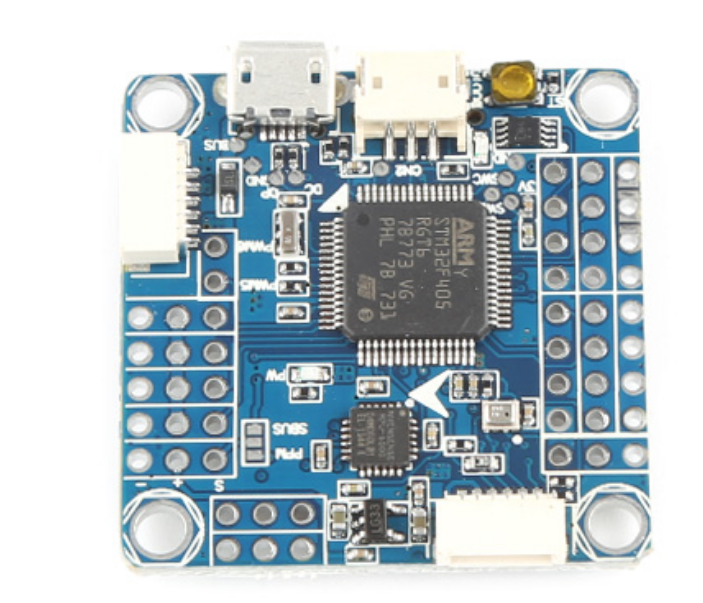 . RC3 will not work either i guess.
I will have to try this eachine clamed omnibusf4v3 from banggood that i have around. it looks similar but with a better bootloader button.
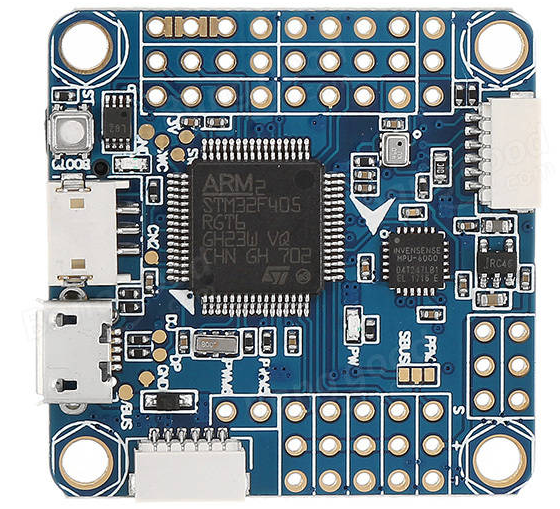
whydoyouwanttoknow
on 5 Jul 2018
@whydoyouwanttoknow thanks for the report!
It seems it is not the bad clone case, but unfortunate design - using extra inverter (xor gate) on the TX line... And it appears to be cloned one-to-one from the original. Here's the problematic chip:
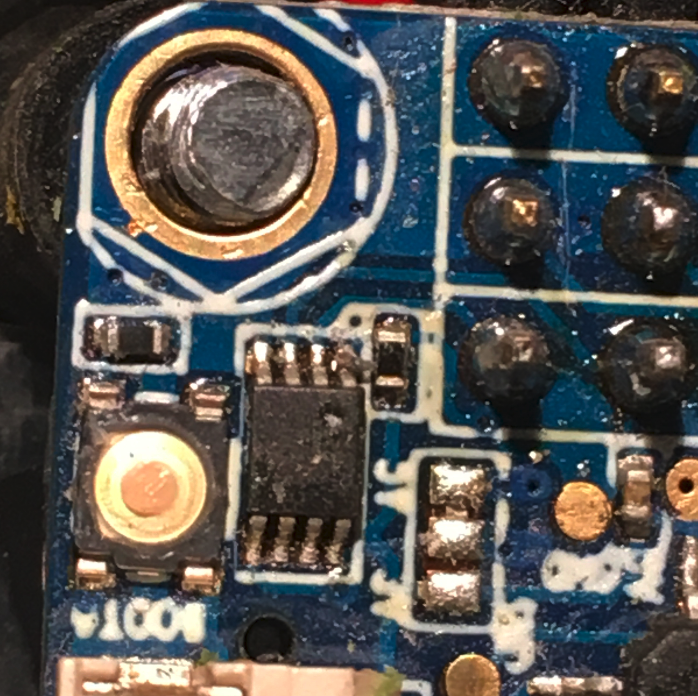
As the TX line always goes through the inverter gate (original V3, V4, V5 and clones) it may be only usable for pure 1-wire telemetries like LTM and not for SmartPort nor FPort... :(
krzysztofmatula
on 5 Jul 2018
@krzysztofmatula
Thanks for teaching. A stupid question: where to get RC3? and your unofficial 2.0-RC2.5 can be used in RC3, correct? I am Omnibus F4V3 with SmartPort telemetry.
golffer
on 6 Jul 2018
RC3 is not yet released. If it were released just now it would be identical to my unofficial RC2.5.
More thoughts on the SmartPort telemetry on UART6-TX:
- it should be doable after getting rid of the HW inverter on the TX line (which is useless anyway)
- it would require soldering the telemetry to leg 6 of the 8-legged chip pictured above
(this line is connected directly to MCU UART6-TX and can be fully controlled in software)
not to leg 3 (inverter gate output). - another way of achieving the same would be to do a small mod on the board and cut leg 3 completely (useless TX inverter output) and instead connect the leg 6 with the trace leading to the TX6 header.
krzysztofmatula
on 6 Jul 2018
@krzysztofmatula
Sorry, I should say I am OmnibusF4V3 with Frsky XSR non-inverted telemetry.
Does your advice still work? thanks
golffer
on 6 Jul 2018
Good morning
@golffer if you are brave and have this chip on your board, you could try what @krzysztofmatula says about soldering a wire to pin 6 on that chip and connect it to telemetry hacked wire on frsky receiver. Or you can just use the hacked wire from your frsky xsr to motor 6, and use this custom firmware(if you have a quad).
inav_2.0.0_OMNIBUSF4V3.zip
I have Frsky XSR telemetry receiver hacked and it works. and remember to set_telemetry_inverted = on
PS: looks like newer official releases of inav will never make telemetry work on omnibusf4v3 boards because of that chip unless you do the hack.
whydoyouwanttoknow
on 6 Jul 2018
@whydoyouwantt.. I flash your customer firmware on quad.
Ports shows: USB VCP, UART1, UART3, UART6, UART1
How come two UART1? Which one to assign to SmartPort telemetry?Thanks
golffer
on 6 Jul 2018
@golffer
You should see this.
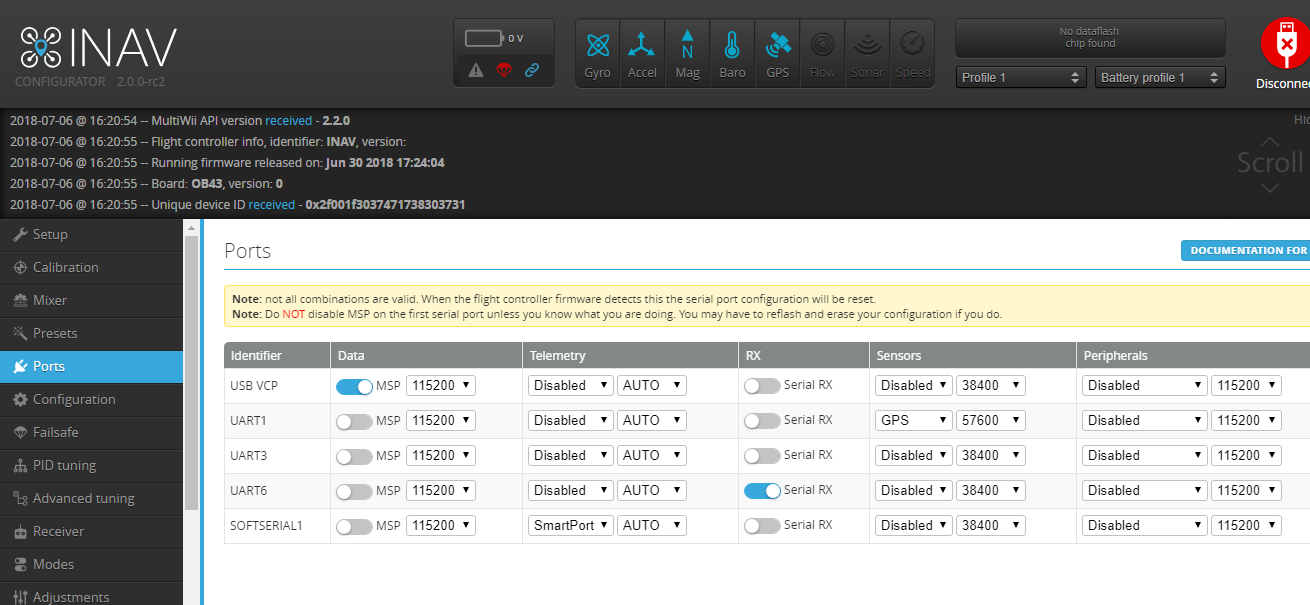
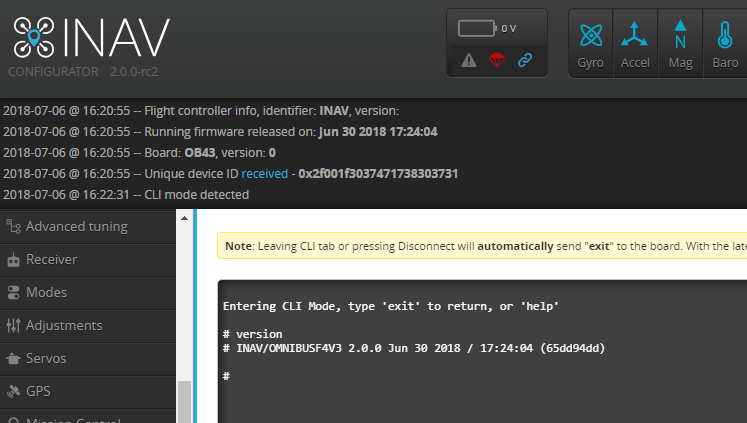
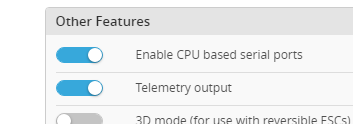
if not try the custom 1.9.1 above. Goodluck
whydoyouwanttoknow
on 6 Jul 2018
This issue / pull request has been automatically marked as stale because it has not had any activity in 60 days. The resources of the INAV team are limited, and so we are asking for your help.
This issue / pull request will be closed if no further activity occurs within two weeks.
![stale[bot] picture](https://avatars3.githubusercontent.com/in/1724?v=4&s=40) stale[bot]
on 4 Sep 2018
stale[bot]
on 4 Sep 2018
@KnuckleUpFPV Are you sure you don't have a Pro? Do you have a current sensor?
 teckel12
on 4 Sep 2018
teckel12
on 4 Sep 2018
@teckel12 i have almost every version of the omnibus f4s. The board I soft serialed the tiny pads on next to sd card has no current sensor.
KnuckleUpFPV
on 5 Sep 2018

Trying to post an image of the small through holes I am talking about. So this post may not work. If it doesnt I will delete it.
KnuckleUpFPV
on 5 Sep 2018
@whydoyouwanttoknow can I use your custom fw for smartaudio too ?
 littlbox
on 15 Sep 2018
littlbox
on 15 Sep 2018
@whydoyouwanttoknow you are the man! I got my smartaudio vtx working again with your fw. By the way is it based on the official 2.0 version or one of the RC versions? Thanx again!
littlbox
on 15 Sep 2018
I just applied the hex file, firmware dated jun-30 2018. I have was successful in using smart-port telemetry on the PWM / MOTOR pin #6 of my Omnibus F4 v3 board (which is probably a clone). Thank you for the resolution.
 DrStein99
on 18 Oct 2018
DrStein99
on 18 Oct 2018
@littlbox .I dont remember. i think i built it from an RC version(rc6) .I will leave you the final release if you want it or anyone with one of these v3 boards.
inav_2.0.1_OMNIBUSF4V3(PA8tx).hex.zip
I havent flashed it to my quad since the custom RC6 one is going good
Try it on your own risk, but it should work.
@DrStein99 You are welcome
whydoyouwanttoknow
on 20 Oct 2018
If anyone needs, here's one I built for the Omnibus F4 V3 with SPort on the LED pin.
Ant73
on 22 Oct 2018
@Ant73 , this .hex provided give us 2 softserial (one on PWM6 and other one on the LED pin)?
I'm asking because I want to use the telemetry from my FRSKY on PWM6 and use smartaudio from my VTX on other serial port. Unfortunately on omnibusF4V3 is not any one available.
 akawaoku
on 7 Nov 2018
akawaoku
on 7 Nov 2018
No, mine (above) is only on the LED pin for the Omnibus F4 V3. I created it for my plane which was using all of the PWM pins for servos already. If you want to use the PWM6, then use whydoyouwanttoknow's target.
Ant73
on 7 Nov 2018
@whydoyouwanttoknow
Did you change the hex file? Because I had tried a couple hours ago with no success. Even the sbus from receiver was not working.
akawaoku
on 8 Nov 2018
@akawaoku- yes , i realized trying for my self that sbus receiver was not working
Now it should work.
inav_2.0.1_OMNIBUSF4V3(PWM6tx&PWM5tx).hex.zip
inav_2.0.1_OMNIBUSF4V3(PWM6tx.&LEDPINtx).hex.zip
whydoyouwanttoknow
on 8 Nov 2018
@whydoyouwanttoknow
now the sbus start working well however no data from telemetry neither smartaudio. Could be some setup missing because it is the first time that I am setting up inav.
Do you have any idea why I still not getting any data? I am using the lua script on x9d+
akawaoku
on 8 Nov 2018
@akawaoku
Cant help you much, since i do not have a smartaudio. Telemetry does work on mine. have you set telemetry inverted = on ? and in the configurator active smartport on softserial1. I have the telemetry on PWM6(motor6) pin and i am receiving data and all is in blue.
whydoyouwanttoknow
on 8 Nov 2018
@whydoyouwanttoknow
I didn't set the telemetry inverted. I will do it and try again. I am using the PWM6 as well.
Should I set at Port->Telemetry "FRSKY" or "Smartport"?
This is my setup:
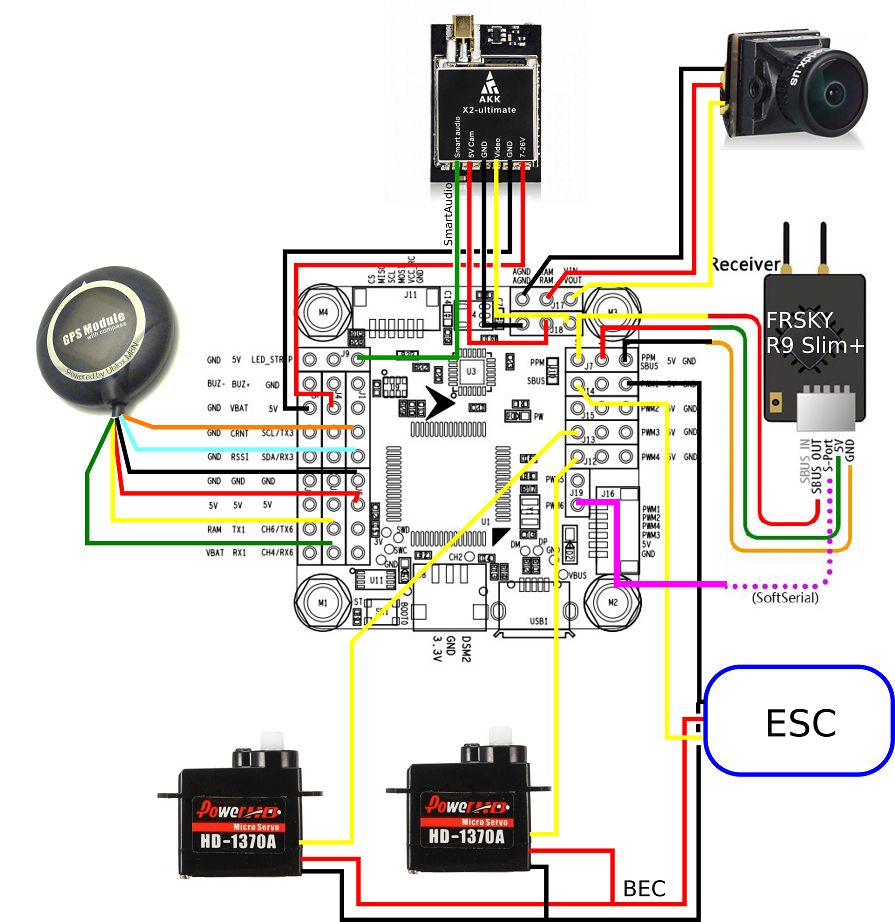
akawaoku
on 8 Nov 2018
@akawaoku
Looks good to me. But i dont have a frskyR9 receiver. If you cant get telemetry than probably you have to mod it to get an noninverted signal like i did with my frsky XSR.
yes you should set a port like this.

whydoyouwanttoknow
on 8 Nov 2018
@whydoyouwanttoknow
now both telemetry and smartaudio seems to be working but I had to connect the smartaudio on PWM5.
Other thing, the telemetry inversion seems not be available on INAV.

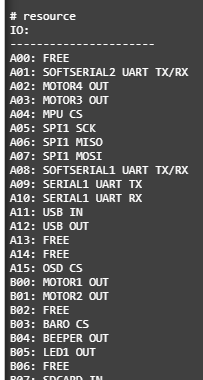
As you can see the PB6 is free.
I was looking in the source code and I think only two softserial possibility are implemented.
akawaoku
on 8 Nov 2018
@akawaoku Telemetry inversion works on INAV as I've been using it for years.
teckel12
on 9 Nov 2018
Good to know @teckel12.
I didn't need that but could you tell me the correct command to type at CLI?
akawaoku
on 9 Nov 2018
@akawaoku
In my case for telemetry to work. Just type set telemetry_inverted = on and of course save,
whydoyouwanttoknow
on 9 Nov 2018
@akawaoku BTW, it only works with soft serial ports, as the F4 can't invert UARTs. One advantage of the F3 and F7 over the F4.
teckel12
on 9 Nov 2018
@whydoyouwanttoknow
now both telemetry and smartaudio seems to be working but I had to connect the smartaudio on PWM5.
Other thing, the telemetry inversion seems not be available on INAV.
As you can see the PB6 is free.
I was looking in the source code and I think only two softserial possibility are implemented.
If you want to use the ledpin(TX) for softserial2 and PWM6(TX) for softserial1 use this custom firmware.
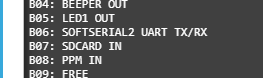
inav_2.0.1_OMNIBUSF4V3(PWM6tx.&LEDPINtx).hex.zip
For PWM5(TX) softserial2 and PWM6(TX) softserial1 use this custom firmware
inav_2.0.1_OMNIBUSF4V3(PWM6tx&PWM5tx).hex.zip
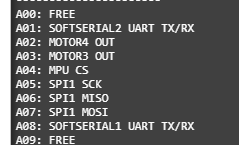
whydoyouwanttoknow
on 9 Nov 2018
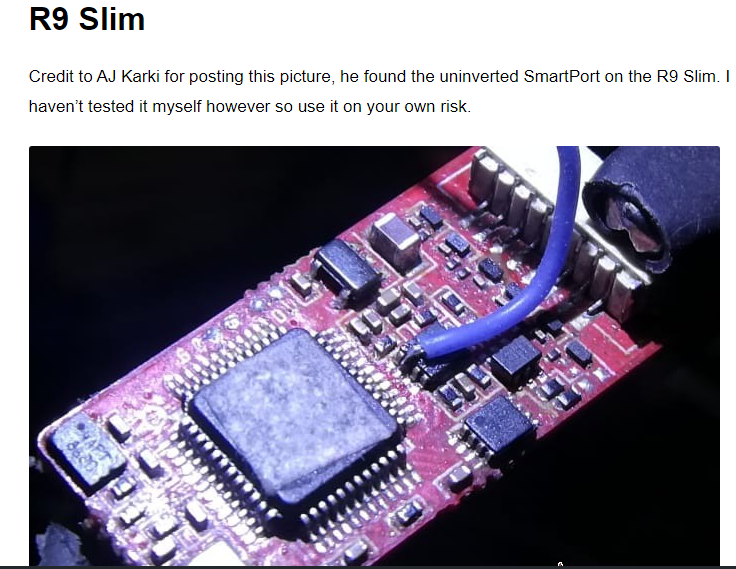
@akawaoku Found this for your frsky r9 slim. Looks like you will have to do some soldering to get the uninverted signal . Just a wire from frsky r9 slim to pwm6. If you dont do it you will not have telemetry on pwm6.
whydoyouwanttoknow
on 9 Nov 2018
Thanks @whydoyouwanttoknow but I am getting telemetry data already without this mod. I think for softserial the inverted signal does not matter.
akawaoku
on 9 Nov 2018
@akawaoku. You are welcome.
Ok , better than if no need to solder. The slim+ is an improvement.
whydoyouwanttoknow
on 9 Nov 2018
Hi everybody,
I flashed inav_2.0.1_OMNIBUSF4V3(PWM6tx&PWM5tx) and I can see softserial in CLI when I enable smartport, but when I am trying to enable MAVlink the softserial disappears and just shows motor 5 or motor 6...
What's wrong with MAVlink? Or does it need separate RX and TX? I've got 3DR telemetry with mavlink which I would like to connect...
_When I flashed OmnibusF4Pro on my clone OmnibusF4V3 I've got one softserial and it does show up correctly in CLI when I configure MAVLink in Ports. But softserial is on C08 and C09 in that case and I can't find if they are physically accessible on that FC. And PRO firmware doesn't match some of the other settings of my V3 board..._
 miklav
on 19 Dec 2018
miklav
on 19 Dec 2018
@miklav Hello
The OMNIBUSF4V3 target only provides an half duplex softserial port on the UART6 TX pin. 3DR telemetry modems require RX and TX lines.
shellixyz
on 19 Dec 2018
@shellixyz Thanks, this is what I suspected. So with custom FW version PWM6tx&PWM5tx we've got two half-duplex ports on PWM5 and PWM6 pins. Would it be possible to get one RX/TX port on those pins instead of those 2 half-duplex?
_I guess that would mean I have to adjust the source code myself and recompile..._
miklav
on 19 Dec 2018
@miklav . Try this custom firmware by your on risk if you want. Have no time to test it.
TX half-dublex on motor 6 and RX half-duplex on motor 5. (Just one softserial)
inav_2.0.1_OMNIBUSF4V3(PWM5rx&PWM6tx).zip
whydoyouwanttoknow
on 19 Dec 2018
@whydoyouwanttoknow Thank you! The port shows up correctly in CLI now, but I can't test it with the telemetry radio today, will try tomorrow.
miklav
on 19 Dec 2018
No success :(
The softserial port seem to be working - 3DR radio has blinking red led meaning some data transmission is happening, and it stops blinking if I change port settings in INAV from MAVLink to smartport.
Green led is solid meaning both radios see each other.
However I haven't got any success connecting the ground station - tried several software on Android and on Windows, all without any luck.
miklav
on 20 Dec 2018
What baud rate ? Keep in mind that you can't use all the baud rate with softserial. Is it working on a regular UART ?
shellixyz
on 20 Dec 2018
I tried different baud rate: AUTO, 57600, 19200, 9600; and I tried physical UART too - unfortunately ground station still doesn't work. It seems to me that the radio itself and the port on FC is working (because of correct LED indication), and that the problem is with the ground station... Actually EZGUI does show some data transfer but says "no data received". Other software don't show anything...
Later I will try with HC-12 radio and different protocol but not today.
miklav
on 21 Dec 2018
Made some more tests. I tried to connect my PC to softserial using USB FTDI adapter. It still didn't work with MAVlink. I tried LTM and MSP but either of this setting in Ports result only one RX or TX of softserial enabled (checking in CLI) but not both TX and RX...
miklav
on 27 Dec 2018
@akawaoku
Good day. I use inav_2.0.1_OMNIBUSF4V3(PWM6tx&PWM5tx).hex.zip and i have r-xsr and I take a non-inverted signal from the transmitter(thelemetry inversion = off), but in cli it does not see the smartport, on the other side smaraudio he sees. can it help me that i will take the inverted signal from the transmitter port according to your scheme?
 St1ngerTula
on 29 Dec 2018
St1ngerTula
on 29 Dec 2018
Yes it help, softserial1=pwm6->inverted smartport(in cli set tlemetry infersion off)
St1ngerTula
on 29 Dec 2018
@St1ngerTula, If you flashed the pwm6&pwm5, as I am using as well, the diagram that I draw is not correct. You should use the pin described as pwm6 to connect the smartaudio.
akawaoku
on 29 Dec 2018

akawaoku
on 29 Dec 2018
@akawaoku, pwm5 not 6, I understand that you used the firmware with led pin. At the beginning, when I flashed, I used a non-inverted signal from the transmitter board(white in photo), later I took an inverted one from the port (yelow) and everything started up. before that in stock firmware of inav, I took telemetry from uart1. Firmware inav_2.0.1_OMNIBUSF4V3(PWM5rx&PWM6tx).zip not good : led strip not work, have erors, but in this firmware i saw telemetry first time by this pins ( i take both signal, iverted and non inverted, from transmitter to this pins )
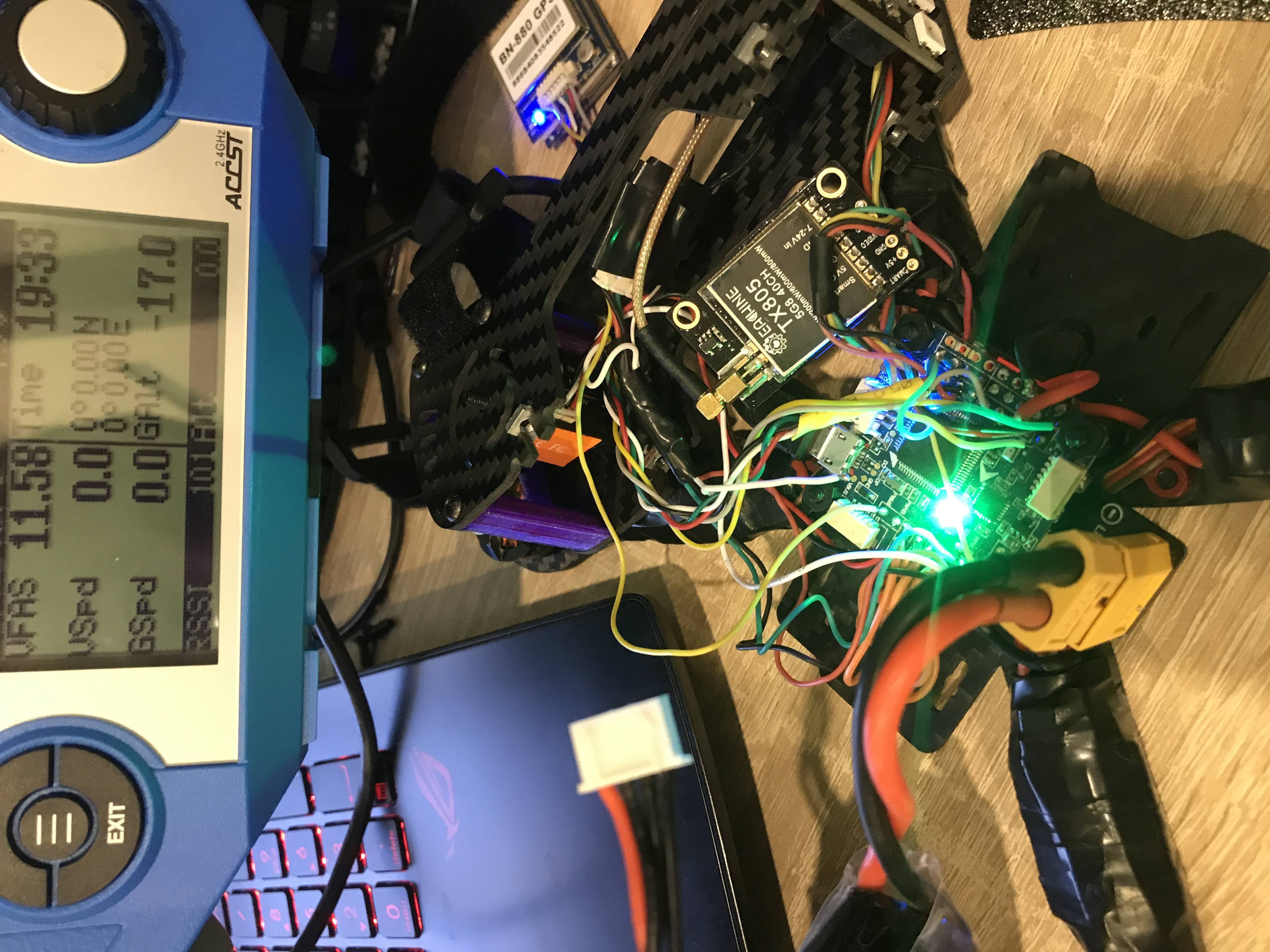
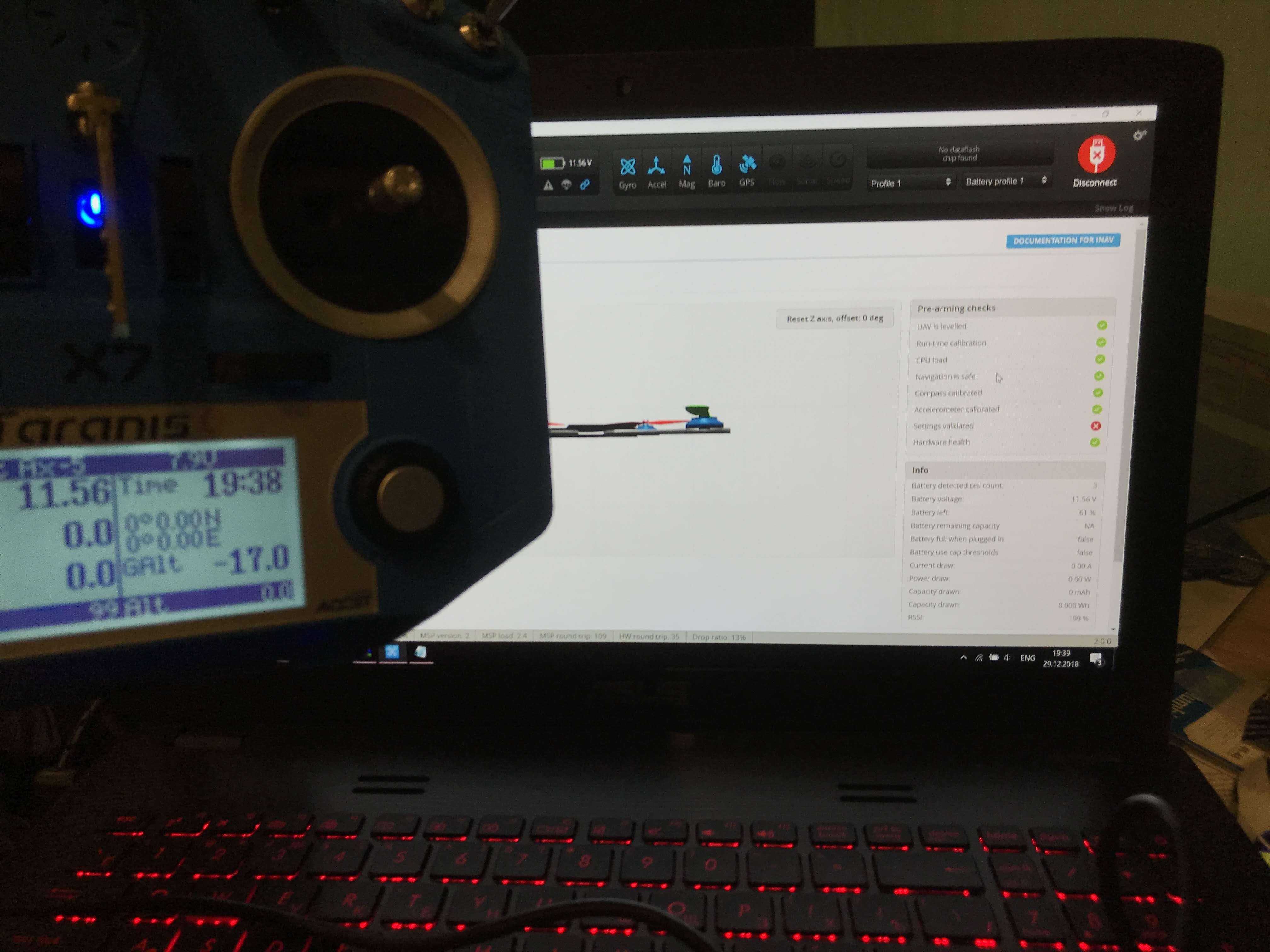
than i flashed on inav_2.0.1_OMNIBUSF4V3.PWM6tx.PWM5tx and it run good
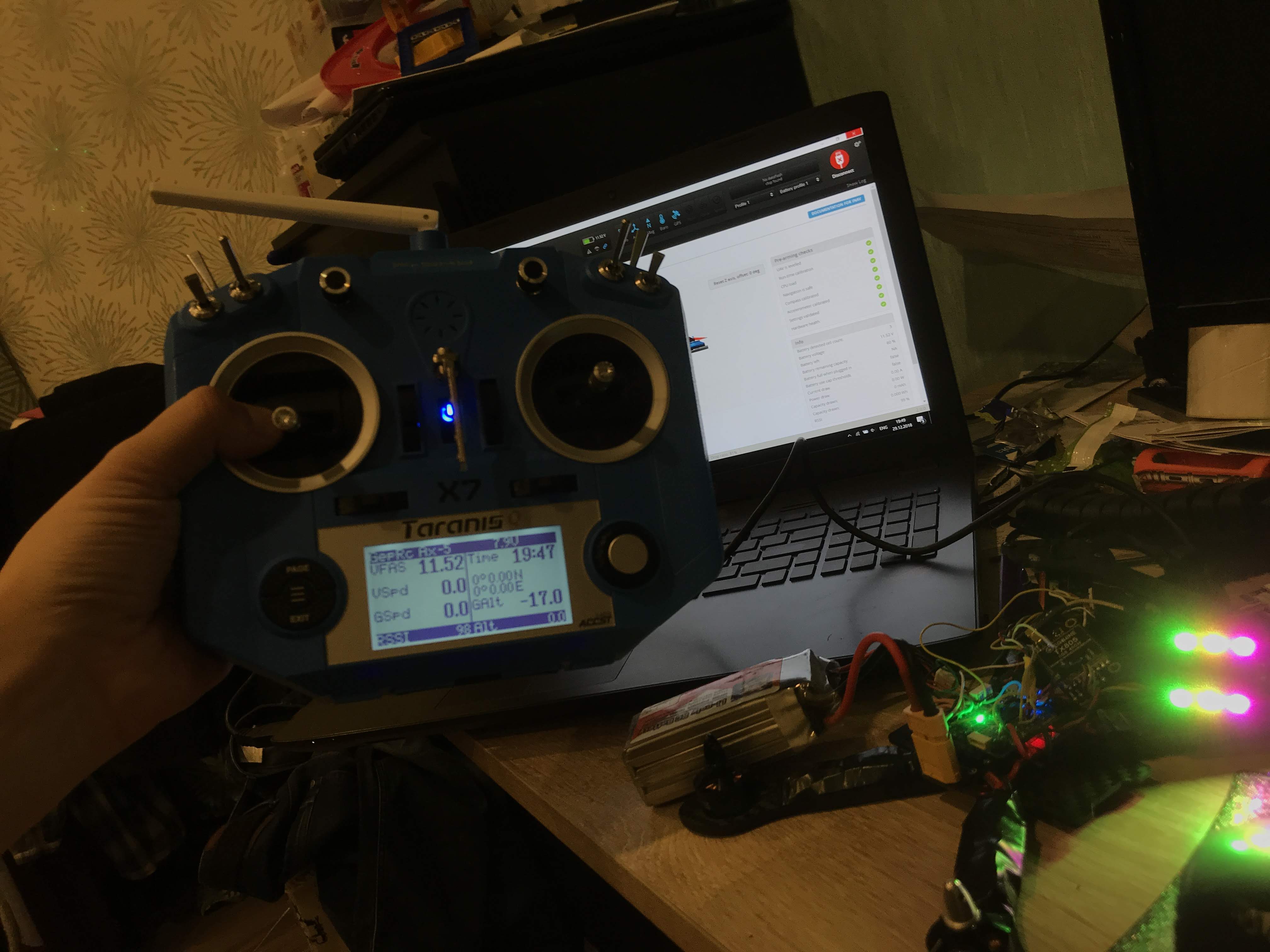
thx to all and especially to author of the firmware
St1ngerTula
on 30 Dec 2018
Glad some of custom firmwares that i have posted works for some people including me.
Since i have being playing around with the firmware and made a few custom ones, probably i have disabled ledpin strip on Firmware inav_2.0.1_OMNIBUSF4V3(PWM5rx&PWM6tx).zip.
But if someone wants to use led strip , here you go another custom one.
inav_2.0.1_OMNIBUSF4V3(M5rx,M6tx,LEDstripenabled).zip
inav_2.0.1_OMNIBUSF4V3(M5tx,M6tx,LEDPINstripPB6enabled).zip
whydoyouwanttoknow
on 30 Dec 2018
If you could have iNav_2.1.0 done on F4v3 for pwm5 and pwm6, I would appreciate it.
Thanks.
 modCZsp01
on 12 Jan 2019
modCZsp01
on 12 Jan 2019
@modCZsp01
inav_2.1.0_OMNIBUSF4V3.zip
Softserial 1 (TX) on PIN MOTOR 6
Softserial 2 (TX) on PIN MOTOR 5
TEST FOR YOUR SELF.
If i am correct this RC1 works ok for most of the small quads. For bigger quads you could have problems if its very noisy.(IF YOU PLAN TO USE DSHOT AS I THINK YOU ARE)
whydoyouwanttoknow
on 12 Jan 2019
@modCZsp01
inav_2.1.0_OMNIBUSF4V3.zip
Softserial 1 ( PIN MOTOR 6-TX & PIN MOTOR 5-RX)
Softserial 2 (TX)(PB6=LEDPIN)(Obviously ledstrip disabled)
TEST ON YOUR OWN RISK ASWELL.
whydoyouwanttoknow
on 12 Jan 2019
You are awesome! Thanks. I'll check them out now.
Update: Test and use the PWM5(TX) & PWM6(TX). Works great !!! Thanks.
Did not test the one with LEDpin disabled. I use LED to tell me Arm, Battery, and GPS condition (# of sat locked).
Thanks again.
modCZsp01
on 13 Jan 2019
@modCZsp01
inav_2.1.0_OMNIBUSF4V3.zip
Softserial 1 ( PIN MOTOR 6-TX & PIN MOTOR 5-RX)
Softserial 2 (TX)(PB6=LEDPIN)(Obviously ledstrip disabled)
TEST ON YOUR OWN RISK ASWELL.
@modCZsp01 - I'm using Inav on a nano talon with an Omnibus F4 Pro V3.
R9mm sbus is connected to UART 1
SmartPort is connected to UART 3
GPS is connected to UART 6
I'm using the LED Strip for GPS status and PWM out 5 is used for the tail servo (it seems PWM 2 is reserved for a non existent motor and cant be changed.
The above seems to all work ! But .......
I really want smart Audio TX ? on PWM 6 without changing PWM 5 for reasons given above. Can you suggest how this can be done ? Thanks
 realpastaman
on 18 Jan 2019
realpastaman
on 18 Jan 2019
I would just go to the Ports page and on the SOFT SERIAL 2 line, assign TBS Smart Audio.
Assign whatever the SSerial# that correspond to PWM6.
modCZsp01
on 18 Jan 2019
I would just go to the Ports page and on the SOFT SERIAL 2 line, assign TBS Smart Audio.
Assign whatever the SSerial# that correspond to PWM6.
Hi I could do this in BF but INAv is not letting me free up resource PWM6. Sorry if I sound a bit stupid on this one.
realpastaman
on 19 Jan 2019
@realpastaman No resource reassignment with INAV. You need to build your own firmware to do it.
teckel12
on 19 Jan 2019
@realpastaman No resource reassignment with INAV. You need to build your own firmware to do it.
Thanks
I'm thinking to update my R9mm to FPort and that should free up a UART I can use for smart audio
realpastaman
on 19 Jan 2019
@Whydoyouwanttoknow I use your custom inav2.0.1 softserial(pwm5 and pwm6) and it's been great. Are you going to make a custom fw for the official 2.1?
littlbox
on 26 Feb 2019
@littlbox Hi.
Test one for your needs and on your own risk Sr.
Built from the latest source code 2.1:
1.) MOTOR PIN 6. Softserial1 TX
inav_2.1.0_OMNIBUSF4V3(PA8tx).zip
2.) MOTOR PIN6 Softserial1 TX & MOTOR PIN5 Softserial2 TX
inav_2.1.0_OMNIBUSF4V3(PA8tx&PA1tx).zip
3.) MOTOR PIN6 TX & MOTOR PIN5 RX (softserial1)
inav_2.1.0_OMNIBUSF4V3(PA8tx&PA1rx).zip
whydoyouwanttoknow
on 26 Feb 2019
@whydoyouwanttoknow you rock!👍
littlbox
on 26 Feb 2019
@whydoyouwanttoknow Could you PR a new target with your changes ? Then you won't have to maintain this yourself.
shellixyz
on 26 Feb 2019
@whydoyouwanttoknow I second this. Make a PR or post your changes and someone will make these targets in INAV so you don't need to maintain them.
teckel12
on 27 Feb 2019
@littlbox Just to say a big thanks as MOTOR PIN 6. Softserial1 TX is working great with soft serial smart audio on a TBS HV VTX . Now I can change channels on LUA and increase power on arm. Big thanks !
realpastaman
on 3 Mar 2019
@whydoyouwanttoknow thanks for custom FW. i am going to test it tomorrow. Was missing one UART for smartaudio :)
 lazar89nis
on 22 Mar 2019
lazar89nis
on 22 Mar 2019
Hi,
Any chance that we can see something up to date for INAV 2.5 ?
I'm currently building a wing (waiting in a box since one year) and can't get the configurator working with the HEX found here. I understand that the configurator doesn't support it anymore.
@shellixyz and @whydoyouwanttoknow "help me obi wan kenobi you're my only hope" :D
 Pasadenasman
on 5 Jun 2020
Pasadenasman
on 5 Jun 2020
Related issues
 digitalentity
·
61Comments
digitalentity
·
61Comments
 stronnag
·
188Comments
stronnag
·
188Comments
 Hazakins
·
71Comments
Hazakins
·
71Comments
 Pairan
·
66Comments
Pairan
·
66Comments
 georgekucher
·
52Comments
georgekucher
·
52Comments
Most helpful comment
If anybody's interested here's a custom firmware for genuine Omnibus F4 V3 with software I2C enabled on PWM5(SCL) and PWM6(SDA). This frees up UART3 as you can use PWM5/PWM6 instead of SCL/TX3 and SDA/RX3 for I2C. This firmware is based on OMNIBUSF4PRO instead of OMNIBUSF4V3 as I had major issues with compass orientation (BN-880) with original OMNIBUSF4V3 firmware.
Download link: inav_1.8.0_OMNIBUSF4V3_I2C_REMAP.hex
Source code: https://github.com/dolphin78/inav/tree/feature/OMNIBUSF4V3_I2C_REMAP
Big thanks to @andriylysenko for this great idea to move I2C instead of using SOFTSERIAL.