Imagesharp: CloneAs fails with dimensions 374x209 and MaxDegreeOfParallelism=16
Prerequisites
- [X] I have written a descriptive issue title
- [X] I have verified that I am running the latest version of ImageSharp ([email protected])
- [X] I have verified if the problem exist in both
DEBUGandRELEASEmode - [X] I have searched open and closed issues to ensure it has not already been reported
Description
For some pixel data loaded images, converting from Bgra32 to Rgba32 fails. Saving the Bgra32 image to a PNG succeeds, and the data is valid / non-corrupt.
Steps to Reproduce
Use repo below
Test.zip
System Configuration
Windows 10 Pro x64
Docker / aspnet runtime 3.1
- ImageSharp version: v1.0.0-unstable0542
- Other ImageSharp packages and versions: --
- Environment (Operating system, version and so on): Windows 10 Pro x64
- .NET Framework version: NetCoreApp 3.1
- Additional information:
Hello World
 Inumedia
All 10 comments
I can't reproduce this. The following code:
```c#
using SixLabors.ImageSharp;
using SixLabors.ImageSharp.PixelFormats;
using System;
using System.IO;
namespace Test
{
class Program
{
static void Main(string[] args)
{
string pixelPayload = REMOVED_SO_I_CAN_POST_COMMENT
int byteCount = 312664;
int width = 374;
int height = 209;
        byte[] pixels = Convert.FromBase64String(pixelPayload);

        if (pixels.Length != byteCount)
        {
            throw new InvalidProgramException("Didn't convert properly");
        }

        using (var loaded = Image.LoadPixelData<Bgra32>(pixels, width, height))
        {
            using (Stream file = File.OpenWrite("test.png"))
            {
                loaded.SaveAsPng(file);
            }

            using (var cloned = loaded.CloneAs<Rgba32>())
            using (Stream file = File.OpenWrite("test-clone.png"))
            {
                cloned.SaveAsPng(file);
            }
        }
    }
}
}
```
Creates two identical images.
Original

Clone

 JimBobSquarePants
on 3 Feb 2020
JimBobSquarePants
on 3 Feb 2020
@JimBobSquarePants With your code example, it still throws an exception at the CloneAs.
Here's my dotnet --info FYI:
dotnet --info
.NET Core SDK (reflecting any global.json):
 Version:   3.1.101
 Commit:    b377529961

Runtime Environment:
 OS Name:     Windows
 OS Version:  10.0.18363
 OS Platform: Windows
 RID:         win10-x64
 Base Path:   C:\Program Files\dotnet\sdk\3.1.101\

Host (useful for support):
  Version: 3.1.1
  Commit:  a1388f194c

.NET Core SDKs installed:
  3.1.101 [C:\Program Files\dotnet\sdk]

.NET Core runtimes installed:
  Microsoft.AspNetCore.All 2.1.15 [C:\Program Files\dotnet\shared\Microsoft.AspNetCore.All]
  Microsoft.AspNetCore.App 2.1.15 [C:\Program Files\dotnet\shared\Microsoft.AspNetCore.App]
  Microsoft.AspNetCore.App 3.1.1 [C:\Program Files\dotnet\shared\Microsoft.AspNetCore.App]
  Microsoft.NETCore.App 2.1.15 [C:\Program Files\dotnet\shared\Microsoft.NETCore.App]
  Microsoft.NETCore.App 3.1.1 [C:\Program Files\dotnet\shared\Microsoft.NETCore.App]
  Microsoft.WindowsDesktop.App 3.1.1 [C:\Program Files\dotnet\shared\Microsoft.WindowsDesktop.App]
Here's the stack trace for the exception:
This exception was originally thrown at this call stack:
    SixLabors.Guard.ThrowArgumentOutOfRangeException(string, string)
    SixLabors.ImageSharp.Memory.RowInterval.RowInterval(int, int)
    SixLabors.ImageSharp.Advanced.ParallelUtils.ParallelHelper.IterateRows.AnonymousMethod__0(int)
    System.Runtime.ExceptionServices.ExceptionDispatchInfo.Throw()
    System.Runtime.ExceptionServices.ExceptionDispatchInfo.Throw(System.Exception)
    System.Threading.Tasks.TaskReplicator.Replica.Execute()
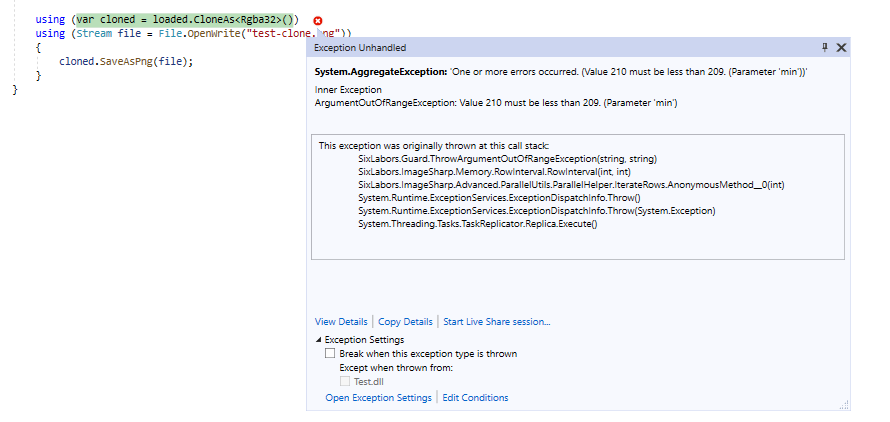
Inumedia
on 3 Feb 2020
@Inumedia what is your Configuration.Default.MaxDegreeOfParallelism?
 antonfirsov
on 3 Feb 2020
antonfirsov
on 3 Feb 2020
Yeah, it looks like there's gonna be a rounding problem in DivideCeil
JimBobSquarePants
on 3 Feb 2020
@antonfirsov As far as I know, it should be the default. I haven't changed anything globally, and I've posted the entire solution for the reproduction
Inumedia
on 3 Feb 2020
@Inumedia It'll be your Environment.Processor count
JimBobSquarePants
on 3 Feb 2020
Yeah, Environment.ProcessorCount / Configuration.Default.MaxDegreeOfParallelism is the only variable factor here, so that info is important.
antonfirsov
on 3 Feb 2020
On Windows 10 Pro x64, 8 physical cores, 16 threads / logical cores. AMD 2700 (https://www.newegg.com/amd-ryzen-7-2700/p/N82E16819113498?Item=N82E16819113498 )
On Linux / Docker, Intel 2x E5645, which is 2x (6 physical cores, 12 logical cores) = 12 physical cores, 24 logical cores ( 2x https://ark.intel.com/content/www/us/en/ark/products/48768/intel-xeon-processor-e5645-12m-cache-2-40-ghz-5-86-gt-s-intel-qpi.html )
Inumedia
on 3 Feb 2020
I was able to reproduce this, by setting Configuration.MaxDegreeOfParallelism = 16. The pixel data is irrelevant, only the image dimensions are important.
@Inumedia until we fix the bug, you can manually alter MaxDegreeOfParallelism to a smaller value as a workaround.
antonfirsov
on 3 Feb 2020
Related issues
JimBobSquarePants
·
30Comments
 lofcz
·
58Comments
lofcz
·
58Comments
 Auersberg
·
27Comments
antonfirsov
·
79Comments
JimBobSquarePants
·
29Comments
Auersberg
·
27Comments
antonfirsov
·
79Comments
JimBobSquarePants
·
29Comments
Most helpful comment
I was able to reproduce this, by setting
Configuration.MaxDegreeOfParallelism = 16. The pixel data is irrelevant, only the image dimensions are important.@Inumedia until we fix the bug, you can manually alter
MaxDegreeOfParallelismto a smaller value as a workaround.