Imagesharp: Projective transform returns incorrect results
Prerequisites
- [X] I have written a descriptive issue title
- [X] I have verified that I am running the latest version of ImageSharp
- [X] I have verified if the problem exist in both
DEBUGandRELEASEmode - [X] I have searched open and closed issues to ensure it has not already been reported
Description
When performing a non-affine transform on an image using a 4x4 matrix, the perspective is incorrect.
Example is shown below, where I attempt to project a 290x154 image onto the quadrilateral with the points (52, 165), (358, 109), (115, 327), (600, 600). The two images below are not to scale with each other, but you can clearly see the issue. Both images were generated using the same matrix, but the first one was done using CSS and matrix3d() while the second one was done using ImageSharp and IImageProcessingContext<Rgba32>.Transform.
Expected output:
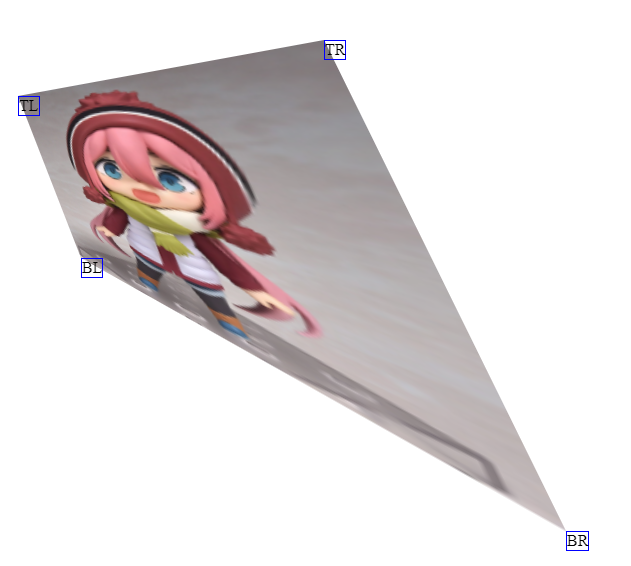
Actual output:

Steps to Reproduce
The below code is for 1.0.0-beta0005, but for the dev builds I just replaced the ctx.Transform call with ctx.Transform(new ProjectiveTransformBuilder().AppendMatrix(m1), KnownResamplers.Lanczos3); and ran into the same issue.
var img = Image.Load<Rgba32>("test.png");
img.Mutate(ctx => { ctx.Resize(290, 154); });
var canvas = new Image<Rgba32>(600, 600);

// Same as the matrix3d() used in https://jsfiddle.net/dFrHS/545/
var m1 = new Matrix4x4(0.260987f, -0.434909f, 0, -0.0022184f, 0.373196f, 0.949882f, 0, -0.000312129f, 0, 0, 1, 0, 52, 165, 0, 1);

canvas.Mutate(ctx =>
{
    ctx.DrawImage(img, 1);
    ctx.Transform(m1, KnownResamplers.Lanczos3);
});
canvas.Save("canvas.png");
The expected output image was generated using https://jsfiddle.net/dFrHS/545/ (from this SO answer).
System Configuration
- ImageSharp version: 1.0.0-beta0005, 1.0.0-dev002237
- Environment (Operating system, version and so on): Windows 10 Pro x64 version 1803, Ubuntu Server x64 18.04.1 LTS with Docker
- .NET Framework version: .NET Core 2.2
- Additional information:
 wchill
All 9 comments
Here's the C# code I used to generate the 4x4 projection matrix, for convenience. If you plug in the values from the repro steps, you should get the same Matrix4x4 (excluding floating point error):
using System;
using System.Numerics;
using MathNet.Numerics.LinearAlgebra;
using SixLabors.ImageSharp.PixelFormats;
using SixLabors.ImageSharp.Processing;
using SixLabors.Primitives;

namespace ImageProcessing
{
    public static class ImageProjectionHelper
    {
        public static Matrix4x4 CalculateProjectiveTransformationMatrix(int width, int height, Point newTopLeft, Point newTopRight, Point newBottomLeft, Point newBottomRight)
        {
            var s = MapBasisToPoints(
                new Point(0, 0),
                new Point(width, 0),
                new Point(0, height),
                new Point(width, height)
            );
            var d = MapBasisToPoints(newTopLeft, newTopRight, newBottomLeft, newBottomRight);
            var result = d.Multiply(AdjugateMatrix(s));
            var normalized = result.Divide(result[2, 2]);
            return new Matrix4x4(
                (float)normalized[0, 0], (float)normalized[1, 0], 0, (float)normalized[2, 0],
                (float)normalized[0, 1], (float)normalized[1, 1], 0, (float)normalized[2, 1],
                0, 0, 1, 0,
                (float)normalized[0, 2], (float)normalized[1, 2], 0, (float)normalized[2, 2]
            );
        }
        private static Matrix<double> AdjugateMatrix(Matrix<double> matrix)
        {
            if (matrix.RowCount != 3 || matrix.ColumnCount != 3)
            {
                throw new ArgumentException("Must provide a 3x3 matrix.");
            }

            var adj = matrix.Clone();
            adj[0, 0] = matrix[1, 1] * matrix[2, 2] - matrix[1, 2] * matrix[2, 1];
            adj[0, 1] = matrix[0, 2] * matrix[2, 1] - matrix[0, 1] * matrix[2, 2];
            adj[0, 2] = matrix[0, 1] * matrix[1, 2] - matrix[0, 2] * matrix[1, 1];
            adj[1, 0] = matrix[1, 2] * matrix[2, 0] - matrix[1, 0] * matrix[2, 2];
            adj[1, 1] = matrix[0, 0] * matrix[2, 2] - matrix[0, 2] * matrix[2, 0];
            adj[1, 2] = matrix[0, 2] * matrix[1, 0] - matrix[0, 0] * matrix[1, 2];
            adj[2, 0] = matrix[1, 0] * matrix[2, 1] - matrix[1, 1] * matrix[2, 0];
            adj[2, 1] = matrix[0, 1] * matrix[2, 0] - matrix[0, 0] * matrix[2, 1];
            adj[2, 2] = matrix[0, 0] * matrix[1, 1] - matrix[0, 1] * matrix[1, 0];

            return adj;
        }

        private static Matrix<double> MapBasisToPoints(Point p1, Point p2, Point p3, Point p4)
        {
            var A = Matrix<double>.Build.DenseOfArray(new double[,]
            {
                {p1.X, p2.X, p3.X},
                {p1.Y, p2.Y, p3.Y},
                {1, 1, 1}
            });
            var b = MathNet.Numerics.LinearAlgebra.Vector<double>.Build.Dense(new double[] { p4.X, p4.Y, 1 });
            var aj = AdjugateMatrix(A);
            var v = aj.Multiply(b);
            var m = Matrix<double>.Build.DenseOfArray(new [,]
            {
                {v[0], 0, 0 },
                {0, v[1], 0 },
                {0, 0, v[2] }
            });
            return A.Multiply(m);
        }
    }
}
Here is some SkiaSharp example code that also uses the same matrix and comes up with the correct result:
var bitmap = SKBitmap.Decode("test.png");
bitmap.Resize(new SKImageInfo(290, 154), SKFilterQuality.High);

using (var surface = SKSurface.Create(new SKImageInfo(600, 600)))
{
    var canvas = surface.Canvas;
    var matrix44 = SKMatrix44.FromColumnMajor(new[]
    {
        0.260987f, -0.434909f, 0, -0.0022184f, 0.373196f, 0.949882f, 0, -0.000312129f, 0, 0, 1, 0, 52, 165,
        0, 1
    });
    canvas.SetMatrix(matrix44.Matrix);
    canvas.DrawBitmap(bitmap, 0, 0);
    var stream = surface.Snapshot().Encode().AsStream();
    using (var fileStream = File.Create("canvas.png"))
    {
        stream.Seek(0, SeekOrigin.Begin);
        stream.CopyTo(fileStream);
    }
}

wchill
on 10 Dec 2018
@wchill Thanks for providing so much detail here, really appreciate it.
I'm not sure what is going wrong here. Given four points of the CSS driven output it appears that the basic output from a transform doesn't match.
With the given rectangle (0, 0, 290, 154) from the image dimensions I would expect the following results
TL = x: 52, y:165
TR = x:358, y:109
BL = x:115, y:372
BR = x:600, y:600
but if I transform the BR property of the rectangle I get the following.
``` c#
void Main()
{
var m1 = new Matrix4x4(
0.260987f, -0.434909f, 0, -0.0022184f,
0.373196f, 0.949882f, 0, -0.000312129f,
0, 0, 1, 0,
52, 165, 0, 1);
Vector2 GetVector(float x, float y)
{
    const float Epsilon = 0.0000001F;
    var v3 = Vector3.Transform(new Vector3(x, y, 1F), m1);
    return new Vector2(v3.X, v3.Y) / Math.Max(v3.Z, Epsilon);
}

// Demo how the transform from a Vector3 into 2D space matches Vector2 transform.
Vector2 v2 = Vector2.Transform(new Vector2(290, 154), m1);
v2.Dump();

Vector2 v2A = GetVector(290, 154);
v2A.Dump();

// <185.1584, 185.1582>
   // Expected 600, 600
}
```
Which is different. I'm wondering whether the row/column values in the Matrix4x4 represent different indexes?
 JimBobSquarePants
on 10 Dec 2018
JimBobSquarePants
on 10 Dec 2018
I can't imagine why the row/column values should work differently in a Matrix4x4 - I was under the impression that transformation matrices work the same way no matter what library is being used due to the mathematics involved.
For what it's worth, I use the same code path for transformations (in other words, using a 4x4 matrix that I calculate) that do not require perspective projection (scaling, rotation and shearing only) and have seen no issues. So my guess is that there is a bug with how we're using Vector2 when it comes to anything that is non-affine.
If I look at the Vector2 source, it looks like it is doing the same multiplications for 4x4 that it would do with a 3x2 matrix, which is what we'd be using for affine transformations. If that's true, then the perspective is being ignored entirely, which would seem to match up with the output from ImageSharp (the output is scaled, rotated and sheared, but not projected).
wchill
on 10 Dec 2018
So I just tested this theory out - here's an example snippet:
static void Main(string[] args)
{
    var m1 = new Matrix4x4(
        0.260987f, -0.434909f, 0, -0.0022184f,
        0.373196f, 0.949882f, 0, -0.000312129f,
        0, 0, 1, 0,
        52, 165, 0, 1);

    Vector4 v4 = Vector4.Transform(new Vector4(290, 154, 0, 1), m1);
    Console.WriteLine(v4); // <185.1584, 185.1582, 0, 0.3085961>
    Vector4 v4a = new Vector4(v4.X / v4.W, v4.Y / v4.W, v4.Z / v4.W, 1);
    Console.WriteLine(v4a); // <600.0024, 600.0018, 0, 1>
    Console.ReadKey();
}
So the issue is that the Vector2 we get back from doing Vector2.Transform is not homogeneous. If we use a Vector4 instead, then normalize the result from the transform, we get the expected result.
I assume the same issue applies to using Vector3 as well, but it has been a long time since I've done this kind of math so it's just an assumption.
wchill
on 10 Dec 2018
@wchill Sorry, I meant if there was some row/column major funkiness going on, the MS docs aren't great.
You're bang on the money with your fix. When I originally ported the taper transform methods from the skiasharp docs I forgot to take into consideration that the 3rd column/row of their SKMatrix struct is the same as our 4th row/column in Matrix4x4 this meant I was using the wrong method to flatten down the transform into the 2D space - Really obvious in retrospect....
I've opened #788 to fix this. Once built you will be able to write the code like this and the library will automatically calculate the correct output canvas size.
``` c#
using (var image = Image.Load("test.png"))
{
var matrix = new Matrix4x4(
0.260987f, -0.434909f, 0, -0.0022184f,
0.373196f, 0.949882f, 0, -0.000312129f,
0, 0, 1, 0,
52, 165, 0, 1);
image.Mutate(x => x.Transform(new ProjectiveTransformBuilder().AppendMatrix(matrix)));
image.Save("canvas.png");
}
```
JimBobSquarePants
on 11 Dec 2018
Ah yeah, I had to employ some trial and error for the matrix calculations. You can actually see that in my C# code my matrices are transposed until when I construct the Matrix4x4 (where I'm effectively manually transposing it back) because it just looks cleaner.
Also, what do you mean by the library will calculate the correct canvas size? Do you mean I can skip creating an intermediate canvas? That was a bit of a pain point before as my transformations would often result in the image being outside the bounds of the original width/height.
wchill
on 11 Dec 2018
Do you mean I can skip creating an intermediate canvas?
Exactly that. In our dev builds we now calculate the correct output bounds of the transform and draw the transformed pixels accordingly. We take into account translations to offset images, shrinking or growing the canvas when required. It's all much easier to use.
For example: Here's the output of your transform against a solid block using the code in the PR. I've colored in the background so you can see where we have offset the positive translation. No intermediate canvas required.

JimBobSquarePants
on 11 Dec 2018
As of 1.0.0-dev002271
PM> Install-Package SixLabors.ImageSharp -Version 1.0.0-dev002271 -Source https://www.myget.org/F/sixlabors/api/v3/index.json

JimBobSquarePants
on 11 Dec 2018
Related issues
 GeorgePlotnikov
·
31Comments
GeorgePlotnikov
·
31Comments
 peter-bozovic
·
47Comments
JimBobSquarePants
·
36Comments
JimBobSquarePants
·
40Comments
peter-bozovic
·
47Comments
JimBobSquarePants
·
36Comments
JimBobSquarePants
·
40Comments
 DeCarabas
·
53Comments
DeCarabas
·
53Comments