Imageprocessor: Performance issues using AzureBlobCache and AzureCDNToolkit
I realize that AzureCDNToolkit is not supported here, and not asking for support of it.
I have an Umbraco-Cloud config (i.e. Amsterdam) using ImageProcessor.Web.Plugins.AzureBlobCache accessing an Azure Blob-Storage end-point in Sydney Australia.
When using AzureBlobCache the 302 redirects were killing it, anything up to a second per image request to get the 302 response, so I decided to try using the AzureCDNToolkit package, to cache the end-point urls and by-pass the 302s.
However, when using AzureCDNToolkit the end-point urls need to be cached by the website on every restart, and that discovery process appears to be killing each initial page request - literally minutes for an initial html response. Once the end-point urls are cached, then performance is pretty good, but that initial page request is problematic.
I am not running a CDN edge service at the moment, but I wouldn't have thought the difference between discovering from a local CDN cache server and the remote Blob-Storage end-point server would account for such a dramatic impact, so I'm suspecting I may have done something seriously wrong with the config of AzureBlobCache.
Currently installed are:
ImageProcessor.2.8.0
ImageProcessor.Web.4.11.0
ImageProcessor.Web.Config.2.6.0
ImageProcessor.Web.Plugins.AzureBlobCache.1.6.0
I'm wondering if it might be possible to check my attached configs for the AzureBlobCache sections of this config, and tell me if I've done something wrong.
 c9mbundy
All 11 comments
Updated the previous with the correct configs file - doh!
c9mbundy
on 23 Jan 2020
I wonder whether there is a better workaround for you...
Instead of using the toolkit perhaps add the site to CDN as an endpoint and allow caching of querystring in the requests.
Theoretically if you set the AzureBlobCache to stream the response you could request the image with querystring commands directly from the CDN and it will serve any previously queried files directly from there falling back to your actual site when it cannot.
 JimBobSquarePants
on 23 Jan 2020
JimBobSquarePants
on 23 Jan 2020
@c9mbundy, @JimBobSquarePants's suggestion is how I do it and it works much better than other approaches I've tried.
 JasonElkin
on 23 Jan 2020
JasonElkin
on 23 Jan 2020
Sorry, I'm obviously a bit slow today, but I'm not actually understanding what's being suggested here, or the mechanics required in the config.
Make the website itself a CDN endpoint ?
Wouldn't that require delegating DNS ? - this was a major sticking point when Umbraco-Cloud recommended I just use Cloudfront-CDN and skip both AzureBlobCache and AzureCDNToolkit, as none of my clients would agree to delegating their DNS to solve 'my' problem.
Is that in addition to making the Blob-Storage a CDN end-point or instead of ? - assuming I was intending on doing that with AzureCDNToolkit.
What are the specific config changes being suggested?
My apologies if I'm asking for solutions outside the scope of AzureBlobCache - just getting a lot of grief from unhappy clients at the moment and feeling the pressure to solve it.
c9mbundy
on 23 Jan 2020
I don't know about CloudFront as I don't use any Amazon webservices but when I set up an Azure CDN I can point the endpoint for that CDN at multiple origin types. There's no DNS delegation required. It simply uses that origin as a source.
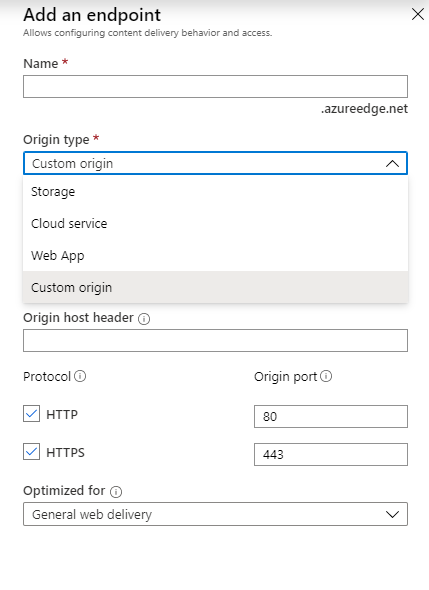
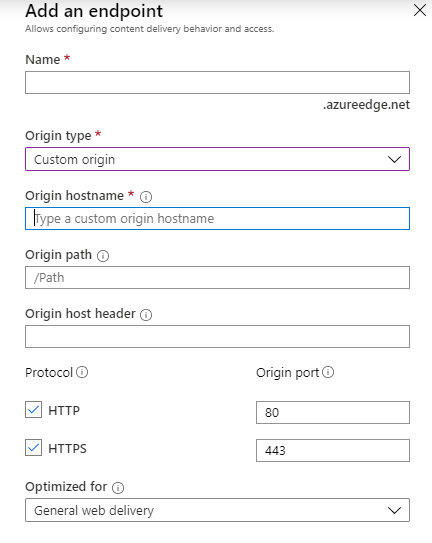
You don't need to make the blob storage an endpoint then. Just use the website itself.
The setting you want is StreamCachedImage you should set that to true.
JimBobSquarePants
on 24 Jan 2020
Thanks for that info. I'll experiment with that approach and see how it works for me. The AzureCDNToolkit is a nice idea and I like its URL translation approach, but using it creates performance issues I can't resolve and it no longer appears to be actively supported, so if I can get performance I need without using it then at least that's a workaround to my current problem.
c9mbundy
on 24 Jan 2020
Your biggest problem is that the blob storage and the website are in different places and have awful connectivity between them. Even if they are in the same datacenter we still have issues with response times.
One small change you can implement immediately is to add memoryMaxMinutes="60" to your cache.config:
<cache name="AzureBlobCache" type="ImageProcessor.Web.Plugins.AzureBlobCache.AzureBlobCache, ImageProcessor.Web.Plugins.AzureBlobCache" maxDays="365" memoryMaxMinutes="60" browserMaxDays="365">
Before the HTTP redirect response is sent to your browser, imageprocessor will check if the file exists in the cache. By adding memoryMaxMinutes it will remember the previous response before checking again. This will make a _small_ improvement in the response time.
 SteveVaneeckhout
on 27 Jan 2020
SteveVaneeckhout
on 27 Jan 2020
@c9mbundy you don't technically need to delegate DNS.
I had the same issue so I:
- Created an Azure CDN pointing at the site but only for requests to
/mediaand allowed caching of querystrings. - Prepended the Azure CDN domain to all image/media URLs in Umbraco.
JasonElkin
on 30 Jan 2020
Also, when PR https://github.com/JimBobSquarePants/ImageProcessor/pull/787 gets merged, the 302 redirects will get cached on the browser, reducing request times for recurring visitors.
Like others mentioned, having the site and Azure Blob storage in different regions is bad for performance, as every incoming request has to check whether a cached image already exists. So the site has to do a request to Azure, wait for the response and if it exists, do the redirect. If it doesn't already exist, it needs to process the image and upload it, before doing the redirect, causing an even bigger delay in response time.
Increasing the memoryMaxMinutes does help a little, as that reduces the requests to Azure by internally caching the responses and assuming it didn't change. Do not set this too high though, as you might redirect to non-existent files (e.g. when the cache is trimmed)!
 ronaldbarendse
on 14 Feb 2020
ronaldbarendse
on 14 Feb 2020
Thanks for all the info.
What is not totally clear to me is when the primary usage is in another region to the site. Accessing Azure Blob Storage media from another region would seem pretty much the same as accessing Website media from another region - which in the case of Umbraco-Cloud websites, is very slow.
Implementing a CDN edge-service for the Azure Blob Storage end-point would seem to make the location of the Azure Blob Storage rather moot - i.e. Azure Blob Storage in the local-usage region or
Azure Blob Storage in a remote-website region would seem to be much of a much-ness if it is being front-ended by a CDN service, as access at both ends would be via the CDN... but perhaps not?
FWIW, the AzureCDNToolkit (0.2.0-alpha-000075) is now updated to support the use of RedisCache, so that the need for reloading the mapping table of local media urls to Azure Blob Storage cache urls, every time the site is restarted, should now be avoidable, if you wanted to use it for bypassing the 302 redirects, but I haven't had time to test that yet, and Azure-RedisCache does have a small fee attached.
c9mbundy
on 14 Feb 2020
Just remember AzureBlobCache is primarily used to offload the cached images to an external location (mainly to preserve local storage space). Like any cache, you want it be as fast as possible, so having it (literally) on the other side of the world doesn't make any sense...
If you just want a CDN, point it to your website's /media path and prepend the endpoint URL when rendering the image URL on a page, like mentioned multiple times by others. You don't even need to use AzureBlobCache for that (but if you do, set StreamCachedImage=true)...
ronaldbarendse
on 14 Feb 2020
Related issues
 rcharb1
·
8Comments
rcharb1
·
8Comments
 kristianstruct
·
4Comments
kristianstruct
·
4Comments
 SergeBerwert
·
4Comments
SergeBerwert
·
4Comments
 skttl
·
5Comments
skttl
·
5Comments
 DocCaliban
·
4Comments
DocCaliban
·
4Comments