Imageprocessor: GDI+ exception when converting some tif files to jpeg
Description
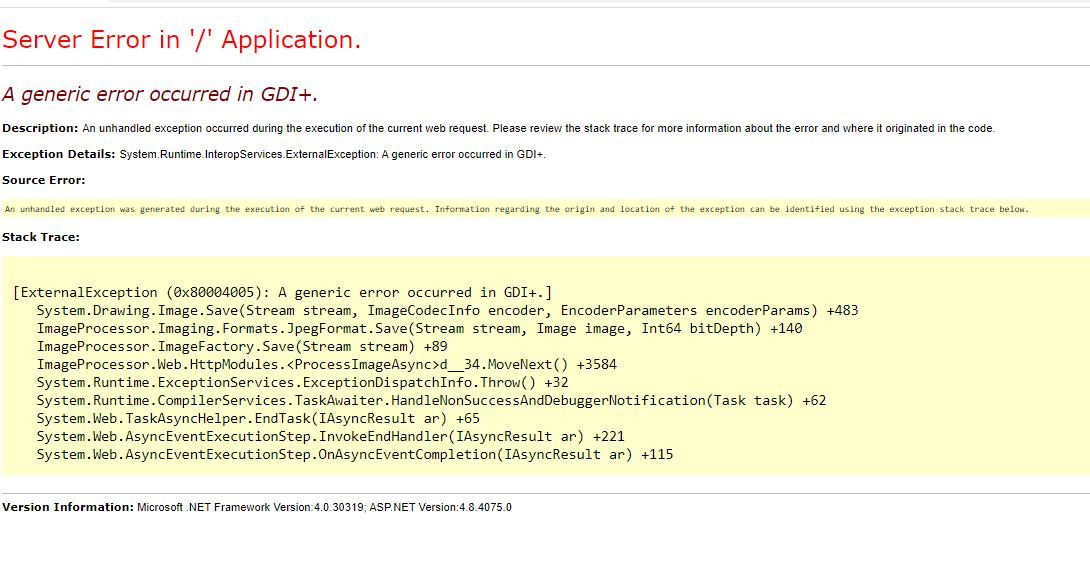
When converting a specific tif file to jpg, using ImageProcessor, an GDI+ Exception is thrown if metadata is preserved.
Note that the conversion completes successfully if preserveExifData: false
Steps to Reproduce
Download file:
https://drive.google.com/file/d/1EHEAb_EOMyg7zzzaWnA0Q4FPhq7_YXZM/view?usp=sharing
Covert to jpeg
using (var imageFactory = new ImageFactory(preserveExifData: true))
{
     imageFactory.Load(inStream)
          .Format(new ImageProcessor.Imaging.Formats.JpegFormat())
          .Save(outStream);
}
System Configuration
- ImageProcessor version: 2.9.0
- .NET Framework version: 4.5.2
 kristianstruct
All 4 comments
Also, It might be interesting that in this case, the order of the parameters in the querystring from imageprocessor.web will have an impact when using meta=false, to ignore metadata when requesting an image.
?meta=false&format=jpg -> This image converts
?format=jpg&meta=false -> This throws the gdi+ exception
kristianstruct
on 29 Jul 2020
Turns out there is a proprietary PropertyItem Tag 37724 in the image which is a Photoshop-specific TIFF Tag
https://www.adobe.com/devnet-apps/photoshop/fileformatashtml/#50577413_pgfId-1039502
I can filter out non standard EXIF items when saving jpegs. It doesn't seem to affect any other formats.
 JimBobSquarePants
on 29 Jul 2020
JimBobSquarePants
on 29 Jul 2020
Thank you for your fast response to this issue.
kristianstruct
on 29 Jul 2020
Now worries, I had an hour to kill over lunch.
Fix is here.
https://www.nuget.org/packages/ImageProcessor/2.9.1
JimBobSquarePants
on 29 Jul 2020
Related issues
 SergeBerwert
·
4Comments
SergeBerwert
·
4Comments
 alecrt
·
7Comments
alecrt
·
7Comments
 magic-john
·
7Comments
magic-john
·
7Comments
 Parovka
·
4Comments
Parovka
·
4Comments
 xumix
·
10Comments
xumix
·
10Comments