Imageprocessor: Resize/Crop are not working as expected
I took the library for crop and resize since I was having
This problem
As you know and you can see, I can achieve crop with a few lines.
With this library I added the extra "Resize" step.
Now I get black bands on top and bottom (and the image is centered between the 2 bands, which is a good thing)
After reading here in issues, I see someone suggested "Also apply Background()"
I set background to white, and the image gets moved to bottom right like saying "Hey now bottom doesn't have a black band! let me move there in the right corner"
TEMPLATE REQUEST
Description
you have it
Steps to Reproduce
run the provided code
System Configuration
windows 10
- ImageProcessor version: last
- Environment (Operating system, version and so on): above
- .NET Framework version: net core 2.2
Why?
 Porkechebure
All 14 comments
Why has the code linked in the stackoverflow question got to do with this library? It’s all System.Drawing code
Nothing. The code is basic, as it's basic what I was trying to do with ImageProcessor.
Anyway.....
Here's the code, since you ask for it (had to put new lines otherwise github puts it all in one line)
`using (Image barcodeImage = barcode.GenerateImage())
            using (MemoryStream stream = new MemoryStream())

            {

                using (ImageFactory imageFactory = new ImageFactory())

                {

                    imageFactory.Load(barcodeImage)

                .Crop(new Rectangle(0, 15, 200, 75))

                .Resize(new Size(200, 100))

                .BackgroundColor(Color.White)

                .Save(stream);

                }

                base64Barcode = Convert.ToBase64String(stream.ToArray());

            }`
Please fill in the issue template
If at least was written somewhere.... one would do it
Porkechebure
on 20 Sep 2019
You saw it when you created this issue: https://github.com/JimBobSquarePants/ImageProcessor/blob/develop/.github/ISSUE_TEMPLATE.md
 dlemstra
on 20 Sep 2019
dlemstra
on 20 Sep 2019
You saw it when you created this issue: https://github.com/JimBobSquarePants/ImageProcessor/blob/develop/.github/ISSUE_TEMPLATE.md
My bad. Added everything which was missing.
Porkechebure
on 20 Sep 2019
Sorry, I deleted the comments, I thought we were overlapping and I misread your first question.
If you use three back ticks before and after your code sample it formats the code properly.
Can you please post the input image and result
 JimBobSquarePants
on 20 Sep 2019
JimBobSquarePants
on 20 Sep 2019
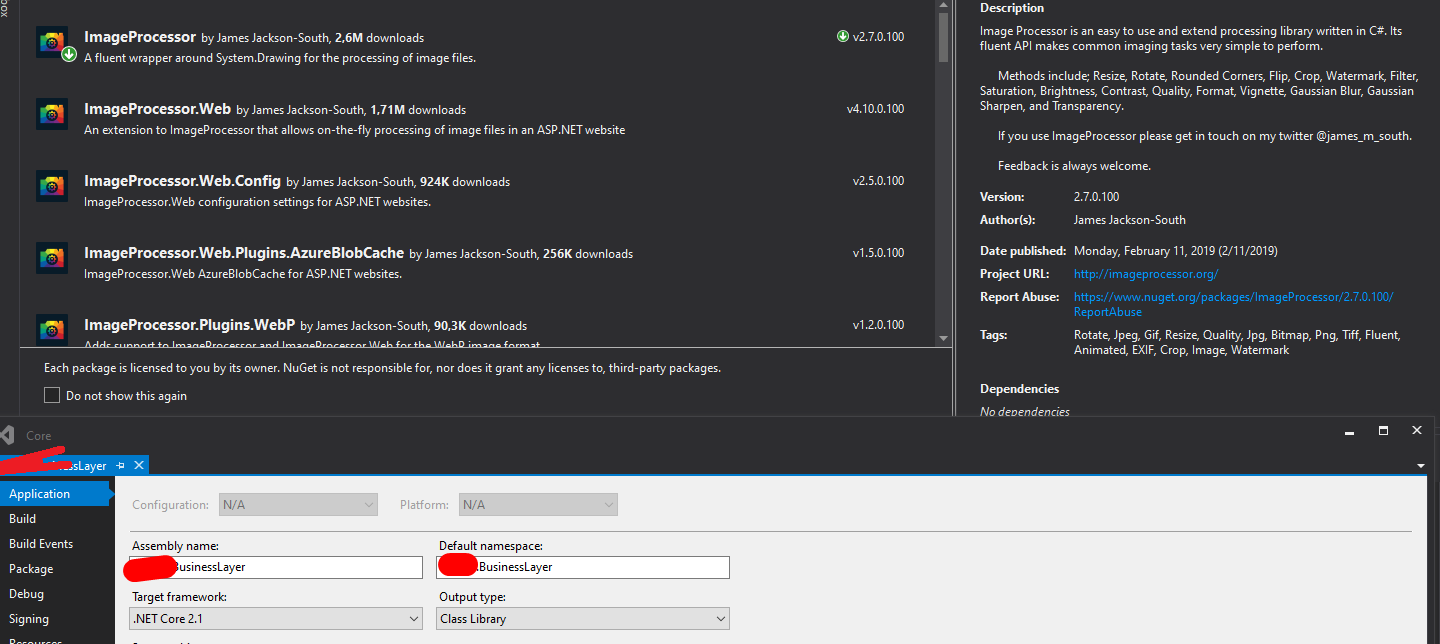
How did you install this in a Net Core app? Shouldn’t be possible via Nuget as it’s not a supported target.
JimBobSquarePants
on 20 Sep 2019
How did you install this in a Net Core app? Shouldn’t be possible via Nuget as it’s not a supported target.
Don't know I think you set wrong dependencies in package
Check attachment
Porkechebure
on 20 Sep 2019
It has none. It’s built against net 4.52 though and is unsupported on net core. I recommend ImageSharp for that target framework
JimBobSquarePants
on 20 Sep 2019
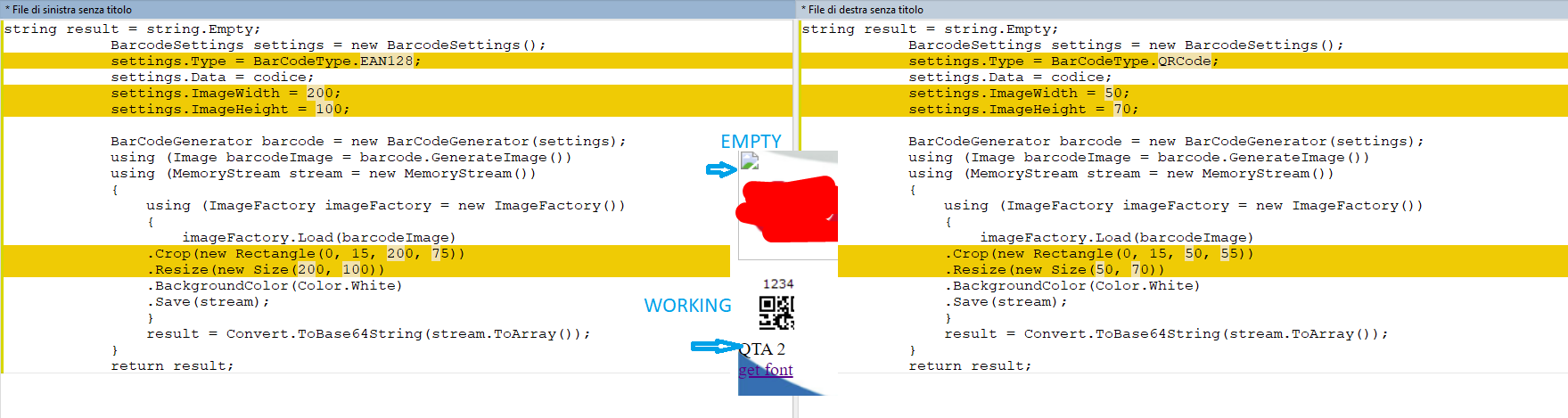
Now from this code I get:
`` BarcodeSettings settings1 = new BarcodeSettings();
settings1.Type = BarCodeType.EAN128;
settings1.Data = codice;
settings1.ImageWidth = 200;
settings1.ImageHeight = 100;
            BarCodeGenerator barcode1 = new BarCodeGenerator(settings1);
            using (Image barcodeImage1 = barcode1.GenerateImage())
            using (MemoryStream stream1 = new MemoryStream())
            {
                using (ImageFactory imageFactory1 = new ImageFactory())
                {
                    imageFactory1.Load(barcodeImage1)
                .Crop(new Rectangle(0, 15, 200, 75))
                .Resize(new Size(200, 100))
                .BackgroundColor(Color.White)
                .Save(stream1);
                }
                base64Barcode = Convert.ToBase64String(stream1.ToArray());
            }
``
Now it gives me
System.ArgumentNullException: Value cannot be null.
Parameter name: encoder
at System.Drawing.Image.Save(Stream stream, ImageCodecInfo encoder, EncoderParameters encoderParams)
System.ArgumentNullException: Value cannot be null.
Parameter name: encoder
at System.Drawing.Image.Save(Stream stream, ImageCodecInfo encoder, EncoderParameters encoderParams)
I know it's when image is in RawFormat but Save() has no parameter to set it as Imageformat.Bmp or something else.
Same code in the same block but with different image works fine
(I put 2 block of the same type as above but the other is called barcode2, barcodeImage2 etc etc
Porkechebure
on 20 Sep 2019
Specifying like this:
            BarCodeGenerator barcode1 = new BarCodeGenerator(settings1);
            using (Bitmap barcodeImage1 = new Bitmap(barcode1.GenerateImage()))
            using (MemoryStream stream1 = new MemoryStream())
            {
                using (ImageFactory imageFactory1 = new ImageFactory())
                {
                    imageFactory1.Load(barcodeImage1)
                .Crop(new Rectangle(0, 15, 200, 75))
                .Resize(new Size(200, 100))
                .BackgroundColor(Color.White)
                .Save(stream1);
                }
                base64Barcode = Convert.ToBase64String(stream1.ToArray());
            }
So it knows it's a bitmap doesn't solve.
Damn... this library is a nasty fucking mass of bugs.... Horrible
Heading to imagesharp....
Porkechebure
on 20 Sep 2019
Just put them in 2 separate methods and made them identical.... still same error, it litterally changes only dimension of images
Ridiculous...
Porkechebure
on 20 Sep 2019
Damn... this library is a nasty fucking mass of bugs.... Horrible
Fundamentally untrue, downloaded millions of times and trusted by many. Run along.
JimBobSquarePants
on 20 Sep 2019
Fundamentally untrue but true:
` using (Bitmap croppedImage = new Bitmap(barcodeImage))
{
//ORIGINAL IMAGE IS 200 Width 100 HEIGHT
croppedImage.Clone(new Rectangle(0, 15, 200, 75), barcodeImage.PixelFormat).Save(stream, ImageFormat.Bmp);
                        imageFactory.Load(stream)
                         .Resize(new Size(200, 100))
                         .BackgroundColor(Color.White)
                         .Save(stream);
                    }`
Even with hacks no solution
Porkechebure
on 20 Sep 2019
How you are going to deny it ahahah you have the proofs here man
Porkechebure
on 20 Sep 2019
Related issues
 Bartmax
·
8Comments
Bartmax
·
8Comments
 x2764tech
·
7Comments
x2764tech
·
7Comments
 SergeBerwert
·
4Comments
SergeBerwert
·
4Comments
 kristianstruct
·
4Comments
kristianstruct
·
4Comments
 clarkd
·
8Comments
clarkd
·
8Comments