Imageprocessor: AWS S3 Cache
Hi Jim,
I'll raise this here but happy to discuss elsewhere if you'd rather (you should be able to DM me on Twitter).
We currently use AWS to host our websites (mainly because we have legacy sites already on AWS and didn't want 2 platforms) and was wondering if you was working on an equivalent to Azure Blob Cache for AWS?
If not is this something you'd be happy for others to look at helping with?
Thanks
Andy
 AndyFelton
All 40 comments
Hi Andy,
There was a start made a long time ago on making an S3 cache.
I've never used S3 though and failed miserable at even getting an account setup properly (Their interface was terrible and there seemed to be no free test option or mocked version like Azure)
The code, is ropey, out of date and will need a bit of work to bring it up to standard but is at least a start. I'd love to get it up and running so any help you can offer would be fantastic.
Cheers
James
 JimBobSquarePants
on 18 Apr 2018
JimBobSquarePants
on 18 Apr 2018
Hi James,
Been busy for a few weeks but now I'm back from CodeGarden hoping to start making a move on this? Looking at the structure think all makes sense.
One thing I didn't find is if there is any Unit Tests for the AzureBlobCache?
Do you want to continue communication here, or would something else be more appropriate?
Thanks
Andy
AndyFelton
on 28 May 2018
Hi Andy,
Here is best thanks.
Yeah, there's not enough unit tests anywhere in the project. 🙁 I'm more than a little ashamed of that.
JimBobSquarePants
on 8 Jun 2018
Hi James,
Done a pull request let me know anything else you need!
Thanks
Andy
AndyFelton
on 10 Jun 2018
@JimBobSquarePants posting something to this to re-open it!
AndyFelton
on 20 Oct 2018
Hey guys. Is the AWS S3 Cache functionality ready for use? I see a project for it in the master branch but there isn't any documentation around how to use it.
 skidmow
on 16 Nov 2018
skidmow
on 16 Nov 2018
Hi James, I am Milind.
I am a big fan of your work. And i am working on my website from a very long time. I used your Image Processor Web libarary in my project for resizing images.
Its works flawless. I shared your work within my community and developer friends they also appreciate it and most of them are using it right now.
James, but from past continuous work of our project in Amazon Web Services (AWS), we are facing a big issue, I found your work on AWS.S3 cache, which we are needing. But found no way to implement it like AzureBlob.
James, I am finding ways to reach you via DM, so if you are reading my message, please can you help us out by leading us know how to implement your code to use S3 for caching.
My email is: [email protected]
Please James, I known you had worked on it a few months ago and had stopped, but being in a big trouble I am asking you for help, as you are the creator and even expert of it.
It will be very helpful for us. As our complete work depends upon it.
Please help us out with any code.
Thanks in advance.
Regards,
Your fan and loving friend
Milind.
 milindchandwe
on 26 Jan 2019
milindchandwe
on 26 Jan 2019
On it... Expect a release this week.
JimBobSquarePants
on 28 Jan 2019
Hi James, it's Milind.
First of all thanks a lot for your quick reply to us.
As the AWS.S3 cache is very needy in order to complete the project, it will be really very helpful as we get it to work. Not just it will help us, but also to many other people who may have requested you in the past. This will also complete your full Image Processor Package including S3 NuGet.
James, I know your time and hard work on it is very precious to us, so thanks a lot once again for your support in it. Please let me know, once you complete it this week. I am waiting for your update.
Once again thank you, brother.
Faithfully,
Your loving fan
Milind.
milindchandwe
on 29 Jan 2019
It's going to be the start of next week before I can ship this I'm afraid. It's taken me longer than I hoped to fix other issues and I can't put any more time towards it this week as I'm travelling. Feel free to copy the code from the develop branch project though in the interim. It will work well.
JimBobSquarePants
on 31 Jan 2019
Hi James, its Milind.
Yes, I totally understand and I have no problem with it brother, please take your time, the complete next week.
Brother your time is precious to me, and henceforth I respect your words.
In a mean while can you please just provide me the link as you said for the code from the develop branch project, so that I can take a look at that.
And brother, you take your time and just a little request as our website has completly become unusable right now, you can also check here: https://www.enoylityimages.com, that please update me as you got your work complete. I will be waiting brother.
Once again thanks a lot for your precious time and support to us.
Yours Faithfully,
Milind.
milindchandwe
on 3 Feb 2019
Available to download now.
https://www.nuget.org/packages/ImageProcessor.Web.Plugins.AmazonS3Cache/
JimBobSquarePants
on 11 Feb 2019
Hi, James brother its Milind.
Hope you are in pink of your health man.
First of all thanks a lot for your precious support, and providing the S3 plugin on our request. Thanks a lot for completing it.
Brother, I downloaded the package and implemented it, but don't know why due to some reason we encountered two errors, I have attached the screenshots in the order you to understand it better.
Bro, it seems out after installing the S3 Cache NuGet it somehow updates the image processor processing.config, which is causing issues, and I don't see any updates in my S3 bucket too.
And we also have the latest versions of the library and its components.
I tried removing the parameters, just for testing purposes and there was no error, but still, S3 cache was not working.
You can also check here: https://www.enoylityimages.com
Bro, I am once again thankful to you for creating it till this point, but please help us out in making it work. Please respond to us in affirmative.
Regards,
Milind.
Image Processor AWS S3 Cache Enoylity.zip
milindchandwe
on 11 Feb 2019
Hi Milind,
Just looked at this as I helped James with some of the S3 work. I'll need
James help with the nuget install as I'm not sure how that works.
On the S3 images are your source images in S3 or load disk? Can you confirm
the S3 bucket for the cached images? Looking at
https://www.enoylityimages.com I see all your images are prefixed with
/remote.axd if I extract the image name after this I see an image - not
sure at the moment if this is an issue or not.
Thanks
Andy
On Mon, 11 Feb 2019 at 14:49, milindchandwe notifications@github.com
wrote:
Hi, James brother its Milind.
Hope you are in pink of your health man.
First of all thanks a lot for your precious support, and providing the S3
plugin on our request. Thanks a lot for completing it.Brother, I downloaded the package and implemented it, but don't know why
due to some reason we encountered two errors, I have attached the
screenshots in the order you to understand it better.
Bro, it seems out after installing the S3 Cache NuGet it somehow updates
the image processor processing.config, which is causing issues, and I don't
see any updates in my S3 bucket too.
And we also have the latest versions of the library and its components.I tried removing the parameters, just for testing purposes and there was
no error, but still, S3 cache was not were working.
You can also check here: https://www.enoylityimages.comBro, I am once again thanks to you for creating it till this point, but
please help us out in making it work. Please respond to us in affirmative.Regards,
Milind.
Image Processor AWS S3 Cache Enoylity.zip
https://github.com/JimBobSquarePants/ImageProcessor/files/2851508/Image.Processor.AWS.S3.Cache.Enoylity.zip—
You are receiving this because you authored the thread.
Reply to this email directly, view it on GitHub
https://github.com/JimBobSquarePants/ImageProcessor/issues/664#issuecomment-462354204,
or mute the thread
https://github.com/notifications/unsubscribe-auth/AJ5q8tX2qzYIHtLQpNkKud0lssNHLlFmks5vMYL3gaJpZM4TYjgf
.
--
~~~~~~
Andy Felton (BEng)
Technical Director
Nemisys
www.nemisys.uk.com
E-mail: andy.[email protected]
Support: [email protected]
Tel: +44 (0)844 706 9665
Fax: +44 (0) 870 458 6323
~~~~~~
AndyFelton
on 11 Feb 2019
Hi Andy its Milind.
Thanks for your quick response buddy.
On the S3 images are your source images in S3 or load disk?
Yes, all our images are getting stored in S3 only, not locally.
Can you confirm the S3 bucket for the cached images?
Yes, we confirm it, because our whole work is pre-based on AWS only, henceforth its very important.
Andy, you are only able to see images because they are getting stored on EBS inside EC2 drive, where only code resides, and you can too understand it get delete on every re-deployment of the website.
And saving on EBS is totally impractical.
The errors I see, are showing in Config files of image processor. Andy please see my attached zip file in my previous message.
And hence I don't know why they are not working!
Andy my brother, I truly appreciate your and James support in it, so thanks alot for your help in this.
If you need any other information or my help please feel free to led me know, but as our website is in production we need your support in it.
Regards,
Milind.
milindchandwe
on 11 Feb 2019
Hi Milind,
Can you confirm which versions of the other ImageProcessor components you
have installed – maybe send me you packages.config.
Thanks
Andy Felton
Technical Director
AndyFelton
on 11 Feb 2019
Hi, Andy its Milind.
I am having;
ImageProcessor 2.7.0.100
ImageProcessor.Web.Config 2.5.0.100
ImageProcessor.Web 4.10.0.100
ImageProcessor.Web.Plugins.AmazonS3Cache 1.0.0.100
AWSSDK.Core 3.3.29.3
AWSSDK.S3 3.3.26.5
Andy, as you can see that almost all the latest versions are installed.
And brother here is my packages.config in the attachments as a zip file.
One more important thing I observed that, after installing S3 Cache ImageProcessor.Web.Plugins.AmazonS3Cache it changed the processing.config. In the attachments, I have also added the previous processing.config before installing the plugin.
previous-processing_config.zip
Hope this will help you to understand it better brother.
Regards,
Milind.
milindchandwe
on 11 Feb 2019
@milindchandwe those errors look to me like you haven't pushed the correct ImageProcessor.Web binaries to your live deployment and are still referencing the old version.
Those properties were added in version 4.9.2.19 released on 2018-09-04
JimBobSquarePants
on 12 Feb 2019
Hi, James its Milind.
Thanks for your reply.
James, for confirmation I reinstalled all the packages with the latest NuGet versions. But still I am encountering these two errors.
Parser Error Message: Unrecognized attribute 'metaDataMode'. Note that attribute names are case-sensitive.
After removing the metaDataMode attribute from the processing.config file (for testing), I see the following error.
Parser Error Message: Unrecognized attribute 'memoryMaxMinutes'. Note that attribute names are case-sensitive.
But everything is updated to the latest one. Even I deleted the config folder data before re-installing all the packages again.
And in Images on Website, it is showing HTTP 404 - as images are not getting cached in S3.
James, so what may have gone wrong. Any idea brother.
Even if you required me to share my screen with you, please feel free to lead me know.
milindchandwe
on 12 Feb 2019
It’s definitely a binary mismatch. You should check the version numbers of the dlls in you deployed bin folder.
 James-Jackson-South
on 12 Feb 2019
James-Jackson-South
on 12 Feb 2019
Wow man, it really worked.
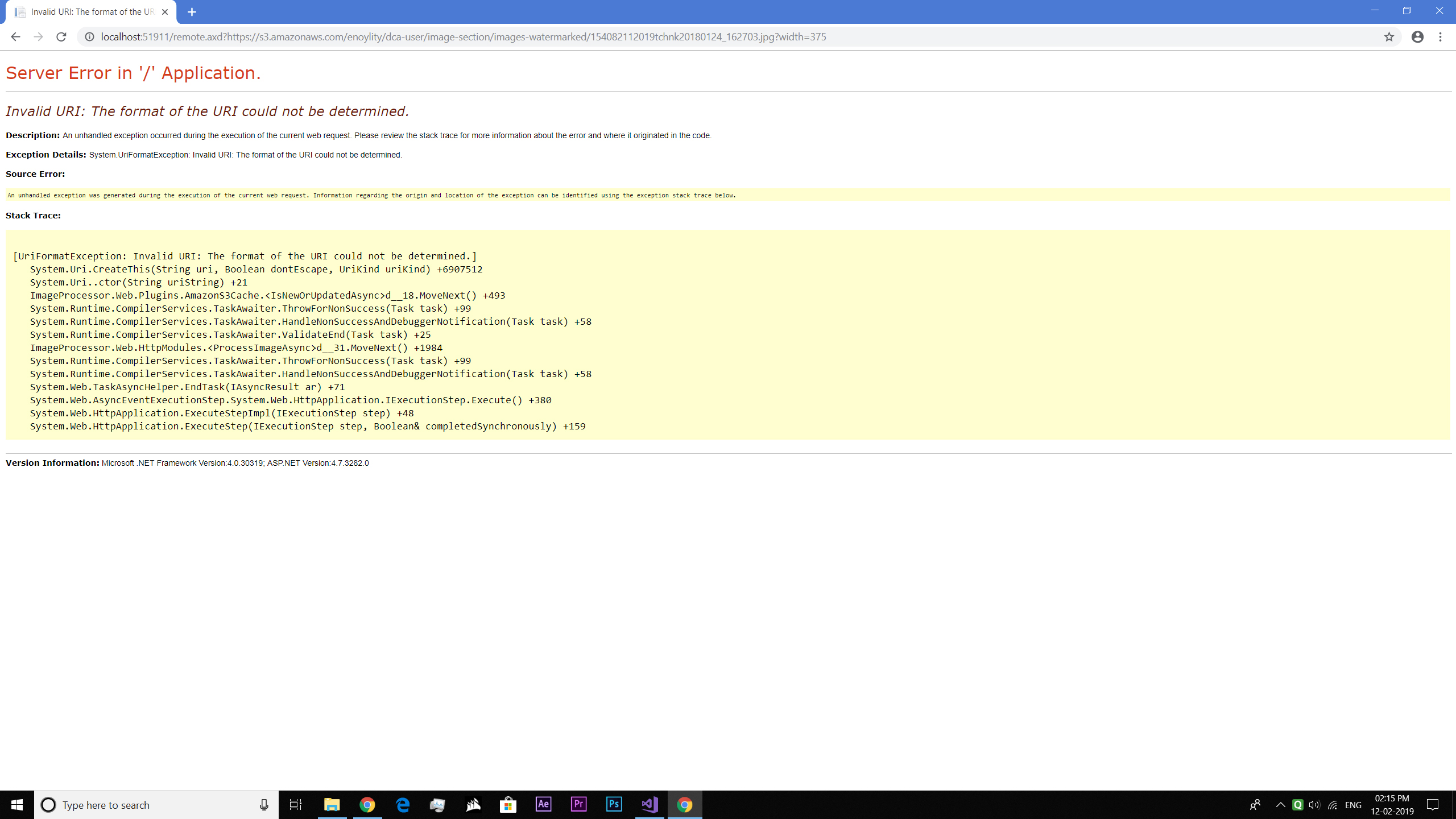
Yes, brother after reinstalling all the packages, I checked the bin and it was referencing the previous versions. I removed them and reinstalled the new versions and now it was showing the latest installed versions. And this also clears those two errors, and now there is no error. I am really thankful to you for clearing out these, but our major concern was with the S3 Cache which is still continuing. I redeployed the new version of my website and still, I am not able to see any cache folder in my S3 bucket. Because it seems it is not even touching S3 bucket for the cache. It seems this time it is unable to get the URI.
It shows error: Invalid URI: The format of the URI could not be determined.
Please check out my website link: https://www.enoylityimages.com
I am also attaching the updated config folder. James, please check my cache.config file, that all parameters I had mentioned are correct or not, or do I need to update any settings to my S3 Bucket or in my code?
Here is a link of an image on our site: https://www.enoylityimages.com/remote.axd?https://s3.amazonaws.com/enoylity/dca-user/image-section/images-watermarked/154162112019glylx20180124_173715.jpg?width=375
Please check it out, brother.
updated_config_file.zip
milindchandwe
on 12 Feb 2019
Hi Milind,
Just looked through this and setup the test website using the released
Nuget packages and can confirm I see S3 cache with a configuration which is
similar to yours. I need to work on some other stuff for a while but will
try and get back on to this later today.
Thanks
Andy
On Tue, 12 Feb 2019 at 06:30, milindchandwe notifications@github.com
wrote:
Wow man, it really worked.
Yes, brother after reinstalling all the packages, I checked the bin and it
was referencing the previous versions. I removed them and reinstalled the
new versions and now it was showing the latest installed versions. And this
also clears those two errors, and now there is no error. I am really
thankful to you for clearing out these, but our major concern is S3 Cache
which is still continued. I redeployed the new version of my website and
still, I am not able to see any cache folder in my S3 bucket. It is still
saving the file on server storage only.Please check out my website link: https://www.enoylityimages.com
I am also attaching the updated config folder. James do I need to add any
settings to my S3 Bucket or any updates in my code? Because it seems it is
not even touching S3 bucket for the cache.Please check it out, brother.
updated_config_file.zip
https://github.com/JimBobSquarePants/ImageProcessor/files/2854355/updated_config_file.zip—
You are receiving this because you authored the thread.
Reply to this email directly, view it on GitHub
https://github.com/JimBobSquarePants/ImageProcessor/issues/664#issuecomment-462633740,
or mute the thread
https://github.com/notifications/unsubscribe-auth/AJ5q8gSbliYsB2hyCR8PM7FGdq8xpx0sks5vMl95gaJpZM4TYjgf
.
--
~~~~~~
Andy Felton (BEng)
Technical Director
Nemisys
www.nemisys.uk.com
E-mail: andy.[email protected]
Support: [email protected]
Tel: +44 (0)844 706 9665
Fax: +44 (0) 870 458 6323
~~~~~~
AndyFelton
on 12 Feb 2019
That url is wrong for a start. (No need for second https://) Otherwise I have no idea what else could be going on because I don't know what your setup is.
My advice:
- Download the source.
- Set your config in the sample website to match your setup.
- Attach a debugger and figure out what is going on.
You need to start acting and thinking like a developer now rather than simply firing off questions on this issue tracker. This is for issues only, we have a Gitter channel for chat.
JimBobSquarePants
on 12 Feb 2019
Hi James and Andy, thanks for your response.
Bro, there is no need to make a new sample website. We have already configured our traffic, and I understand your saying this because of being in production. But James, brother we have no concern regarding it. It will be better to make it work in production only.
And buddy, the thing is that, as you said regarding second https:// yes I am having an eye on it, as the S3 cache started working we are gonna update the urls in all the pages.
By the way brother, have you got any idea, why is it giving an error?
As all the files of S3.Cache are in the ddl, I have no idea how to add a breakpoint in it.
Brother, its my little request to you, I know how much important your time is, and I do respect it, including Andy support too. But if possible can you give me just 5-10 mins by having a screen share among us. This way, I will be able to show you the complete project too.
If still its difficult for you, then I can understand it also, afterall your time is important but still it need to make it work.
And Andy any update regarding your testing demo.
Regards,
Milind.
milindchandwe
on 12 Feb 2019
Hi Miland,
No further information all I tried worked and the S3 cache was populated.
As James suggested best next step would be try the sample app writing to
your cache with your configuration to see if you can get it to work.
Thanks
Andy Felton
Technical Director
[image: Description: Description: cid:3351500905_1077630]
andy.[email protected] andy.felton@nemisys.uk.com
Support & switchboard: 0844 706 9665
Support email: [email protected]
Registered address: Janelle House, Hartham Lane, Hertford, Hertfordshire
SG14 1QN
UK Company number: 04306749
From: milindchandwe notifications@github.com
Sent: 12 February 2019 17:49
To: JimBobSquarePants/ImageProcessor ImageProcessor@noreply.github.com
Cc: AndyFelton andy.felton@nemisys.uk.com; Author <
[email protected]>
Subject: Re: [JimBobSquarePants/ImageProcessor] AWS S3 Cache (#664)
Hi James and Andy, thanks for your response.
Bro, there is no need to make a new sample website. We have already
configured our traffic, and I understand your saying this beacuse of being
in production. But James, brother we have no concern regarding it. It will
be better to make it work in production only.
And buddy, the thing is that, as yoi said regarding second https:// yes I
am having an eye on it, as the S3 cache started working we are gonna update
the urls in all the pages.
By the way brother, have you got any idea, why is it giving an error?
Brother, its my little request to you, I know how much important your time
is, and I do respect it, including Andy support too. But if possible can
you give me just 5-10 mins by having a screen share among us. This way, I
will be able to show you the complete project too.
If still its difficult for you, then I can understand it also, afterall we
need to make it work.
And Andy any update regarding your testing demo.
James, I know you are highly expert in the image processor brother,
afterall you are the creator, I really request you to help me out in
sorting this little S3 issue also.
Regards,
Milind.
—
You are receiving this because you authored the thread.
Reply to this email directly, view it on GitHub
https://github.com/JimBobSquarePants/ImageProcessor/issues/664#issuecomment-462861977,
or mute the thread
https://github.com/notifications/unsubscribe-auth/AJ5q8jO-gBW7PGM5R20zS7GTUdfKY7SBks5vMv5wgaJpZM4TYjgf
.
AndyFelton
on 12 Feb 2019
Hi Andy,
You said your is working man. Brother can you please send me your sample
app project, just remove your credentials and send me the demo. I will add
up mine and use the same code.
And Andy, have you encountered any error like mine in it?
Please led me know.
Faithfully,
Milind.
On Tue, 12 Feb 2019, 11:35 pm AndyFelton <[email protected] wrote:
Hi Miland,
No further information all I tried worked and the S3 cache was populated.
As James suggested best next step would be try the sample app writing to
your cache with your configuration to see if you can get it to work.Thanks
Andy Felton
Technical Director
[image: Description: Description: cid:3351500905_1077630]
andy.[email protected] andy.felton@nemisys.uk.com
Support & switchboard: 0844 706 9665
Support email: [email protected]
Registered address: Janelle House, Hartham Lane, Hertford, Hertfordshire
SG14 1QN
UK Company number: 04306749From: milindchandwe notifications@github.com
Sent: 12 February 2019 17:49
To: JimBobSquarePants/ImageProcessor ImageProcessor@noreply.github.com
Cc: AndyFelton andy.felton@nemisys.uk.com; Author <
[email protected]>
Subject: Re: [JimBobSquarePants/ImageProcessor] AWS S3 Cache (#664)Hi James and Andy, thanks for your response.
Bro, there is no need to make a new sample website. We have already
configured our traffic, and I understand your saying this beacuse of being
in production. But James, brother we have no concern regarding it. It will
be better to make it work in production only.And buddy, the thing is that, as yoi said regarding second https:// yes I
am having an eye on it, as the S3 cache started working we are gonna update
the urls in all the pages.By the way brother, have you got any idea, why is it giving an error?
Brother, its my little request to you, I know how much important your time
is, and I do respect it, including Andy support too. But if possible can
you give me just 5-10 mins by having a screen share among us. This way, I
will be able to show you the complete project too.If still its difficult for you, then I can understand it also, afterall we
need to make it work.And Andy any update regarding your testing demo.
James, I know you are highly expert in the image processor brother,
afterall you are the creator, I really request you to help me out in
sorting this little S3 issue also.Regards,
Milind.—
You are receiving this because you authored the thread.
Reply to this email directly, view it on GitHub
<
https://github.com/JimBobSquarePants/ImageProcessor/issues/664#issuecomment-462861977,
or mute the thread
<
https://github.com/notifications/unsubscribe-auth/AJ5q8jO-gBW7PGM5R20zS7GTUdfKY7SBks5vMv5wgaJpZM4TYjgf.
—
You are receiving this because you were mentioned.
Reply to this email directly, view it on GitHub
https://github.com/JimBobSquarePants/ImageProcessor/issues/664#issuecomment-462868938,
or mute the thread
https://github.com/notifications/unsubscribe-auth/APOFzh_9XRc38EsOq4G69NWgMXdN5CQGks5vMwJygaJpZM4TYjgf
.
milindchandwe
on 12 Feb 2019
James or Andy, can you confirm one thing.
Is there any mistake in my configurations in the config folder here.
updated_config_file.zip
Please have a look and confirm.
Regards,
Milind.
milindchandwe
on 12 Feb 2019
Hi,
I’ll sort it for you tomorrow. Is the error you’re referring to being that images aren’t added to the cache, if so no I’ve not seen that.
Thanks
Andy
Sent from my iPad
On 12 Feb 2019, at 18:10, milindchandwe notifications@github.com wrote:
Hi Andy,
You said your is working man. Brother can you please send me your sample
app project, just remove your credentials and send me the demo. I will add
up mine and use the same code.And Andy, have you encountered any error like mine in it?
Please led me know.
Faithfully,
Milind.On Tue, 12 Feb 2019, 11:35 pm AndyFelton <[email protected] wrote:
Hi Miland,
No further information all I tried worked and the S3 cache was populated.
As James suggested best next step would be try the sample app writing to
your cache with your configuration to see if you can get it to work.Thanks
Andy Felton
Technical Director
[image: Description: Description: cid:3351500905_1077630]
andy.[email protected] andy.felton@nemisys.uk.com
Support & switchboard: 0844 706 9665
Support email: [email protected]
Registered address: Janelle House, Hartham Lane, Hertford, Hertfordshire
SG14 1QN
UK Company number: 04306749From: milindchandwe notifications@github.com
Sent: 12 February 2019 17:49
To: JimBobSquarePants/ImageProcessor ImageProcessor@noreply.github.com
Cc: AndyFelton andy.felton@nemisys.uk.com; Author <
[email protected]>
Subject: Re: [JimBobSquarePants/ImageProcessor] AWS S3 Cache (#664)Hi James and Andy, thanks for your response.
Bro, there is no need to make a new sample website. We have already
configured our traffic, and I understand your saying this beacuse of being
in production. But James, brother we have no concern regarding it. It will
be better to make it work in production only.And buddy, the thing is that, as yoi said regarding second https:// yes I
am having an eye on it, as the S3 cache started working we are gonna update
the urls in all the pages.By the way brother, have you got any idea, why is it giving an error?
Brother, its my little request to you, I know how much important your time
is, and I do respect it, including Andy support too. But if possible can
you give me just 5-10 mins by having a screen share among us. This way, I
will be able to show you the complete project too.If still its difficult for you, then I can understand it also, afterall we
need to make it work.And Andy any update regarding your testing demo.
James, I know you are highly expert in the image processor brother,
afterall you are the creator, I really request you to help me out in
sorting this little S3 issue also.Regards,
Milind.—
You are receiving this because you authored the thread.
Reply to this email directly, view it on GitHub
<
https://github.com/JimBobSquarePants/ImageProcessor/issues/664#issuecomment-462861977,
or mute the thread
<
https://github.com/notifications/unsubscribe-auth/AJ5q8jO-gBW7PGM5R20zS7GTUdfKY7SBks5vMv5wgaJpZM4TYjgf.
—
You are receiving this because you were mentioned.
Reply to this email directly, view it on GitHub
https://github.com/JimBobSquarePants/ImageProcessor/issues/664#issuecomment-462868938,
or mute the thread
https://github.com/notifications/unsubscribe-auth/APOFzh_9XRc38EsOq4G69NWgMXdN5CQGks5vMwJygaJpZM4TYjgf
.—
You are receiving this because you authored the thread.
Reply to this email directly, view it on GitHub, or mute the thread.
AndyFelton
on 12 Feb 2019
Hi, Andy its Milind. Hope you are doing great.
Andy, here is a sample application, that has the same exact situation as of the live production app.
Download Sample App: https://drive.google.com/open?id=1ABldfKxHgpFE-MBBYeR_bizhngZMYXPI
It created it in Visual Studio 2017, and basically I tried all possibilities to sort out the error, but still, I was getting the same error in this sample app also.
Invalid URI: The format of the URI could not be determined.
Andy, please download this sample app on your PC from the above Google Drive link. I had already installed all the required NuGet packages in it, so you no need to worry, simply run it. Just open the Resize.aspx in it, as you will find everything in it.
I think it's causing because there is some issue in S3 Cache code.
If James, you are seeing this message, please check it out, brother as I am waiting for the response.
Please update.
Regards,
Milind.
milindchandwe
on 14 Feb 2019
Hi Miland,
I have placed my setup in to the cache.config file and seen files be
written to my S3 cache so this has got to be something wrong with your
config.
In the config you’ve sent me I can see RegionEndpoint is set to USEast1
this should be us-east-1, also why is the CachedCDRNRoot not set?
Hope that helps
Thanks
Andy Felton
Technical Director
AndyFelton
on 14 Feb 2019
My dear brothers, James and Andy, its Milind over here man.
First of all sorry for delayed reply, but was working on project to make everything perfect.
Bro, as Andy send me his sample project, I figured out I was missing CDN and using Region.Endpoints, which after correction, there was no errors brother.
Not just this even the AWS.S3 cache started working, even I setup for cloud remote files and it's working flawless.
Here it is: https://www.enoylityimages.com
James and Andy, I really want to thank both of your from the bottom of my heart, as James started working on my request from weeks ago and Andy you to supporting him in the whole S3 stuff. Really brother, thank you so so very much for your precious support and time giving to me.👍
Andy, my name is Milind not Miland, still I loved to hear it from you brother. 😅
Even a big Thank You to both of you guys from my Mom, as when I shared this thing with her, she said.
Once again this was really not possible with you, so thanks James and Andy for your support and precious time, and I pray that may your image processor grow in millions, and even I will too share it brother.
Regards,
Milind Chandwe.
milindchandwe
on 16 Feb 2019
Big props to @AndyFelton here. He did by far most of the work. I'm very glad you got everything sorted out Milind, the best of luck with your project.
JimBobSquarePants
on 17 Feb 2019
James, thanks for your work with ImageProcessor and the especially the S3 cache! I have imageprocessor in Umbraco fully integrated now with S3.
A super easy install via nuget but to be honest the hardest part was trying to decipher the cache.config keys.
1) Wondering why this great plugin is not listed with the other plugins on the Nuget page? It should be added there for sure.
2) cache.config file notes. I would be happy to add comments to this file and share with other but can you please clarify the following:
What is the difference between RegionEndpoint and SourceRegionEndpoint?
Assuming that the CachedCDNRoot is the root URL of the S3 bucket? ie: "https://mybucket.s3.ca-central-1.amazonaws.com/"
What is CloudSourceURI?
What is StreamCachedImage?
If you can answer these questions, I'll note a file and send back to you and maybe you can include that config in the release.
Thanks!
Jamie
 jattwood
on 20 Sep 2019
jattwood
on 20 Sep 2019
Hello there!
I was wondering why use CDN/CloudSorce?
I use this other plugin to save my images in S3 from Umbraco: https://github.com/ElijahGlover/Umbraco-S3-Provider and somehow it manages to save my files without CloudSource.
Whats make this plugin case diferent?
Thanks in advance!
 laura-san-martin
on 4 Jun 2020
laura-san-martin
on 4 Jun 2020
Laura, Umbraco S3 provider stores media on the cloud, however this plugin is a great compliment to that S3 media provider because image processor (the default tool used in Umbraco to render cropped or processed images) will take the processed images from S3 and store them locally on the server in the Temp_Data/cache folder. So after you use image processor to crop a banner via code for example, Umbraco will no longer reference S3, looking instead to the Temp_Data/cache folder for the cached image. So while in a load balanced environment you have centralized media via the S3 media provider, all of a sudden you might have different versions of the cache folder on each of your different servers depending on requests. This plugin allows you to write the cache folder to S3 alongside your media folder. Then all your Umbraco instances can access a single cloud based cache folder.
jattwood
on 4 Jun 2020
Hello there!
Thanks for the quick reply!
Yeah, I'm having exacly this "problem" in a Project for a client. I need all my images stored in S3, not in the production machine in EC2, but if I use any of ImageProcessorWeb methods, all processed images are saved in APP_Data/cache, like you said.
My problem is, I don't have access to AWS console of my client, just the EC2 machine and the Keys for S3 storage.
So, if I'm not wrong, to use ImageProcessor AmazonS3Cache I need to configure a CloudFront service as a connection between the production machine and S3, but, the plugin Umbraco-S3-Provider does'nt require CloudFront.
I was thinking of implementing the IImageCache using the logic of the S3 provider. Yesterday I tried to make heads and tails of the two codes but Im still far of acomplish anything.
I'll study the codes a little more, if I figure something out I let you know :).
Thanks again!
laura-san-martin
on 5 Jun 2020
Laura, you don't need cloudfront, just create a cache folder on s3 next to your media folder and then set up the s3 keys in the S3 cache config. The images from image processor will get processed on the server and written to the cache folder on s3 after you configure this plugin correctly. Then, instead of looking locally for the cached files, your Umbraco instance will look for the cache folder on s3. You can of course configure those images to be served from cloudfront as well after they are put up on s3, but that would require some extra path changes in your view files I believe to re route/map the url from the s3 cache folder to your cloudfrount url. I have not need to go to that level yet. Hope that helps...
jattwood
on 5 Jun 2020
Ok, I think I've made some confusion by reading some of the comments in this thread, sorry >. So let me see if I got it right now.
I assumed, wrong, that a CloudFront service was needed. (fail)
In my cache config I had removed the disk cache, but actually it is still needed to upload the manipulated image to S3.
That's my config file now:
<caches>
    <cache name="DiskCache" type="ImageProcessor.Web.Caching.DiskCache, ImageProcessor.Web" maxDays="365" memoryMaxMinutes="1" browserMaxDays="7">
        <settings>
            <setting key="VirtualCachePath" value="~/app_data/cache" />
        </settings>
    </cache>
    <cache name="AmazonS3Cache" type="ImageProcessor.Web.Plugins.AmazonS3Cache.AmazonS3Cache, ImageProcessor.Web.Plugins.AmazonS3Cache" maxDays="365">
        <settings>
            <setting key="AwsAccessKey" value="XXXXXX" />
            <setting key="AwsSecretKey" value="XXXXXX" />
            <setting key="AwsBucketName" value="bucketName" />
            <setting key="AwsCacheKeyPrefix" value="cache" />
            <setting key="RegionEndpoint" value="us-east-1" />
            <setting key="SourceRegionEndpoint" value="us-east-1" />
            <setting key="CachedCDNRoot" value="https://bucketName.us-east-1.amazonaws.com/" />
            <setting key="CloudSourceURI" value="https://bucketName.s3.amazonaws.com/media/" />
            <setting key="CachedCDNTimeout" value="2000" />
            <setting key="StreamCachedImage" value="false" />
        </settings>
    </cache>
</caches>
And the security config look like this:
<services>
    <service prefix="media/" name="CloudImageService" type="ImageProcessor.Web.Services.CloudImageService, ImageProcessor.Web">
            <settings>
            <setting key="Container" value="" />
            <setting key="MaxBytes" value="8194304" />
            <setting key="Timeout" value="30000" />
                <setting key="Host" value="https://bucketName.s3.amazonaws.com/media/" />
            </settings>
    </service>
    <service prefix="remote.axd" name="RemoteImageService" type="ImageProcessor.Web.Services.RemoteImageService, ImageProcessor.Web">
        <settings>
            <setting key="MaxBytes" value="8194304" />
            <setting key="Timeout" value="3000" />
            <setting key="Protocol" value="https" />
        </settings>
            <whitelist>
            <add url="https://bucketName.s3.amazonaws.com/"/>
            <add url="https://bucketName.us-east-1.amazonaws.com/"/>
            <add url="https://s3.amazonaws.com" />
            <add url="https://bucketName.us-east-1.amazonaws.com/" />
            <add url="https://s3.us-east-1.amazonaws.com/bucketName/" />
        </whitelist>
    </service>
</services>
Then call the image like this:
<img src="@("remote.axd?" + imgURL + "?width=215&height=270&mode=min")" />
The image is risized perfectly, but never get uploaded to S3, I've got no erros and looking at the network calls in the browser developer tools, it doesn't even mention the bucket.
I'm really sory for all the confusion, but I can't find a way to make this work.
Sorry for the trouble and thanks again!
laura-san-martin
on 5 Jun 2020
Hey Laura, looks like you are defining your caches, but not setting one. You should have as the first line in the cache:
<caching currentCache="AmazonS3Cache">
  <caches>...
OMG (-‸ლ) I'm feeling the stupiest person alive right now.
I've must have copy and pasted something wrong along the way.
Now it's working PERFECTLY!!!
This is the best plugin ever!
Sorry for taking your time and thanks for have the patience with my dumb questions.
You're the BEST <3!
laura-san-martin
on 17 Jun 2020
Related issues
 Leftyx
·
5Comments
Leftyx
·
5Comments
 SergeBerwert
·
4Comments
SergeBerwert
·
4Comments
 kristianstruct
·
4Comments
kristianstruct
·
4Comments
 clarkd
·
8Comments
clarkd
·
8Comments
 Jogai
·
6Comments
Jogai
·
6Comments
Most helpful comment
My dear brothers, James and Andy, its Milind over here man.
First of all sorry for delayed reply, but was working on project to make everything perfect.
Bro, as Andy send me his sample project, I figured out I was missing CDN and using Region.Endpoints, which after correction, there was no errors brother.
Not just this even the AWS.S3 cache started working, even I setup for cloud remote files and it's working flawless.
Here it is: https://www.enoylityimages.com
James and Andy, I really want to thank both of your from the bottom of my heart, as James started working on my request from weeks ago and Andy you to supporting him in the whole S3 stuff. Really brother, thank you so so very much for your precious support and time giving to me.👍
Andy, my name is Milind not Miland, still I loved to hear it from you brother. 😅
Even a big Thank You to both of you guys from my Mom, as when I shared this thing with her, she said.
Once again this was really not possible with you, so thanks James and Andy for your support and precious time, and I pray that may your image processor grow in millions, and even I will too share it brother.
Regards,
Milind Chandwe.