Imageglass: Mouse cursor doesnt work if Tooltip blinks - Define the Mouse Click Area ..
System information:
- Windows OS version: Windows 10
- ImageGlass version: 7.6.4.30
To Reproduce
Steps to reproduce the behavior:
- Enlarge the program
- Get the mouse near the "Next" / "previous" buttons
- You cant click if you have blinking "tooltip"
Actual behavior:
The tool tip is disabled , still its showing when you dont place your mouse properly over the "NEXT" "PREVIOUS" buttons , or any button of that sort
Expected behavior:
The tool tip shouldnt blink. Also the Cursor area needs to be enlarged so that program doesnt misread its position/box area.
Screenshots:
adding a gif ...

Additional context:
 NR2014
All 12 comments
This doesnt happen when the program is run in a smaller window mode.. or in full screen. It only happens when its in maxed window mode.
If the cursor is not in the middle of the button or when the tooltip is blinking , even if you clock the mouse , nothing happen. the program doesnt register the click. Also is there a way to disable that tooltip message ?
NR2014
on 11 Aug 2020
Thanks for the info. There is no solution for disabling tooltip yet.
 d2phap
on 11 Aug 2020
d2phap
on 11 Aug 2020
Thanks , but i think something has to be done for "HIT BOX" area for these button. Even slight click away from the centre either activated the blinking tooltip or doesnt register the click at all.
Also i noted that on second click , it registers.
NR2014
on 11 Aug 2020
See issue #634
 fire-eggs
on 3 Sep 2020
fire-eggs
on 3 Sep 2020
Fixed in IG Moon https://imageglass.org/moon
d2phap
on 13 Sep 2020
Works wonderful. I simply replaced all the files from the zip to current location. Lost my settings.. but no problem.. will get it back.
The issue is resolved. Please while we are at it, give option to whether show "tooltip" or not.
Thanks again for fixing it.
NR2014
on 13 Sep 2020
@NR2014
Please while we are at it, give option to whether show "tooltip" or not.
You can set IsHideTooltips to True in igconfig.xml file. This is hidden option, not showing on UI yet.
d2phap
on 13 Sep 2020
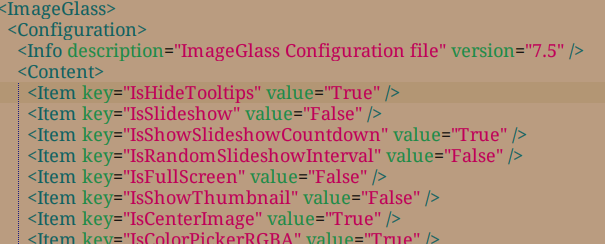
I think i did it correctly.. still its showing tooltip ..
CMIIW.
NR2014
on 14 Sep 2020
I think i did it correctly.. still its showing tooltip ..
Yes, you have it correct. I have just verified that IsHideTooltips does stop showing tooltips for me.
What you need to do is make sure there is no second "IsHideTooltips" line in the XML file. Annoyingly, it overrides any earlier line, and is probably set False.
fire-eggs
on 14 Sep 2020
Just checked , there is only one "IsHideTooltips" in the xml file.
I even tried to put that line at the end , still the same result.
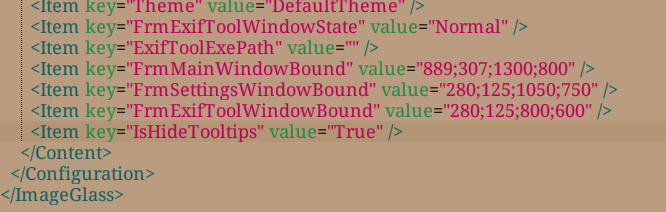
NR2014
on 15 Sep 2020
Added option in Settings to hide toolbar tooltips.
https://imageglass.org/moon
🎈 Please note that, there is a known issue when hiding tooltip, then going back to Settings > Toolbar, the text of toolbar buttons does not show in the lists

d2phap
on 29 Sep 2020
Fixed the known error mentioned above https://imageglass.org/moon
d2phap
on 11 Oct 2020
Related issues
 MoneyAllDay
·
5Comments
MoneyAllDay
·
5Comments
 mikkolukas
·
3Comments
d2phap
·
4Comments
mikkolukas
·
3Comments
d2phap
·
4Comments
 Unknow0059
·
4Comments
Unknow0059
·
4Comments
 Matix-Media
·
5Comments
Matix-Media
·
5Comments