System information:
- Windows OS version: Win10
- ImageGlass version: 7.0.7.26
Questions
How do I enable debug log output in ImageGlass ?
I have a strange problem in combination of ImageGlass and LotusNotes and would like to check what command is ImageGlass executed...
 miharix
All 7 comments
Hi @miharix
ImageGlass does not write log at all in the current version. So you can describe the "strange problem" here, I may help you.
 d2phap
on 15 Nov 2019
d2phap
on 15 Nov 2019
Hi @d2phap
when opening attachemnt in mail, when mail has multiple atachments in Lotus
The file is correctly saved in temp folder under AppDataLocalTempnotes_ID_
But, displayed image is allways the first image in this folder, not that user is trying to open.
miharix
on 15 Nov 2019
What you can do is use Process Explorer. You can download it from here.
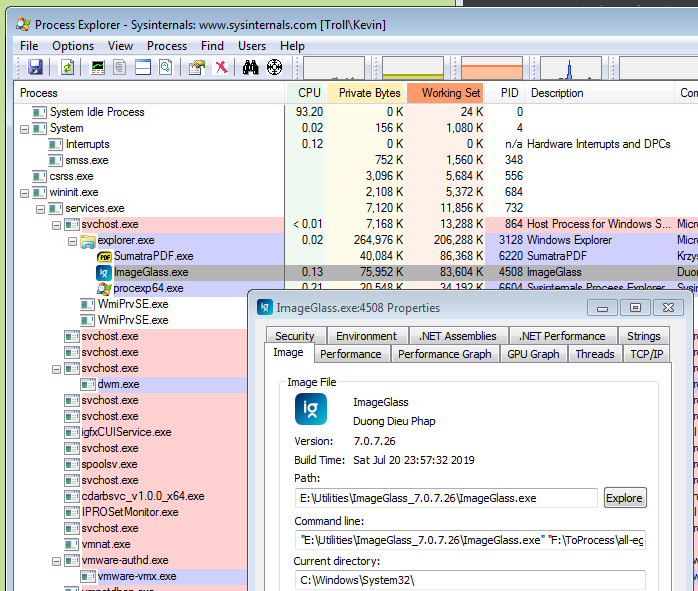
What Process Explorer will let you do is to see the command line that occurred when ImageGlass was invoked.
- Run your LotusNotes, open an attachment in mail.
- (Presumably) ImageGlass runs.
- Run Process Explorer.
- Find ImageGlass in the list of processes.
- Right-click on ImageGlass and show Properties. Or even just hover over the line, the tooltip will show the command line.
The command line used to invoke ImageGlass is shown.
For example, here is Process Explorer showing the ImageGlass properties on my system. I invoked ImageGlass by double-clicking an image file in Windows Explorer.
Microsoft also provides another tool called Process Monitor, which I understand can also view the command line. However, it must be running _before_ ImageGlass is invoked.
Hope this helps; let us know what Lotus Notes is doing!
 fire-eggs
on 15 Nov 2019
fire-eggs
on 15 Nov 2019
Hi,
still on searching but for now just info where it looks to be the problem
My user name on win is miha.admin when opening from Lotus its calling path
C:UsersMIHA~1.ADMAppDataLocalTempnotes7AC391
and not
C:Usersmiha.adminAppDataLocalTempnotes7AC391
this path shortening seems to be the problem.
miharix
on 25 Nov 2019
My coworker has fund the bug and fixed the problem:
https://github.com/d2phap/ImageGlass/pull/654
miharix
on 25 Nov 2019
Thanks @miharix so much
I will take a look!
d2phap
on 25 Nov 2019
Merged the PR. Thanks!
d2phap
on 30 Nov 2019
Related issues
 BowChow
·
6Comments
BowChow
·
6Comments
 MoneyAllDay
·
5Comments
MoneyAllDay
·
5Comments
 retrue
·
5Comments
retrue
·
5Comments
 OLEGSHA
·
5Comments
OLEGSHA
·
5Comments
 smaragdus
·
3Comments
smaragdus
·
3Comments
Most helpful comment
What you can do is use Process Explorer. You can download it from here.
What Process Explorer will let you do is to see the command line that occurred when ImageGlass was invoked.
The command line used to invoke ImageGlass is shown.
For example, here is Process Explorer showing the ImageGlass properties on my system. I invoked ImageGlass by double-clicking an image file in Windows Explorer.
Microsoft also provides another tool called Process Monitor, which I understand can also view the command line. However, it must be running _before_ ImageGlass is invoked.
Hope this helps; let us know what Lotus Notes is doing!