Imageglass: Some programs in Windows10 Startmenu display as ImageGlass Icon
Prerequisites
- [x] I have written a descriptive issue title
- [x] I have searched open and closed issues to ensure it has not already been reported
System information:
- Windows OS version: Windows10 Professional 1809
- ImageGlass version: 6.0.12.29
To Reproduce
Steps to reproduce the behavior:
- Add "Adobe Acrobat DC" or "Evernote" to the Startmenu.
Actual behavior:
I can't see some programs' correct icons in the Startmenu like "Adobe Acrobat DC" and "Evernote".
Expected behavior:
See correct icons in the Startmenu.
Screenshots:
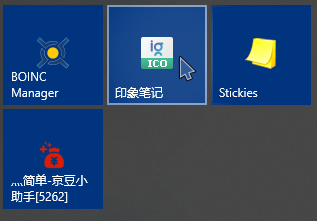
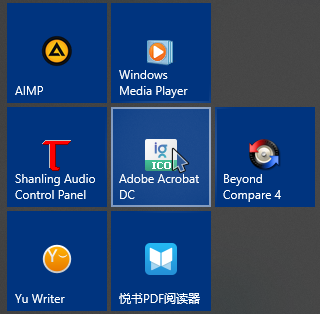
Additional context:
No
 XiaofengdiZhu
All 8 comments
I can reproduce for Adobe Acrobat DC.
 s8321414
on 31 Dec 2018
s8321414
on 31 Dec 2018
I believe the problem is with Evernote, Adobe, etc.
For instance
 fire-eggs
on 31 Dec 2018
fire-eggs
on 31 Dec 2018
Also have this issue after installing ImageGlass, on the Start Menu main list (without pinning Adobe Reader DC):

 Otiel
on 3 Jan 2019
Otiel
on 3 Jan 2019
After times of rebooting,
I believe the problem is with Evernote, Adobe, etc.
For instance
After using the solution in the link and times of rebooting, this problem has been solved.
XiaofengdiZhu
on 4 Jan 2019
thanks for confirmation
 d2phap
on 4 Jan 2019
d2phap
on 4 Jan 2019
@d2phap After several months this still seems to be an issue. However, it is not hijacking my Adobe Evernote, etc icons. It is hijacking all Windows store applications (Camera, Calculator, Windows Terminal, etc). The originally intended icons are present everywhere but Windows search. There is no way to modify the "shortcuts" because Windows store apps do not have shortcuts from what I can tell. I've followed all the advice on this thread and all the advice on this thread. I would really like to know a way to revert back to the original icons.


 lbux
on 16 Jun 2020
lbux
on 16 Jun 2020
@lbux
Can you try delete (or rename) Ext-Icons folder in ImageGlass installed folder, then
- Open Windows Settings, change default photo viewer to MS Photos
- Open ImageGlass Settings > File Type Association
- Click on Set as Default photo viewer button
- Go back to Windows Settings, set ImageGlass as default photo viewer
d2phap
on 16 Jun 2020
@d2phap Thank you for getting back to me so quickly. I've tried all that and nothing works. Even if I delete ImageGlass, restart my PC, and then look for all traces of anything related to ImageGlass using a search application and delete those files, the problem persists.
I'd also like to add that if I uninstall an app from the Microsoft Store and reinstall it Image Glass hijacks the search icon for it right away.
lbux
on 16 Jun 2020
Related issues
 Matix-Media
·
5Comments
Matix-Media
·
5Comments
 Unknow0059
·
4Comments
Unknow0059
·
4Comments
 motazalnuweiri
·
5Comments
motazalnuweiri
·
5Comments
 DraHD
·
5Comments
DraHD
·
5Comments
 xmha97
·
4Comments
xmha97
·
4Comments
Most helpful comment
I believe the problem is with Evernote, Adobe, etc.
For instance