Imageglass: Preferred folder to open when I start app
Expected behavior:
I expected that this app have some setting for choosing preferred folder to open when I start app.
Actual behavior:
There is no such a thing.
Steps to reproduce:
//////
System info:
- ImageGlass version: actual from 11 july 2017
- OS version: windows 7
Other info:
Suggestion , make a setting which will have option to choose folder which it will open at start.
I keep all my photos in one folder, with many subfolders, dates, etc, so whenever I start app it opens only home page, I wish you could do it, when I select my folder it opens automatically when I start app.
Best, Miroslav Maksimovic
 miki995
All 2 comments
Hi @miki995
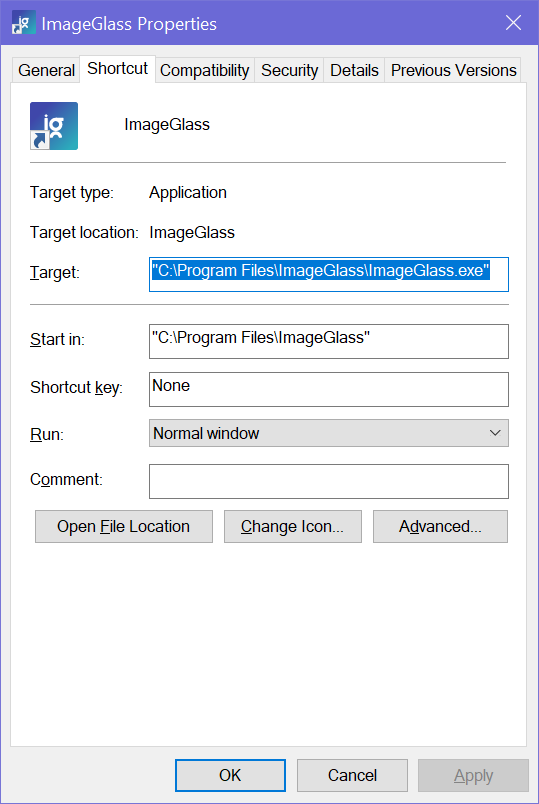
You can do it by passing folder path to ImageGlass shortcut.
Okay, right-click on the ImageGlass shortcut, select Properties
- Navigate to the
Shortcuttab, theTargetfield shows the executable file of ImageGlass. - Assuming your preferred folder path is
D:\My photos\, you can add it into the field with"char:
"C:\Program Files\ImageGlass\ImageGlass.exe" "D:\My photos\"
Hope this helps!
 d2phap
on 11 Jul 2017
d2phap
on 11 Jul 2017
👍1
Yes, that works, but I stil expect from you to make that in options
miki995
on 12 Jul 2017
👍2
Was this page helpful?
0 / 5 - 0 ratings
Related issues
d2phap
·
4Comments
 anyfactor
·
4Comments
anyfactor
·
4Comments
 xmha97
·
4Comments
xmha97
·
6Comments
xmha97
·
4Comments
xmha97
·
4Comments
xmha97
·
6Comments
xmha97
·
4Comments
Most helpful comment
Yes, that works, but I stil expect from you to make that in options