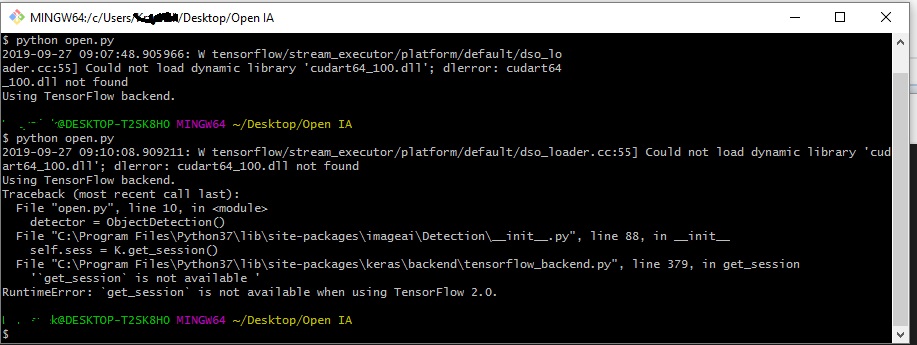
Imageai: RuntimeError: `get_session` is not available when using TensorFlow 2.0.
 ghost
ghost
All 26 comments
Same for me ...
 rubikva
on 1 Oct 2019
rubikva
on 1 Oct 2019
Tensorflow 2. is not supported currently (and not sure if @OlafenwaMoses has any plans to upgrade it), so you'll have to downgrade your TF version or migrate the library your self (check this manual if you go for the second)
 rola93
on 1 Oct 2019
rola93
on 1 Oct 2019
Tensorflow 2. is not supported currently (and not sure if @OlafenwaMoses has any plans to upgrade it), so you'll have to downgrade your TF version or migrate the library your self (check this manual if you go for the second)
That's how I came up with it, and did the downgrade. I just think that in this case it will be fair to change description. Currently it suggest thet we can work with TF2 . So that people do not waste time installing it when they work with .
ghost
on 1 Oct 2019
@rola93 Thanks for the comments.
We can't give a specific date yet , but ImageAI will soon be updated to support Tensorflow 2.0 .
 OlafenwaMoses
on 3 Oct 2019
OlafenwaMoses
on 3 Oct 2019
@Krzysiek1984 and @rola93 can you guys please explain how did you manage solve that by downgrading as its confusing and I am new to this.
 shivam9804
on 4 Oct 2019
shivam9804
on 4 Oct 2019
Just install a lower version (for instance, 1.12) pip install tensorflow==1.12
it will be fair to change description.
I agree with @Krzysiek1984, should update this @OlafenwaMoses
rola93
on 4 Oct 2019
Thank you @rola93
shivam9804
on 6 Oct 2019
@Krzysiek1984 can I know the steps downgrade the tensorflow version?
 andromeda1998
on 8 Nov 2019
andromeda1998
on 8 Nov 2019
Just install a lower version (for instance, 1.12)
pip install tensorflow==1.12
it will be fair to change description.
I agree with @Krzysiek1984, should update this @OlafenwaMoses
@rola93 this is not working. I tried the command in command prompt. It says " Could not find a version that satisfies the requirement tensorflow==1.1 (from versions: 1.13.0rc1, 1.13.0rc2, 1.13.1, 1.13.2, 1.14.0rc0, 1.14.0rc1, 1.14.0, 1.15.0rc0, 1.15.0rc1, 1.15.0rc2, 1.15.0rc3, 1.15.0, 2.0.0a0, 2.0.0b0, 2.0.0b1, 2.0.0rc0, 2.0.0rc1, 2.0.0rc2, 2.0.0)
No matching distribution found for tensorflow==1.1"
any other way of doing it?
andromeda1998
on 8 Nov 2019
Just install a lower version (for instance, 1.12)
pip install tensorflow==1.12
it will be fair to change description.
I agree with @Krzysiek1984, should update this @OlafenwaMoses@rola93 this is not working. I tried the command in command prompt. It says " Could not find a version that satisfies the requirement tensorflow==1.1 (from versions: 1.13.0rc1, 1.13.0rc2, 1.13.1, 1.13.2, 1.14.0rc0, 1.14.0rc1, 1.14.0, 1.15.0rc0, 1.15.0rc1, 1.15.0rc2, 1.15.0rc3, 1.15.0, 2.0.0a0, 2.0.0b0, 2.0.0b1, 2.0.0rc0, 2.0.0rc1, 2.0.0rc2, 2.0.0)
No matching distribution found for tensorflow==1.1"any other way of doing it?
Please just pay attention to details. tensorflow 1.1 is very old version.
I suggest using 1.13.1 that works for me, just use the next command:
pip install tensorflow==1.13.1
Depending on your system you may need to deinstall previous version of TF
Please note that it is just the same command that already was suggested, you've made a simple typing error.
 Simaex
on 9 Nov 2019
Simaex
on 9 Nov 2019
When You get an error regarding , get session is not applicable or callable in Tensorflow 2.0 , Try to install the Lower version of it.
You can install pip install tensorflow== 1.14.1
Depending on your system pip install tensorflow==1.13.1 cannot work , anyway try using 2 process.
Happy Data Sciencing
 Prasan97
on 17 Dec 2019
Prasan97
on 17 Dec 2019
get_session is removed in tensorflow 2.0 and hence not available.
so, in order to load saved model we switched methods. Rather than using keras’s load_model, we used tensorflow to load model so that we can load model using distribution strategy.
Note
The tf.distribute.Strategy API provides an abstraction for distributing your training across multiple processing units.
New code to get model
another_strategy = tf.distribute.MirroredStrategy()
with another_strategy.scope():
model = SentimentService.get_model1()
New code to load model
def load_deep_model(self, model):
loaded_model = tf.keras.models.load_model("./src/mood-saved-models/"model + ".h5")
return loaded_model
 tejaswinivjadhav
on 7 Jan 2020
tejaswinivjadhav
on 7 Jan 2020
Just install a lower version (for instance, 1.12)
pip install tensorflow==1.12
it will be fair to change description.
I agree with @Krzysiek1984, should update this @OlafenwaMoses@rola93 this is not working. I tried the command in command prompt. It says " Could not find a version that satisfies the requirement tensorflow==1.1 (from versions: 1.13.0rc1, 1.13.0rc2, 1.13.1, 1.13.2, 1.14.0rc0, 1.14.0rc1, 1.14.0, 1.15.0rc0, 1.15.0rc1, 1.15.0rc2, 1.15.0rc3, 1.15.0, 2.0.0a0, 2.0.0b0, 2.0.0b1, 2.0.0rc0, 2.0.0rc1, 2.0.0rc2, 2.0.0)
No matching distribution found for tensorflow==1.1"
any other way of doing it?Please just pay attention to details. tensorflow 1.1 is very old version.
I suggest using 1.13.1 that works for me, just use the next command:
pip install tensorflow==1.13.1
Depending on your system you may need to deinstall previous version of TF
Please note that it is just the same command that already was suggested, you've made a simple typing error.
Just install a lower version (for instance, 1.12)
pip install tensorflow==1.12
it will be fair to change description.
I agree with @Krzysiek1984, should update this @OlafenwaMoses@rola93 this is not working. I tried the command in command prompt. It says " Could not find a version that satisfies the requirement tensorflow==1.1 (from versions: 1.13.0rc1, 1.13.0rc2, 1.13.1, 1.13.2, 1.14.0rc0, 1.14.0rc1, 1.14.0, 1.15.0rc0, 1.15.0rc1, 1.15.0rc2, 1.15.0rc3, 1.15.0, 2.0.0a0, 2.0.0b0, 2.0.0b1, 2.0.0rc0, 2.0.0rc1, 2.0.0rc2, 2.0.0)
No matching distribution found for tensorflow==1.1"
any other way of doing it?Please just pay attention to details. tensorflow 1.1 is very old version.
I suggest using 1.13.1 that works for me, just use the next command:
pip install tensorflow==1.13.1
Depending on your system you may need to deinstall previous version of TF
Please note that it is just the same command that already was suggested, you've made a simple typing error.
Thanks.. it worked for me...
 SUNILARAVA
on 12 Jan 2020
SUNILARAVA
on 12 Jan 2020
As Tensorflow website (https://www.tensorflow.org/guide/migrate) suggest about migrate, you could import tensorflow as following to keep compatibility when you have tensorflow 2.0 installed:
import tensorflow.compat.v1 as tf
 inspirepassion
on 26 Jan 2020
inspirepassion
on 26 Jan 2020
first, remove the previous version of TensorFlow, then install TensorFlow 1.14 using pip install tensorflow==1.14 command
it works.
 Romyull-Islam
on 12 Mar 2020
Romyull-Islam
on 12 Mar 2020
If downgraded to tensorflow 1.14. Unfortunately I now get an ImportError.
"ImportError: 'load_weights' requires h5py." yolo.h5 is in the same folder as the script. Any advice?
 MichielBbal
on 12 Apr 2020
MichielBbal
on 12 Apr 2020
first, remove the previous version of TensorFlow, then install TensorFlow 1.14 using
pip install tensorflow==1.14command
it works.
No.. I failed, there will be no matching repository soon.. You better clone from their 'official' github :
https://github.com/tensorflow/tensorflow . Find the Release of 1.15 ..
 hariadirian
on 9 Jun 2020
hariadirian
on 9 Jun 2020
You have to use tensorflow 1.13.1 not 1.14.
 ehiagheaig
on 10 Jun 2020
ehiagheaig
on 10 Jun 2020
Would the following suggestion from StackOverflow (original link) work?
import tensorflow as tf

session = tf.compat.v1.Session()
 nathanielng
on 19 Jun 2020
nathanielng
on 19 Jun 2020
its the mid of 2020 and still ImageAI doesnt support Tensorflow 2.0 ?
when are were going to see the updated version, any idea ? @OlafenwaMoses
Thank you
 DrKhatri
on 19 Jun 2020
DrKhatri
on 19 Jun 2020
@ehiagheaig

it shows the above error even after tryin to install 1.13.1
bro plz help !!!
thank you
DrKhatri
on 19 Jun 2020
I'm also having the same problem. I get RuntimeError:get_sessionis not available when using TensorFlow 2.0. so when I downgrade it, then keras says I need tensorflow 2.0 or higher.
 kgh475926
on 22 Jun 2020
kgh475926
on 22 Jun 2020
giao
 yiyiyuebing
on 23 Jun 2020
yiyiyuebing
on 23 Jun 2020
I am getting the same error. It appears that 1.x was removed and is no longer available.
 NebraskaCoder
on 25 Jun 2020
NebraskaCoder
on 25 Jun 2020
1.14 is only available on Python 3.4-3.7.
https://pypi.org/project/tensorflow/1.14.0/
If you are on Ubuntu 20.04 you can use the dead-snakes ppa. You need the -dev, -tk & -venv apt packages. (Tested on Python 3.5 & python 3.7)
sudo apt-get install python3.7-dev python3.7-tk python3.7-venv
This is is my requirements file:
tensorflow==1.14
keras==2.3.1
imageai
This works to setup an environment that runs the imageai examples.
python3.7 -mvenv imageai_venv
source imageai_venv/bin/activate
pip install -U pip wheel setuptools
pip install -r requirements.txt
 dapperfu
on 16 Jul 2020
dapperfu
on 16 Jul 2020
@rola93 Thanks for the comments.
We can't give a specific date yet , but ImageAI will soon be updated to support
Tensorflow 2.0.
I assume "soon" will be never or in a while.
 SpeedyCraftah
on 24 Nov 2020
SpeedyCraftah
on 24 Nov 2020
Related issues
 mbaguant
·
6Comments
mbaguant
·
6Comments
 pytesnim
·
5Comments
pytesnim
·
5Comments
 Overdoze47
·
3Comments
Overdoze47
·
3Comments
 bestbugwriter
·
5Comments
bestbugwriter
·
5Comments
 bjente
·
3Comments
bjente
·
3Comments
Most helpful comment
@rola93 Thanks for the comments.
We can't give a specific date yet , but ImageAI will soon be updated to support
Tensorflow 2.0.