Image-sequencer: Multi color gradient
Please describe the problem (or idea)
What happened just before the problem occurred? Or what problem could this idea solve?
Gradient Module has only black color
What did you expect to see that you didn't?
Choose the rgb input for color of gradient
Please show us where to look
image-sequencer
What's your PublicLab.org username?
niravasher
Browser, version, and operating system
windows 10
Thank you!
Your help makes Public Lab better! We deeply appreciate your helping refine and improve this site.
To learn how to write really great issues, which increases the chances they'll be resolved, see:
https://publiclab.org/wiki/developers#Contributing+for+non-coders
 niravasher
All 71 comments
An input from 0 to 255 to see the color on the starting of the gradient
niravasher
on 26 Feb 2019
Hello, I solved this, should I open a pull request @HarshKhandeparkar
niravasher
on 27 Feb 2019
Yes go ahead. Also I will be busy for a month(exams) so you can mention @publiclab/is-reviewers to ask any queries. Thanks.
 harshkhandeparkar
on 27 Feb 2019
harshkhandeparkar
on 27 Feb 2019
Hi! Cool - i think this could be achieved through a re-use of the Colormap code - it has pretty sophisticated gradienting: https://github.com/publiclab/image-sequencer/blob/main/src/modules/Colormap/Colormap.js
Take a look, thank you!!!
 jywarren
on 27 Feb 2019
jywarren
on 27 Feb 2019
The gradients in Colormap are pretty different then what the gradient module should do according to me. I am trying to implement features like circular gradient and %x to %y intensity, please elaborate more if I am wrong somewhere @jywarren
niravasher
on 3 Mar 2019
Hello I am not able to understand exaxctly how to make circular gradients, I made a new function "makeCircularGradients". What should I return require to write this makeCircularGradients : makeCircularGradients @jywarren @HarshKhandeparkar ???
niravasher
on 3 Mar 2019
@publiclab/is-reviewers please help nirav. I'm busy. Thanks.
harshkhandeparkar
on 3 Mar 2019
Progress till now
R1 , G1 , B1 and R2 , B2 , G2 are the inputs and we have gradient between those two colors. I am now trying to give the percentage control to the user.
niravasher
on 5 Mar 2019
I still don't understand what is the function of the third variable in the pixels.set()? Please help @HarshKhandeparkar @jywarren .. also adding the feature of asking the user for setting the direction of gradient from top to bottom and left to right and vice versa. I also need help with adding circular gradients. I am not sure how exactly to start with.
niravasher
on 5 Mar 2019
Hi, hmm, so can you open a PR so we can look?
Regarding the colormap module, I think we could think of that as a linear-gradient module, but to generate a radial gradient would be in some ways similar - we could start with a monochrome circular gradient, from 0 to 100 brightness, and then map colors to that using the colormap modules in a similar way. Does that make sense?
jywarren
on 5 Mar 2019
So, potentially you could start by doing PixelManipulation and shading darker depending on the cartesian distance from a center point? Then pass that into colormap -- see what I mean? Thanks!!!
jywarren
on 5 Mar 2019
Ok, so we don't require dual color linear gradients but radial gradients only. Will start doing pixel manipulation and as you said and please tell me about the 3rd and 4th arguements of pixel.set(arg1, arg2, arg3, arg4). @jywarren
niravasher
on 5 Mar 2019
I'm not sure but I would guess the args are Red Green Blue Alpha!
On Tue, Mar 5, 2019 at 3:38 PM Nirav Asher notifications@github.com wrote:
Ok, so we don't require dual color linear gradients but radial gradients
only. Will start doing pixel manipulation and as you said and please tell
me about the 3rd and 4th arguements of pixel.set(arg1, arg2, arg3, arg4).
@jywarren https://github.com/jywarren—
You are receiving this because you were mentioned.
Reply to this email directly, view it on GitHub
https://github.com/publiclab/image-sequencer/issues/822#issuecomment-469848029,
or mute the thread
https://github.com/notifications/unsubscribe-auth/AABfJztnvZ3wFoPUl_A8UCmUSxBf_fEPks5vTtXCgaJpZM4bSpyL
.
jywarren
on 5 Mar 2019
No they can't be red green blue and alpha because first and second are i and j which is the pixel position @jywarren .
niravasher
on 5 Mar 2019
Ah - it's x, y, channel, value: https://github.com/publiclab/image-sequencer/blob/main/src/modules/_nomodule/PixelManipulation.js#L61-L64
Hope that helps!!!
jywarren
on 5 Mar 2019
Nirav in pixels.set, arg1=x, arg2=y, arg3=channel{0=r,1=g,2=b,3=a}, arg4=value. Hope this helps you. 😊
harshkhandeparkar
on 6 Mar 2019
Thankyou, I have my exams from the next week, so will not be able to work till then. Will definitely be back after exams end.
niravasher
on 6 Mar 2019
OK, good luck with your exams!!!
On Wed, Mar 6, 2019 at 7:53 AM Nirav Asher notifications@github.com wrote:
Thankyou, I have my exams from the next week, so will not be able to work
till then. Will definitely be back after exams end.—
You are receiving this because you were mentioned.
Reply to this email directly, view it on GitHub
https://github.com/publiclab/image-sequencer/issues/822#issuecomment-470096068,
or mute the thread
https://github.com/notifications/unsubscribe-auth/AABfJz1MBBgab1ZFOUmlKDg0u9k8kfwGks5vT7owgaJpZM4bSpyL
.
jywarren
on 6 Mar 2019
Good evening, starting again with this issue. So I will try creating a gradient of brightness from 0 to 100 in the gradient module and will try to pass it to the colormap module. I don't have to make the multi color linear gradient now @jywarren @HarshKhandeparkar
niravasher
on 16 Mar 2019
Actually the colormap module has a range of different gradients to apply
including multi color ones. I think that will help you?
On Sat, Mar 16, 2019, 12:00 PM Nirav Asher notifications@github.com wrote:
Good evening, starting again with this issue. So I will try creating a
gradient of brightness from 0 to 100 in the gradient module and will try to
pass it to the colormap module. I don't have to make the multi color linear
gradient now @jywarren https://github.com/jywarren @HarshKhandeparkar
https://github.com/HarshKhandeparkar—
You are receiving this because you were mentioned.
Reply to this email directly, view it on GitHub
https://github.com/publiclab/image-sequencer/issues/822#issuecomment-473554346,
or mute the thread
https://github.com/notifications/unsubscribe-auth/AABfJyKBosDr8sAHKfvGQfhy1j2JGoeEks5vXRTigaJpZM4bSpyL
.
jywarren
on 16 Mar 2019
What do I exactly need to do? directly make circular gradients in the colormap module? @jywarren
niravasher
on 16 Mar 2019
Hi! So, to generate a radial monochrome gradient you can build a module around pixel manipulation. For an example of a linear gradient, see:
https://github.com/publiclab/image-sequencer/blob/main/src/modules/Gradient/Module.js
Instead of line 23, you'd set the value of the pixel to correspond to the distance between the current pixel xy and the center of the image.
Later you could make the center point a parameter, so the gradient could start at a specified point but default to the middle of the image. But let's think about that later.
The value will have to be mapped from 0-255, so perhaps the farthest point from the center would correspond to 255?
Try creating a new module and opening a pull request, and we can help you tackle this one step at a time!
Thanks!!!
jywarren
on 16 Mar 2019
Ok got it making a new module called CircularGradient
niravasher
on 16 Mar 2019
Hi, to start making a gradient I first thought to make a line from center to the top and then going circular. But I seem to have problem with changePixel and getNeighbourPixel. I think I am not able to understand the syntax correctly. I am sending a pull request with basic code in it, but please tell me how these two functions exactly work, i mean what happens when I return values from those functions @HarshKhandeparkar @jywarren
niravasher
on 17 Mar 2019
Ok
harshkhandeparkar
on 17 Mar 2019
You can mention @publiclab/is-reviewers
harshkhandeparkar
on 17 Mar 2019
The changePixel function provides the rgba values of each pixel in the image as parameters and also the x and y positions of the pixel as 5th and 6th param, the returned value is set as that pixel. The returned array has the format [r, g, b, a] these are the color channels for that pixel. So essentially this function is run on every pixel of the image and does the same manipulation on every pixel. The returned value is set as that pixels value.
Eg
function (r, g, b, a){
  return [r+5, g+5, b+5, a+5];
}// This will add 5 to all the channels of all the pixels

function(){
  return [255, 255, 255, 255];
} // Will make the whole image white

function(r, g, b, a, x, y){
 if (x > 20 && y > 20){
  return  [255, 255, 255, a];
}
else return [r, g, b, a];
} // Will make only pixels with x greater than 20 and y greater than 20 white and alpha for each pixel will remain same
Oh okay, keeping r,g,b,a as r,g,b,a keeps them the same. I thought this has to be undefined somehow. Now understood. Also in the getNeighbourPixel, are the variables curX, curY, distX and distY predefined somewhere
niravasher
on 17 Mar 2019
Hmm. I have never used getNeighboutPixel so cannot tell you exactly you can try to reverse engineer it. Not very difficult. It is in the file src/modules/_nomodule/pixelManipulation.js. I don't have time for this right now.
Also there is an extraManipulation method which returns all the pixels as an ndarray(n-dimensional/multi-dimensional array) with 3 dimensions it is again passed as a param to that func. The param has getter and setter methods get and set the get has the params get(x, y, channel{0, 1, 2, 3}) and returns the value for that specific channel. The set has set(x, y, channel, value) sets that channel value of the pixel(x, y) as value. I'll call the param as pixels. pixels.shape[0] returns the width and pixels.shape[1] returns the height and pixels.shape[2] will return 4 as it has 4 channels. A simple example of extraManipulation can be found here src/modules/DrawRectangle check all the contents of this dir.
I hope you understand what I have written and that it is helpful.
harshkhandeparkar
on 17 Mar 2019
Sorry I had linked to a wrong place in the comment above. I have edited it. Please read it again. Sorry for the inconvenience
harshkhandeparkar
on 17 Mar 2019
Yes, thankyou very much for help
niravasher
on 17 Mar 2019
I divided the image into 4 quadrants and tried to make gradient in each one of them
Here is the for loop that goes in 2nd quadrant
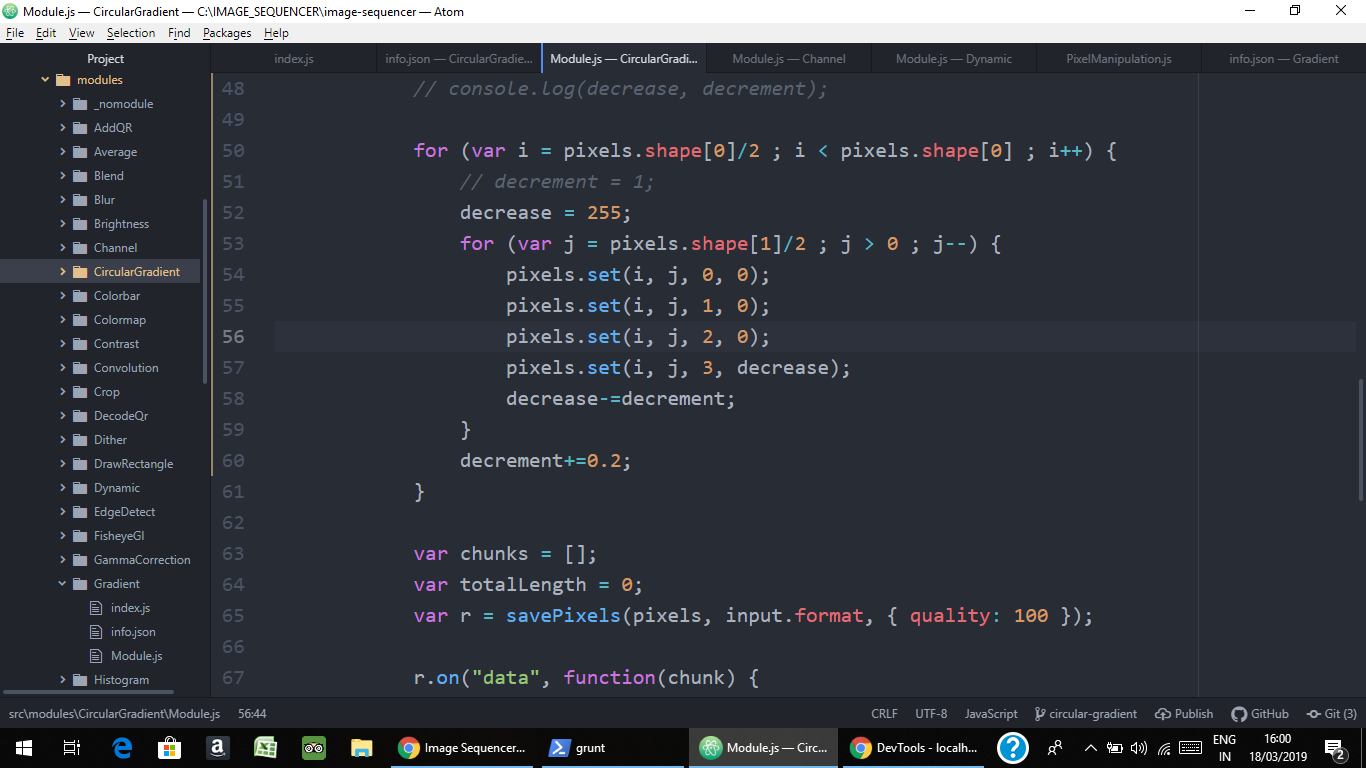
I still get a gradient in the first quadrant, any idea why this happens? @HarshKhandeparkar @jywarren
niravasher
on 18 Mar 2019
You don't have to run savePixels yourself. The PixelManipulation func does it for you. Check out module drawRectangle for reference. https://github.com/publiclab/image-sequencer/blob/main/src/modules/DrawRectangle/Module.js
harshkhandeparkar
on 18 Mar 2019
Yes removed that.
niravasher
on 18 Mar 2019
The starting x and y of the imagedo not start at the bottom left corner but instead start at the top left corner. So pixel(0,0) will be at the top left and pixel(width-1, height-1) will be at the bottom right corner. X increases from left to right and y increases from top to bottom. I hope this info helps you. Maybe the quadrant that you are think is the second quadrant is actually the first quadrant.
harshkhandeparkar
on 18 Mar 2019
If you want to show a code snippet try to copy it inside block code markdown instead of sharing an img. This also highlights any syntax errors.
You can put the code inside ```js and ```
E.g.
var example = 1;
example += 1;
console.log(example); // 2
The following code has syntax erros as strings cannot span multiple lines. GitHub highlights the errors.
var illegalString = 'line 1
Line 2 without line break escape';
Fix
var legalString = 'Line 1\
Line 2, line break escaped';
for (var i = pixels.shape[0]/2 ; i < pixels.shape[0] ; i++) {
                decrease = 255;
                for (var j = pixels.shape[1]/2 ; j > 0 ; j--) {
                    pixels.set(i, j, 0, 0);
                    pixels.set(i, j, 1, 0);
                    pixels.set(i, j, 2, 0);
                    pixels.set(i, j, 3, 255-decrease);
                    decrease-=decrement;
                }
                decrement+=0.2;
            }
var i goes from pixels.shape[0]/2 to pixels.shape[0], and var j goes from pixels.shape[1]/2 to 0 that is the top right quadrant. But I get gradient in the top left quadrant @HarshKhandeparkar
niravasher
on 18 Mar 2019
You have to make it go to (pixels.shape[0] - 1) as coordinates are zero indexed and also if pixels.shape[0] is odd, pixels.shape[0]/2 will not be an integer. Have you made any provisions for that?
harshkhandeparkar
on 18 Mar 2019
Have you implemented only the code for top right quadrant or also for top left? Check if there are any logs in the console and also I cannot see an assignment for variable decrement have you assigned it a value?
harshkhandeparkar
on 18 Mar 2019
Made the provisions for odd width and height. Initially var decrease = 255 and var decrement = 1. Wrote the code for top left and top right quadrant, Updating my PR, debug there @HarshKhandeparkar
niravasher
on 18 Mar 2019
The logic that I am trying to use is, set alpha = 255 for every i. and decrease alpha with j (I will map height and 0 to 255 later). As I increases the decrement in alpha should be greater so that i get a circular like structure. Also keeping the save-pixels function for now to check something, will remove it afterwards
niravasher
on 18 Mar 2019
This is how gradient is implemented in the original module.
            for (var i = 0; i < pixels.shape[0]; i++) {
                for (var j = 0; j < pixels.shape[1]; j++) {
                    let val = (i / width) * 255;
                    pixels.set(i, j, 0, val);
                    pixels.set(i, j, 1, val);
                    pixels.set(i, j, 2, val);
                    pixels.set(i, j, 3, 255);
                }
            }
Try implementing it this way and see if anything improves.
harshkhandeparkar
on 18 Mar 2019
Try not to change alpha value but instead produce a greyscale pixel.
harshkhandeparkar
on 18 Mar 2019
Ok will try this method and get back to you tmrw if I face any problem, thankyou very much for help
niravasher
on 18 Mar 2019
Hi Nirav - also think about going through the pixels by rows and columns,
as Harsh suggested, but applying a function to each pixel which calculates
its distance from the center, and chooses a darkness based on that
distance. So for pixel i, j and center point x, y:
distX = (x - i)
distY = (y - j)
distance = Math.sqrt(Math.pow(distX) + Math.pow(distY)) // remember
pythagorean theorem!
brightness = 255 * (distance / imgWidth) // maybe... we could figure out
something better but this sets the diameter of the circle
pixels.set(i, j, 0, brightness);
pixels.set(i, j, 1, brightness);
pixels.set(i, j, 2, brightness);
Does this make sense?
On Mon, Mar 18, 2019 at 4:40 PM Nirav Asher notifications@github.com
wrote:
Ok will try this method and get back to you tmrw if I face any problem,
thankyou very much for help—
You are receiving this because you were mentioned.
Reply to this email directly, view it on GitHub
https://github.com/publiclab/image-sequencer/issues/822#issuecomment-474091591,
or mute the thread
https://github.com/notifications/unsubscribe-auth/AABfJ4kq-4_yLX1kCRlSKcxYPL-dG0SZks5vX_l_gaJpZM4bSpyL
.
jywarren
on 18 Mar 2019
Instead of pythagoras you can directly use trigonometric functions to get the intesities based on the distance. Also sin and cos can be used to get the hypotenuse (distance from center) using just the x or y coordinate. The value of the angle will be arctan(y/x) in radians. In js it will be
var angle = Math.atan2(y, x); // returns angle in radians
Keep in mind that the y and x coordinates may not be the actual coordinates but can be difference in x or y between a point and the center of the image.
I hope this helps. Thank!
harshkhandeparkar
on 19 Mar 2019
Hey, a bit modification of the pythagoras theorem gives me this. The user now has control for the end color of the gradient whereas the centre remains black.
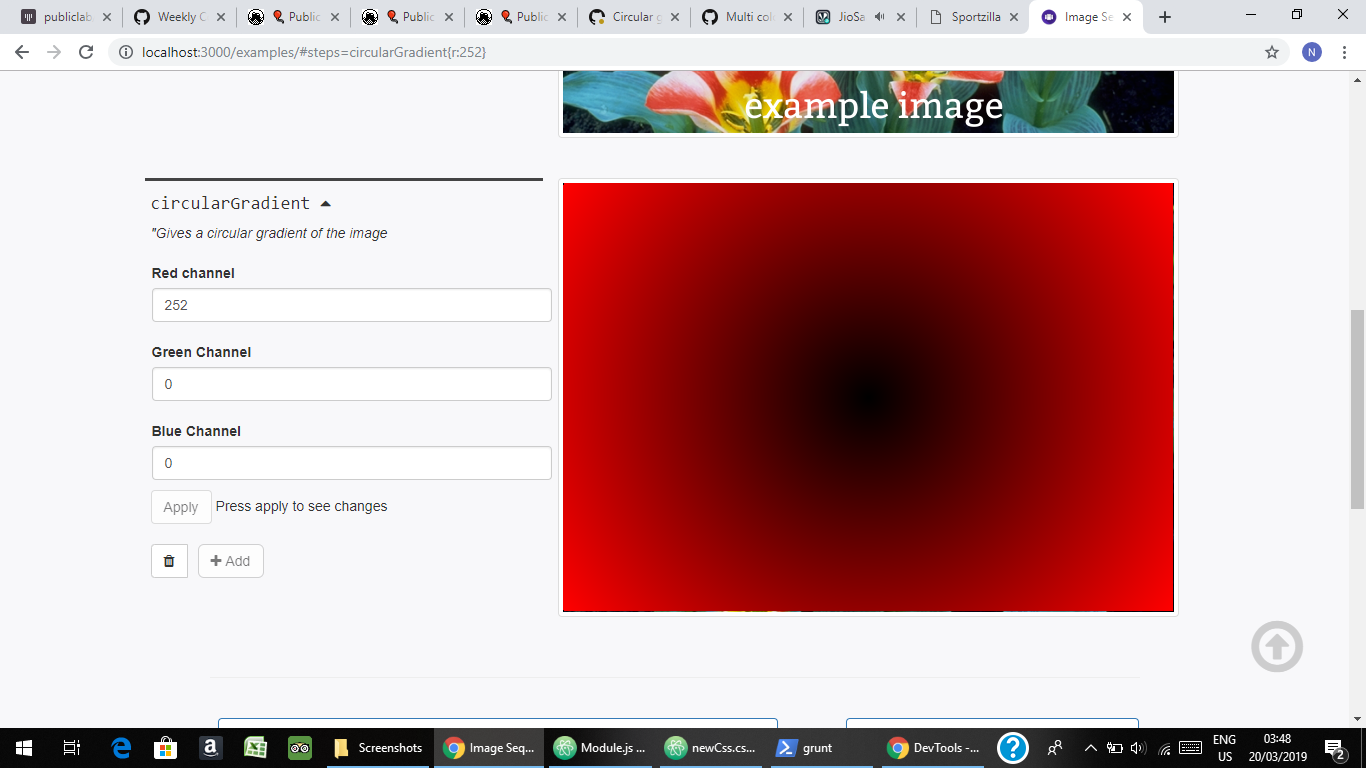
@jywarren @HarshKhandeparkar
niravasher
on 19 Mar 2019
Also gave the user option to choose the starting point of the gradient.
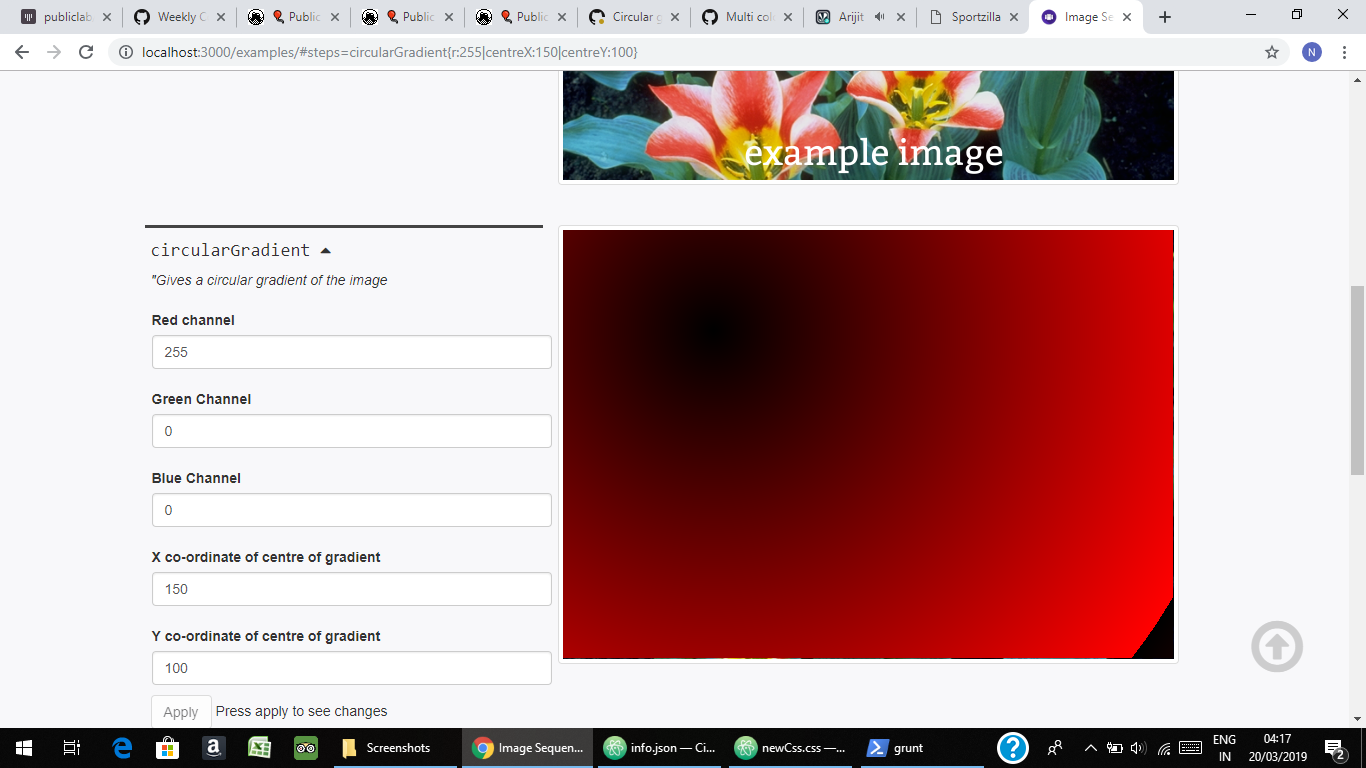
niravasher
on 19 Mar 2019
This looks awesome!!!
Ok, now, can you do it the same in all channels, and not expose the 3
channels in the settings -- what we'll do is then pass this through in
monochrome to the colormap module, which will apply any one of the complex
colormaps to the monochrome image. This will allow more than just
color-color gradients, but many-color gradients, does that make sense?
On Tue, Mar 19, 2019 at 6:49 PM Nirav Asher notifications@github.com
wrote:
Also gave the user option to choose the starting point of the gradient.
[image: Screenshot (45)]
https://user-images.githubusercontent.com/32176296/54647073-3767af00-4ac7-11e9-9247-e2b2d8695d46.png—
You are receiving this because you were mentioned.
Reply to this email directly, view it on GitHub
https://github.com/publiclab/image-sequencer/issues/822#issuecomment-474614380,
or mute the thread
https://github.com/notifications/unsubscribe-auth/AABfJ_IaQQ2w5FdUmcE2k-M6RZ1Btyy0ks5vYWlPgaJpZM4bSpyL
.
jywarren
on 20 Mar 2019
Hey @jywarren didn't get you. Please explain in more layman's terms. "Not exposing the three channels" means?
niravasher
on 20 Mar 2019
My apologies - meant, mainly, not allowing the user to set channels as
options. I think we can simply accept x, y input and not do channels
differently - just set the color for all 3 channels equally so that it's
monochrome. Then the colorizing will happen in the colormap library. Is
that ok?
On Tue, Mar 19, 2019 at 7:58 PM Nirav Asher notifications@github.com
wrote:
Hey @jywarren https://github.com/jywarren didn't get you. Please
explain in more layman's terms. "Not exposing the three channels" means?—
You are receiving this because you were mentioned.
Reply to this email directly, view it on GitHub
https://github.com/publiclab/image-sequencer/issues/822#issuecomment-474630137,
or mute the thread
https://github.com/notifications/unsubscribe-auth/AABfJxlf2Gp309z9DkC7pcU7ZSyqPhLsks5vYXlsgaJpZM4bSpyL
.
jywarren
on 20 Mar 2019
Looks awesome!
harshkhandeparkar
on 20 Mar 2019
Instead of asking for all channels you can ask for a space separted color like in many other modules like paintBucket and drawRectangle
harshkhandeparkar
on 20 Mar 2019
Added space separated color input
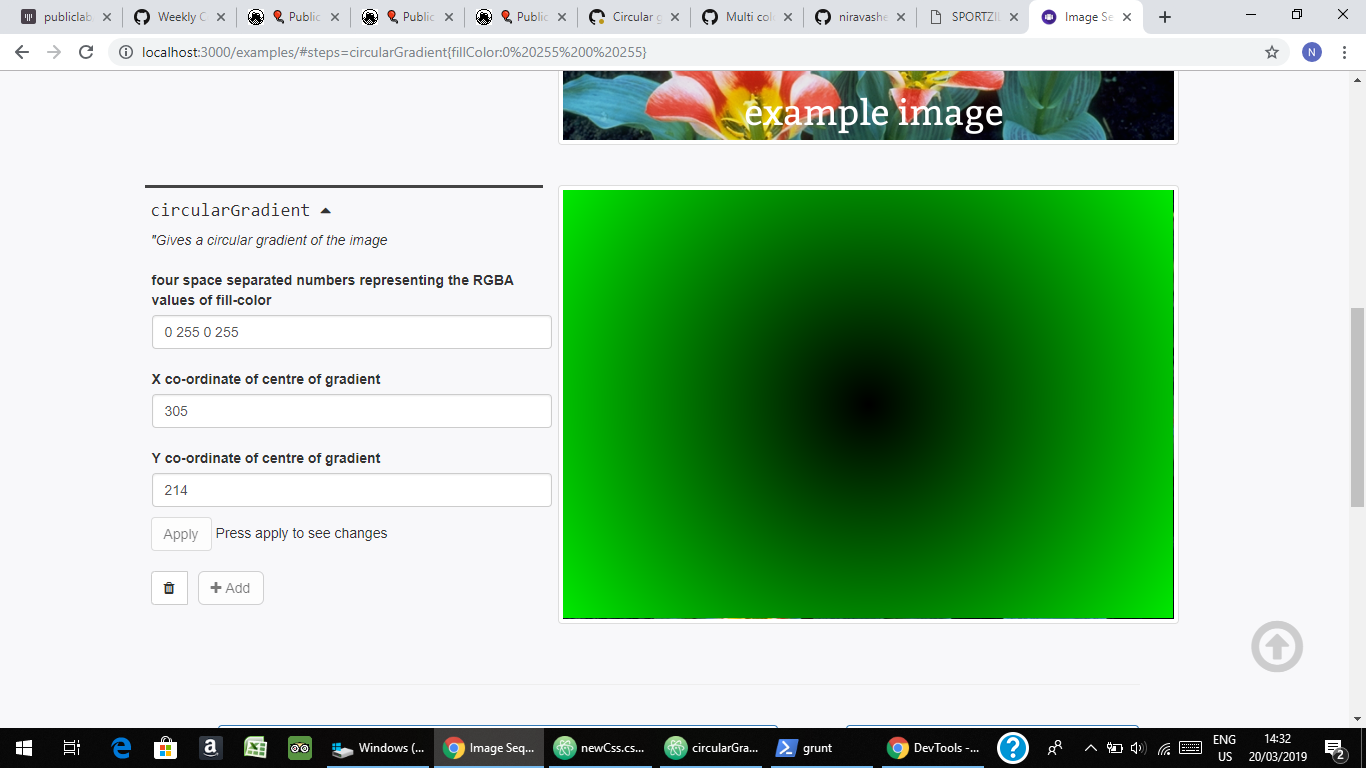
Also removed the savePixels and made new circularGradient.js file that is exported to module.js.
How should I pass this to colormap? @HarshKhandeparkar @jywarren
niravasher
on 20 Mar 2019
Looks great but I have a few questions.
- Why do you need alpha values? Please try and keep the alpha at 255 and only change the intensity of the color used.
- What do you want to do with colormap? What will you use it for?
harshkhandeparkar
on 20 Mar 2019
Ok, I have set the alpha value to 255 only. As Jeff said we need to pass this to colormap, so I thought he wants some changes that way @HarshKhandeparkar
niravasher
on 20 Mar 2019
Oh so if you are asking for color, what is the use of colormap? Is it reqd?
harshkhandeparkar
on 20 Mar 2019
Yes it isn't required, so the circular gradient module is complete. Updating my PR @HarshKhandeparkar
niravasher
on 20 Mar 2019
I guess no. Wait, if you want a multicolor gradient like a rainbow, you will have to use colormap. Can you create a separate multicolor gradient module? It can be a metamodule. In this module, can you also let users have a circular greyscale gradient where the users don't have to set the color?
harshkhandeparkar
on 20 Mar 2019
The colormap first averages the r, g, b values to get greyscale pixels and then maps the greyscale values to different colors based on some specific threshold maps. If you are able to create a greyscale gradient, a metamodule can be creater using this and the colormap module.
harshkhandeparkar
on 20 Mar 2019
Can you also integrate circular and normal gradient modules into one? And provide an option like gradient type which can be linear or circular. Also can you add an option to set the direction of linear gradient. I don't doing these changes will be difficult as you have already created the scaffolding for it.
harshkhandeparkar
on 20 Mar 2019
Ok
Step 1) Merge the circular and normal gradient. Give user the option to choose between them
Step 2) Add option for setting the direction
Step 3) Create greyscale gradients with colormap
Which three values from many will the colormap averge?
I mean I have an image, I apply the new metamodule to it which produces a greyscale. As there are many colors in the original image, which three should I choose? @HarshKhandeparkar
niravasher
on 20 Mar 2019
Whatever I have said might be a bit difficult to digest and understand. Even I couldn't understand what I wrote.😅. Sorry.
In proper words:
- 🌈 Like gradients require colormap module. Colormap module requires all the three channels to be of the same color(i.e greyscale like the original linear gradient module). Can you do the same with circular gradient?
- Having 2 different gradient modules isn't very useful. Can you integrate both into one? This won't be difficult since you have the code for both. You will just have to add an option called gradient type or just type which can be linear or circular.
- Metamodules are modules which have other modules inside them, like you can use gradient and colormap together and they will be shown as a completely different module even though it is not.
- Can you create a metamodule like this to create multicolor linear or circular gradients?
I hope you understood this better. 😊
harshkhandeparkar
on 20 Mar 2019
You can have a look at the original gradient module to see how greyscale gradients are createdm
harshkhandeparkar
on 20 Mar 2019
Did you understand everything or do you need more help?
harshkhandeparkar
on 20 Mar 2019
Ok, first you want to combine linear and circular gradients (I am sure this is easy). Then in the new metamodule, the user will have option to select between colormap and gradient. If the user chooses colormap, he/she will be shown options like default, greyscale, stretched etc. If the user chooses gradient, he/she will be shown option to choose between linear and circular and a space separated color option too, I am right completely??? @HarshKhandeparkar .Also if user wants a rainbow colors, then he/she can add colormap in default mode after adding linear gradient step
niravasher
on 20 Mar 2019
Actually you are close to be correct. The metamodule is a completely different module from the gradient module. The gradient module can only create a greyscale gradient or a single color gradient. The metamodule is like a module of its own with an info json file etc. It can be calledmulticolorGradient and it will be only used to create 🌈 like gradients. It can have only one option. I.e linear or circular multicolor gradient. That is enough for now. We can think about improving later(if possible). Good to go?
harshkhandeparkar
on 20 Mar 2019
For e.g colorbar is a metamodule made up of gradient, colormap, crop and overlay modules which are already existing modules. Check it out.
harshkhandeparkar
on 20 Mar 2019
Yes Yes got it, will try to create the new metamodule
niravasher
on 20 Mar 2019
Hi all, thanks! For simplicity we don't yet need to do the steps of
combining the gradient modules, we can do that later. And we can also do
the metamodule step in a follow-up PR. Let's focus on getting the
monochrome circular gradient module, which is almost done, and merging it,
then we can build on top of it! Thanks!!!
On Wed, Mar 20, 2019, 6:47 AM Nirav Asher notifications@github.com wrote:
Yes Yes got it, will try to create the new metamodule
—
You are receiving this because you were mentioned.
Reply to this email directly, view it on GitHub
https://github.com/publiclab/image-sequencer/issues/822#issuecomment-474778577,
or mute the thread
https://github.com/notifications/unsubscribe-auth/AABfJ2fy-ynqK5ffsZCuILsP8toLMS3Eks5vYhGagaJpZM4bSpyL
.
jywarren
on 20 Mar 2019
So is there anything else that I am supposed to do for this module ? Also I am done with the direction setting of linear gradient @HarshKhandeparkar @jywarren
niravasher
on 20 Mar 2019
Related issues
harshkhandeparkar
·
4Comments
 VladimirMikulic
·
3Comments
VladimirMikulic
·
3Comments
 vaibhavmatta
·
4Comments
vaibhavmatta
·
4Comments
 kindanduseful
·
5Comments
jywarren
·
5Comments
kindanduseful
·
5Comments
jywarren
·
5Comments
Most helpful comment
Yes Yes got it, will try to create the new metamodule