Igniteui-angular: Error when enabling toolbar
Description
When i enable [showToolbar]="true" on my grid, there is bug in console
core.js:6228 ERROR TypeError: Cannot read property 'first' of undefined
    at IgxGridComponent.get toolbarCustomContentTemplate [as toolbarCustomContentTemplate] (igniteui-angular.js:53563)
    at IgxGridToolbarComponent.get customContentTemplate [as customContentTemplate] (igniteui-angular.js:43295)
    at IgxGridToolbarComponent_Template (igniteui-angular.js:43338)
because of that error there is no cell rendering and i got message "There is no data".
- igniteui-angular version: 9.0.15
- browser: Chrome 81.0.4044.138
Steps to reproduce
Just define basic grid with columns defined:
                <igx-grid #grid [primaryKey]="'id'"  [height]="'800px'" [width]="'100%'" displayDensity='compact' [autoGenerate]='false'
                    [showToolbar]="true" toolbarTitle="Pupils" loading = "loading"
                    [data]="contract">

                    <igx-column [field]="'num'" header="Number" width="200px" [sortable]="true"></igx-column>
                    <igx-column [field]="'type'" header="Type" width="80px" [sortable]="true"></igx-column>
Result
There is no cell rendering and i got message "There is no data".
When disabling toolbar everything is working well.
Expected result
Without error and showing data
 sebitsi
All 8 comments
I have coppied custom template from samples into my grid:
                        <ng-template igxToolbarCustomContent let-grid="grid">
                            <button igxButton="flat" igxRipple igxRippleCentered="true" (click)="grid.clearSort()">
                                <igx-icon fontSet="material">clear</igx-icon>
                                Clear Sort
                            </button>
                        </ng-template>
Button has showed up and clik on it force grid to reload (spinner is visible for a second).
Error is still there and grid is without data.
Any suggestion ?
sebitsi
on 29 May 2020
@sebitsi I'm unable to reproduce this bug, could you please attach a sample either in StackBlitz or in a .zip file? Whichever suits you best.
 onlyexeption
on 2 Jun 2020
onlyexeption
on 2 Jun 2020
@onlyexeption Hi.
I cannot send full application.
This error raises only in full app. When i try it in "sandbox" there is no error.
Can you give me some suggestions what should i try ?
Regards.
sebitsi
on 2 Jun 2020
@sebitsi Can you please attach a screenshot of your package.json?
onlyexeption
on 3 Jun 2020
Sure. I attached.
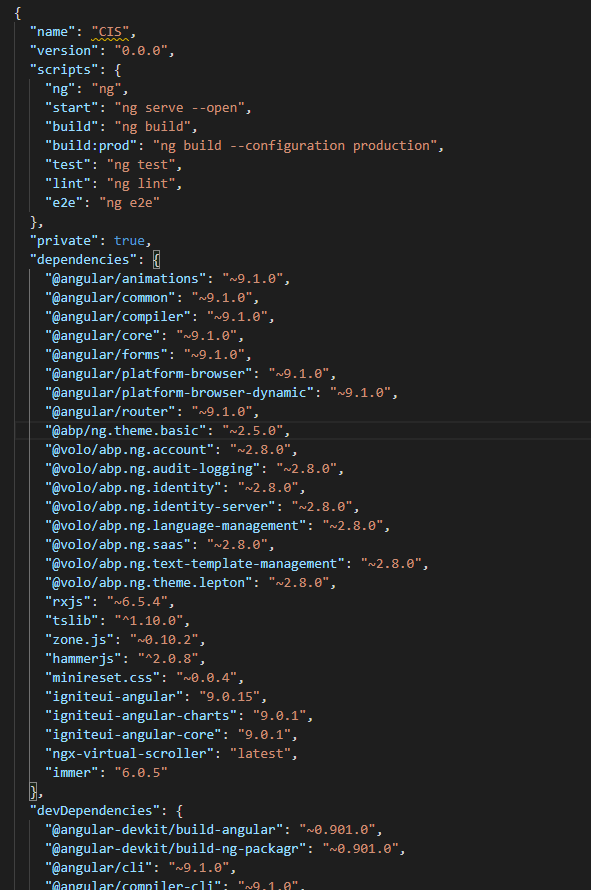
I have forgot to mention that i'm using yarn not npm.
sebitsi
on 3 Jun 2020
@sebitsi I still couldn't reproduce this bug even with your angular version. Try to attach a sample app that has this issue because if not unfortunately I won't be able to help you.
onlyexeption
on 3 Jun 2020
Ok. Thanks.
I Will try to reproduce this error. Please leave this issue open.
sebitsi
on 5 Jun 2020
Hi @onlyexeption.
I found a problem.
If I set this.grid.totalItemCount in onInithook with showToolbar enabled error is raised.
I move this.grid.totalItemCount into ngAfterViewInithook.
Regards.
sebitsi
on 10 Jun 2020
Related issues
 brianlagunas
·
3Comments
brianlagunas
·
3Comments
 tkiryu
·
3Comments
tkiryu
·
3Comments
 nikunjgajera
·
3Comments
nikunjgajera
·
3Comments
 furugen
·
3Comments
furugen
·
3Comments
 Eralmidia
·
3Comments
Eralmidia
·
3Comments
Most helpful comment
Ok. Thanks.
I Will try to reproduce this error. Please leave this issue open.