Igniteui-angular: Searching text on a date column in Excel Style Filtering returns illogical results
Description
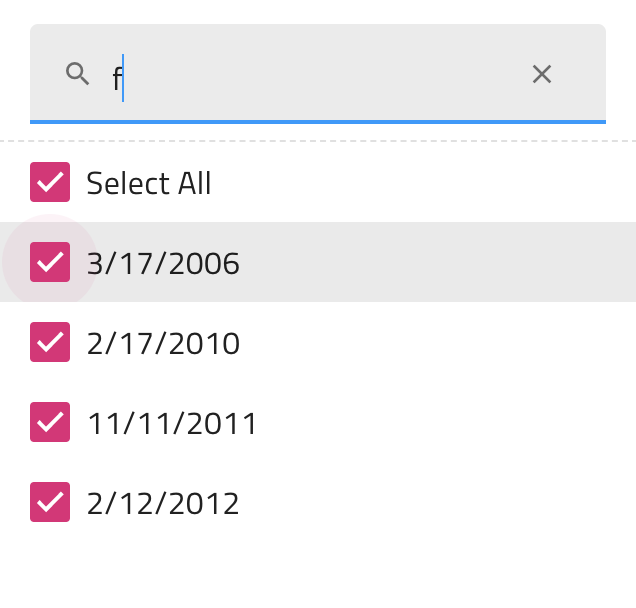
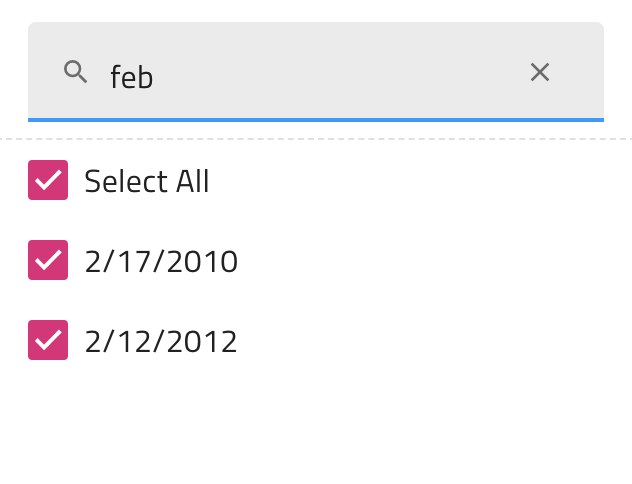
Open the (ESF)[https://www.infragistics.com/products/ignite-ui-angular/angular/components/grid/excel_style_filtering.html] and try to search on the column of type date with the string "f" feb" "februa" the results are inexplainable :)
Result
The search works in a manner that cannot be fully explained. Apparently it filters results that are in the month of February but then some dates are shown that have no "f" in the wording, and also when the criterion is extended to the full writing "february" no matches are present.
Expected result
We could take this as an enhancement but in my opinion we should not let the users type in characters that are not part of the mask that the column uses, which in this case is a date mask of numeric type.
Attachments

 StefanIvanov
All 5 comments
We could take this as an enhancement but in my opinion we should not let the users type in characters that are not part of the mask that the column uses, which in this case is a date mask of numeric type.
@StefanIvanov, Unfortunately we can't restrict the user input because the column doesn't have mask property, but a formatter property which is a function and we don't know what format the user might use. However we will implement the search to work on the display value of the items.
 DiyanDimitrov
on 9 Apr 2020
DiyanDimitrov
on 9 Apr 2020
OK, can you elaborate, how the end-user experience will be if the search worked on the display value?
StefanIvanov
on 9 Apr 2020
OK, can you elaborate, how the end-user experience will be if the search worked on the display value?
@StefanIvanov For example if we have the two following dates:
8/14/2011
5/18/2013
Searching by 8/ will return both items since the pipe we are using when searching uses .indexOf(targetString) > -1. This means that if the end user decides to use other date format, he'll have to search by the format his items are in, e.g.:
Aug 14 2011
May 18 2013
In this case 8/ wont return anything since '/' doesn't appear in this format. Hope I explained it properly. Should you have any questions, please don't hesitate to comment further.
 onlyexeption
on 9 Apr 2020
onlyexeption
on 9 Apr 2020
I think this proposal would resolve the issue and prevent the scenario that led to my frustration.
StefanIvanov
on 9 Apr 2020
I think this proposal would resolve the issue and prevent the scenario that led to my frustration.
Yes, I already resolved it this way. I only have to finish the unit tests. The previous issue happened because the value and label properties were both the same in this format ->
Mon Mar 15 2010 00:00:00 GMT+0200
In this case, when you search for 'f', it returns all the dates that were either Friday or February.
'Feb' would return all the dates that were in February and 'february' won't return anything since date.ToString() returns the string with the short names of month and day of week
onlyexeption
on 9 Apr 2020
Related issues
 mkamiishi
·
3Comments
mkamiishi
·
3Comments
 brianlagunas
·
3Comments
brianlagunas
·
3Comments
 ChronosSF
·
3Comments
ChronosSF
·
3Comments
 furugen
·
3Comments
furugen
·
3Comments
 jdk339
·
3Comments
jdk339
·
3Comments