Igniteui-angular: Not able to change filter option in excel style filter.
Description
Not able to change filter option in excel style filter.
- igniteui-angular version: 7.2.X
- browser: all
Steps to reproduce
- Click excel style filter. (Listing all Unique values as selected)
- Click select all option of Unique values list. (Unchecked all Unique values)
- Select only one value from Unique values.
- Apply the filer.(It is filtering the grid data for the applied option).
Issue.
5.Click the same filter again.
Result
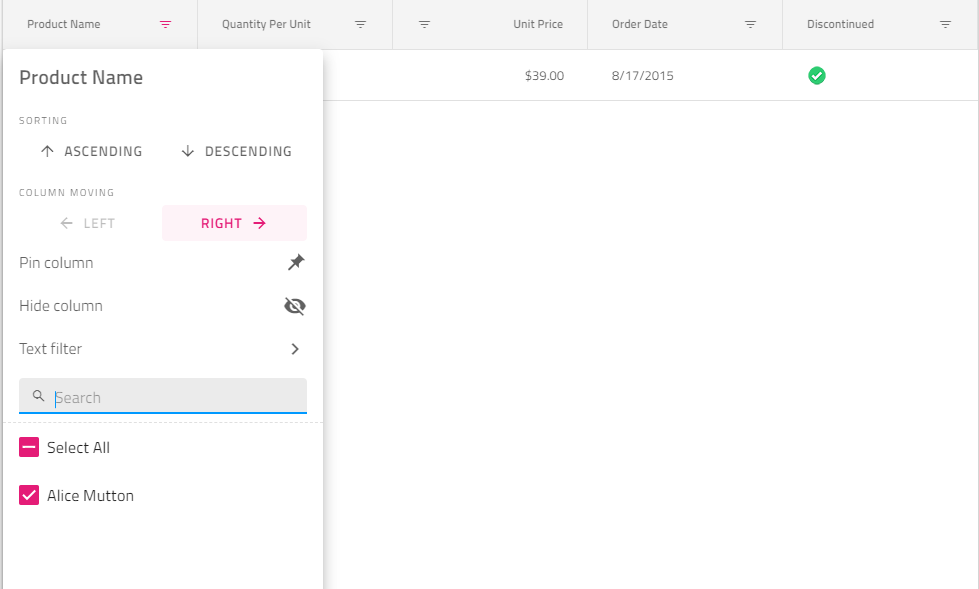
It is listing only filtered option.
Expected result
It should list the unique values from grid data and old filtered value as checked
Attachments
 rssureshkumar
All 10 comments
@rssureshkumar Hi currently we do not plan to change this as it is by Design provided from our US team @StefanIvanov and @DaniMarinov if you guys think this can be an improvement to our current solution please replay in the issue.
 SlavUI
on 19 Mar 2019
SlavUI
on 19 Mar 2019
If I understand correctly the bug report is that instead of seeing all unique column values on the second opening of the filter, it only shows the ones matching the filter defined during the previous time the dialog was open. We have discussed what enhancements we could offer and decided to add the capability to clear the filter in the dialog that upon applied would let you have the full collection next time you open the excel style filter.
 StefanIvanov
on 19 Mar 2019
StefanIvanov
on 19 Mar 2019
Yes, In excel always it will list all unique values and filtered values as checked. We can add or remove values to filter by checking or unchecking items from the list. Clear can provide option to change the value when filtering single item .But it is very hard when working with multiple values. For example first time I have selected many random items . On next time I would like to add/remove some items at this time once I clear the filter I will loose all of my previous selection and I have to restart from first. Users are expecting like excel and commented as unusable. Please let me know any possibilities to achieve the same.
rssureshkumar
on 19 Mar 2019
There's two things here that need to be considered.
- What values are shown in the filtering UI of a single column that has already applied filters on the data.
- What values are shown in the filtering UI of a column from a collection of columns that have applied filters on the data.
In general, all of the UI is implemented to work with the collection that the user sees, meaning the filtered down collection. This means that when a filtering UI is opened, we want the user to see only the values that remain after applying filters on other columns. The current implementation does not exclude filters applied by the current column, which leads to the behavior that you want changed.
What we can implement as a change would result in the following behavior:
E.g. 1. We have Name, Country and City columns.
The user opens the filtering UI for
Countryand applies a filter for only US and Canada.
Then the user opens the filtering UI forCountryagain. We want the user to see all unique values for country, with US and Canada being checked and the rest unchecked.
E.g. 2. We have Name, Country and City columns.
The user opens the filtering UI for
Countryand applies a filter for only US and Canada.
Then the user opens the filtering UI forName. We want the user to see only the unique names that belong to records withCountrybeing US or Canada.
E.g. 3. We have Name, Country and City columns.
The user opens the filtering UI for
Countryand applies a filter for only US and Canada.
Then the user opens the filtering UI forCity. The user sees all unique values forCityfor records that have theirCountrybeing US or Canada. The user filters out Vancouver and Philadelphia.
Then the user opens the filtering UI forCityagain to change the selection. The collection has all unique values forCitywithCountrybeing US or Canada, with all checked, except for Vancouver and Philadelphia.
@rssureshkumar Please confirm that the behavior that you're expecting is what I have given as examples.
@bkulov @sstoyanovIG In order to have this, we would need to feed the collection not through filteredData, but through the filtered collection with all filtering expressions applied, except for the filtering expressions for the current column the user interacts with.
 kdinev
on 21 Mar 2019
kdinev
on 21 Mar 2019
@kdinev
Yes, exactly same as users expectation.
E.g. 4. We have Name, Country and City columns.
User clears any of two applied filters for example Country and City then name becomes primary and once user opens filtering UI for Name. user wants see all unique values for Name.
And if the filtering UI provides option to assign custom list with control for checkbox. It can be customized for any user requirement.
rssureshkumar
on 21 Mar 2019
And search in filtering UI also needs to be taken care.
rssureshkumar
on 21 Mar 2019
@rssureshkumar HI can you clarify what do you mean by your last comments ? "And search in filtering UI also needs to be taken care."
SlavUI
on 25 Mar 2019
@rssureshkumar The search will react to what's available in the list. The custom list will become available as a strategy method to provide the unique values to the excel-style filter UI. This can be used, for example, to call a back-end service to retrieve the unique values. If a custom list is provided then that would mean custom filtering operands for the column, as well as custom search in the list, meaning all those would have to be provided as callbacks/strategies.
kdinev
on 25 Mar 2019
@SlavUI
1.Select all option should be visible on search to check / uncheck all searched values.
- If I search before uncheck all it is not only considering searched value it is considering all the initial list values.
@kdinev
Yes we are doing some custom filtering through external UI for some specific columns but not server side only on client side and not able to do for all the columns .If there is a way to do it for all columns as part of excel-style filter UI that's great .Please let me know the way or sample to do it on client side.
Still I did not get any comments on custom filtering operands in excel-style filter UI but got some comments on quick filter to set start with as a default search operand.
rssureshkumar
on 25 Mar 2019
@rssureshkumar I meant that the strategy injection mechanism would allow to inject even logic that does server-side operations. The client-side would work for sure.
kdinev
on 26 Mar 2019
Related issues
 jdk339
·
3Comments
jdk339
·
3Comments
 tkiryu
·
3Comments
tkiryu
·
3Comments
 mkamiishi
·
3Comments
mkamiishi
·
3Comments
 ViktorSlavov
·
3Comments
ViktorSlavov
·
3Comments
 Hypenate
·
3Comments
Hypenate
·
3Comments
Most helpful comment
There's two things here that need to be considered.
In general, all of the UI is implemented to work with the collection that the user sees, meaning the filtered down collection. This means that when a filtering UI is opened, we want the user to see only the values that remain after applying filters on other columns. The current implementation does not exclude filters applied by the current column, which leads to the behavior that you want changed.
What we can implement as a change would result in the following behavior:
E.g. 1. We have
Name,CountryandCitycolumns.E.g. 2. We have
Name,CountryandCitycolumns.E.g. 3. We have
Name,CountryandCitycolumns.@rssureshkumar Please confirm that the behavior that you're expecting is what I have given as examples.
@bkulov @sstoyanovIG In order to have this, we would need to feed the collection not through
filteredData, but through the filtered collection with all filtering expressions applied, except for the filtering expressions for the current column the user interacts with.