Igniteui-angular: Grid remains in pending state after commiting row edit w/o changes
Description
Grid w/ [rowEditable]="true" remains in pending transaction state (even when no transaction are enabled) after a commit row editing w/o making changes.
- igniteui-angular version: 7.2.x, 7.3.x
- browser: N/A
Steps to reproduce
Open the devSample for Grid Row Editing.
Under the first grid (*Row Editing w/o Transactions):
- Enter row editing on the first row and make a change (without exiting)
- Click on the Delete button on another row - that row is properly deleted
- Enter row editing on the first row and make no change (do not exit)
- Click on the Delete button on another row
Result
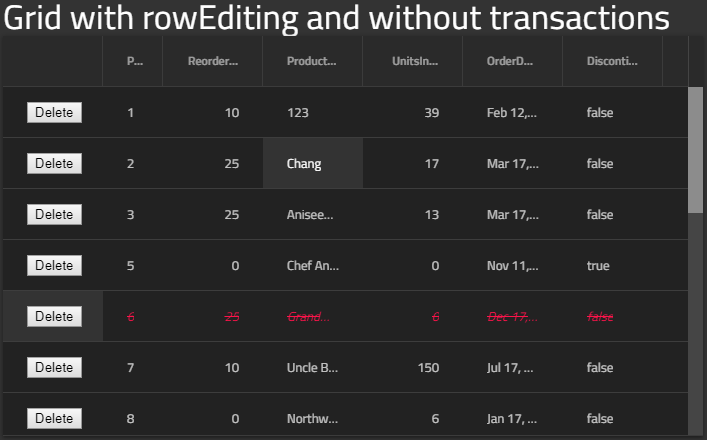
The row is not deleted and stays in a pending deleted state
Expected result
The row is deleted
Attachments
Invalid state:
 ViktorSlavov
All 3 comments
Curious if this will also fix the issue where values changed in custom ng-templates will not trigger a changed row value.
In the StackBlitz sample for the documentation's "Grid Row Editing" page, here is the result after changing a row's UnitsInStock value:
{rowID: 1, oldValue: {…}, newValue: null, cancel: false…}
The expected result would be:
{rowID: 1, oldValue: {…}, newValue: {...}, cancel: false…}
If this is too unrelated to this issue (#4680), then I can create another issue. It's an extremely important feature for our company, so please fix quickly.
 jdk339
on 3 May 2019
jdk339
on 3 May 2019
@jdk339 this fix is not related to the issue you are facing. Actually the issue you are facing is related to the wrong binding in the sample. I logged this sample issue here. To fix this at your side bind to cell.editValue instead of to cell.value.
 wnvko
on 7 May 2019
wnvko
on 7 May 2019
Thanks again, @wnvko. Everything is working fine now.
jdk339
on 7 May 2019
Related issues
 lorenzo-iovino
·
3Comments
lorenzo-iovino
·
3Comments
 Hypenate
·
3Comments
Hypenate
·
3Comments
 tkiryu
·
3Comments
tkiryu
·
3Comments
 SAndreeva
·
3Comments
SAndreeva
·
3Comments
 furugen
·
3Comments
furugen
·
3Comments
Most helpful comment
@jdk339 this fix is not related to the issue you are facing. Actually the issue you are facing is related to the wrong binding in the sample. I logged this sample issue here. To fix this at your side bind to
cell.editValueinstead of tocell.value.