Igniteui-angular: Filtering input gets populated on keyboard action
Description
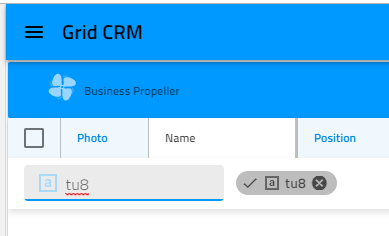
- [ ] - 1. Filtering input gets populated on keyboard action
[ ] - 2. X clear icon dissappers after activating/deactivating the chip:
- igniteui-angular version: 6.2.0, 7.0.0
Steps to reproduce #1
- Go to https://stackblitz.com/angular/brljdreeyelm
- Click the filter button for OpenPrice column
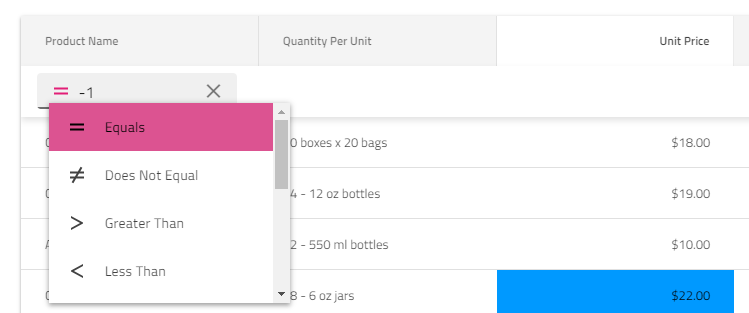
- Use the arrow down key to open the dropdown with filterin conditions
Result
The input is populated with "-1":
Steps to reproduce #2
- Open filter for a column and type value in the input
- Deactivate the chip
- Activate the cip and the X icon dissappears
 hanastasov
All 2 comments
From now on the drop down will be opened with Alt+ Arrow Down, because for numeric columns the down arrow decrements the value.
 sstoyanovIG
on 29 Nov 2018
sstoyanovIG
on 29 Nov 2018
👍1
It would be good to update the grid-filtering topic with a section covering the keyboard navigation over the filtering ui.
hanastasov
on 29 Nov 2018
👍1
Was this page helpful?
0 / 5 - 0 ratings
Related issues
 Hypenate
·
3Comments
Hypenate
·
3Comments
 QuinntyneBrown
·
3Comments
QuinntyneBrown
·
3Comments
 Eralmidia
·
3Comments
Eralmidia
·
3Comments
 ViktorSlavov
·
3Comments
ViktorSlavov
·
3Comments
 tkiryu
·
3Comments
tkiryu
·
3Comments