Igniteui-angular: Feature-request: IgxGrid improve Printing Experience
Description
The grid does not seem to work very well for printing. The grid overflows and content is hidden. I'm not sure whether this is a bug, or there just needs to be some clarification in the documentation on how to make it work with printing.
- igniteui-angular version: 6.0.1 (but issue seems to also be present on current stackblitz sample)
- browser: Chrome
Steps to reproduce
- Open https://lrqakgovrdo.angular.stackblitz.io/
- Press Ctrl + p
Result
The grid overflows the page
Expected result
Grid should fit on page for printing, at least when it is defined in % and not px.
 Eralmidia
All 15 comments
@Eralmidia currently we do not provide any specific style for printing. But you can always extend our default themes for the igx-grid and add the necessary style changes by you own. Another thing that I can suggest you is to export to exel all the data from Igx-Grid and then print it.
 ddincheva
on 23 Jul 2018
ddincheva
on 23 Jul 2018
@SlavUI it should be decided whether we are going to provide a specifix style for printing like media Attribute or not.
 zdrawku
on 23 Jul 2018
zdrawku
on 23 Jul 2018
@ddincheva Thank's for the input. I'm sure it can be done with some CSS overrides, yes. I just created a simple test, by limiting the width of the grid to a size fitting onto a A4 page, and that didn't seem to work by itself. While the grid size was limited to the A4 page, the grid columns was still cut off. As @zdrawku says, it would be great if you could add @media to the grid, to improve if for printing.
As for the excel export, we do provide this for allmost all out grids, but customers tends to want an easy way to print (and print to pdf) directly from the browser. Our application is all about large amounts of data and reports, and having to export to excel several times on a daily basis becomes cumbersome.
Eralmidia
on 29 Jul 2018
@Eralmidia we can provide printing layout for all of our components in an upcoming release. I will make sure we schedule time for that. So far we haven't had the resources to spend on printing layouts.
 simeonoff
on 22 Nov 2018
simeonoff
on 22 Nov 2018
@kdinev Any chance of finding time for this one in the next milestone? :)
Eralmidia
on 22 Mar 2019
@Eralmidia We'll start working on that request this week. Should have something ready for 7.3.0.
simeonoff
on 25 Mar 2019
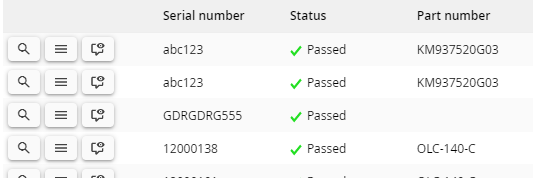
@simeonoff In the new print style for the grid, will it be possible to mark a given column to be excluded from the print? For instance, we have a grid, which always has an actions column, but this column has no value for printing, and only takes up space:
Eralmidia
on 21 May 2019
@Eralmidia I think you could bind to the 'beforeprint' event and hide all columns you want using the standard column hiding api.
Consequently, you can reveal all hidden column by binding to the 'afterprint' event.
simeonoff
on 21 May 2019
Will that work though? For the column to hide, it will need to redraw the screen after getting the order to hide the column. I dont think you can force the print to wait for the next tick before showing the print dialog. Not sure, it might work, but I have had issues with this kind of things in the past. For our own components we simply do this
@media print {
.no-print {
display: none !important;
}
}
and throw the no-print on anything we need to not show. Would have been great to apply that class to a column as well.
Eralmidia
on 21 May 2019
Yeah, that'd be a cool way to handle it, but afaik, the column is not a 'real' structural element and doesn't group the DOM elements in it. We would have to create a new property on the column that specifies whether this column is visible in the printing layout, thus applying the 'display: none' property on every single visible cell in the column. @rkaraivanov could have some other ideas.
Tbh, I would try my first suggestion. The __beforeprint__ event callback should be handled before the printing preview appears, so it will have to mutate the DOM. Give it a try.
simeonoff
on 21 May 2019
@simeonoff Seemed to work fine. Thanks. Any ETA on this one?
Eralmidia
on 29 May 2019
@Eralmidia we've discussed it with @rkaraivanov and we had decided that the approach described above is good enough. We're not planning on incorporating this feature as a property on the igx-column component. @kdinev may have different ideas about it.
simeonoff
on 29 May 2019
@simeonoff Sorry, the ETA question was referring to the actual feature for this issue (the print styles) 😉
Eralmidia
on 29 May 2019
@simeonoff The @media print that @desig9stein added to his PR should make it into the branch or no? As for hiding columns when printing, I think we should create a DocFX article about how this should be handled.
 kdinev
on 29 May 2019
kdinev
on 29 May 2019
@kdinev The PR is pending since April 1. @desig9stein will close the current PR, since it was never merged, and the target branch is way too old now. He will instead wait for master to update to Angular 8.0 and then open up a new PR targeting that branch.
simeonoff
on 29 May 2019
Related issues
 cornel-stoica-str
·
3Comments
cornel-stoica-str
·
3Comments
 ViktorSlavov
·
3Comments
ViktorSlavov
·
3Comments
 Hypenate
·
3Comments
Hypenate
·
3Comments
 ymita
·
3Comments
ymita
·
3Comments
 jdk339
·
3Comments
jdk339
·
3Comments