Ignite: Storybook does not show any stories

 hendra47
All 18 comments
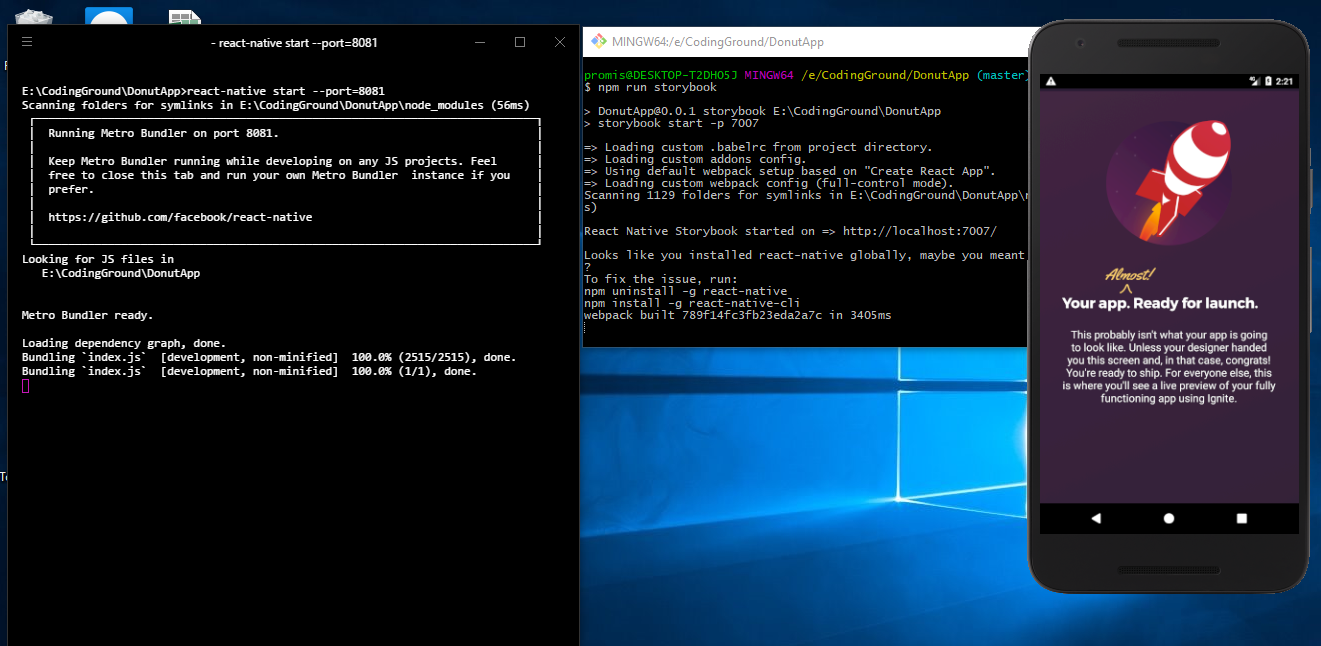
Don't run react-native start separately, the command npm run storybook starts the packager.
# build and install app to phone
react-native run-ios

# close the react-native packager

# start storybook
yarn run storybook
I just verified following those steps makes Storybook work as expected (screenshot).
If you want actions to appear in the action logger, you need to configure your stories to do so (this isn't generated). Follow the guide in the readme for @storybook/addons: https://github.com/storybooks/storybook/tree/master/addons/actions
 ruddell
on 17 Mar 2018
ruddell
on 17 Mar 2018
Am having a same issue, tried many things, but my storybook is always empty. Am using the Bowser boilerplate. Any idea?
 rdewolff
on 6 May 2018
rdewolff
on 6 May 2018
@rdewolff Could you open a separate issue on Bowser? I believe this issue is about Andross.
https://github.com/infinitered/ignite-ir-boilerplate-bowser/
 kevinvangelder
on 17 May 2018
kevinvangelder
on 17 May 2018
@hendra47 Can you give us more information on how you configured Storybook?
kevinvangelder
on 17 May 2018
Solved on my side, usage problem! Don't forget to set the SHOW_STORYBOOK var to true :)
rdewolff
on 18 May 2018
Dom we'll have a better switch in there soon enough.
On Fri, May 18, 2018 at 8:49 AM, Rom notifications@github.com wrote:
Solved on my side, usage problem! Don't forget to set the SHOW_STORYBOOK
var to true :)—
You are receiving this because you are subscribed to this thread.
Reply to this email directly, view it on GitHub
https://github.com/infinitered/ignite/issues/1242#issuecomment-390213114,
or mute the thread
https://github.com/notifications/unsubscribe-auth/AA83JSMJr5LqgCpUaqL_a6xkbFoTkL36ks5tztFcgaJpZM4Su7oG
.
 GantMan
on 18 May 2018
GantMan
on 18 May 2018
Documentation could cover this :)
rdewolff
on 18 May 2018
coming soon 👍
GantMan
on 18 May 2018
@rdewolff the same issue, none story showed in the browser, where did you set the 'SHOW_STORYBOOK' var?
 dreamlover
on 24 May 2018
dreamlover
on 24 May 2018
It's in src/app/main.tsx.
 skellock
on 24 May 2018
skellock
on 24 May 2018
@skellock I'm using the 'ignite-ir-boilerplate', can not find the file...
dreamlover
on 25 May 2018
ignite-ir-boilerplate does not support Storybook out of the box.
kevinvangelder
on 25 May 2018
@kevinvangelder ok, i see. I added storybook manually according to the tutorial of storybook. The stories can be showed on the mobile, but not in the browser. I thought it was the same reason...
dreamlover
on 25 May 2018
I'm not very experienced with Storybook, but my understanding is that any stories that show up on mobile should also show up in the browser. Maybe there is an extra configuration step or something.
kevinvangelder
on 25 May 2018
Yes, it should be so. I'm still trying to figure it out! :)
dreamlover
on 25 May 2018
I figured it out! Config -> DebugConfig -> launchStorybook: true
npm run storybook and npm run ios
 eldooon
on 30 May 2018
eldooon
on 30 May 2018
Check out this issue. Right stories in React Native project don't show in the web.
https://github.com/storybooks/storybook/issues/2063
 waleedsarwar86
on 10 Jul 2018
waleedsarwar86
on 10 Jul 2018
Don't run
react-native startseparately, the commandnpm run storybookstarts the packager.# build and install app to phone react-native run-ios # close the react-native packager # start storybook yarn run storybookI just verified following those steps makes Storybook work as expected (screenshot).
If you want actions to appear in the action logger, you need to configure your stories to do so (this isn't generated). Follow the guide in the readme for
@storybook/addons: https://github.com/storybooks/storybook/tree/master/addons/actions
In my case it was opposite. First i had to run yarn run storybook and then react-native run-ios
 luckeysherpa07
on 9 Apr 2020
luckeysherpa07
on 9 Apr 2020
Related issues
 ghost
·
29Comments
GantMan
·
18Comments
ghost
·
29Comments
GantMan
·
18Comments
 AlirezaAkbarix
·
23Comments
AlirezaAkbarix
·
23Comments
 chapeljuice
·
22Comments
chapeljuice
·
22Comments
 FernandoMorais
·
23Comments
FernandoMorais
·
23Comments
Most helpful comment
Solved on my side, usage problem! Don't forget to set the
SHOW_STORYBOOKvar totrue:)