Ignite: Storybook does not show any stories
Hi,
I've created a project with ignite new myproject.
Then:
npm run storybook
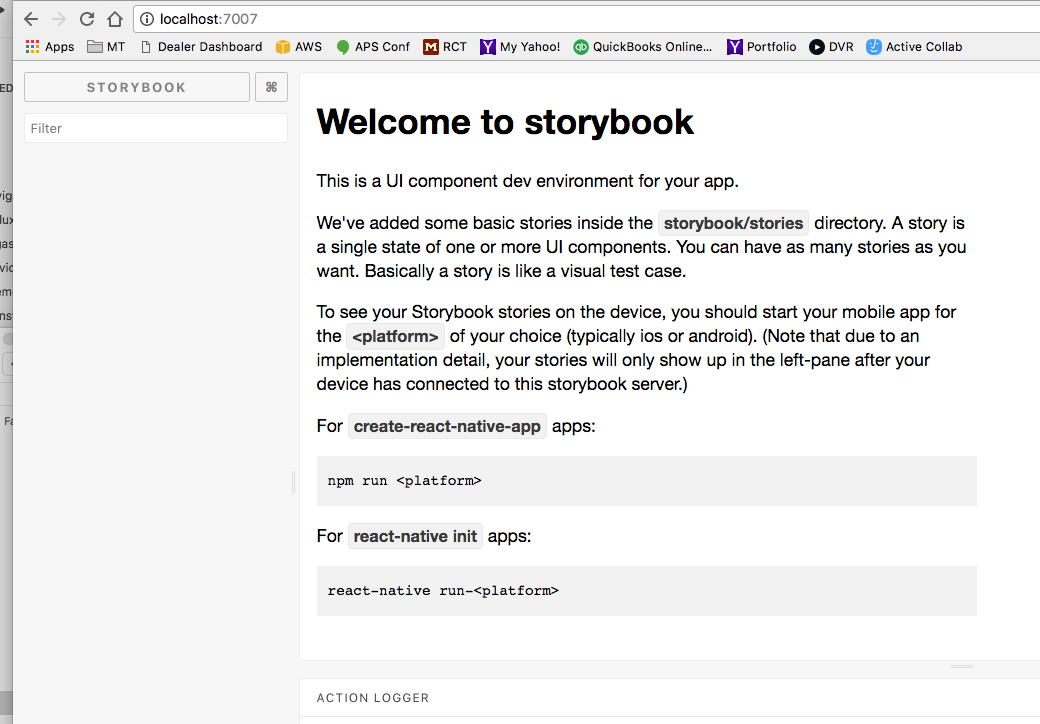
Open localhost:7007 in a browser.
Storybook displays but no items are in its menu. It appears the directory structure is not set up in the way storybook expects. From looking at other examples, storybook 3.2 seems to expect a .storybook directory with a config.js file.
Adding to the docs about how Storybook finds its stories and how to use it both on desktop and on device would be awesome. So anxious to be able to use this tool!
 mobitinker
All 10 comments
Looks like this is being resolved here: https://github.com/infinitered/ignite-ir-boilerplate/pull/153
 ryanlntn
on 11 Oct 2017
ryanlntn
on 11 Oct 2017
To run Storybook:
- Install the app to the device, then close the React Native packager
- Run
npm run storybookwhich starts a a host on port 7007 and the React Native packager on port 8081 - Refresh the app on your device and Storybook will be rendered instead of your usual LaunchScreen
You can choose the stories from your browser, but they will only render in the app.
 ruddell
on 11 Oct 2017
ruddell
on 11 Oct 2017
Is this still open? I'd love to take this on.
 shahzeb1
on 13 Oct 2017
shahzeb1
on 13 Oct 2017
@shahzeb1 Storybook works so this issue should be closed
ruddell
on 13 Oct 2017
@ruddell @shahzeb1 i have a error: ERROR Metro Bundler can't listen on port 8081 🤨 why?
 pherm
on 6 Jan 2018
pherm
on 6 Jan 2018
@pherm You probably have the bundler already running somewhere. Try ending that process and anything else that uses port 8081, then run npm run storybook from the root of your project
ruddell
on 6 Jan 2018
@ruddell My steps:
Install the app to the simulator device:
1) react-native run-ios 'iphone 6'
then i close the React Native packager.
Check storybook files:
2) getstorybook
Run storybook which host on port 7007:
3) yarn run storybook
i run RN
4) react-native start --port=8081
and then it return: undefined is not an object (evaluating 'RCTAsyncStorage.multiMerge') 🤔
pherm
on 7 Jan 2018
@pherm You should stop after step 3. Storybook starts on port 7007 and also runs the packager on 8081.
If you still have another issue, please open a new one. Your problem looks unrelated to this issue
ruddell
on 7 Jan 2018
@ruddell my ACTION LOGGER is white screen how fix this?
 hendra47
on 17 Mar 2018
hendra47
on 17 Mar 2018
@hendra47 If you have a separate issue, please open a new issue with details on how to reproduce it. I'm not sure what you mean by "my ACTION LOGGER is white screen"
ruddell
on 17 Mar 2018
Related issues
 chapeljuice
·
22Comments
chapeljuice
·
22Comments
 AlirezaAkbarix
·
23Comments
AlirezaAkbarix
·
23Comments
 budda
·
24Comments
budda
·
24Comments
 skellock
·
34Comments
skellock
·
34Comments
 wdiechmann
·
28Comments
wdiechmann
·
28Comments
Most helpful comment
To run Storybook:
npm run storybookwhich starts a a host on port 7007 and the React Native packager on port 8081You can choose the stories from your browser, but they will only render in the app.