Iglistkit: Two Shared instances are generated
New issue checklist
- [x] I have reviewed the
READMEand documentation - [x] I have searched existing issues and this is not a duplicate
General information
IGListKitversion:
- IGListKit (3.4.0):
- IGListKit/Default (= 3.4.0)
- IGListKit/Default (3.4.0):
- IGListKit/Diffing
- IGListKit/Diffing (3.4.0)
- iOS version(s):
simulator iphone6 - 11.4 - CocoaPods/Carthage version:
COCOAPODS: 1.5.3 - Xcode version:
Version 9.4.1 (9F2000) - Devices/Simulators affected:
- Reproducible in the demo project? (Yes/No):
Yes
TestTabCol.zip
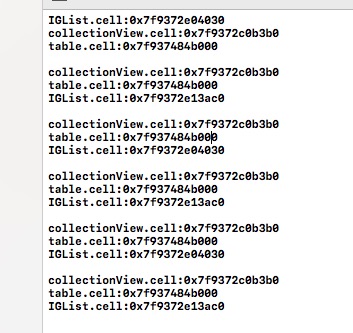
the result log:
 feixue299
All 7 comments
In this demo every time I click on the button cell instance, it toggles between the two Shared instances
feixue299
on 9 Aug 2018
Before a cell is removed from superview, it's not added into the reuse queue, so when you dequeue for the new cell, it'll create a new instance for you. After the update, the first one is added into the reuse queue. So the next time when you call dequeue, you'll get the first instance.
It's expected behavior of UICollectionView, so it's neither IGListKit or UICollectionView's bug.
 allenhsu
on 9 Aug 2018
allenhsu
on 9 Aug 2018
@allenhsu UITableView的行为会和UICollectionView一样吗,我自己按正常步骤写UICollectionView时未出现两个实例切换的情况,这个和cell的注册时机有关吗
feixue299
on 9 Aug 2018
@allenhsu
feixue299
on 9 Aug 2018
Yup sounds like this is just the expected behavior
Sent with GitHawk
 rnystrom
on 9 Aug 2018
rnystrom
on 9 Aug 2018
@feixue299 nope, it's not related to registration of cells, it depends on how you reload data, with or without animation.
In your demo project, you're calling reloadData of UITableView and your own UICollectionView, while calling performUpdates(animated: true, completion: nil) of ListAdapter, they're totally different.
So during animation, all existing cells are ON SCREEN, and new cells are ADDED TO SCREEN at the same time, so there need to be 2 instances for the animation to complete.
However, if you call reloadData, all cells are REMOVED FROM SCREEN and ADDED TO REUSE QUEUE, so when you dequeue a cell, an existing instance will be reused. Different from the animated update, there won't be 2 cells on screen at the same time.
You can also try performBatchUpdates of UICollectionView and beginUpdates/endUpdates of UITableView. They're more similar to IGListKit's performUpdates, but you need to deal with diff logic in the block by yourself.
allenhsu
on 10 Aug 2018
@allenhsu thanks. I rarely use animation updates to understand the differences.
feixue299
on 10 Aug 2018
Related issues
 joseph-francis
·
3Comments
joseph-francis
·
3Comments
 racer1988
·
3Comments
rnystrom
·
3Comments
racer1988
·
3Comments
rnystrom
·
3Comments
 alexwillrock
·
3Comments
alexwillrock
·
3Comments
 kanumuri9593
·
3Comments
kanumuri9593
·
3Comments