Iglistkit: The y position of sticky header was wrong after data changing
New issue checklist
- [x] I have reviewed the
READMEand documentation - [x] I have searched existing issues and this is not a duplicate
General information
IGListKitversion: 3.0- iOS version(s): iOS 11
- CocoaPods/Carthage version: CocoaPods 1.0.1
- Xcode version: 9 beta 3
- Devices/Simulators affected: Simulators iPhone SE
- Reproducible in the demo project? (Yes/No):
- Related issues:
I used several ViewModel to combine a data array for IGListAdaper, and query data in one of the ViewModel instance, named CoreDataViewModel.
When adapter dataSource method listAdapter:sectionControllerForObject: invoke, and the object type is CoreDataViewModel, it return a CoreDataSectionController.
In CoreDataSectionController, numberOfItems method return a count of CoreDataViewModel's array.
Like this:
~~~objc
@protocol CoreDataViewModelDelegate
- (void)viewModelDataDidUpdate:(CoreDataViewModelDelegate *)viewModel;
@end
@interface CoreDataViewModel : NSObject
@property (nonatomic, copy) NSArray
@property (nonatomic, weak) id < CoreDataViewModelDelegate> delegate;
@end
~~~
When CoreDataViewModel received database change notification, the delegate will invoke and the ViewController will reload the data like:
~objc
[self.adapter reloadDataWithCompletion:nil];
~
Every thing work well but in CoreDataSectionController, I implement sticky header with IGListSupplementaryViewSource and using IGListCollectionViewLayout for collectionView.
When reload the data, and the data array had someone object be removed, and the sticky header's y position will wrong. Until I scroll the collection view.
Is anything I forgot to set or something did wrong? Thanks for help.
--- Update ---
I can reproduce this problem in the following example project.
 marcuswu0814
All 5 comments
Will take a look
 rnystrom
on 10 Aug 2017
rnystrom
on 10 Aug 2017
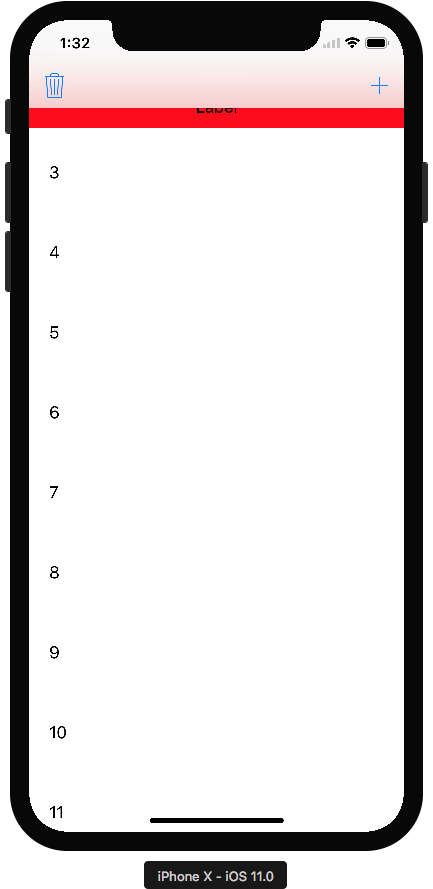
Running the project above in Xcode 9 w/ iPhone X simulator and scrolling up also shows another bug where the sticky Header appears underneath the new UINavigationBar.
 DarrenAndes
on 27 Sep 2017
DarrenAndes
on 27 Sep 2017
@DarrenAndes can you open a new issue for that? Include what collection view layout you’re using.
Sent with GitHawk
rnystrom
on 27 Sep 2017
@rnystrom
I think it's my demo project and used IGListCollectionViewLayout,the topContentInset is hard code 64 cause this issue.
marcuswu0814
on 27 Sep 2017
@marcuswu0814 closing due to inactivity, lmk if this is still an issue.
rnystrom
on 29 Jan 2018
Related issues
 FazeelAkhtar
·
3Comments
rnystrom
·
3Comments
FazeelAkhtar
·
3Comments
rnystrom
·
3Comments
 shuhrat10
·
3Comments
rnystrom
·
3Comments
shuhrat10
·
3Comments
rnystrom
·
3Comments
 alexwillrock
·
3Comments
alexwillrock
·
3Comments
Most helpful comment
@rnystrom
I think it's my demo project and used
IGListCollectionViewLayout,thetopContentInsetis hard code 64 cause this issue.