Iglistkit: Same item is being shown in all cells
New issue checklist
- [ x ] I have reviewed the
READMEand documentation - [ x ] I have searched existing issues and this is not a duplicate
General information
IGListKitversion: 3.0- iOS version(s): 10.2
- CocoaPods/Carthage version: latest
- Xcode version: 8.3.3
- Devices/Simulators affected: iPhone 6s
- Reproducible in the demo project? (Yes/No): Yes
- Related issues: No
Debug information
# Please include debug logs using the following lldb command:
po [IGListDebugger dump]
No Information
This seems like a simple bug but I don't know how to fix it, and I tried Googling all over and searching on the Github pages but I can't seem to find the answer to my issue.
The problem is that I send 5 variables to the Section Controller, but the section controller only shows the last variable 5 times, instead of showing each of the variables that I want them to show.
I mimicked the tutorials and examples to the best of my abilities, and I still have no clue on what the solution could be.
Here is code:
import Foundation
import UIKit
import IGListKit

class SearchResultsViewController: UIViewController, ListAdapterDataSource
{

    @IBOutlet weak var searchCollectionView: UICollectionView!

    lazy var adapter: ListAdapter = {
        return ListAdapter(updater: ListAdapterUpdater(), viewController: self, workingRangeSize: 0);
    }()

    lazy var searchResults = [
        User(username: "Hey", firstName: "Testing", lastName: "Andre", bio: "Hey"),
        User(username: "Hey", firstName: "User", lastName: "2", bio: "Hey"),
        User(username: "Hey", firstName: "User", lastName: "3", bio: "Hey"),
        User(username: "Hey", firstName: "User", lastName: "4", bio: "Hey"),
        User(username: "Hey", firstName: "User", lastName: "5", bio: "Hey"),
    ];

    override func viewDidLoad()
    {
        super.viewDidLoad();

        // view.addSubview(collectionView)

        adapter.collectionView = searchCollectionView;
        adapter.dataSource = self;

        /* let user1 = User();
        let user2 = Barber();
        let user3 = Shop();
        let user4 = User();
        let user5 = User();

        user1.firstName = "Testing";
        user1.lastName = "Yandre";
        user2.firstName = "User";
        user2.lastName = "2";
        user3.firstName = "User";
        user3.lastName = "3";
        user4.firstName = "User";
        user4.lastName = "4";
        user5.firstName = "User";
        user5.lastName = "5";

        self.searchResults = [User]();
        self.searchResults.append(user1);
        self.searchResults.append(user2);
        self.searchResults.append(user3);
        self.searchResults.append(user4);
        self.searchResults.append(user5); */

    }

    func objects(for listAdapter: ListAdapter) -> [ListDiffable] {
        // this can be anything!

        return searchResults as! [ListDiffable]
    }

    func listAdapter(_ listAdapter: ListAdapter, sectionControllerFor object: Any) -> ListSectionController {
        return SearchResultSectionController()
    }

    func emptyView(for listAdapter: ListAdapter) -> UIView? {
        return nil
    }

}
import Foundation
import UIKit
import IGListKit

class SearchResultSectionController: ListSectionController {
    private var object: User!

    override init() {
        super.init()
        inset = UIEdgeInsets(top: 0, left: 0, bottom: 15, right: 0)
    }

    override func numberOfItems() -> Int {
        return 1;
    }

    override func sizeForItem(at index: Int) -> CGSize {
        return CGSize(width: 340, height: 113)
    }

    override func cellForItem(at index: Int) -> UICollectionViewCell {
        let cell = collectionContext?.dequeueReusableCellFromStoryboard(withIdentifier: "SearchResultCell", for: self, at: index) as! SearchResultCell;
        // cell.messageLabel.text = "Testing Andre";
        // cell.userName.text = "Testing Andre";
        cell.userName.text = "\(self.object.firstName) \(self.object.lastName)";
        return cell;
    }

    override func didUpdate(to object: Any) {
        self.object = object as! User;
        print("Selected index \(self.object.firstName) \(self.object.lastName)");
    }

    override func didSelectItem(at index: Int) {
    }
}
and here is what the collection view looks like:
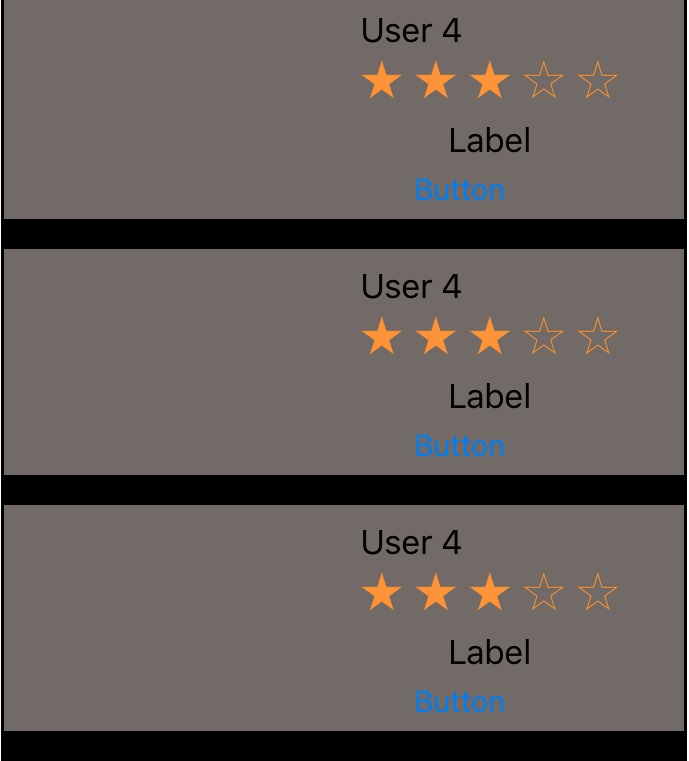
Any help would be appreciated. Thank you!
 FrescoFlacko
All 12 comments
@FrescoFlacko weird! Your setup looks correct. Mind sharing your User model too? I have a feeling something is off there. We should have asserting in place though if model conflicts occur, so I'm a little puzzled.
 rnystrom
on 19 Jun 2017
rnystrom
on 19 Jun 2017
I am having the same problem , only the last item from 3 items is being displayed. Have you figured out why? Thanks
 hanab
on 19 Jun 2017
hanab
on 19 Jun 2017
~~@rnystrom I am experiencing the same issue. My code is similar as above I am having a simple model class as follows: ~~
class ActivityViewModel: ListDiffable {
    let primaryKey: String
    let name: String

    init(primaryKey: String, name: String) {
        self.primaryKey = primaryKey
        self.name = name
    }

    func diffIdentifier() -> NSObjectProtocol {
        return self.primaryKey as NSString
    }

    func isEqual(toDiffableObject object: ListDiffable?) -> Bool {
        if let object = object as? ActivityViewModel {
            return primaryKey == object.primaryKey
        }
        return false
    }
}
Sorry, I was an idiot. Obviously, the section controller gets created for this one item so the index is always zero. As the index within the section controller is in the internal counter not for the whole collection view. I now storing the viewModel-instance in didUpdate-method and it's all good now :)
(Hiding in shame)
 weyert
on 20 Jun 2017
weyert
on 20 Jun 2017
@rnystrom
Here is the code:
`
import Foundation
import IGListKit
class User : NSObject, ListDiffable
{
var username: String;
var firstName: String;
var lastName: String;
var bio: String;
var pk: Int;

override init()
{
    self.username = "";
    self.firstName = "";
    self.lastName = "";
    self.bio = "";
    self.pk = 0;
}

convenience init(username: String, firstName: String, lastName: String, bio: String) {

    self.init();

    self.username = username;
    self.firstName = firstName;
    self.lastName = lastName;
    self.bio = bio;
}

public func isEqual(toDiffableObject object: ListDiffable?) -> Bool {
    guard self !== object else { return true }
    guard let object = object as? User else { return false }
    return username == object.username && firstName == object.firstName
        && lastName == object.lastName && bio == object.bio;

}

public func diffIdentifier() -> NSObjectProtocol {
    return pk as NSObjectProtocol
}
}
`
FrescoFlacko
on 20 Jun 2017
@FrescoFlacko At a quick glance I'd probably try ensuring the 'diffIdentifier' (primary key) is unique per item, looks to me as it's always zero!
 Sherlouk
on 20 Jun 2017
Sherlouk
on 20 Jun 2017
@Sherlouk I am so dumb.. that was actually exactly why it wasn't working! Thank you very much!
FrescoFlacko
on 20 Jun 2017
@rnystrom Maybe not a bad idea to make it obvious in the guide that the primary key has to be unique?
Sherlouk
on 20 Jun 2017
That's what it says: where the diff identifier uniquely identifies data (common scenario is primary key in databases). Equality comes into play when comparing the values of two uniquely identical objects (driving reloading).
weyert
on 20 Jun 2017
@weyert I for one rarely read paragraphs, I'd be more likely to see it if it was part of the bullet points. Though yeah I didn't see that phrase, so maybe it's okay
Sherlouk
on 20 Jun 2017
Nice spot @Sherlouk!
@FrescoFlacko were you getting any log warnings at all?
https://github.com/Instagram/IGListKit/blob/master/Source/IGListAdapterUpdater.m#L106
Also I'll add another issue for a DEBUG assert like this to search for dupe diffIdentifiers.
Also its bizarre those showed up at all, this method should be trimming objects with duped identifiers... will investigate.
rnystrom
on 20 Jun 2017
Haha, I missed the bit about needingto set a dataSource :)
weyert
on 20 Jun 2017
If we need to return same identifier for different type of objects, we can just add classForCoder (return "\(userId)\(classForCoder)" as NSString). (was my issue so I came here)
 Jauzee
on 3 Jul 2017
Jauzee
on 3 Jul 2017
Related issues
 krysztalzg
·
3Comments
rnystrom
·
3Comments
krysztalzg
·
3Comments
rnystrom
·
3Comments
 joseph-francis
·
3Comments
joseph-francis
·
3Comments
 jessesquires
·
3Comments
jessesquires
·
3Comments
 Przemyslaw-Wosko
·
3Comments
Przemyslaw-Wosko
·
3Comments
Most helpful comment
@Sherlouk I am so dumb.. that was actually exactly why it wasn't working! Thank you very much!