Idyntree: Add meshcat visualizer in iDynTree
Hi all, these days I tried to embed meshcat inside iDynTree. I tried to replicate what is currently implemented in Pinocchio adjusting it to the iDynTree framework.
Even if the visualizer is not completely working I would like to share with you some results.
First of all, you can find the code related to the visualizer in this branch https://github.com/GiulioRomualdi/idyntree/tree/visualizer/meshcat
The MeshcatVisualizer class is installed only if the swig bindings are enabled.
Once you have installed the bindings you can run the following script
from idyntree.visualize import MeshcatVisualizer
import idyntree.bindings as idyn
import numpy as np
import os

robot_name = "iCubGazeboV2_5"

viz = MeshcatVisualizer()

model_path = os.path.join(os.environ['ROBOTOLOGY_SUPERBUILD_INSTALL_PREFIX'],
                    "share", "iCub", "robots", robot_name, "model.urdf")
joint_list = ["torso_pitch", "torso_roll", "torso_yaw",
              "l_shoulder_pitch", "l_shoulder_roll", "l_shoulder_yaw", "l_elbow",
              "r_shoulder_pitch", "r_shoulder_roll", "r_shoulder_yaw", "r_elbow",
              "l_hip_pitch", "l_hip_roll", "l_hip_yaw", "l_knee", "l_ankle_pitch", "l_ankle_roll",
              "r_hip_pitch", "r_hip_roll", "r_hip_yaw", "r_knee", "r_ankle_pitch", "r_ankle_roll"]
joint_list_idyn = idyn.StringVector()
for joint in joint_list:
    joint_list_idyn.push_back(joint)

loader = idyn.ModelLoader()
loader.loadReducedModelFromFile(model_path, joint_list_idyn)

s = [0.0] * len(joint_list)
R = np.eye(3)
p = np.array([0.0, 0.0, 0.0])

print("Load model")
viz.set_model(loader.model())
viz.load_model(color=[1, 1, 1, 1])
input()

print("Move the robot in the zero configuration")
viz.display(p, R, s)
input()
Some results
iCubGazeboV2_5 is not correctly loaded. Indeed as you can see in the following image/video there is a problem similar to the one discussed in https://github.com/stack-of-tasks/pinocchio/issues/1471 and https://github.com/robotology/icub-models/issues/97.
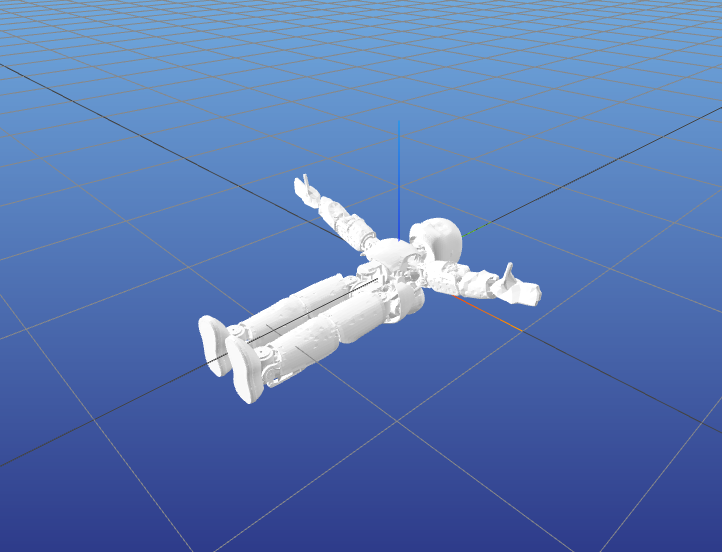
When viz.display(p, R, s) is called, the homogeneous transformations are not correctly applied (probably it's a scaling problem)
 GiulioRomualdi
All 5 comments
Just to understand, in Python you tried to mimic the existing Visualizer bindings?
 traversaro
on 17 Jul 2021
traversaro
on 17 Jul 2021
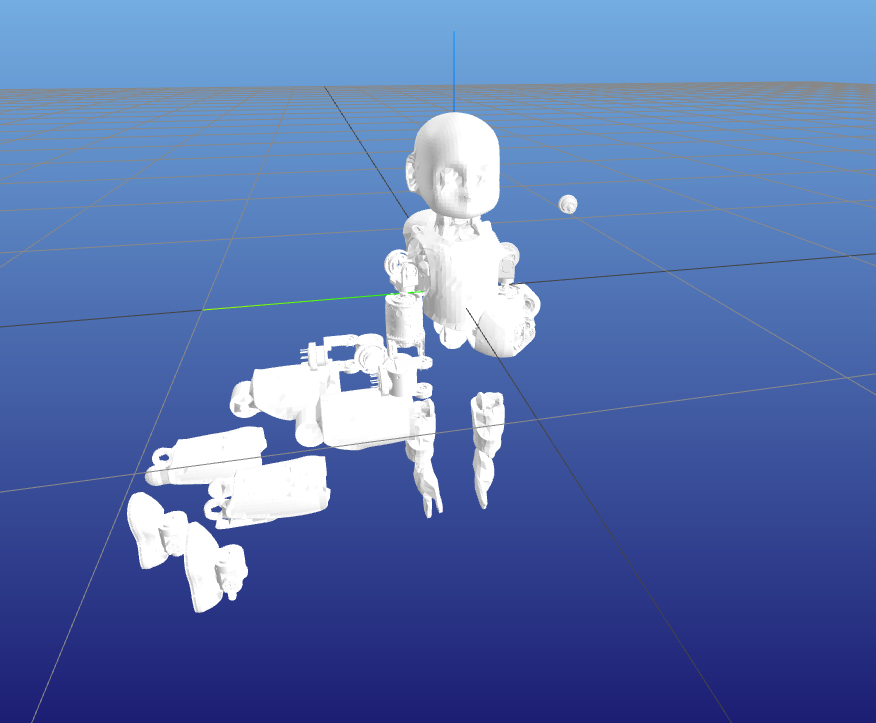
I am not sure, but probably the visualization problem could be related to the fact that the solid_shape.getLink_H_geometry (the transform between the link frame and the frame in which the mesh point are expressed) is not considered. In the irrlicht-based visualizer this info is used in https://github.com/robotology/idyntree/blob/7febf5ad8f97e294d8d19651631ccdc3bcac0e45/src/visualization/src/IrrlichtUtils.h#L254 .
traversaro
on 17 Jul 2021
I applied @traversaro suggestion and this is the result. The visualizer works as expected
GiulioRomualdi
on 19 Jul 2021
Perfect, now we just need to bind the Python code to C++ via https://pybind11.readthedocs.io/en/stable/advanced/pycpp/index.html and we will get meshcat C++ interface, just in a super scary way. :D
traversaro
on 19 Jul 2021
Meshcat has been introduced in #901. An experimental version of meshcat in c++ through pybind11 is here: https://github.com/GiulioRomualdi/meshcat-cpp-pybind11
GiulioRomualdi
on 24 Jul 2021
Related issues
GiulioRomualdi
·
9Comments
traversaro
·
3Comments
traversaro
·
11Comments
 ahoarau
·
5Comments
GiulioRomualdi
·
10Comments
ahoarau
·
5Comments
GiulioRomualdi
·
10Comments
Most helpful comment
Perfect, now we just need to bind the Python code to C++ via https://pybind11.readthedocs.io/en/stable/advanced/pycpp/index.html and we will get meshcat C++ interface, just in a super scary way. :D