Id: Can't split an area on a connected vertex
First off, kudos to the dev team for new features and overall usability improvements. So I'll start asking for some more...
When working with multipolygons, it is often needed to split existing areas (closed lines) and thus convert them to multipolygons. However, an area cannot be split at a vertex where another line has been connected. Steps to reproduce:
- Draw a closed Area, say a rectangle
- Draw a line connecting to one of the area's vertices
- Click the vertex and try to split the area. You get a "Lines can't be split on their beginning or end". I expect they can.
For the situation from the screenshot, the area cannot be split at any vertex:
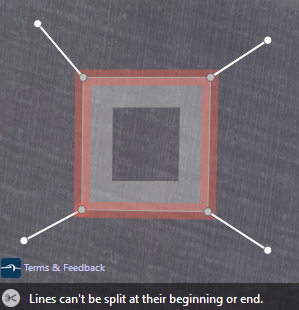
To work around the issue, I have to split the boundary elsewhere (converting it to a multipolygon), then I can split it at the connection, merge the segments as necessary... a dozen clicks what should be just one.
The desired behavior is to allow the split at the connecting point, which would convert the area into a single-boundary multipolygon.
 DujaOSM
All 6 comments
Select the area first, then shift select the node and then split -- it will split the area:
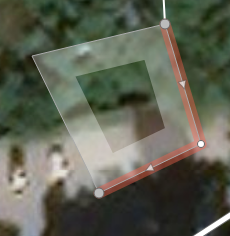
That said, iD should probably just split the area ignoring the connecting line. That is, if there's just one way to split something at a node, don't require multiple selected features.
 RudyTheDev
on 16 Mar 2019
RudyTheDev
on 16 Mar 2019
@RudyTheDev
That is, if there's just one way to split something at a node, don't require multiple selected features.
That would likely result in splitting areas accidentially. Assume a highway is connected to an an area, and the user intends to split the highway in a node, where it is already splitted. The accidential split of the area would be hardly detectable.
I would prefer if the area would always have to be selected or at least be the related parent to be splitted.
The related parent is the weakly highlighted way, which is used for vertex navigation.
Requiring selections of multiple elements is potentially an issue for tablet users, but #3635 with parts of #3634 could offer a smooth workflow even for tablets based on the related parent logic:
- select the area,
- select the vertex subsequently (no shift modifier required, the area gets unselected),
- choose the split operation from the edit menue (or use the shortcut).
This workflow is quite natural, as the area has typically to be selected first to make the vertex selectable anyway.
@quincylvania
As you are optimizing iD for mobile devices, have a look at the linked issues (#3634 and #3635).
I'm sure they would result in a great improvement for all users, and especially for tablet users.
The rendering of the related parent is weak, but the resulting workflows wouldn't require the related parent to be rendered at all.
 slhh
on 16 Mar 2019
slhh
on 16 Mar 2019
Disconnecting features is definitely one of the most tedious common things I encounter, especially those highways sharing nodes with residentials. What if iD offered a list of items to cut/split when only a node is selected? Something like:
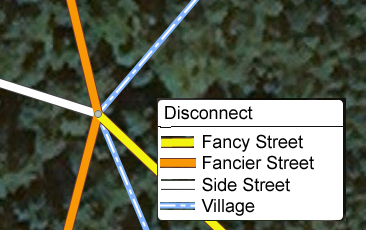
(Then possibly auto-select the separated node and start a move operation, as that is generally the use case.)
RudyTheDev
on 16 Mar 2019
@RudyTheDev
What if iD offered a list of items to cut/split when only a node is selected?
Disconnecting a single way selectively is the much more typical usecase than iD current operation, but the list would be too unspecific in the general case, e.g. where multiple unnamed roads of the same type are connecting.
A disconnecting workflow based on #3635 and partially #3634 would be easier:
- select the way to be disconnected,
- select the node (no shift modifier required, the way gets unselected),
- choose the disconect operation from the edit menue (or use the shortcut).
(Then possibly auto-select the separated node and start a move operation, as that is generally the use case.)
I agree.
The workflow can be continued for the next node without selecting the way again, as the way is still the related parent.
slhh
on 16 Mar 2019
Select the area first, then shift select the node and then split -- it will split the area:
Thanks, I knew the trick for line-continuation purposes ([A] key), but at minimum it should be documented in OSM help. I will update the OSM wiki, but it is not the canonical place for iD help.
By the way, I find it counterintuitive that splitting an area will result in a multipolygon with two outer ways, with another split point automatically introduced at a semi-randomly selected node.
Otherwise, I agree with other comments that the process of selecting an object to work with leaves a lot to be desired, and endorse slhh's proposals. Recently, I had to disconnect four farmland polygons that shared a common junction node with three administrative borders, each participating in 2-3 relations; it was a nightmare (and I'm experienced enough to know most editing tricks).
DujaOSM
on 23 Mar 2019
First off, kudos to the dev team for new features and overall usability improvements.
I know this was a year and a half ago, but thanks for the kudos! I hope our subsequent work has also helped you out.
an area cannot be split at a vertex where another line has been connected
I changed this so you can still split the area if none of the connected lines can be split (e.g. they're endpoints). While in some cases this might be unexpected, it's usually clear after the fact what's been split and the mapper can easily undo. If we do #8034, then iD will highlight the ways that will be split before you click.
 quincylvania
on 29 Sep 2020
quincylvania
on 29 Sep 2020
Related issues
 Chaz6
·
3Comments
Chaz6
·
3Comments
 tordans
·
3Comments
tordans
·
3Comments
 bhousel
·
3Comments
bhousel
·
3Comments
 mvl22
·
3Comments
tordans
·
3Comments
mvl22
·
3Comments
tordans
·
3Comments