Icingaweb2: Wrong Location detected for Timezone
Expected Behavior
The Timezone should be correct detected. In this case "Europe/Berlin"
Current Behavior
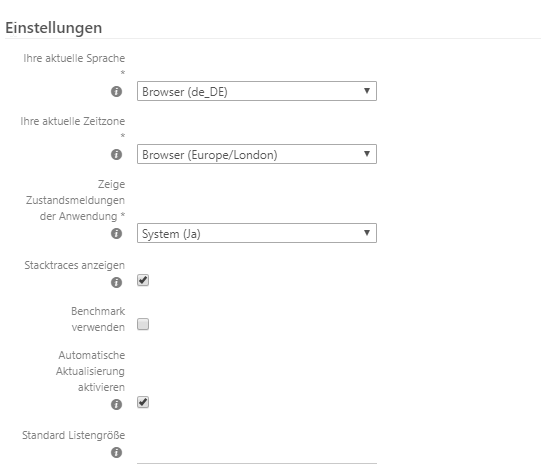
The Timezone from the Browser is detected as "Europe/London"
We already check the PHP and Webserver configuration. Any relativ configuration already set for "Europe/Berlin"
Steps to Reproduce (for bugs)
Open the User Preferences and check the Timezone from the Browser detection.
Context
Your Environment
- Icinga Web 2 version and modules (System - About): 2.6.1
Version used (
icinga2 --version): r2.9.2-1
System information:
Platform: Red Hat Enterprise Linux Server
Platform version: 7.5 (Maipo)
Kernel: Linux
Kernel version: 3.10.0-862.2.3.el7.x86_64
Architecture: x86_64Operating System and version: RHEL 7 3.10.0-862.2.3.el7.x86_64
- Enabled features (
icinga2 feature list):api checker command ido-mysql influxdb livestatus mainlog notification perfdata
 MaBauMeBad
All 31 comments
Did you chance the timezone in the php.ini? At the beginning this was also our fault. After that ist was also correct.
There is a part [Date] with the Parameter date.timezone. Here you can write your Zone.
 .
.
After restart of php everyhting was fine.
I don't now if icingaweb2 can take that Information from the browser yet. But when you take a look into the documentation https://icinga.com/docs/icingaweb2/latest/doc/02-Installation/ there is still written: _Most important for icingaweb2 is date.timezone._
 stevie-sy
on 29 Oct 2018
stevie-sy
on 29 Oct 2018
Hi Stevie,
thanks for your reply.
As mentioned above, we already check that.
Our current configuration looks like that:
[Date]
; Defines the default timezone used by the date functions
; http://php.net/date.timezone
date.timezone = Europe/Berlin
MaBauMeBad
on 29 Oct 2018
no problem.
Another thing we got was with php-fpm. It has is it own php.ini. e.g. we have one in /etc/php.ini and one in /etc/opt/rh/rh-php71/php.ini
If this is also not the reason we have to wait for an answer from the developer.
stevie-sy
on 29 Oct 2018
Good point, with PHP FPM you'd need to edit the correct php.ini for this.
 dnsmichi
on 29 Oct 2018
dnsmichi
on 29 Oct 2018
Hi stevie (again ;) ),
in the "normal" php.ini under /etc/ and /etc/opt/rh/rh-php71/ is set the Timezone correctly for "Europe/Berlin."
At the /etc/php-fpm.conf and /etc/opt/rh/rh-php71/php-fpm.conf is no Timezine at all configured.
But when i try to grep the TImezone via CLI....
[root@HOSTNAME ~]#
php-fpm -i | grep -i timezone
"Olson" Timezone Database Version => 0.system
Timezone Database => internal
Default timezone => Europe/Berlin
date.timezone => Europe/Berlin => Europe/Berlin
So, just for my understanding. The "Browser Timezone"(as it is called in the User Preferences) ist not at all from the Browser/Client, but from the Webserver ?
Thanks in advcance :)
MaBauMeBad
on 29 Oct 2018
@MaBauMeBad you're welcome. That was only from our experience with installing Icingaweb2 and timezones in our environment. Now it's a turn for the developers I think :-)
stevie-sy
on 29 Oct 2018
I just stumbled across this issue too.
For me the timezone in the frontend is reported as Browser (Europe/London) even though all of the remaining time on the entire computer is set to Europe/Berlin, and even in the developer console window I can enter the follwing code and get the correct time (Berlin time that is) reported:
new Date().toLocaleString()
My guess is that the timezone detection is based on the set locale (intl.accept_languages equals en-GB, en-US), instead of the set localtime.
 benaryorg
on 2 Nov 2018
benaryorg
on 2 Nov 2018
this seems to be quite an old problem?
I'm seeing this issue in all systems I have set up to date, every system shows _Browser (Europe/London)_ as default timezone.
Happens for various OS&icingaweb2 versions:
Ubuntu 14.04 + icingaweb2 2.4.2
Ubuntu 16.04 + icingaweb2 2.6.1
Ubuntu 18.04 + icingaweb2 2.6.1
centOS 7 + icingaweb2 2.6.0
centOS 7 + icingaweb2 2.6.1
All systems have set date.timezone = Europe/Berlin in either php.inior /etc/php/<version>/apache2/conf.d/timezone.ini
 log1-c
on 5 Nov 2018
log1-c
on 5 Nov 2018
Regarding php-fpm (running icingaweb2 inside the nginx container image from Docker library, based on Debian9, locales installed and set to de_DE.UTF-8) I also added php_admin_value[date.timezone] = "Europe/Berlin" to my fpm-pool file /etc/php/7.0/fpm/pool.d/www.conf but I think this will inherit from /etc/php/7.0/fpm/php.ini where I already set date.timezone.
Anyway I don't see how server-side settings should affect browser time zone detection (which looks good in http://browserspy.dk/date.php btw but just is Europe/London in icingaweb2).
 sebrem
on 5 Nov 2018
sebrem
on 5 Nov 2018
We have the same problem but only with the Chrome Browser (Version 70.0.3538.77).
Location is Europe/Berlin but the auto detection is showing "Browser (Europe/London)".
In Firefox, Edge and Internet Explorer the timezone is Europe/Paris.
Icingaweb2 version: Icinga Web 2 Version 2.6.1
Icinga2 version: r2.10.1-1
System information: Debian 9 latest updates
 teclogi
on 6 Nov 2018
teclogi
on 6 Nov 2018
You'are right.
Tested it With IE and Firefox. Both Browser show Paris as TimeZone.
Thank you all!
MaBauMeBad
on 7 Nov 2018
I think this is still a bug which should be fixed!?
teclogi
on 7 Nov 2018
Dito.
Firefox/Chrome/Vivaldi: "Europe/London"
IE/Edge: "Europe/Paris"
no Browser shows the configured "Europe/Berlin" for me
@MaBauMeBad can you please re-open this issue?
log1-c
on 7 Nov 2018
Today I had the genius idea of deleting the icingaweb2-tzo cookie (in my browser's dev console) used in these places:
All of a sudden it had the correct timezone.
Can anyone confirm this?
benaryorg
on 7 Nov 2018
cleared the complete browser data from FF and Vivaldi. Didn't help
log1-c
on 8 Nov 2018
@log1-c Please note that I did not say to clear the complete browser data, only this single cookie.
benaryorg
on 8 Nov 2018
The effect would be the same, wouldn't it?
Anyway, I just deleted only the one cookie and you are partly right: The time zone is than reported as "Europe/Berlin". But as soon as I reload the page it's back on "Europe/London" again.
log1-c
on 9 Nov 2018
Re-opening for further discussion on the matter.
dnsmichi
on 9 Nov 2018
Anyway, I just deleted only the one cookie and you are partly right: The time zone is than reported as "Europe/Berlin". But as soon as I reload the page it's back on "Europe/London" again.
Same here.
 Axel577
on 9 Nov 2018
Axel577
on 9 Nov 2018
scratch that, was beeing a bit dumb and was on the second webinterface, where I didn't manually set the time zone.
This is getting quite annoying/confusing, when the deployments in the Icinga Director are "mixed up".
I have set the time zone to Europe/Berlin manually but sometimes this doesn't seem to work!?
image
So I have the latest deployment (made at 14:24:06) further down in the deployment list, as it is displayed in Europe/London time zone...
log1-c
on 9 Nov 2018
It did look like a fishy thing for a cookie to store the timezone at all times even if not set via the settings.
As deleting the cookie seems to fix the issue (until next reload at which presumably the cookie is simply set again?), would a minimum fix be to just not set the cookie when not needed?
benaryorg
on 9 Nov 2018
Is there any solution yet?
Axel577
on 13 Nov 2018
Hi,
There is no solution yet but I'll have a look what's going wrong here.
Best,
Eric
 lippserd
on 14 Nov 2018
lippserd
on 14 Nov 2018
I've found it!
The problem is in public/js/icinga/timezone.js:17
You are using Date().getYear() method, which returns 118 right now - number on years since 1900.
This causes wrong DST detection, which causes wrong timezone.
You shoud use Date().getFullYear() in this place
 h0rmiga
on 15 Nov 2018
h0rmiga
on 15 Nov 2018
@h0rmiga Good catch, thanks.
lippserd
on 15 Nov 2018
Hi all,
Could you please test the related PR and provide feedback whether the issue is fixed for you? You have to remove the icingaweb2-tzo cookie in order to trigger the timezone detection.
Best,
Eric
lippserd
on 15 Nov 2018
Replaced the current timezone.js with the fixed one, restarted apache and deleted the cookie.
IcingaWeb2 no shows Europe/Paris as timezone consistently. So I'd say it is working.
log1-c
on 15 Nov 2018
@h0rmiga Thank you!
@lippserd It worked for me now!
Thank your very much all !
MaBauMeBad
on 19 Nov 2018
@lippserd Can you tell me a date when you are planning to release version 2.6.2?
Axel577
on 19 Nov 2018
On Wednesday this week.
lippserd
on 19 Nov 2018
There seems to be a regression, or problem related to this.
System Information
Frontend
|Icinga Web 2||
|:---|---:|
|Version|2.6.3|
Browser
|Firefox||
|:---|---:|
|Version|67.0b10 (64-bit)|
|Locale (as per Intl.Collator().resolvedOptions().locale)|en-GB|
|Timezone (as per Intl.DateTimeFormat().resolvedOptions().timeZone)|Europe/Berlin|
Issue
My detected browser settings in My Account are wrong (not reporting Europe/Berlin, but Europe/Paris).
Reproducability
- open Icinga Web
- head over to My Account
- change all settings to be browser detected
- log out
- you will land on the login page
- open your cookie store in the developer tools
- delete all cookies
- click login
- it doesn't matter what you input, it will fail due to missing cookies either way
- the same page shows again
- now you have the
_chcandIcingaweb2cookies set
- now you have the
- log in using your username and password
- now you have the
icingaweb2-announcementsandicingaweb2-sessioncookies set
- now you have the
- head over to My Account
- your cookies will not change, since the page is not reloaded but changed dynamically
- your timezone and browser language will probably be correct
- reload the page
- now you have the
icingaweb2-tzocookie set¹ - timezone and browser language continue to be correct, presumably since the browser only just received the
Set-Cookievia HTTP and has not reported that to the server yet
- now you have the
- reload again
- timezone and browser language might change right now (as they do for me), presumably since the server tries to use the value of the now received
icingaweb2-tzocookie
- timezone and browser language might change right now (as they do for me), presumably since the server tries to use the value of the now received
¹: Why even use that cookie in this situation? Everything seems pretty okay and working without it.
benaryorg
on 6 May 2019
Related issues
 theFeu
·
6Comments
theFeu
·
6Comments
 jschoone
·
7Comments
jschoone
·
7Comments
 fireba11
·
8Comments
fireba11
·
8Comments
 nE0sIghT
·
6Comments
nE0sIghT
·
6Comments
 Christiaan-Liebenberg
·
7Comments
Christiaan-Liebenberg
·
7Comments
Most helpful comment
On Wednesday this week.