Icingaweb2: Implement a "remember me" feature
This issue has been migrated from Redmine: https://dev.icinga.com/issues/12213
Created by Manul on 2016-07-23 12:57:04 +00:00
I'd really love not to have to log in on every visit at least from some hosts I regularly use to access Icinga Web 2.
I understand that security is a concern with such a feature and that it would have to be implemented carefully. I had a look at how owncloud implements it since I guess their security requirements are roughly on the same level and the following is an outline of a solution I think could work, based mainly on their implementation:
(DISCLAIMER: I'm not a security expert and I have very limited knowledge of PHP so I might have partly or even completely misunderstood their approach. Please consider all flaws in the following outline mine and all merits owncloud's)
Configuration options (mandatory)
---------------------------------

- must be possible to dis-/enable site-wide by admin
- must be possible to dis-/enable per session by user

Configuration options (optional)
--------------------------------

- should be possible to dis-/enable per user by
  a) admin
  b) the user
- max duration should be configurable by admin
- per session duration should be selectable on login page

On presenting login page
------------------------

- check if feature is enabled
- if yes, present check box/option for duration
(- possibly disable/hide check box after entry of username if disabled for that user)

On successful login (with activated feature)
--------------------------------------------

(- check if permitted for user)
- generate random token
- store uid,token,lifetime in DB
- store uid,token(,lifetime) in Cookie with appropriate lifetime

On new session/visit
--------------------

- if feature enabled:
  - check if Cookie present
  - check if Cookie still valid
  - check if uid from Cookie exists
  - check if feature enabled for uid
  - check token,lifetime against DB
  - if all tests okay, log user in
  - delete successfully used token and generate new one as above

If user's credentials change
---------------------------

- delete all tokens for user from DB

Additional UI
-------------

- present option for admin to delete all tokens for specific user/all users
- present option for user to delete all tokens
I'm looking forward to your comments and insights on this.
 icinga-migration
All 12 comments
Updated by Manul on 2016-07-30 11:03:21 +00:00
I have a hard time believing I am the only one interested in such a feature. Is what I have written such utter nonsense that nobody even deems it worth their while to refute it? I'd be really grateful if someone took the time to enlighten me.
I'd be happy to help develop such a feature, but I think I'd need some guidance and help from someone familiar with Icinga Web 2 and its source. Any takers?
icinga-migration
on 30 Jul 2016
Updated by elippmann on 2016-10-04 12:28:26 +00:00
- Target Version set to _Backlog_
Hi,
Thanks for the report. Unfortunately we're blocked w/ other issues until the end of this year. But we may design this in the meantime and get back to you, if you're still willing to contribute.
Best regards,
Eric
icinga-migration
on 4 Oct 2016
I'm the OP of this issue. Just wanted to give a quick thumbs-up: I'm still watching this and yes, I'm still willing to contribute, as time and skill permits.
 m-reiter
on 17 Jan 2017
m-reiter
on 17 Jan 2017
I'm interested in this as well, as are others, I guess.
 ge-fa
on 10 May 2017
ge-fa
on 10 May 2017
I would like this together with #2394 - THX!
 wols
on 25 Jul 2017
wols
on 25 Jul 2017
My suggestion on this:
- a checkbox "Remember me"
- an RSA keypair on the server side (Hello #2582!)
- a new cookie (name: TBD)
If a user logs in with the checkbox checked, we generate a random Token, combine it w/ the user's name (including the domain) (and the backend name?) and an expiration timestamp and sign the result w/ the private key. Then we put the payload + signature into the new cookie w/ the same expiration timestamp.
On an unauthenticated request we check for that cookie and verify the signature and the expiration timestamp and (on success) we log the user back in (seemlessly).
This would save us requiring a database, tons of tokens in it and the TTL management.
Again, CC @lippserd @Thomas-Gelf @nilmerg
 Al2Klimov
on 27 Nov 2017
Al2Klimov
on 27 Nov 2017
As discussed w/ @lippserd (offline):
No, we don't do it this way.
Al2Klimov
on 27 Nov 2017
As discussed w/ @lippserd (offline):
- You'd have to sync that key across an LB'ed IW2 setup
- You'd have neither pre-expirity revokes, nor even listing
- Something reusable (like API tokens) would be better for this
- These API tokens would be stored in the IW2 DB (requires a DB, period) e.g. like this:
CREATE TABLE `icingaweb_token`(
  `token`           varbinary(255) NOT NULL,
  `username`        varchar(254) COLLATE utf8_unicode_ci NOT NULL,
  `expiration_time` timestamp NOT NULL,
  `ctime`           timestamp NULL DEFAULT NULL,
  `mtime`           timestamp NULL DEFAULT NULL ON UPDATE CURRENT_TIMESTAMP,
  PRIMARY KEY (`token`)
) ENGINE=InnoDB DEFAULT CHARSET=utf8;

CREATE INDEX icingaweb_token_expiration_time_idx ON `icingaweb_token`(`expiration_time`);
- There would be a "TokenBackend" which log in users by token (e.g. API: header, remember me: persistent cookie)
- Caveat: if you re-visit your web app and it recognizes your cookie and logs you seamlessly back in, your authn backend would be the TokenBackend – and not e.g. LDAP w/ groups, domain-awareness, ...
Al2Klimov
on 27 Apr 2018
During a PoC we settled on the following process:
- We introduce a "remember me" checkbox in the login form
- We introduce a new cookie
- The cookie should expire after 1 month and must be automatically renewed if appropriate
- If session cookie authentication is no longer possible, we try to authenticate via the "remember me" cookie
- Authentication via the "remember me" cookie must trigger our normal authentication process, i.e. logging in with the username and password and creating a new session cookie if authentication succeeded
- The cookie must be deleted if authentication fails or logout is triggered
In order to securely store the users secrets, we create an RSA key pair on the server side upon creation of the "remember me" cookie. The key pair must be stored in our web database. The contents of the cookie must be the following:
- Public key
- Username and password encrypted using the public key
That makes the public key our common secret. Upon authentication via the "remember me" cookie we look for the public in key in our database, decrypt the secretes using the private key and trigger our normal authentication with the decrypted username and password.
Renewal happens automatically upon a successful "remember me" authentication and involves recreating the RSA key pair and cookie.
If the public key can't be found in our database or if authentication fails, the "remember me" cookie must be deleted.
 lippserd
on 18 Mar 2020
lippserd
on 18 Mar 2020
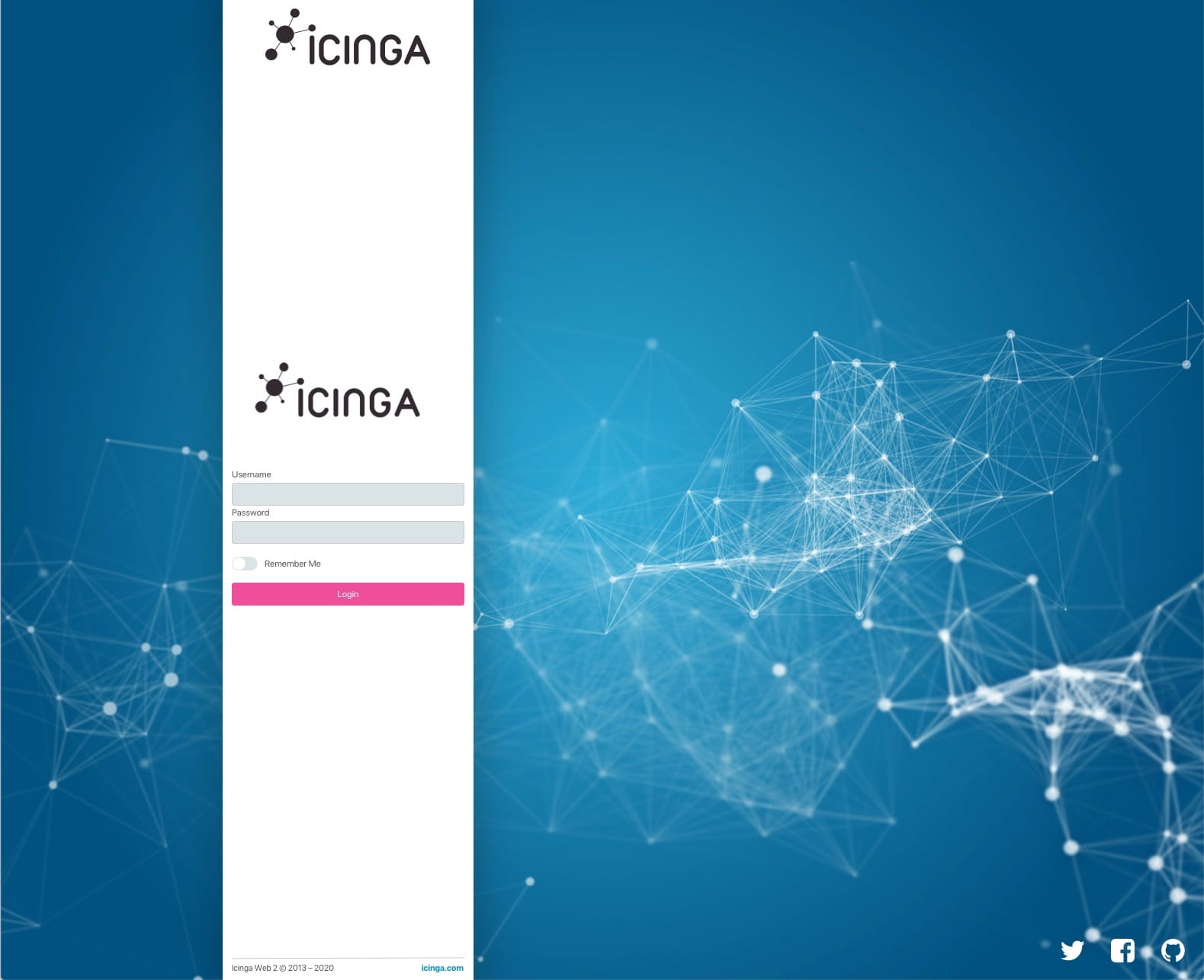
Here are mockups for how this should look style wise.

 flourish86
on 28 Apr 2020
flourish86
on 28 Apr 2020
Thanks @flourish86!
@sukhwinder33445 Please try to implement this.
lippserd
on 29 Apr 2020
Also please use "Stay logged in" instead of "Remember me".
lippserd
on 29 Apr 2020
Related issues
flourish86
·
7Comments
 K0nne
·
4Comments
K0nne
·
4Comments
 winem
·
5Comments
icinga-migration
·
6Comments
winem
·
5Comments
icinga-migration
·
6Comments
 theFeu
·
4Comments
theFeu
·
4Comments
Most helpful comment
I'm the OP of this issue. Just wanted to give a quick thumbs-up: I'm still watching this and yes, I'm still willing to contribute, as time and skill permits.