Hyper: Emoji in PROMPT is causing character duplication after pressing TAB
- [x] I am on the latest Hyper.app version
- [x] I have searched the issues of this repo and believe that this is not a duplicate
- OS version and name: macOS Mojave 10.14.3 (18D109)
- Hyper.app version: 2.1.2 (stable)
- Link of a Gist with the contents of your .hyper.js: https://gist.github.com/jkulak/1633a8c0572aade642f050be97b1da76
- Relevant information from devtools _(CMD+ALT+I on macOS, CTRL+SHIFT+I elsewhere)_:
- The issue is reproducible in vanilla Hyper.app: yes
Issue
I am using Hyper.js and oh-my-zsh. My PROMPT has an emoji (which causes the issue).
When I type a part of a command and press TAB to complete the command - and I get a list of suggestions for completion, the first letter of my command gets duplicated. Typing ls and pressing TAB gives:
🦀 ~ lls
LSCOLORS   ls         lsa        lsappinfo  lsbom      lskq       lsm        lsmp       lsof       lsvfs
When I type dock and the only option to autocomplete is docker it works just fine, and pressing TAB shows 🦀 ~ docker. Pressing TAB again gives
🦀 ~ ddocker
docker                         docker-compose                 docker-credential-osxkeychain  docker-machine
Pressing enter runs docker command and not ddocker so it's only a visual issue.
The issue occurs only with an emoji in the PROMPT. Issue doesn't occur in iTerm nor in Terminal.
 jkulak
All 14 comments
Similar experience for me, and I also only experience it when I have an emoji in the prompt.
I am using Hyper and Bash. I don't see the issue on autocomplete (tab), but I do see it when I hit the UP arrow to go to previous commands. The first UP pulls in the previous command, the second UP has the previous command's first letter prefixing it (visual only; the command will run properly).
Example:
🍕 ~ vim .
🍕 ~ du -sh Downloads/
(hit UP arrow)
🍕 ~ du -sh Downloads/
(hit UP again)
🍕 ~ dvim .
 stripedpajamas
on 11 Mar 2019
stripedpajamas
on 11 Mar 2019
Still the same in Hyper.app version: 3.0.0 (stable)
jkulak
on 8 May 2019
I am getting the same issue in 3.0.2 (stable) on macOS mojave (version 10.14.4 (18E226)) with a simple prompt running the built-in bash (which is of course old, v3.2.57)
export $PS1="🔭> "
a hexdump (echo $PS1 | hexdump) gives
0000000 f0 9f 94 ad 3e 0a
0000006
This doesn't cause an problem for iTerm, so it's not a bash specific thing.
Oh and it seems to not mind unless the command you scroll through has more than one word, at least for me. so scrolling through echo is find, but scrolling through echo "hi" will make a persistent e on the terminal
 johnarban
on 12 May 2019
johnarban
on 12 May 2019
in case it helps anyone else out...
@romkatv offered a fix for hyper/zsh misinterpreting an emoji's width in a zsh prompt:
https://github.com/robbyrussell/oh-my-zsh/issues/7945#issuecomment-508724741
Essentially: PROMPT='%{%G🦀%}'
 zhao-li
on 5 Jul 2019
zhao-li
on 5 Jul 2019
Any idea on how to fix when you actually write on ZSH, like a shell commit with an emoji?
 elegos
on 4 Nov 2019
elegos
on 4 Nov 2019
Any idea on how to fix when you actually write on ZSH, like a shell commit with an emoji?
It's a bug in Hyper so it needs to be fixed in Hyper.
 romkatv
on 4 Nov 2019
romkatv
on 4 Nov 2019
I know it's a Hyper bug, that's why I'm here. As the last comment is of the 5th of July I was wondering if anything can actually be made to fix it.
elegos
on 4 Nov 2019
I know it's a Hyper bug, that's why I'm here. As the last comment is of the 5th of July I was wondering if anything can actually be made to fix it.
Apparently no one is working on fixing this bug. You can either fix it yourself and send a PR, induce someone else to fix it, or wait and hope that others will do the work of fixing/inducing.
romkatv
on 5 Nov 2019
Hey there, to verify if this is indeed a Hyper issue or upstream at https://github.com/xtermjs/xterm.js/ could you please test if another xterm.js powered terminal shows the same problem you are experiencing? I suggest using https://github.com/Microsoft/vscode for testing. Thanks!
 Stanzilla
on 5 Nov 2019
Stanzilla
on 5 Nov 2019
@Stanzilla if the VSCode terminal uses xterm.js, it seems to be an xterm.js problem (same issue). I'm going to open a bug there.
elegos
on 6 Nov 2019
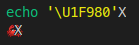
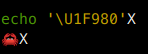
I can confirm that the integrated terminal in VSCode also incorrectly prints 🦀 as if it was a narrow character.
Here's how it's supposed to look like (same font and shell but in GNOME Terminal):
romkatv
on 6 Nov 2019
Yup, going to close this then.
Stanzilla
on 6 Nov 2019
@Stanzilla if the VSCode terminal uses xterm.js, it seems to be an xterm.js problem (same issue). I'm going to open a bug there.
Can you please link the issue you reported for xterm.js?
jkulak
on 21 Jan 2020
PROMPT='%1{🤖%} ' did the trick for me, could somebody confirm?
 philippnoah
on 26 Feb 2020
philippnoah
on 26 Feb 2020
Related issues
 stan-stripe
·
3Comments
stan-stripe
·
3Comments
 aem
·
3Comments
aem
·
3Comments
 cilice
·
3Comments
cilice
·
3Comments
 alejandrofloresm
·
3Comments
alejandrofloresm
·
3Comments
 hxnt
·
3Comments
hxnt
·
3Comments
Most helpful comment
Still the same in Hyper.app version: 3.0.0 (stable)