Hydrogen: [Feature Request] Optimize useability in Note Properties Ruler
Hydrogen version * : 97a784bdf46436d8d08bd2739d0df017a2ee0d6e
Operating system + version : Debian Sid
Audio driver + version : Jackd
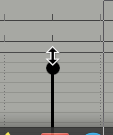
I recently use a drum software from a market leader. Their note properties are way better handleable because the
top ends of the property bars have a circle and if you hover over with the mouse you get a different cursor.
It would also be interesting to apply a bigger sensible area around the circle so that it's easier to grab.
Maybe this is a minor change what improves the usebility. I visualize it in the screenshot.
 Olli
Olli
All 13 comments
Hey @Olli
I do see your point. However, this kind of cursor might obscure the fact that you are able to draw multiple properties at once (press and hold left mouse key and move vertically in the Note Properties Ruler).
 theGreatWhiteShark
on 31 Dec 2020
theGreatWhiteShark
on 31 Dec 2020
Hi @Olli , If I'm reading this right, the issue is that there's nothing that suggests to the user that they can interact with the properties display (or how to interact with it)?
The actual click/draggable area that can be hit to set the value is much larger than just the head of the note, so I worry that highlighting that as the point to interact with seems a little misleading?
I agree that there should probably be something more to highlight that it can be clicked/dragged, but as @theGreatWhiteShark says, the vertical size cursor is a bit misleading.
Perhaps using the open/closed hand cursors ( https://doc.qt.io/qt-5/qcursor.html ) would be appropriate?
An alternative to a mouse cursor change might be to add some visual cue to the note when the cursor hovers over it?
Thanks!
Thanks for your input
 cme
on 31 Dec 2020
cme
on 31 Dec 2020
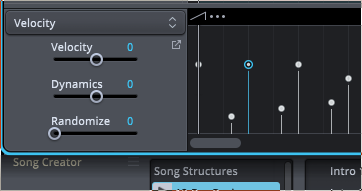
The point with this suggested optimisation is that I hate to use the Note Properties Ruler. Then I used Superior Drummer and what they had done is something I really like. It's clear and it's no game of patience like it is sort of in hydrogen (IMHO).
Also Superior Drummer has the posibility to move more than one property. I know this feature in hydrogen but it's not my friend because I can't draw a straight line with the mouse so for me it's also a game of patience.
Here is also some visual inspiration from SD
Olli
on 31 Dec 2020
Thanks @Olli . I think I'm missing something from your suggestion.
The area that's "grabbable" on the Hydrogen note properties editor is much bigger than just the head of the note or the width of the bar -- it's the width of the grid, and the whole height of the properties editor. Adding a cursor change or visual representation of the head of the note doesn't change the behaviour, so I think I'm missing something of what you mean.
I entirely agree that using the note properties editor in H2 in general is a painful experience. Multiple selection and manipulation of note properties is forthcoming (release 1.1 in all likelihood):
https://user-images.githubusercontent.com/768466/103417481-c2be1180-4b82-11eb-8a72-384dcadd3a81.mov
Does this seem like the sort of behaviour you'd be looking for?
Any other feedback would be absolutely appreciated and welcomed :)
(Please excuse the terrible quality of my internal microphone in that video!)
cme
on 31 Dec 2020
Ok I got it what you mean. The sensible area around the endings of the bars is really bigger than thought. This isn't obvious because the cursor doesn't change.
The select action of the note properties doesn't work here as it's been show in the video. I have the actual version from today.
The shown behavior will maybe resolve most of my "complains". :-)
Olli
on 31 Dec 2020
Okay, great, we're on the same page. :)
I think changing the mouse cursor over the interactive areas of the properties editor is a good idea and something we should do (it's slightly less trivial to implement than it may seem at first though).
I'm not sure the "hand" cursor set is quite right either though, as it fits for the case of dragging a single bar but not dragging over multiple. Perhaps
- Open hand cursor when hovering over the clickable/draggable area
- Crosshairs while actually dragging
cme
on 31 Dec 2020
sounds good.
Olli
on 31 Dec 2020
Hey @Olli,
Could you check the new handling of the NotePropertiesRuler available in the master branch and see if it serves your needs?
theGreatWhiteShark
on 9 Jan 2021
Nice!!! Now it's very convenient to use ... also marking a lot of bars and than raising and lowering all at once is very cool.
Thanks a lot :1st_place_medal:
Olli
on 9 Jan 2021
I'd found a bug ;)
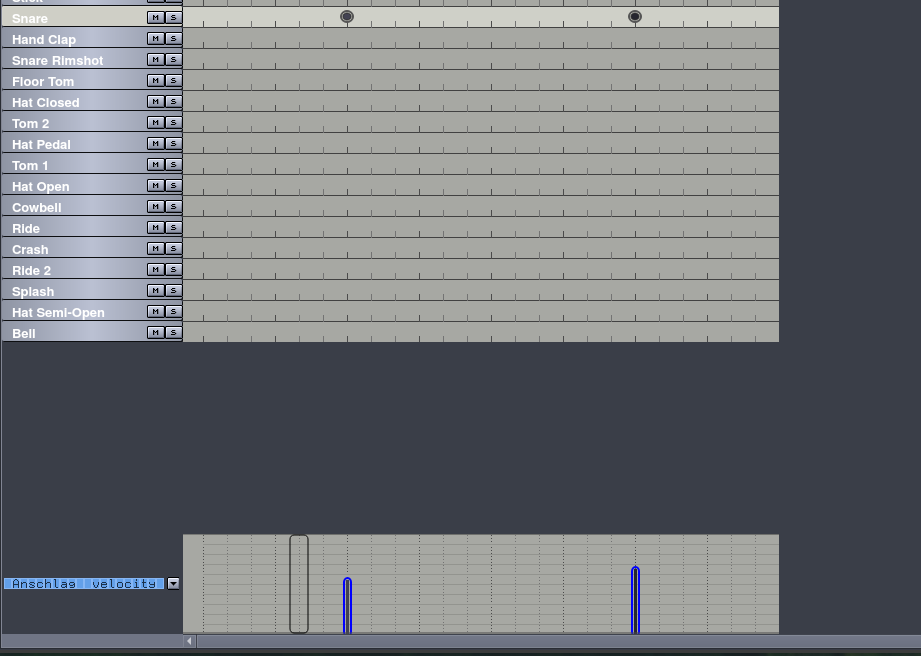
If I mark the bars and than changing the window focus (the window focus changes in my system automatically on that window where the mouse points at) I got some "ghost" markings. This "ghost mark" can be moved with the arrow keys on the keyboard.
The screenshot of it:
Olli
on 9 Jan 2021
Ah! Interesting! Sort of a bug but probably not the one you think!
This "ghost mark" is the keyboard input cursor, which is also present in the pattern editor and song editor. It's hidden by default (to stay consistent with old user expectations) and only unhides on pressing an arrow key (or similar keyboard navigation key) or gain focus by tabbing into the window. I guess the focus-follows-mouse focus change has been interpreted by Qt as a keyboard focus change (or I've been too liberal in conditions for unhiding the keyboard cursor!)
I actually use WindowMaker in focus-follow-mouse mode, so it's possible I've seen this behaviour before but never noticed it since I already know what it is! :D
I shall investigate. In case it makes a difference, what window manager are you using?
Cheers!
cme
on 9 Jan 2021
I use XFCE 4.newest in Debian SID
Olli
on 9 Jan 2021
Aha! My mistake. Fixed. Thank you very much! :)
cme
on 9 Jan 2021
Related issues
theGreatWhiteShark
·
13Comments
 desperateCoder
·
14Comments
desperateCoder
·
14Comments
 elpescado
·
8Comments
elpescado
·
8Comments
 jonmay6
·
13Comments
theGreatWhiteShark
·
7Comments
jonmay6
·
13Comments
theGreatWhiteShark
·
7Comments