Hydrogen: Output from pandas dataframe has brighter cell borders in Hydrogen v2.10.3
Prerequisites
- [x] Have you checked that your issue isn't already filed ?
- [x] Have you checked the solutions in our troubleshooting guide for common problems ?
Description
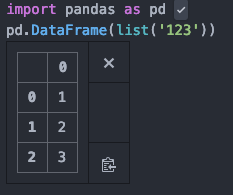
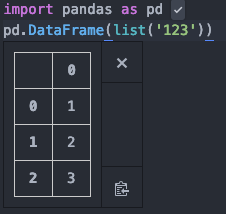
After upgrading to Hydrogen 2.10.3 from 2.9.0, the cell borders in pandas dataframe output are noticeably brighter. This change decreases readability as now the cell borders and contents are of similar color and brightness. In addition to that, the table cell padding is now larger. (see screenshots)
Steps to Reproduce
- install Hydrogen 2.10.3 and run
import pandas as pd; pd.DataFrame(list('123')); - install Hydrogen 2.9.0 and run
import pandas as pd; pd.DataFrame(list('123'));
Versions
OS version:
macos Mojave 10.14.5
atom --version
Atom    : 1.39.1
Electron: 3.1.10
Chrome  : 66.0.3359.181
Node    : 10.2.0
apm --version
apm  2.2.4
npm  6.2.0
node 8.9.3 x64
atom 1.39.1
python 3.7.0
git 2.22.0
Hydrogen version:
2.10.3
Plugins
Have you installed and activated any of the Hydrogen plugins below ?
- [ ] hydrogen-python
- [ ] Hydrogen Launcher
- [ ] Data Explorer
Expected behavior
Cell borders in pandas output are dimmer. Cells are smaller in size.
Screenshots
- hydrogen 2.9.0
- hydrogen 2.10.3
 IDDT
IDDT
All 8 comments
I will look into this. Likely something in the stylesheet changed, but it could also be another package/theme you have
 wadethestealth
on 30 Jul 2019
wadethestealth
on 30 Jul 2019
@wadethestealth Hydrogen is the only package. Only default themes installed.
IDDT
on 30 Jul 2019
@IDDT Unforntunately there is nothing inside of hydrogen that is controlling the styling of the table. It comes from "user agent stylesheet" aka chrome. The color of the outline/border is considered to be "grey" which may have had a slight visual change in chrome. It is likely that you updated atom and there was a color change inside the new chrome version.
To revert this change, open up your atom styles.less (Click File -> Click Stylesheet...) and paste the code below at the end of the file.
.hydrogen {
  table.dataframe {
    border-color: #61656e;
    td, th {
      border-color: inherit;
    }
  }
}
Great catch Thomas ! Thanks from me too.
 aviatesk
on 30 Jul 2019
aviatesk
on 30 Jul 2019
@wadethestealth, thank you for the stylesheet!
If the issue is Atom version related shouldn't the table styling stay the same when downgrading Hydrogen? Downgrading Hydrogen to v2.9.0 on the newest Atom (v1.39.1) changes the table style back.
IDDT
on 31 Jul 2019
I can downgrade and do a double check as to what caused the issue. But I am going to assume the provided stylesheet is going to be the solution anyways
wadethestealth
on 31 Jul 2019
Turns out, this is a weird rendering "bug" that occurred when we switched output dependencies. I updated the stylesheet inside the next release it should return back to normal
cc: @BenRussert @aviatesk (commit with the change)
wadethestealth
on 31 Jul 2019
Nice work !
aviatesk
on 31 Jul 2019
Related issues
 HaoranXue
·
4Comments
HaoranXue
·
4Comments
 onyxfish
·
4Comments
onyxfish
·
4Comments
 Mungoid
·
4Comments
Mungoid
·
4Comments
 lgeiger
·
3Comments
lgeiger
·
3Comments
 neurotronix
·
4Comments
neurotronix
·
4Comments
Most helpful comment
Turns out, this is a weird rendering "bug" that occurred when we switched output dependencies. I updated the stylesheet inside the next release it should return back to normal
cc: @BenRussert @aviatesk (commit with the change)