Hydrogen: [output feature request] stream output to different (sub)panes, e.g. to split graphs/tables/bugs/inline
I use hydrogen a lot for data exploration, but am not a big fan of the inline view because it needs so much scrolling once you've added a bit of data.
So what I would enjoy using is if there was a way to define where an output is streamed to, specifically to create a separate output panel for graphs, where i could go through all the graphs in a one-by-one way, and then another one where other output was streamed to (I liked using RStudio in this regard).
This would be something similar to what I'm thinking of.
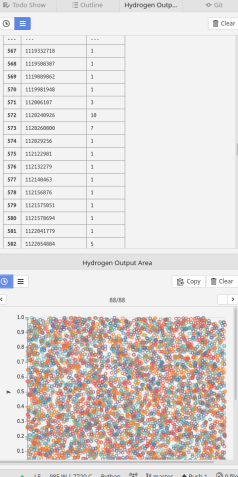
With a bit of configuration, one could possibly add options to, for example show bugs or inline-output inline, and tables, graphs, etc in separate panels?
I assume for the former part one would need to allow the creation of a second output pane (at the moment one can only toggle it) and somehow add a filter (maybe a dropdown list?) for data types to be shown in that pane.
For custom configuration ideally a class would be added to the pane.
This has been added to the Hydrogen Wiki. If you close this issue please remove it from the Hydrogen Wiki.
 mbroedl
All 4 comments
Edit: I misread this issue so removed my response 😁
 BenRussert
on 23 Jul 2018
BenRussert
on 23 Jul 2018
+1 Rstudio is great for interractive Data exploration.
Console with bugs/inline/tables. Super useful to understand which the oder of the outputs.
Hydrogen Output area for plots and tables when a better formatting is desired.
Actually, Rstudio's trick to avoid loosing too much space screen space, is having a tab to switch between plots and projects/files.
Pycharm started a scientific mode to mimic this way to exploring, but has some downside compared to Hydrogen (especially remote kernels).
 jacquespeeters
on 20 Sep 2018
jacquespeeters
on 20 Sep 2018
I think the image pane is possible at least.
To keep it simple, we could redirect the output to the lower right box any time the response mimetype is an image, like image/png or image/svg+xml.
 kylebarron
on 24 Sep 2018
kylebarron
on 24 Sep 2018
To keep it simple, we could redirect the output to the lower right box any time the response mimetype is an image, like image/png or image/svg+xml.
If anyone wants to experiment, you could easily do so as a hydrogen plugin. Hydrogen kernel middleware can be set up to listen for a particular output media type e.g. image/png. You could then open a view customized for that particular output.
As an example, my plugin data-explorer does just this. It looks for: application/vnd.dataresource+json which is the media type that the nteract data-explorer component expects. When it finds this media type, a customized display is opened in a separate pane. See the example here.
Feel free to ask questions here or on slack if you are confused or need any tips to get started!
BenRussert
on 9 Oct 2018
Related issues
 wadethestealth
·
3Comments
wadethestealth
·
3Comments
 jasonleonhard
·
3Comments
jasonleonhard
·
3Comments
 gepcel
·
3Comments
gepcel
·
3Comments
 Mungoid
·
4Comments
Mungoid
·
4Comments
 DannyDannyDanny
·
3Comments
DannyDannyDanny
·
3Comments
Most helpful comment
If anyone wants to experiment, you could easily do so as a hydrogen plugin. Hydrogen kernel middleware can be set up to listen for a particular output media type e.g.
image/png. You could then open a view customized for that particular output.As an example, my plugin
data-explorerdoes just this. It looks for:application/vnd.dataresource+jsonwhich is the media type that the nteract data-explorer component expects. When it finds this media type, a customized display is opened in a separate pane. See the example here.Feel free to ask questions here or on slack if you are confused or need any tips to get started!