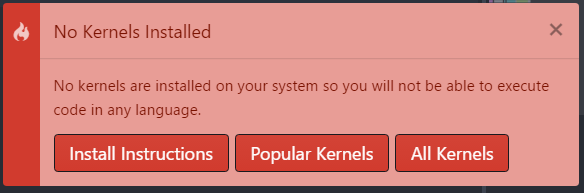
No Kernels Installed:
No kernels are installed on your system so you will not be able to execute code in any language.
Steps to Reproduce:
- install atom on windows 10
- install hydrogen package
- run hydrogen
Versions:
Windows 10 with the version of Hydrogen and Atom.
Atom : 1.25.0
Electron: 1.7.11
Chrome : 58.0.3029.110
Node : 7.9.0
Logs:
No kernels are installed on your system so you will not be able to execute code in any language.
 dlefcoe
All 25 comments
Have you read the installation instructions: https://nteract.gitbooks.io/hydrogen/docs/Installation.html?
 lgeiger
on 17 Mar 2018
lgeiger
on 17 Mar 2018
yes, i have. i have done all of this... does not seem to work. not sure what to do as they instructions are pretty simple ?!?
dlefcoe
on 17 Mar 2018
Do you have a kernel installed for the language you want to execute
lgeiger
on 17 Mar 2018
@lgeiger here's some context. @dlefcoe reported this issue inside another issue that had been closed. See his comment and responses below for more details. @dlefcoe's tried to install the kernel manually, but Hydrogen still can find it.
 n-riesco
on 17 Mar 2018
n-riesco
on 17 Mar 2018
yes, i have done this.
the language is javascript (node.js). also tried with python 3.0. same. am really struggling to figure out what to do ?!?!?
dlefcoe
on 17 Mar 2018
I too am noticing this after installing Atom 1.25. Every kernel I attempt to use gives me an error asking if it's in my path. I did re-compile as suggested.
But what I realized is that I had also installed a new version of node via nvm. I ran through the setup again (of all the kernels I cared about) and it works again.
 nobleach
on 17 Mar 2018
nobleach
on 17 Mar 2018
so reinstall node ? is this the solution ? you have a link or instruction for installing new version using NVM please ? (for windows 10 if this is a solution)
dlefcoe
on 17 Mar 2018
No, not at all. I just realized _that_ is what was causing _my_ problem. I updated to node 8.10.
My suggestion is that you run npm build from your terminal with whatever node version you're currently using. And, to test things out, make sure you can run your kernel from the command line or just try which ijskernel (or whatever kernel you care to use)
nobleach
on 17 Mar 2018
@vijaykarthik123 What happens when you run the command hydrogen:update-kernels?
n-riesco
on 27 Apr 2018
where should i run the suggested command please ? in atom or in the command prompt ?!?
dlefcoe
on 27 Apr 2018
its in atom
 singh72641
on 27 Apr 2018
singh72641
on 27 Apr 2018
@dlefcoe It's under Packages > Hydrogen (or you could type after pressing shift+ctrl+p).
n-riesco
on 27 Apr 2018
i type shift+ctrl+p
and then enter hydrogen:update-kernels
it brings up the same error message that am trying to resolve but cannot:
dlefcoe
on 27 Apr 2018
@n-riesco thanks for pointing that out to me. I wanted a light-weight text editor and Atom - however good it might be - doesn't suit my purpose. But anyways, Hydrogen package works now. I'll have to choose between Spyder IDE and Visual Studio Code.
Thanks again!
 vijaykarthik123
on 27 Apr 2018
vijaykarthik123
on 27 Apr 2018
@dlefcoe in your case, please could you also confirm that the file %APPDATA%\jupyter\kernels\javascript\kernel.json exists and post the contents here?
(note that, by default, Windows hides file extensions and you may have created a file named kernel.json.txt instead of kernel.json; you could tell the difference by using the file explorer, because the type JSON File is assigned to files with the extension .json, and the type Text Document to files with extention .txt).
For anyone else having this issue, please could you post here:
- what happens when you run the command
hydrogen:update-kernels - your operating system
- whether IPython or Jupyter is installed in your machine
- and if Jupyter is installed, the output of running:
jupyter kernelspec list
n-riesco
on 27 Apr 2018
yes. i can confirm that kernel.json exists in the folder suggested and the content is as follows.
{
  "argv": [
    "C:\Users\Owner\AppData\Roaming\ijskernel.cmd",
    "--hide-undefined",
    "{connection_file}",
    "--protocol=5.0"
  ],
  "display_name": "Javascript (Node.js)",
  "language": "javascript"
}
dlefcoe
on 27 Apr 2018
@dlefcoe I got to reproduce the issue and it seems to be caused one of the libraries used by hydrogen. I've opened an issue on their repo: https://github.com/nteract/kernelspecs/issues/31
n-riesco
on 27 Apr 2018
@dlefcoe The issue was actually caused by the kernelspec. The backward slashed need escaping, like this:
{ "argv": [ "C:\\Users\\Owner\\AppData\\Roaming\\ijskernel.cmd", "--hide-undefined", "{connection_file}", "--protocol=5.0" ], "display_name": "Javascript (Node.js)", "language": "javascript" }
This is done. A new different error now when attempt to run hydrogen on Hello world program:
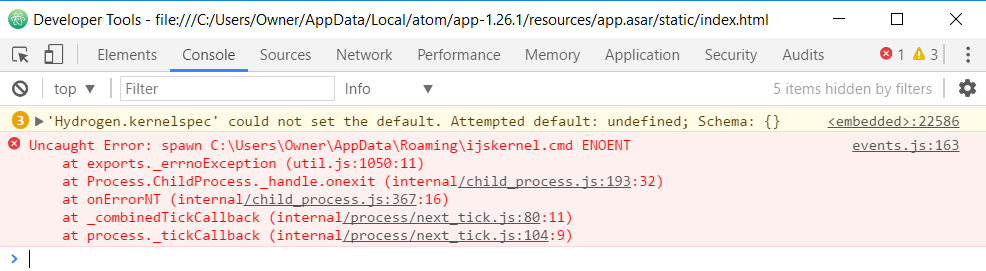
'C:\Users\Owner\AppData\Roaming\ijskernel.cmd' could not be spawned. Is it installed and on your path? If so please open an issue on the package spawning the process.
also get this in developer tools
dlefcoe
on 28 Apr 2018
@dlefcoe It looks like the path C:\\Users\\Owner\\AppData\\Roaming\\ijskernel.cmd is wrong.
I reckon it should be: C:\\Users\\Owner\\AppData\\Roaming\\npm\\ijskernel.cmd
n-riesco
on 28 Apr 2018
This solves the problem.
The final solution is to update kernel.json accordingly:
{ "argv": [ "C:\\Users\\Owner\\AppData\\Roaming\\npm\\ijskernel.cmd", "--hide-undefined", "{connection_file}", "--protocol=5.0" ], "display_name": "Javascript (Node.js)", "language": "javascript" }
dlefcoe
on 28 Apr 2018
Hi,
In regard to @n-riesco 's comment "please could you also confirm that the file %APPDATA%\jupyter\kernels\javascriptkernel.json":
I don't seem to have the folder kernels. (I guess that explains why Atom says it can't find the kernels?)

regarding the instructions on https://nteract.io/kernels , I don't quit understand where to run these commands?
I have Hydrogen Installed in Atom
I have Jupyter and IPython Installed (via Anaconda, _that should be enough, right?_ )
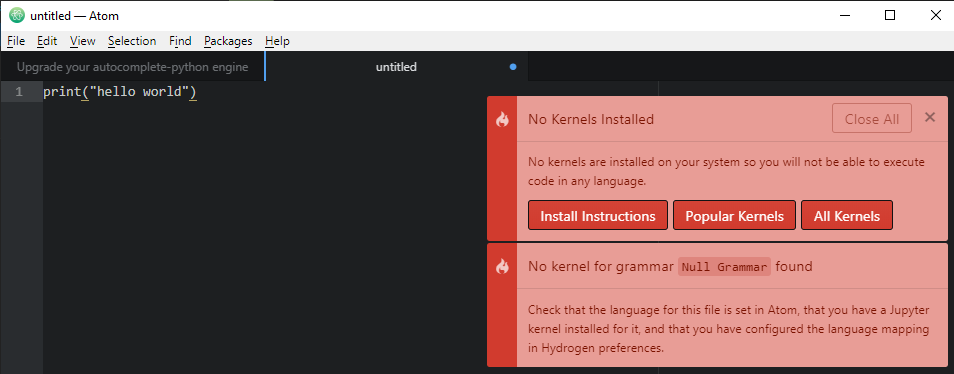
When trying to run "hydrogen:update-kernels" in Atom, I get "no matches found"
 m-y-reich
on 8 Jun 2020
m-y-reich
on 8 Jun 2020
Welcome to close. Believe it was never resolved.
On Mon, 8 Jun 2020, 08:24 m-y-reich, notifications@github.com wrote:
Hi, (I hope it's ok to continue on this closed thread?)
In regard to @n-riesco https://github.com/n-riesco 's comment "please
could you also confirm that the file
%APPDATA%\jupyter\kernels\javascriptkernel.json":
I don't seem to have the folder kernels. (I guess that explains why Atom
says it can't find the kernels?)
[image: image]
https://user-images.githubusercontent.com/66467030/84002824-558a2b00-a969-11ea-8553-f4754b725770.pngregarding the instructions on
https://nteract.io/kernelshttps://nteract.io/kernels
, I don't quit understand where to run these commands?I have Hydrogen Installed in Atom
I have Jupyter and IPython Installed (via Anaconda, that should be
enough, right? )
When trying to run "hydrogen:update-kernels" in Atom, I get "no matches
found"[image: Kernel Error]
https://user-images.githubusercontent.com/66467030/84001586-40ac9800-a967-11ea-854b-f2e159d226d9.png—
You are receiving this because you modified the open/close state.
Reply to this email directly, view it on GitHub
https://github.com/nteract/hydrogen/issues/1261#issuecomment-640418229,
or unsubscribe
https://github.com/notifications/unsubscribe-auth/AEC7DGFCBCRVIQUFXLF27QLRVSG2JANCNFSM4EV2JLKQ
.
dlefcoe
on 8 Jun 2020
@m-y-reich : in your case the issue seems to be that the tab untitled hasn't been assigned a language. Please, save the tab to a file with the appropriate extension and try again.
n-riesco
on 8 Jun 2020
I managed to solve my issue.
- I had to only run the third and fourth line of the kernel installation instruction in the command prompt. (originally I didn't try further than the first line when that one didn't execute)
- I had to save the file in in Atom as xxx.py for it to be recognized as a python file.
m-y-reich
on 8 Jun 2020
Related issues
 vader333
·
3Comments
vader333
·
3Comments
 wadethestealth
·
3Comments
wadethestealth
·
3Comments
 HaoranXue
·
4Comments
lgeiger
·
3Comments
HaoranXue
·
4Comments
lgeiger
·
3Comments
 ekoepplin
·
4Comments
ekoepplin
·
4Comments