Hydrogen: 'C:\Python3\python.exe' could not be spawned. Is it installed and on your path? If so please open an issue on the package spawning the process. [Python is in System PATH]
Description:
When trying to run "cell" using Hydrogen, I get the following error:
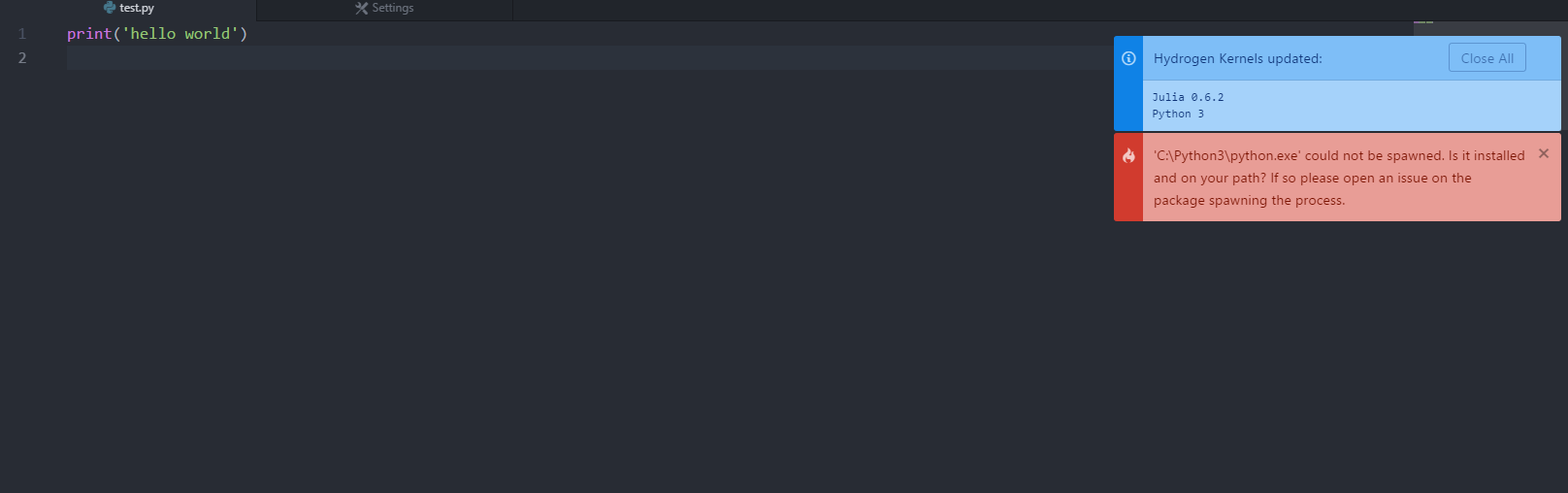
It asks if I have Python installed in my PATH, which I do, although the file path is not "C:\Python3\python.exe" like the error message states.

I am able to (and have been able to) run Python from my command line as well as within atom using my Script package.
I have tried to to add C:\Python3\python.exe to my system PATH but I still receive the same error. I've since removed it so I don't have multiple instances of Python 3 in my PATH.
Steps to Reproduce:
- Activate venv
- Launch atom from command line
- Highlight code within Atom
- Ctrl + Enter (shortcut for running code as cell via Hydrogen)
- Error message pops up.
Versions:
Atom: 1.24.0
Hydrogen: 2.2.3
Electron: 1.6.16
Chrome: 56.0.2924.87
Node: 7.4.0
Logs:

 ghost
ghost
All 6 comments
I have same problem with python 2. Atom is looking for python executable in an old path (Program File (x86)\Anaconda\python.exe), which no more existed. How can I change it.
 cocomice
on 2 Mar 2018
cocomice
on 2 Mar 2018
To update the IPython's kernel spec, run: python -m ipykernel install --user
 n-riesco
on 2 Mar 2018
n-riesco
on 2 Mar 2018
@n-riesco thanks! it works for me ~~maybe this can be added into the Hydrogen's troubleshooting guide ...
cocomice
on 2 Mar 2018
This is already part of the installation instructions, but it won't hurt if we add it to the troubleshooting guide too.
@cocomice Want to send a PR?
 lgeiger
on 2 Mar 2018
lgeiger
on 2 Mar 2018
@lgeiger sorry I am a newbie. What do you mean by "send a PR"? I would like to contribute if possible.
cocomice
on 2 Mar 2018
Looks like python -m ipykernel install --user fixes this.
 BenRussert
on 15 Apr 2019
BenRussert
on 15 Apr 2019
Related issues
lgeiger
·
3Comments
 Mike-MU10
·
4Comments
Mike-MU10
·
4Comments
 ekoepplin
·
4Comments
ekoepplin
·
4Comments
 onyxfish
·
4Comments
onyxfish
·
4Comments
 neurotronix
·
4Comments
neurotronix
·
4Comments
Most helpful comment
To update the IPython's kernel spec, run:
python -m ipykernel install --user