Atom cannot connect to a Jupyter remote kernel:
Steps to Reproduce:
- run jupyter on server :
jupyter notebook --no-browser --ip=192.168.61.140 --debug - run atom on client
- set up two connections, one direct, one with a local tunnel through ssh
[{"name": "xx" , "options": {"baseurl": "http://192.168.61.140:8888",
"token": "65.."}
},
{"name": "xx-local" , "options": {"baseurl": "http://localhost:8888",
"token": "65.."}
}]
(I added the kernel specs but it makes no difference, i does change the log see below) - Ctl-P Hydrogen:Connect to Server
I get the list of the two servers, but connecting to either fails, sometimes with a message
failed to connect to gateway.
I monitor the server, there no activity whatsoerver.
(when I connect from the browser, both connections work perfectly)
Server,
uname -a
Linux cleo 4.7.1-1-ARCH #1 SMP PREEMPT Wed Aug 17 08:13:35 CEST 2016 x86_64 GNU/Linux
python --version
Python 3.6.1 :: Continuum Analytics, Inc.
jupyter --version
4.3.0
jupyter kernelspec list --json
{ "kernelspecs": {
"python3": {
"resource_dir": "/home/gabriel/miniconda3/share/jupyter/kernels/python3",
"spec": {
"argv": [ "python", "-m", "ipykernel_launcher", "-f", "{connection_file}" ],
"env": {},
"display_name": "Python 3",
"language": "python"
} } } }
Atom installed on Windows 7 64 version 1.19.1, with Hydrogen 1.20.1
Logs:
Hydrogen: KernelManager: startKernel: Python 3
log @ utils.js:119
startKernel @ kernel-manager.js:58
(anonymous) @ kernel-manager.js:39
(anonymous) @ kernel-manager.js:106
(anonymous) @ kernel-manager.js:97
getAllKernelSpecs @ kernel-manager.js:87
getAllKernelSpecsForGrammar @ kernel-manager.js:92
getKernelSpecForGrammar @ kernel-manager.js:104
startKernelFor @ kernel-manager.js:30
createResultBubble @ main.js:322
run @ main.js:421
hydrogenRunAndMoveDown @ main.js:96
module.exports.CommandRegistry.handleCommandEvent @
(anonymous) @
module.exports.KeymapManager.dispatchCommandEvent @
module.exports.KeymapManager.handleKeyboardEvent @
module.exports.WindowEventHandler.handleDocumentKeyEvent @
(anonymous) @
utils.js:119 Hydrogen: ZMQKernel: monitor shellSocket
log @ utils.js:119
monitor @ zmq-kernel.js:135
(anonymous) @ zmq-kernel.js:140
monitor @ zmq-kernel.js:142
connect @ zmq-kernel.js:91
(anonymous) @ zmq-kernel.js:57
utils.js:119 Hydrogen: ZMQKernel: monitor controlSocket
log @ utils.js:119
monitor @ zmq-kernel.js:135
(anonymous) @ zmq-kernel.js:141
monitor @ zmq-kernel.js:142
connect @ zmq-kernel.js:91
(anonymous) @ zmq-kernel.js:57
utils.js:119 Hydrogen: ZMQKernel: monitor ioSocket
log @ utils.js:119
monitor @ zmq-kernel.js:135
(anonymous) @ zmq-kernel.js:142
monitor @ zmq-kernel.js:142
connect @ zmq-kernel.js:91
(anonymous) @ zmq-kernel.js:57
events.js:160 Uncaught Error: spawn python ENOENT
at exports._errnoException (util.js:1022)
at Process.ChildProcess._handle.onexit (internal/child_process.js:193)
at onErrorNT (internal/child_process.js:359)
at _combinedTickCallback (internal/process/next_tick.js:74)
at process._tickCallback (internal/process/next_tick.js:98)
 gabrielash
All 10 comments
Could it be a firewall issue?
 BenRussert
on 29 Aug 2017
BenRussert
on 29 Aug 2017
No, I tried disabling, but also I can connect to my jupiter kernel on http without a problem
gabrielash
on 4 Sep 2017
I facing the same issue, when I run the jupyter notebook server with
jupyter notebook --certfile=xx --keyfile=xx
or using ssl in jupyter_notebook_config.py
Hydrogen seems not able to connect the remote kernel,
also the server did not receive any request when I commend on atom .
Hydrogen:Connect to Remote Kernel
While I not using secure notebook server(connect with http), it does not having any issue.
Both I have setup token, so I guess not the problem not regarding to token.
 hotung1027
on 2 Oct 2017
hotung1027
on 2 Oct 2017
@hotung1027 Are you using a self-signed certificate? If so, then you might be having a different issue from the original post. SSL certificate validation in hydrogen is all handled by nodejs, and until very recently node have no provisions for accepting self-signed certs. Newer versions of node have addressed this (i.e. they can read from the system trust store instead, but you still have to manually mark your certs as trusted), but I have no idea if atom has actually been upgraded to use these newer versions of node.
 nikitakit
on 3 Oct 2017
nikitakit
on 3 Oct 2017
but I have no idea if atom has actually been upgraded to use these newer versions of node.
You can get the node version from your atom installation by running atom -v in a console.
Here is my output on the latest stable atom version:
Atom    : 1.20.1
Electron: 1.6.9
Chrome  : 56.0.2924.87
Node    : 7.4.0
Looks like you need at least node 7.5 (or either the 6.10 or 6.11 LTS release) to get the nodejs cert changes. Even then, the ability to use the system trust store appears to be a compile-time option, so it's unclear if it would be enabled or not.
nikitakit
on 3 Oct 2017
Same issue as @hotung1027. Remote connecting with http is worked but not https. @nikitakit , installed the cert-tweaks, but still not working.
 77QingLiu
on 17 Sep 2018
77QingLiu
on 17 Sep 2018
@77QingLiu If you're using cert-tweaks, did you configure it to specifically trust the certificate used by the notebook server? The cert-tweaks package doesn't do anything unless properly configured.
nikitakit
on 17 Sep 2018
@nikitakit. I dowloaded the certificate which in PEM format from the server and setting the cert-tweaks point to this PEM file.
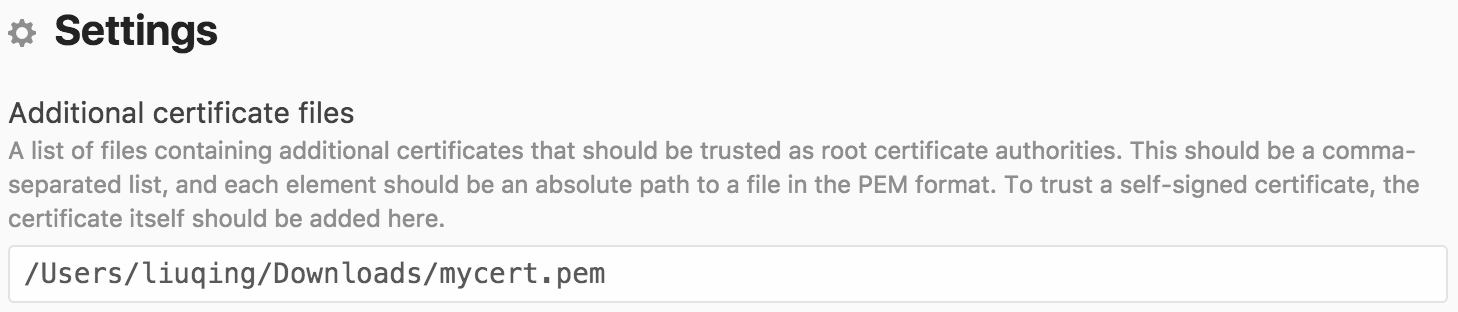
But it's not working. Do you know why?
77QingLiu
on 17 Sep 2018
This issue has grown stale as OP has not responded and the original issue was not about https or certificates.
 wadethestealth
on 1 Oct 2019
wadethestealth
on 1 Oct 2019
Related issues
 onyxfish
·
4Comments
onyxfish
·
4Comments
 gepcel
·
3Comments
gepcel
·
3Comments
 tobiasbj
·
4Comments
tobiasbj
·
4Comments
 DannyDannyDanny
·
3Comments
DannyDannyDanny
·
3Comments
 jasonleonhard
·
3Comments
jasonleonhard
·
3Comments