Description:
Atom is not running R in my computer with the Hydrogen package, there is a message saying "No kernel for grammar R found. Check that the language for this file is set in Atom and that you have a Jupyter kernel installed for it."
Steps to Reproduce:
This is what I did:
Install Jupyter in Ubuntu 14.0:
sudo apt-get update
sudo apt-get -y install python-pip python-dev
sudo -H pip install --upgrade pip
sudo apt-get -y install ipython ipython-notebook
sudo -H pip install jupyter
Then the kernel from R:
install.packages('devtools')
devtools::install_github('IRkernel/IRkernel')
IRkernel::installspec() # to register the kernel in the current R installation
IRkernel::installspec(name = 'ir32', displayname = 'R 3.2')
Versions:
I am using atom 1.18.0, in Ubuntu 14.04
 juancarloscastillo
All 9 comments
Could you check if the IR kernel is properly installed and listed when running jupyter kernelspec list?
 lgeiger
on 7 Jul 2017
lgeiger
on 7 Jul 2017
yes, I get:
juan@juan-Lenovo-Yoga-2-13:~$ jupyter kernelspec list
Available kernels:
ir /home/juan/.local/share/jupyter/kernels/ir
ir32 /home/juan/.local/share/jupyter/kernels/ir32
python2 /usr/local/share/jupyter/kernels/python2
is maybe something missing?
juancarloscastillo
on 7 Jul 2017
Mine is OSX 10.10.5
I guess I have similar issue.
Below is what happens when I press shift-enter in .R file
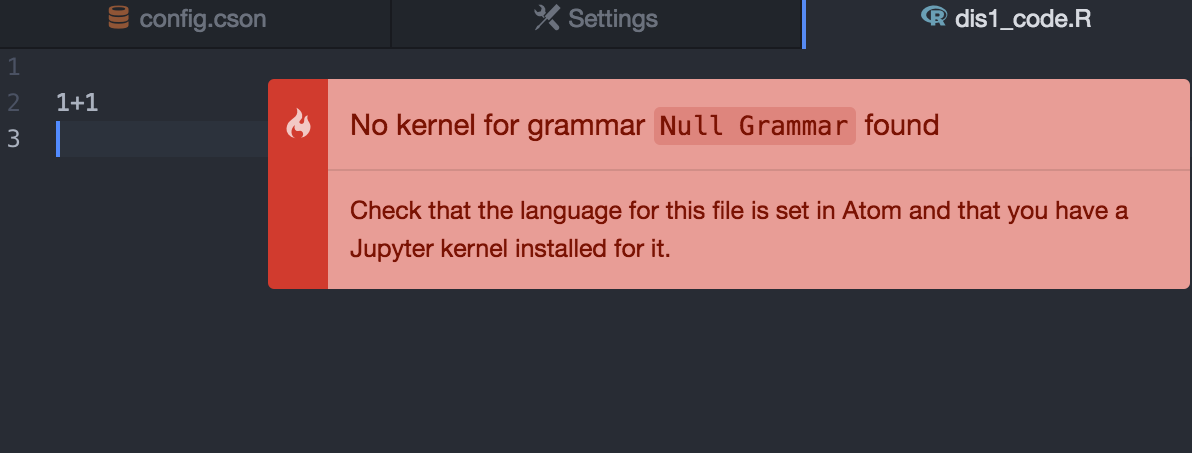
Things are fine in Juila and Python files.
Here is my kernelspec
{
  "kernelspecs": {
    "julia-0.5": {
      "spec": {
        "language": "julia",
        "display_name": "Julia 0.5.0",
        "env": {},
        "argv": [
          "/Applications/Julia-0.5.app/Contents/Resources/julia/bin/julia",
          "-i",
          "--startup-file=yes",
          "--color=yes",
          "/Users/po/.julia/v0.5/IJulia/src/kernel.jl",
          "{connection_file}"
        ]
      },
      "resource_dir": "/Users/po/Library/Jupyter/kernels/julia-0.5"
    },
    "ir": {
      "spec": {
        "language": "R",
        "display_name": "R",
        "env": {},
        "argv": [
          "/Library/Frameworks/R.framework/Resources/bin/R",
          "--slave",
          "-e",
          "IRkernel::main()",
          "--args",
          "{connection_file}"
        ]
      },
      "resource_dir": "/Users/po/Library/Jupyter/kernels/ir"
    },
    "python3": {
      "spec": {
        "language": "python",
        "display_name": "Python 3",
        "env": {},
        "argv": [
          "/Users/po/anaconda/bin/python3",
          "-m",
          "ipykernel",
          "-f",
          "{connection_file}"
        ]
      },
      "resource_dir": "/Users/po/Library/Jupyter/kernels/python3"
    }
  }
}
 pochoi
on 10 Jul 2017
pochoi
on 10 Jul 2017
You need to install the language package for R https://atom.io/packages/language-r (the icons shown come from a different package).
 rgbkrk
on 10 Jul 2017
rgbkrk
on 10 Jul 2017
Now I restarted everything and its working! Now a last question: it is possible to have R in Atom with Jupyter, but at the same time a screen with a log of all the results of a session? thanks!
juancarloscastillo
on 10 Jul 2017
@juancarloscastillo Glad it's working!
Now a last question: it is possible to have R in Atom with Jupyter, but at the same time a screen with a log of all the results of a session? thanks!
You can open the external output area with "Hydrogen: Toggle Output Area" to show the execution history in the side panel.
lgeiger
on 10 Jul 2017
Great feature, thanks! But I am still looking for the possibility to have a
option for a "traditional" log where results appear after running a code
line, as in a terminal. I have been searching all over the web and so far
the only thing that appears to work is r-exec ... only for Mac (I am on
Linux). Is this so? It would be a pity because I think Atom could be a
great place for generating a workflow for academics working with R-Latex
and Git ... but it seems that so far this works only in Emacs.
Juan Carlos Castillo
Instituto de Sociología, Pontificia Universidad Católica de Chile
COES http://www.coes.cl - Centro de Estudios de Conflicto y Cohesión
Social
jc-castillo.com http://jc-castillo.com *+56 2 2354 4654*
Horas reunión alumnos: jc-castillo.com/contact
2017-07-10 16:27 GMT+02:00 Lukas Geiger notifications@github.com:
@juancarloscastillo https://github.com/juancarloscastillo Glad it's
working!Now a last question: it is possible to have R in Atom with Jupyter, but at
the same time a screen with a log of all the results of a session? thanks!You can open the external output area
https://github.com/nteract/hydrogen/releases/tag/v1.15.0 with
"Hydrogen: Toggle Output Area" to show the execution history in the side
panel.—
You are receiving this because you were mentioned.
Reply to this email directly, view it on GitHub
https://github.com/nteract/hydrogen/issues/909#issuecomment-314122386,
or mute the thread
https://github.com/notifications/unsubscribe-auth/Ab0wct9cYRLKrT15a7tlJAEjiLD8sCXDks5sMjS7gaJpZM4OREc2
.
juancarloscastillo
on 11 Jul 2017
why is jupyter required? can't it be done without jupyter?
 mireille-raad
on 28 Aug 2018
mireille-raad
on 28 Aug 2018
IJavascript requires Jupyter to install its kernelspec.
If you don't want to install Jupyter, you could install IJavascript's kernelspec manually I guess
 yhulaila
on 8 May 2020
yhulaila
on 8 May 2020
Related issues
 ethan92429
·
3Comments
ethan92429
·
3Comments
 vader333
·
3Comments
vader333
·
3Comments
 gepcel
·
3Comments
gepcel
·
3Comments
 olegantonyan
·
3Comments
olegantonyan
·
3Comments
 HaoranXue
·
4Comments
HaoranXue
·
4Comments
Most helpful comment
You need to install the language package for R https://atom.io/packages/language-r (the icons shown come from a different package).