Hydrogen: Hydrogen can't find ipykernel launcher
Description:
When running simple python script with Hydrogen, receive error in: /usr/bin/python: No module named ipykernel_launcher
Using Python 3 installed with homebrew. Jupyter notebooks run fine from the terminal and ipython works within that environment, but within Atom, Hydrogen cannot seem to start the kernel. When selecting Kernel within Hydrogen, "Python 3" shows up as automatically found kernel to select.
Steps to Reproduce:
- Run python script
Versions:
macOS 10.12.4
Atom 1.16.0
Hydrogen 1.11.2
Logs:
/usr/bin/python: No module named ipykernel_launcher
 daborton
All 62 comments
I also ran into this. It's looking for the Python 2 version of ipykernel_launcher but I only had IPython installed in Python 3. Fixed with pip install ipython ipykernel.
Now the Python 3 kernel works for me.

Is there a reason why Hydrogen should not use the Python 3 version of the ipykernel_launcher when it's available?
 cbarrick
on 21 Apr 2017
cbarrick
on 21 Apr 2017
Hmm. So in macOS the system install of Python2.7 is protected, so your solution would require me to install a separate python2 than used by the system. Certainly doable, but perhaps I can second your question:
"Is there a reason why Hydrogen should not use the Python 3 version of the ipykernel_launcher when it's available?"
daborton
on 21 Apr 2017
Is there a reason why Hydrogen should not use the Python 3 version of the ipykernel_launcher when it's available?
No reason to use one or the other. It is a preference left up to the user.
Like you mentioned, Mac and Linux distributions often ship with Python2 and/or 3 installed. You can install another version of python side-by-side without issues (at least in my experience). I have had good luck with the python3 anaconda distributions.
 BenRussert
on 21 Apr 2017
BenRussert
on 21 Apr 2017
No reason to use one or the other. It is a preference left up to the user.
How is this preference set? As I mentioned above, the Python 3 kernel is found by Hydrogen (and selected), but for some reason the error in launching the kernel remains...
daborton
on 21 Apr 2017
Could you try opening a terminal and running jupyter kernelspec list --json and pasting the output here?
BenRussert
on 21 Apr 2017
See below, but remember that jupyter runs fine (notebook, etc in local server / browser).
{
  "kernelspecs": {
    "python3": {
      "resource_dir": "/usr/local/share/jupyter/kernels/python3",
      "spec": {
        "argv": [
          "python",
          "-m",
          "ipykernel_launcher",
          "-f",
          "{connection_file}"
        ],
        "env": {},
        "display_name": "Python 3",
        "language": "python"
      }
    }
  }
}
similar issue on #720 . Both issues mention ipykernel_launcher module missing.
BenRussert
on 21 Apr 2017
Similar issue on nteract desktop: https://github.com/nteract/nteract/issues/1640
 rgbkrk
on 21 Apr 2017
rgbkrk
on 21 Apr 2017
@daborton Could you try running python3 -m ipykernel install --user?
It looks like the python executable points to the default Python 2 installation.
 lgeiger
on 21 Apr 2017
lgeiger
on 21 Apr 2017
I'm seeing something really odd right now where a python3 kernel named as python3 will actually launch python2 (and by extension only IPython 5.x...).
$ diff python3/kernel.json pythonwtf/kernel.json
9c9
<  "display_name": "Python 3",
---
>  "display_name": "Python 3 WTF",
11c11
< }
\ No newline at end of file
---
> }
kylek@nfml-83G ~/Library/Jupyter/kernels$ cat python3/kernel.json
{
 "argv": [
  "/usr/local/opt/python3/bin/python3.6",
  "-m",
  "ipykernel_launcher",
  "-f",
  "{connection_file}"
 ],
 "display_name": "Python 3",
 "language": "python"
}
With my WTF kernel, I get an actual Python3 setup. With the python3 kernel it's really launching Python2. WTF?
rgbkrk
on 1 May 2017
Does it happen if you delete the kernels and reinstall them?
 willingc
on 1 May 2017
willingc
on 1 May 2017
Wait the only difference is the display name? That's strange.
Is the output of jupyter kernelspec list --json consistent with the json files?
/usr/local/opt/python3/bin/python3.6 isn't symlinked to some python2 executable, right?
lgeiger
on 1 May 2017
Yeah, I tried out deleting the python3 kernel and running the python3 -m ipykernel install --user command. This is pretty strange. One difference we have to jupyter is that we don't inherit a system python, we're running the argv from the kernel.json directly.
rgbkrk
on 1 May 2017
Yeah, the output is consistent with the json files.
rgbkrk
on 1 May 2017
kylek@nfml-83G ~$ ls -la /usr/local/opt/python3/bin/python3.6
lrwxr-xr-x  1 kylek  admin  57 Mar 21 00:47 /usr/local/opt/python3/bin/python3.6 -> ../Frameworks/Python.framework/Versions/3.6/bin/python3.6
kylek@nfml-83G ~$ ls -la /usr/local/opt/python3/Frameworks/Python.framework/Versions/3.6/bin/python3.6
-rwxr-xr-x  2 kylek  admin  13620 Apr  4 12:46 /usr/local/opt/python3/Frameworks/Python.framework/Versions/3.6/bin/python3.6
$ /usr/local/opt/python3/Frameworks/Python.framework/Versions/3.6/bin/python3.6 --version
Python 3.6.1
Do nteract and Hydrogen behave the same?
lgeiger
on 1 May 2017
What does jupyter kernelspec list output?
willingc
on 1 May 2017
Oh no I opened this issue from my phone just now and must remind myself to come back with answers.
rgbkrk
on 1 May 2017
pip install --upgrade ipykernel
 dr-john
on 3 May 2017
dr-john
on 3 May 2017
@lgeiger sorry for the delay. Ran, and response is:
Installed kernelspec python3 in /Users/daborton/Library/Jupyter/kernels/python3
same issue, when running Hydrogen in Atom, yields same:
/usr/bin/python: No module named ipykernel_launcher
daborton
on 5 May 2017
@willingc:
$ jupyter kernelspec list
Available kernels:
  ir            /Users/kylek/Library/Jupyter/kernels/ir
  javascript    /Users/kylek/Library/Jupyter/kernels/javascript
  python2       /Users/kylek/Library/Jupyter/kernels/python2
  python3       /Users/kylek/Library/Jupyter/kernels/python3
  pythonwtf     /Users/kylek/Library/Jupyter/kernels/pythonwtf
  scala         /Users/kylek/Library/Jupyter/kernels/scala
Trimmed output of jupyter kernelspec list --json (using jq):
{
  "pythonwtf": {
    "resource_dir": "/Users/kylek/Library/Jupyter/kernels/pythonwtf",
    "spec": {
      "language": "python",
      "display_name": "Python 3 WTF",
      "env": {},
      "argv": [
        "/usr/local/opt/python3/bin/python3.6",
        "-m",
        "ipykernel_launcher",
        "-f",
        "{connection_file}"
      ]
    }
  },
  "python3": {
    "resource_dir": "/Users/kylek/Library/Jupyter/kernels/python3",
    "spec": {
      "language": "python",
      "display_name": "Python 3",
      "env": {},
      "argv": [
        "/usr/local/opt/python3/bin/python3.6",
        "-m",
        "ipykernel_launcher",
        "-f",
        "{connection_file}"
      ]
    }
  },
  "python2": {
    "resource_dir": "/Users/kylek/Library/Jupyter/kernels/python2",
    "spec": {
      "language": "python",
      "display_name": "Python 2",
      "env": {},
      "argv": [
        "/usr/local/opt/python/bin/python2.7",
        "-m",
        "ipykernel_launcher",
        "-f",
        "{connection_file}"
      ]
    }
  }
}
@dr-john Thanks, Upgrading ipykernel within virtualenv solved my problem.
 pankajkumar
on 14 May 2017
pankajkumar
on 14 May 2017
@pankajkumar how did you do that?
 shpigunov
on 30 May 2017
shpigunov
on 30 May 2017
@shpigunov You can upgrade ipykernel by running pip install --upgrade ipykernel
lgeiger
on 30 May 2017
@lgeiger did that.
solved the issue for me.
thanks a million!
shpigunov
on 8 Jun 2017
I have a similar issue, the same error but it looks like atom/hydrogen is looking for the kernel in the wrong place? The error I am seeing is referencing: /Library/Frameworks/Python.framework/Versions/2.7/Resources/Python.app/Contents/MacOS/Python: No module named ipykernel_launcher as the directory it's looking for the kernel but running jupyter kernelspec list --jsonoutputs:
```{
"kernelspecs": {
"python3": {
"resource_dir": "/Library/Frameworks/Python.framework/Versions/3.6/share/jupyter/kernels/python3",
"spec": {
"argv": [
"python",
"-m",
"ipykernel_launcher",
"-f",
"{connection_file}"
],
"env": {},
"display_name": "Python 3",
"language": "python"
}
}
}
}
I went into the config file on atom to try and force it to look at the python 3 directory instead of the OSX default 2.7 directory my config file currently looks like:
```"*":
  Hydrogen:
    kernelspec: '''
      {
        "kernelspecs": {
          "python3": {
            "resource_dir": "/Library/Frameworks/Python.framework/Versions/3.6/share/jupyter/kernels/python3",
            "spec": {
              "argv": [
                "python",
                "-m",
                "ipykernel_launcher",
                "-f",
                "{connection_file}"
              ],
              "env": {},
              "display_name": "Python 3",
              "language": "python"
            }
          }
        }
      }
    '''
  core:
    telemetryConsent: "no"
    themes: [
      "one-dark-ui"
      "atom-dark-syntax"
    ]
  "exception-reporting":
    userId: "e7139dd9-68d0-14cd-1aec-1f216d962304"
  runner:
    scopes:
      python: "/Library/Frameworks/Python.framework/Versions/3.6/bin/python3"
  welcome:
    showOnStartup: false
I'm not entirely sure why it's still looking at /Library/Frameworks/Python.framework/Versions/2.7/Resources/Python.app/Contents/MacOS/Python
Anyone know what i'm doing wrong here?

 echz
on 12 Jun 2017
echz
on 12 Jun 2017
@echz We have a bug described in #856 that affects custom kernelspecs in some cases. Once #869 is merged the problem you describe could be resolved.
BenRussert
on 12 Jun 2017
@echz Have you tried upgrading ipykernel by running pip install --upgrade ipykernel and removing your custom kernelspecs setting?
lgeiger
on 14 Jun 2017
Thanks @BenRussert is this something I need to manually update, or is it a case of just waiting for the next release to see if this resolves the issue?
Hi @lgeiger I have upgraded my ipykernel. I think it's more related to having two Python versions on OSX, the default 2.7 that comes with OSX and the 3.6 version.
The up-to-date kernel is installed in the /Library/Frameworks/Python.framework/Versions/3.6/bin/python3 directory. Atom runner has confirmed that is the version of python being used, over the 2.7 version:
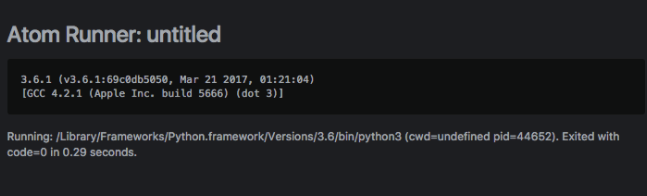
This was changed out when I added the runner code to the config:
  runner:
    scopes:
      python: "/Library/Frameworks/Python.framework/Versions/3.6/bin/python3"
Running 'jupyter kernelspec list --json' in the terminal also points to this directory for the kernel.
The weird part is the error message that is coming up still references the default 2.7 OSX directory for the kernel:
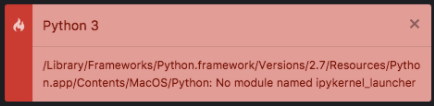
If it leave it on the default settings, it will point to the 2.7 version so I changed the config file for Hydrogen to point to /Library/Frameworks/Python.framework/Versions/3.6/share/jupyter/kernels/python3 but I still get the error saying it can't find the kernel in the old OSX 2.7 directory it seems to be getting it's information on where to search for the kernel from from somewhere other than the config file?
This sounds like the bug @BenRussert has described so I might just need to wait for the next update to see if the issue is resolved.
echz
on 15 Jun 2017
@echz we have merged the fix for custom kernelspecs and will probably ship very soon (maybe even tomorrow).
Or, if you want to try a dev version see this page from the docs
BenRussert
on 15 Jun 2017
Hi @lgeiger I have upgraded my ipykernel. I think it's more related to having two Python versions on OSX, the default 2.7 that comes with OSX and the 3.6 version.
The problem seems to be on the jupyter side. Looks like python in "argv": [ "python",..] points to your systems default Python 2.7 installation.
You can try running: python3 -m ipykernel install --user which may fix this. If not, changing "argv": [ "python",..] to point to Python 3 in /Library/Frameworks/Python.framework/Versions/3.6/share/jupyter/kernels/python3 or inside the Hydrogen settings should fix it.
lgeiger
on 15 Jun 2017
is this fixed?
 aeromomo
on 21 Jun 2017
aeromomo
on 21 Jun 2017
@aeromomo For me this looks like a ipykernel issue, which can be fixed by updating ipykernel for most people.
Though https://github.com/nteract/hydrogen/issues/730#issuecomment-299525167 seams to still exist.
lgeiger
on 21 Jun 2017
This fix the problem in my case on Mac OS X: python3 -m ipykernel install --user
 flowoftime
on 21 Jun 2017
flowoftime
on 21 Jun 2017
@lgeiger @rgbkrk Do you want to go ahead and close this issue? If Kyle's comment about JSON exists still, perhaps that would work better as another issue.
willingc
on 22 Jun 2017
Yeah, I think we can close it. Solution is to fully upgrade ipython and reinstall the kernelspec.
rgbkrk
on 22 Jun 2017
I'm having this same I'm having this same issue here...
I've tried updating ipykernel, and that hasn't fixed the problem. Any advice? Where should I look to fix things?
 bwilliams18
on 21 Aug 2017
bwilliams18
on 21 Aug 2017
My problem with ipykernel was path-related. Be aware that python3 -m ipykernel install --user as proposed by phanhoangphuong above stores the kernel for Python 3 in a folder named python3. My Hydrogen was looking for "python", so a simple symbolic link did the trick for me:
ln -s ~/Library/Jupyter/kernels/python3 ~/Library/Jupyter/kernels/python
 joseflilljegren
on 29 Aug 2017
joseflilljegren
on 29 Aug 2017
(Not a Jupyter expert here. Just getting Hydrogen working for the first time.)
I chose the solution proposed by @lgeiger because it leaves default macOS Python and Homebrew Python 3 completely alone. I copied the Terminal output of jupyter kernelspec list --json into Hydrogen settings Kernal Specs but changed the first argv from python to python3.
@joseflilljegren, thanks for the symbolic link trick. I’ll note that one for future reference.
Could anyone explain what python3 -m ipykernel install --user actually does?
Also, pip3 install --upgrade ipykernel?
Update:
I edited /usr/local/share/jupyter/kernels/python3/kernel.json and changed python to python3 there instead.
 lukejanicke
on 4 Oct 2017
lukejanicke
on 4 Oct 2017
On Mac OS X this line fixes the error once and for all:- python3 -m ipykernel install --user
Run this command in the terminal and in a second problem will be gone.
(woke up the whole night to find this solution...)
 rajaatreja
on 4 Nov 2017
rajaatreja
on 4 Nov 2017
I have a similar issue on linux. I use pyenv to create virtual envs for different python versions. I know that I had to change the point to the binary in hydrogen. After a recent update I am not able to find this anymore. Hydrogen points to a different version of python that I am using, can somebody tell me where this point is in the package?
This is my output for jupyter kernelspec list --json
{
  "kernelspecs": {
    "python3": {
      "resource_dir": "/home/casper/.pyenv/versions/3.6.1/share/jupyter/kernels/python3",
      "spec": {
        "argv": [
          "python",
          "-m",
          "ipykernel_launcher",
          "-f",
          "{connection_file}"
        ],
        "env": {},
        "display_name": "Python 3",
        "language": "python"
      }
    },
    "matlab": {
      "resource_dir": "/home/casper/.pyenv/versions/3.6.1/share/jupyter/kernels/matlab",
      "spec": {
        "argv": [
          "python",
          "-m",
          "matlab_kernel",
          "-f",
          "{connection_file}"
        ],
        "env": {},
        "display_name": "Matlab",
        "language": "matlab"
      }
    }
  }
}
 cvanelteren
on 21 Nov 2017
cvanelteren
on 21 Nov 2017
@cvanelteren Just installed hydrogen today and had the same issue on linux, solved by linking:
ln -s .local/share/jupyter/kernels/python3 .local/share/jupyter/kernels/python
 potterzot
on 9 Dec 2017
potterzot
on 9 Dec 2017
In most cases above the "argv" dictionary key in the json output (jupyter kernelspec list --json) points to the system default version of _python_ . If you have multiple python versions installed, i.e. 2.x.x or 3.x.x on the same system, this command will call your default version. You can check your default version by running:
python --version
I take it most people want to run with python 3.
To fix this issue in Atom you have to change "argv" entry from python to python3.
To do this run:
jupyter kernelspec list --json
Save/Copy the output and change:
_argv": [ "python" ..._ to _argv": [ "python3"_
Copy the changed (complete JSON) and in Atom:
Edit->Prefferences->Packages->Hydrogen->Kernel Specs
paste the result
 CrispyCrafter
on 12 Feb 2018
CrispyCrafter
on 12 Feb 2018
Edit->Prefferences->Packages->Hydrogen->Kernel Specs
There is no Kernel Specs option in the Hydrogen settings menu.
 ghost
on 14 Feb 2018
ghost
on 14 Feb 2018
That's quite strange. I am running Hydrogen v1.22.0 and Atom v1.19.3 .
Also, I'm running it on Ubuntu 16.04.
What is your setup?
CrispyCrafter
on 21 Feb 2018
Atom 1.19 is quite old and doesn't support the newest version of Hydrogen. After upgrading Atom, you'll be able to use the latest version of Hydrogen (v2.2.3)
lgeiger
on 21 Feb 2018
Updated. It seems Kernel Specs are no longer available. Am I correct in assuming that the Language Mappings json would serve the same purpose as Kernel Specs in previous versions.
i.e.
(Kernel Specs) argv": [ "python" ... to argv": [ "python3" ===> (Language Mappings) {"python": "python3"}
CrispyCrafter
on 21 Feb 2018
I don't see kernelspecs on the settings page either.
 neo-anderson
on 8 May 2018
neo-anderson
on 8 May 2018
For what it is worth, the following rigmarole succeeded for me: I'm using Mac OS High Sierra 10.13.4 and I have Homebrew 1.6.3. I already set up my /usr/local/bin/python2.7 and /usr/local/bin/python3.6 via brew. I'm have Atom 1.27.0 installed via brew cask and Hydrogen-2.5.0 installed via the Atom package manager.
It is essential to straighten out which python is which ...
$ which python
/usr/bin/python              # Mac OS bundled python, _avoid_

$ which python2
/usr/local/bin/python2   # Installed via brew

$ which python3
/usr/local/bin/python3   # Installed via brew
If this looks sane, we may proceed to the installation of jupyter and the python3, python2 kernels and thier specs:
# set up jupyter and kernel spec for python3 in user's $HOME
pip3 install --upgrade jupyter
python3 -m ipykernel install --user

# set up kernel spec for python2 in user's $HOME
pip2 install --upgrade ipykernel

# kernel set up may fail with error concerning zeromq, so reinstall first
brew reinstall zeromq
pip2 uninstall pyzmq ; pip2 install pyzmq
python2 -m ipykernel install --user
Now we may check whether the kernal specs look good:
$ jupyter kernelspec list --json
{
  "kernelspecs": {
    "python3": {
      "resource_dir": "/Users/redscharlach/Library/Jupyter/kernels/python3",
      "spec": {
        "argv": [
          "/usr/local/opt/python/bin/python3.6",
          "-m",
          "ipykernel_launcher",
          "-f",
          "{connection_file}"
        ],
        "env": {},
        "display_name": "Python 3",
        "language": "python",
        "interrupt_mode": "signal",
        "metadata": {}
      }
    },
    "python2": {
      "resource_dir": "/Users/redscharlach/Library/Jupyter/kernels/python2",
      "spec": {
        "argv": [
          "/usr/local/opt/python@2/bin/python2.7",
          "-m",
          "ipykernel_launcher",
          "-f",
          "{connection_file}"
        ],
        "env": {},
        "display_name": "Python 2",
        "language": "python",
        "interrupt_mode": "signal",
        "metadata": {}
      }
    }
  }

}
After this I restarted Atom and checked that Hydrogen appeared to handle python3 _and_ python2 code when the correct Jupyter kernel was selected.
 njgresham
on 19 May 2018
njgresham
on 19 May 2018
Same issue in atom when hydrogen was updated.
/usr/bin/python: No module named ipykernel_launcher

Ubuntu 18.04.1
pip install ipython ipykernel gives requirements already satisfied.
 wesinator
on 26 Jan 2019
wesinator
on 26 Jan 2019
@wesinator Try python3 -m pip install -U ipython ipykernel
To check kernelspecs: jupyter kernelspec list
For more info: jupyter kernelspec -h
willingc
on 26 Jan 2019
@willingc Requirement already up-to-date for all reqs.
Available kernels:
  python3    /home/ubuntu/.local/share/jupyter/kernels/python3
I'm still experiencing this issue also on macOS 10.14.3

Looks like it's trying to load the /usr/bin/python Python 2 version regardless of the selected kernel.
Python 3 is /usr/local/bin/python3
apm  2.1.3
npm  6.2.0
node 8.9.3 x64
atom 1.34.0
python 2.7.10
git 2.17.2
atom was installed with brew cask
Available kernels:
  python3    /usr/local/share/jupyter/kernels/python3
pip3 install -U ipython ipykernel
Requirement already up-to-date: ipython in /usr/local/lib/python3.7/site-packages (7.2.0)
Requirement already up-to-date: ipykernel in /usr/local/lib/python3.7/site-packages (5.1.0)
Requirement already satisfied, skipping upgrade: setuptools>=18.5 in /usr/local/lib/python3.7/site-packages (from ipython) (40.6.3)
Requirement already satisfied, skipping upgrade: prompt-toolkit<2.1.0,>=2.0.0 in /usr/local/lib/python3.7/site-packages (from ipython) (2.0.7)
Requirement already satisfied, skipping upgrade: backcall in /usr/local/lib/python3.7/site-packages (from ipython) (0.1.0)
Requirement already satisfied, skipping upgrade: pygments in /usr/local/lib/python3.7/site-packages (from ipython) (2.3.1)
Requirement already satisfied, skipping upgrade: pickleshare in /usr/local/lib/python3.7/site-packages (from ipython) (0.7.5)
Requirement already satisfied, skipping upgrade: traitlets>=4.2 in /usr/local/lib/python3.7/site-packages (from ipython) (4.3.2)
Requirement already satisfied, skipping upgrade: decorator in /usr/local/lib/python3.7/site-packages (from ipython) (4.3.0)
Requirement already satisfied, skipping upgrade: pexpect; sys_platform != "win32" in /usr/local/lib/python3.7/site-packages (from ipython) (4.6.0)
Requirement already satisfied, skipping upgrade: jedi>=0.10 in /usr/local/lib/python3.7/site-packages (from ipython) (0.13.2)
Requirement already satisfied, skipping upgrade: appnope; sys_platform == "darwin" in /usr/local/lib/python3.7/site-packages (from ipython) (0.1.0)
Requirement already satisfied, skipping upgrade: jupyter-client in /usr/local/lib/python3.7/site-packages (from ipykernel) (5.2.4)
Requirement already satisfied, skipping upgrade: tornado>=4.2 in /usr/local/lib/python3.7/site-packages (from ipykernel) (5.1.1)
Requirement already satisfied, skipping upgrade: wcwidth in /usr/local/lib/python3.7/site-packages (from prompt-toolkit<2.1.0,>=2.0.0->ipython) (0.1.7)
Requirement already satisfied, skipping upgrade: six>=1.9.0 in /usr/local/lib/python3.7/site-packages (from prompt-toolkit<2.1.0,>=2.0.0->ipython) (1.12.0)
Requirement already satisfied, skipping upgrade: ipython-genutils in /usr/local/lib/python3.7/site-packages (from traitlets>=4.2->ipython) (0.2.0)
Requirement already satisfied, skipping upgrade: ptyprocess>=0.5 in /usr/local/lib/python3.7/site-packages (from pexpect; sys_platform != "win32"->ipython) (0.6.0)
Requirement already satisfied, skipping upgrade: parso>=0.3.0 in /usr/local/lib/python3.7/site-packages (from jedi>=0.10->ipython) (0.3.1)
Requirement already satisfied, skipping upgrade: python-dateutil>=2.1 in /usr/local/lib/python3.7/site-packages (from jupyter-client->ipykernel) (2.7.5)
Requirement already satisfied, skipping upgrade: pyzmq>=13 in /usr/local/lib/python3.7/site-packages (from jupyter-client->ipykernel) (17.1.2)
Requirement already satisfied, skipping upgrade: jupyter-core in /usr/local/lib/python3.7/site-packages (from jupyter-client->ipykernel) (4.4.0)
Should I open a new issue ?
wesinator
on 11 Feb 2019
@wesinator
Try:
python3 -m ipykernel install
Edit: or specifically
/usr/local/bin/python3 -m ipykernel install
 kylebarron
on 11 Feb 2019
kylebarron
on 11 Feb 2019
@kylebarron
Installed kernelspec python3 in /usr/local/share/jupyter/kernels/python3
When I run "Start Local Kernel" > Python 3, it doesn't do anything; show the error or run.
wesinator
on 12 Feb 2019
I think that's the same as https://github.com/nteract/hydrogen/issues/1538. What's the output of jupyter kernelspec list --json?
kylebarron
on 12 Feb 2019
@kylebarron
{
  "kernelspecs": {
    "python3": {
      "resource_dir": "/usr/local/share/jupyter/kernels/python3",
      "spec": {
        "argv": [
          "/usr/local/opt/python/bin/python3.7",
          "-m",
          "ipykernel_launcher",
          "-f",
          "{connection_file}"
        ],
        "env": {},
        "display_name": "Python 3",
        "language": "python",
        "interrupt_mode": "signal",
        "metadata": {}
      }
    }
  }
}
Seems to be running now, when I did Hydrogen: Run it worked and shows the menu in the bottom left.
I think https://github.com/nteract/hydrogen/issues/730#issuecomment-462523232 fixed the kernel issue. I guess I need to read the docs more on how to run it.
Thanks!
wesinator
on 12 Feb 2019
@wesinator
The argv part of the kernelspec output means that when you start Jupyter, it tries to run the Python executable found at /usr/local/opt/python/bin/python3.7. If that's not the Python you want to run, you should change that. That's set automatically to be the same Python as is run during the python -m ipykernel install step. So it sounds like you have multiple Python 3 installations on your machine.
kylebarron
on 12 Feb 2019
please run "python3 -m ipykernel install --user"
 farmerscut
on 22 Jun 2019
farmerscut
on 22 Jun 2019
Related issues
 gepcel
·
3Comments
gepcel
·
3Comments
 mda6
·
3Comments
mda6
·
3Comments
 ekoepplin
·
4Comments
ekoepplin
·
4Comments
 tobiasbj
·
4Comments
tobiasbj
·
4Comments
 danbri
·
4Comments
danbri
·
4Comments
Most helpful comment
@daborton Could you try running
python3 -m ipykernel install --user?It looks like the
pythonexecutable points to the default Python 2 installation.